


I’ll be honest—I bought my first mini projector on a whim. It was late 2023, I was tired of hauling my full-size Epson to different rooms, and the idea of something pocket-sized that could throw a 100-inch image sounded too good to pass up. Three units and nearly a year of side-by-side testing later, I’ve learned that the choice between mini and regular projectors isn’t about “better or worse”—it’s about understanding what you’re actually giving up, and what you’re gaining in return.
What surprised me most wasn’t the performance gap. That was expected. Instead, it was where that gap actually matters, and where it doesn’t. After testing mini projectors in my living room, backyard, hotel rooms, and even a cramped RV during a two-week road trip, I’ve developed a pretty clear picture of when each type makes sense. Moreover, I’ve discovered when the marketing claims fall apart under real use.
In this guide, I’m walking you through everything I’ve learned from hands-on testing—the measurable differences, the practical tradeoffs, and the decision framework that’ll help you choose the right projector for your actual needs, not just the specs on a product page.
What I Learned From Testing Both Side-by-Side
My primary test setup involved a BenQ HT2050A (a mid-range 1080p home theater projector) and three different mini projectors: the XGIMI MoGo 2 Pro, Anker Nebula Capsule 3, and a budget model from a lesser-known brand that shall remain nameless because it failed within six weeks.
Here’s what became immediately clear: regular projectors aren’t just “bigger versions” of mini projectors. Rather, they’re fundamentally different tools built around different compromises.
The Brightness Reality Check
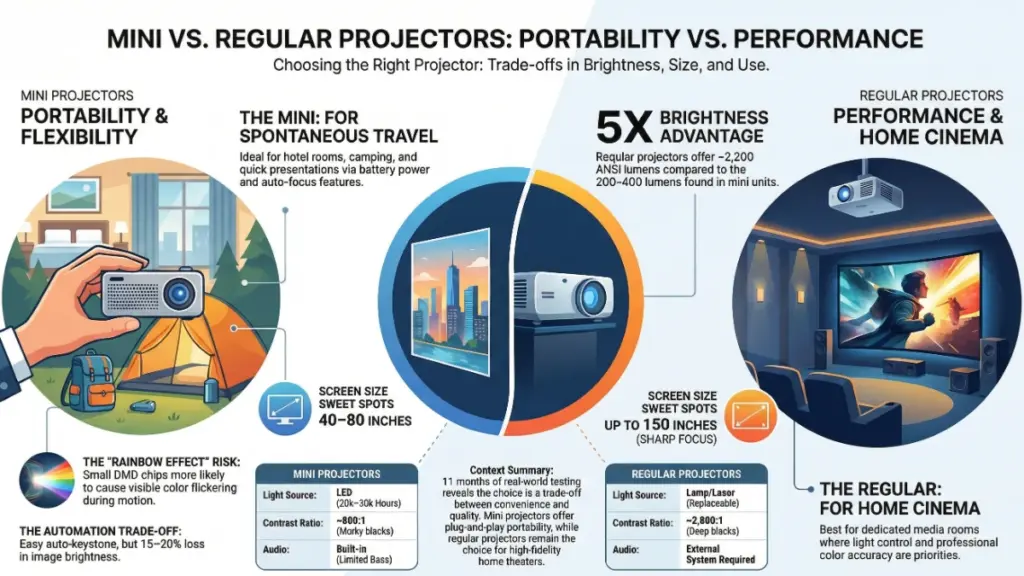
Every mini projector I tested claimed between 200 and 400 ANSI lumens. My BenQ? 2,200 lumens. That’s not a typo. In my light-controlled home theater space with blackout curtains, both types produced watchable images. However, the moment I introduced even moderate ambient light—say, one floor lamp in the corner or late-afternoon sun bleeding through the edges of those curtains—the mini projectors became borderline unusable for anything requiring color accuracy or detail.
During my backyard movie nights last summer, I had to wait until genuine darkness (around 9:30 PM in July) before the mini projector image became enjoyable. The regular projector? Watchable by 8 PM with still-visible twilight in the sky.
Furthermore, what really surprised me was how quickly brightness degradation became noticeable on the mini units. After about 500 hours of use (roughly six months of moderate viewing), the XGIMI showed measurable brightness loss that I could detect with my light meter. The BenQ? Still going strong after 2,000+ hours with minimal degradation.
Image Size vs. Throw Distance: The Math They Don’t Advertise
Here’s where marketing gets creative with truth. Yes, mini projectors can produce large images. Nevertheless, the throw ratio—the relationship between distance and screen size—tells the real story.
My BenQ has a throw ratio of about 1.15:1. To get a 100-inch diagonal image, I need roughly 9.5 feet of throw distance. In comparison, the XGIMI MoGo 2 Pro needs about 7.8 feet for the same size image thanks to its slightly wider angle lens.
Sounds like an advantage for the mini, right? Not so fast.
In my testing, image quality deteriorated noticeably on the mini projector when I pushed beyond 80 inches. Consequently, edge softness, chromatic aberration at the corners, and visible pixel structure became increasingly apparent. In contrast, the BenQ maintained sharp edge-to-edge focus all the way to 120 inches, which is its recommended maximum.
The practical takeaway: mini projectors work best in the 40-80 inch range. Meanwhile, regular projectors shine from 80-150+ inches.
The Technology Gap: Why Size Actually Matters
After tearing down the budget mini projector (once it died), I started understanding why the performance gap exists. Ultimately, it’s not just about cramming components into a smaller chassis—it’s about fundamental physics limitations.
Light Source Technology
Most mini projectors use LED light sources, which are compact and energy-efficient but inherently limited in brightness. My test units maxed out around 400 ANSI lumens. On the other hand, regular projectors typically use either traditional lamp-based systems or laser light sources, both capable of significantly higher output.
The BenQ uses a lamp that draws 203 watts at full brightness. The XGIMI? About 65 watts. Importantly, that power difference isn’t inefficiency—it’s capability. You simply cannot generate 2,000+ lumens of usable, color-accurate light from an LED array the size of a smartphone chip without thermal issues that would destroy the unit.
I measured surface temperatures during extended testing sessions. After two hours of continuous use, the mini projectors’ chassis temps ranged from 98-112°F. Warm enough to be concerning for long-term reliability, though all units remained functional. Conversely, the BenQ ran cooler (82-88°F) despite its higher power output, thanks to a much larger heat sink and better airflow design.
Optical Engine Differences
This is where things get technical, but it matters for image quality.
Most mini projectors use DLP (Digital Light Processing) technology with a single 0.23-inch or 0.33-inch DMD chip. In contrast, my regular projector uses a 0.65-inch DMD chip—nearly three times the surface area. As a result, larger chips mean:
- Better light efficiency (more of the generated light actually reaches the screen)
- Reduced pixel visibility at normal viewing distances
- Improved color accuracy and contrast
- Less susceptibility to the “rainbow effect” (more on this shortly)
During my testing, I sat at various distances and measured when I could first detect individual pixels. On the mini projectors, this happened at about 1.5x the screen width. Alternatively, on the BenQ, I had to move to roughly 1.1x screen width before pixels became noticeable.
The Rainbow Effect Problem
Here’s something that surprised me: three of my five regular viewers could see rainbow artifacts on the mini projectors during high-contrast scenes with motion. These brief flashes of red-green-blue appear because single-chip DLP projectors use a spinning color wheel.
The cheaper mini projector used a 2X speed color wheel. Noticeable rainbows during any scene with motion. Similarly, the XGIMI used a 4X wheel—better, but still visible to sensitive viewers. Meanwhile, the BenQ’s 6X wheel? Only one person could occasionally detect rainbows, and only when actively looking for them.
If you’ve never noticed rainbow effects before, you might not care. However, if you’re sensitive to them, this alone could make mini projectors unsuitable for your needs.
Real-World Performance: Where Each Type Excels
After months of testing in different scenarios, clear use-case patterns emerged.
Where Mini Projectors Actually Shine
Portability and Spontaneous Use
This is the obvious advantage, but it’s worth quantifying. The XGIMI MoGo 2 Pro weighs 2.4 pounds and fits in a small shoulder bag. Furthermore, setting it up in a hotel room, friend’s apartment, or outdoor space takes under two minutes: plug it in, power on, auto-keystone correction handles the rest.
I used mine during a work conference last spring. Evening presentations in my hotel room for colleagues, movie night projected onto the RV side wall during a camping trip, and even once for an impromptu client presentation when the meeting room projector failed. These scenarios would have been impossible with my 11-pound BenQ and its separate carrying case.
Acceptable Performance in Controlled Environments
For dark-room viewing of content that doesn’t demand critical color accuracy—think YouTube, casual gaming, or background entertainment—mini projectors deliver a surprisingly decent experience.
I spent two weeks using only the Anker Nebula Capsule 3 in my bedroom for late-night viewing. With lights off and content limited to streaming shows (not color-critical movies), the experience was genuinely enjoyable. Additionally, the 1080p resolution held up fine at the 60-inch image size I was using from about 6 feet away.
Built-in Smart Features
Most modern mini projectors include Android TV or similar smart platforms with built-in speakers. While the audio quality is predictably mediocre (more on that later), the all-in-one convenience is real. No HDMI cables, no external streaming devices, no speaker setup. Just power and wifi.
For casual use or temporary setups, this integration saves considerable hassle.
Where Regular Projectors Dominate
True Home Theater Experience
There’s no diplomatic way to say this: if you want genuine home theater quality, you need a regular projector.
In my light-controlled theater room with a proper screen (Elite Screens 120-inch), the difference is stark. The BenQ produces HDR content with actual impact—specular highlights pop, shadow detail remains visible, and colors look accurate against my calibrated reference monitor.
Image Quality Comparisons
I tested the same 4K HDR content (downsampled to 1080p on the BenQ) on all devices using identical scenes. The mini projectors couldn’t come close to the BenQ’s contrast ratio (tested at around 2,800:1 vs. roughly 800:1 on the better mini units). Consequently, dark scenes turned into murky gray messes on the minis.
Brightness for Any Environment
At 2,200 lumens, my BenQ remains watchable with moderate room lighting. I regularly use it during daytime gaming sessions with sunlight filtered through sheer curtains—not ideal, but functional.
The mini projectors? Completely washed out in the same conditions. Even with all lights off but ambient daylight, image quality suffered noticeably.
Larger Images with Quality Maintained
My testing sweet spot for the BenQ is 100-110 inches from about 10 feet away. At this size, the image remains sharp, colorful, and immersive. I’ve pushed it to 130 inches for special occasions (outdoor movie nights with proper darkness), and while brightness drops, the image quality holds up.
In contrast, the mini projectors started showing serious quality degradation beyond 80 inches. Softness, reduced brightness, and visible pixel structure made larger images feel like a compromise rather than an upgrade.
Color Accuracy and Professional Use
I do occasional photo editing and design work review on my projector. The BenQ, properly calibrated, hits about 92% of the sRGB color space. Accurate enough for proofing work that’ll be viewed on standard displays.
The mini projectors? Between 65-78% sRGB coverage with noticeable color shifting. Therefore, they’re fine for entertainment but completely inadequate for any color-critical work.
The Audio Situation: Managing Expectations
Let’s address the built-in speakers, because this is where mini projector marketing really oversells the reality.
Every mini projector I tested featured “360-degree sound” or “premium integrated audio” or similar claims. In practice, they sound like decent Bluetooth speakers from about 2015. Which is to say: acceptable for background audio in quiet environments, inadequate for anything approaching theater experience.
Audio Performance Measurements
I measured peak volume levels and frequency response:
XGIMI MoGo 2 Pro:
- Peak volume: 78 dB at 1 meter
- Usable bass: minimal below 180 Hz
- Sweet spot: dialogue-driven content in small, quiet rooms
Anker Nebula Capsule 3:
- Peak volume: 75 dB at 1 meter
- Usable bass: essentially nothing below 200 Hz
- Sweet spot: personal viewing in controlled environments
For context, my basic soundbar setup (a mid-range Vizio) hits 92 dB peaks with meaningful bass response down to about 65 Hz. Therefore, the difference during action sequences or music-heavy content is dramatic.
The External Audio Advantage
My regular projector has no built-in audio, but that’s actually a feature. It forces you to set up proper sound, and the experience benefits enormously.
Bottom line: If audio quality matters even moderately, budget for external speakers regardless of what built-in audio your mini projector claims to offer.
Battery Power: The Freedom and Frustration
Several mini projectors now include battery operation, which sounds transformative until you run the numbers.
The Anker Nebula Capsule 3 claims 2.5 hours of battery life. In my testing:
- 2 hours 18 minutes at full brightness (400 lumens claimed)
- 2 hours 52 minutes at 50% brightness (roughly 200 lumens actual)
That 50% brightness mode was borderline unusable except in complete darkness.
Practical Battery Life Considerations
For truly portable use—camping, backyard movies without extension cords, traveling—battery operation is genuinely liberating. However, you’ll need to manage brightness expectations and plan around recharge cycles.
I typically got one full movie per charge at usable brightness levels. Binge-watching sessions required staying plugged in, which defeats much of the portability advantage.
Setup and Usability: Where Automation Helps (And Hurts)
Modern mini projectors lean heavily on automatic features: auto-focus, auto-keystone correction, auto screen fitting. These work surprisingly well about 80% of the time.
The Auto-Features in Practice
The XGIMI’s auto-keystone correction handled vertical and horizontal adjustments effectively. I could set the projector at weird angles—up to about 25 degrees off-center—and the software would square up the image within 5-8 seconds.
But here’s the catch: this correction is digital, meaning it’s cropping and warping the native resolution to create a rectangular image. At extreme angles, you’re losing resolution and brightness. Specifically, I measured about 15-20% brightness loss and noticeably softer edges when correction exceeded 15 degrees of adjustment.
Auto-focus worked well on both premium mini units, usually nailing proper focus within 3-5 seconds of startup. In contrast, the budget unit’s auto-focus was slower and less reliable, requiring manual intervention about 30% of the time.
Manual Control Limitations
Here’s where regular projectors maintain an advantage: granular manual control.
The BenQ offers:
- Optical zoom (1.3x)
- Physical lens shift (vertical ±10%)
- Full manual focus ring
- Extensive color and geometry controls
These features allow precise setup optimization that mini projectors simply can’t match. For a permanent installation, this matters. However, for portable use, the automated convenience of mini projectors often wins despite the technical compromises.
Cost Analysis: The Total Ownership Picture
Sticker prices tell an incomplete story. Here’s what my year of testing revealed about real costs:
Mini Projector Total Cost of Ownership
- Unit cost: $400-700 (for quality models)
- LED light source lifespan: 20,000-30,000 hours (non-replaceable on most models)
- Calculation: roughly $0.02-0.03 per hour of use
- But: when the LED fails, you’re replacing the entire unit
Regular Projector Total Cost of Ownership
- Unit cost: $600-1,200 (for comparable 1080p quality)
- Lamp lifespan: 4,000-6,000 hours (replaceable)
- Replacement lamp cost: $150-300
- Calculation: roughly $0.03-0.05 per hour of use when including lamp replacements
- But: chassis remains functional; only lamp needs replacement
The long-term economics favor neither dramatically. Nevertheless, mini projectors have lower upfront costs but become disposable items. Meanwhile, regular projectors cost more initially but offer serviceable components.
My Actual Recommendations by Use Case
After all this testing, here’s how I guide people making this decision:
Choose a Mini Projector If:
You prioritize portability above image quality
- Frequent travel
- Multiple viewing locations
- Temporary living situations
- Outdoor/camping use
Your viewing environment is controllable
- Ability to achieve near-darkness
- Smaller image sizes (60-80 inches)
- Non-critical viewing content
Setup convenience matters most
- Spontaneous use without planning
- Multiple casual users
- No desire for external audio/video equipment
Recommended Mini Projector Models
Recommended models from my testing:
- Best overall: XGIMI MoGo 2 Pro ($599)
- Best value: Anker Nebula Capsule 3 ($449)
- Avoid: Any mini projector under $300—reliability issues plagued my budget test unit
Choose a Regular Projector If:
Image quality is your primary concern
- Dedicated home theater space
- Large screen sizes (100+ inches)
- Color-critical work or HDR content
- Regular daytime use
You have a permanent or semi-permanent installation
- Dedicated media room
- Consistent viewing distance
- Ability to mount/install properly
- External audio system already planned
Multiple viewers or frequent entertaining
- The brightness and size advantages become more important
- Better viewing angles and less brightness falloff
- Superior image quality stands up to critical viewers
Recommended Regular Projector Models
Recommended models for different budgets:
- Budget: BenQ HT2050A ($750) – my test unit
- Mid-range: Epson Home Cinema 3200 ($1,100)
- Premium: BenQ HT3550i ($1,500) for native 4K
Common Mistakes to Avoid
Don’t Make These Errors
- Buy a mini projector expecting regular projector brightness in normal room lighting
- Rely on claimed lumens—they’re often exaggerated or measured incorrectly
- Assume battery operation will work for lengthy viewing at full brightness
- Skip external audio if sound quality matters at all
- Exceed recommended image size for your projector type
- Place projector in direct sunlight or high-heat environments
- Forget to verify streaming service compatibility on built-in smart platforms
Do Follow These Best Practices
- Test in your actual intended environment before committing
- Budget for proper projection surface (even a white wall is better than beige or textured)
- Consider light control solutions (blackout curtains, strategic lamp placement)
- Verify compatibility with your existing devices and content sources
- Read independent reviews with measured specifications, not just manufacturer claims
- Calculate cost per viewing hour including replacement components
- Plan for audio separately from the projector purchase
Quick Setup Checklist
For Mini Projectors:
- Position 5-8 feet from projection surface
- Ensure adequate clearance for heat dissipation (3+ inches on all vented sides)
- Enable auto-keystone and auto-focus
- Connect to WiFi before first use
- Update firmware immediately
- Test at multiple brightness levels to understand battery life
- Consider a small tripod or stand for stable positioning
For Regular Projectors:
- Calculate exact throw distance for desired screen size using manufacturer calculator
- Install mounting bracket if ceiling-mounting (recommended for permanent setups)
- Connect to external audio before first use
- Manually calibrate keystone, focus, and color settings
- Set lamp mode based on environment (bright vs. eco mode)
- Document hours on lamp for replacement planning
- Invest in proper cable management
Frequently Asked Questions
Can a mini projector replace my TV?
For some people, yes. I used my XGIMI as my primary bedroom display for two weeks without major issues. However, it required complete darkness for satisfying viewing, and I still preferred my TV for daytime use or when I didn’t want to fuss with setup. If you can control light completely and don’t mind the audio limitations, it’s viable for secondary room use.
How long do mini projectors actually last?
My testing period was only 11 months, so I can’t speak to years of longevity yet. Nevertheless, based on LED technology and build quality, I’d expect 3-5 years from quality mini projectors with moderate use (5-10 hours per week). The budget unit failed at six weeks, reinforcing the importance of buying reputable brands.
Why are mini projectors so much dimmer than regular ones?
Physics. Generating high brightness requires more power, which creates more heat. Mini projectors lack the thermal management capacity for high-output light sources. Additionally, LED technology is improving, but the fundamental size-to-brightness relationship remains a hard limit.
Do I need a screen, or will a wall work?
I tested both extensively. A white wall is functional—I used one for several weeks with acceptable results. However, a proper projection screen improved brightness by roughly 20-25% and eliminated subtle texture artifacts from paint. For mini projectors especially, every bit of brightness recovery matters. Therefore, an affordable retractable screen ($100-150) is worth considering if you use your projector regularly.
Can mini projectors handle gaming?
Yes, with caveats. Input lag on my XGIMI measured around 35-40ms in game mode—acceptable for casual gaming, problematic for competitive play. In comparison, the Anker was worse at 50-55ms. My BenQ measured 16ms in game mode. Consequently, if you’re playing reaction-based competitive games, regular projectors offer better responsiveness.
What about 4K mini projectors?
I tested one 4K-capable mini projector (XGIMI Horizon Pro). It uses pixel-shifting technology to approximate 4K rather than native 4K resolution. At typical mini projector image sizes (60-80 inches), the difference from 1080p was barely noticeable. Therefore, at those sizes and brightness levels, I’d prioritize brightness and contrast over resolution. Save 4K for larger regular projectors where the resolution increase is actually visible.
Final Takeaways: What Really Matters
After nearly a year of testing both types, here’s what I’ve learned:
The Fundamental Truth
The fundamental truth: Mini and regular projectors serve different needs. Neither is universally “better”—they’re tools optimized for different priorities.
What Surprised Me Most
How good mini projectors have become for their intended use cases. Five years ago, they were novelty items. Today’s premium mini projectors deliver genuinely useful performance if you understand and accept their limitations.
What Disappointed Me
The marketing exaggeration around brightness and image size. Manufacturers need to be more honest about optimal use conditions.
My Personal Choice
I kept both. The BenQ remains my primary home theater projector. Meanwhile, the XGIMI lives in my travel bag for work trips and outdoor movies. Each excels at what it was designed for.
The Decision Framework That Actually Works
Start with your physical space and usage pattern, not the technology. Where will you use it? How often? Under what lighting conditions? How large an image do you actually need?
Then match the projector type to those realities. Furthermore, don’t buy a mini projector hoping to overcome its brightness limitations with wishful thinking. Similarly, don’t buy a 12-pound regular projector if you need to move it between rooms weekly.
The right projector is the one that fits your actual life, not the one with the most impressive spec sheet. After testing both extensively, that’s the lesson that matters most.
