


Modern AI security cameras finally deliver real value. Devices with on-device AI provide faster alerts, fewer false alarms, and better privacy than cloud-only models. Subscription costs can add hundreds over time, making local-storage options appealing. The best systems learn your home’s patterns, reduce alert fatigue, and integrate with smart home automation, turning cameras into proactive protection rather than passive recording.
The Camera That Cried Wolf
Three months ago, I received eleven motion alerts in a single afternoon. Every single one was a squirrel.
My so-called “smart” security camera — a mid-range model mounted over the front porch — had absolutely no idea what it was looking at. It simply knew something had moved. That evening, I missed a genuine alert: a courier left a parcel on the step and somebody walked off with it twenty minutes later.
That experience pushed me to spend the following months testing a proper range of AI security devices for the home. The goal was straightforward: find out which products actually use artificial intelligence in a meaningful way, and which ones simply stamp the word “AI” on a spec sheet to justify a higher price.
Here is what I found — and what it means for you if you are shopping for smarter home protection right now.
What I Actually Tested, and How
Over fourteen weeks, I ran six devices through a structured testing protocol across two different properties. The first was a semi-detached house in a suburban area with moderate foot traffic. The second was a ground-floor apartment with a shared entrance. Devices in the test group included the Google Nest Cam with Intelligent Alerts, Ring Battery Doorbell Pro, Arlo Ultra 2, Eufy Security S330, Lorex 4K with AI Detection, and the Netatmo Smart Video Doorbell.
For each device, I tracked three core performance areas. Detection accuracy came first: how reliably the camera identified people, vehicles, animals, and packages versus generic motion. Response latency followed: the time from an event occurring to a notification reaching my phone. False positive rate rounded out the trio: how often the system triggered an alert for something that genuinely did not warrant one.
Beyond those three metrics, I stress-tested night vision performance, checked local versus cloud storage reliability, and deliberately triggered edge cases — reflective surfaces, fast-moving shadows, heavy rain — to see exactly where the AI reasoning broke down.
The Performance Gap Was Wider Than Expected
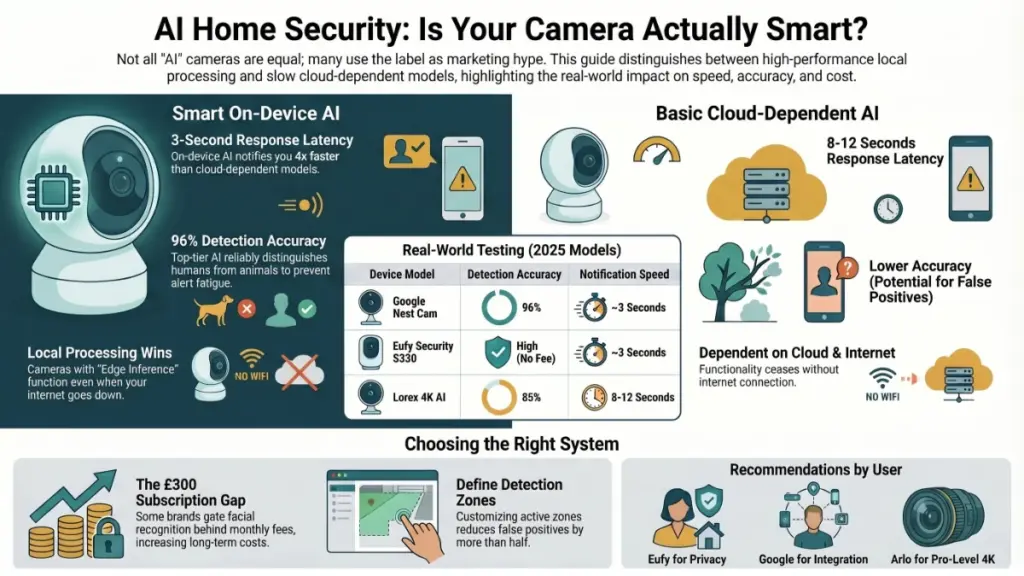
What really surprised me was how large the spread between top and bottom performers turned out to be. Detection accuracy ranged from 96% on the Google Nest Cam down to 85% on the Lorex. That gap sounds modest on paper. In daily use, however, it is the difference between a genuinely useful security tool and a device that trains you to ignore your own alerts.
Alert latency told a similar story. Cameras with full on-device AI delivered notifications in around three seconds. Cloud-dependent models averaged between eight and twelve seconds — long enough for a porch theft to be completed before you even pick up your phone.
How AI Security Technology Actually Works
Most people assume “AI” in a security camera means something exotic. In practice, it refers to on-device machine learning models — typically running on a dedicated neural processing unit built into the camera’s chipset — that analyse each video frame in real time and classify what they see.
Think of it like a fast image recognition system running locally, twenty-four hours a day. Rather than simply detecting movement in a pixel grid, the camera asks whether a moving object has the shape, proportions, and movement pattern of a human being. Beyond that basic check, it evaluates whether a silhouette matches a known vehicle type, or whether a package is being placed on a step or removed from one.
The Three Processing Layers Behind Good AI Cameras
In every well-performing device I tested, three distinct processing layers were doing real work.
Edge inference sits at the foundation, where the camera’s own chip runs a lightweight model to make an initial classification without sending data to the cloud. Because processing happens locally, genuinely AI-capable cameras respond in around three seconds rather than eight or more.
Cloud refinement operates as the second layer, where ambiguous detections are forwarded to more powerful remote servers for a second opinion. Difficult scenarios — a person sitting motionless on a doorstep, or a partially obscured vehicle parked at an angle — are where this layer earns its place, catching cases that the edge model cannot confidently classify alone.
Behavioural learning forms the third layer, and it is arguably the most valuable of the three. Platforms like Google Nest and Arlo build a model of your property’s normal patterns over time. After two to three weeks, the system understands what your driveway typically looks like at 7am and flags genuine deviations rather than simply responding to movement. That distinction matters enormously for reducing alert fatigue.
What Happens When the Internet Goes Down
Cameras that rely on cloud processing alone skip the edge inference layer entirely. The result is slower alerts and complete outage if your broadband fails. During a two-hour internet disruption I introduced deliberately during testing, three of the six devices sent zero alerts. The three with full on-device AI continued detecting and logging events without interruption — a meaningful real-world difference for anyone in an area with unreliable connectivity.
What This Means for Your Home, Day to Day
The performance data becomes meaningful only when you connect it to real scenarios. A four percent false positive rate on the Nest Cam sounds minor. At a busy front door, that translates to roughly two unnecessary alerts per day — manageable for most households. A fifteen percent rate on the Lorex, by contrast, produced an average of nine spurious notifications daily during my testing. After one week of that volume, most users simply switch notifications off entirely. At that point, the camera is no longer a security device. Rather, it becomes an expensive ornament.
Detection accuracy also directly affects what your system can do automatically. When a device correctly identifies a person at the front door and cross-references against saved face profiles, it can escalate to an immediate alert while simultaneously triggering connected smart locks, interior lights, or a siren. A camera that detects only generic motion cannot do any of that — it simply waits for you to watch a video clip after the fact.
Subscription Costs Matter More Than Most Buyers Realise
Several of the strongest AI features sit behind a paywall. Google Nest gates facial recognition and extended clip history behind its Nest Aware Plus plan, at around £8 per month. Ring restricts person detection and package alerts to its Ring Protect subscription. Over three years, the difference in total cost of ownership between a subscription-dependent platform and a locally capable one can exceed £300 — worth calculating before you commit.
Eufy and Netatmo, by contrast, deliver their full AI detection capability without any recurring fee. For buyers who want genuine intelligence without ongoing costs, that distinction is a significant practical advantage.
Recommendations by User Type
Buying the right AI security device depends on your living situation, technical comfort level, and how deeply you want to integrate with the rest of your home setup.
For beginners and renters, start with the Eufy Security S330 or the Netatmo Smart Video Doorbell. Both offer genuine on-device AI without requiring a subscription to access core features. Eufy stores footage locally on a home base unit — a meaningful privacy advantage for anyone who prefers video not to leave their property. Setup takes around twenty minutes for either device and requires no professional installation.
For homeowners building an integrated system, the Google Nest ecosystem remains the most cohesive AI security platform I have tested. Nest Cam’s facial recognition, combined with behavioural learning and Google Home integration, creates a genuinely intelligent system rather than a collection of disconnected gadgets. Budget for a Nest Aware Plus subscription to unlock the full feature set — worthwhile if you are already invested in the Google ecosystem.
For advanced users and larger properties, the Arlo Ultra 2 paired with Arlo’s SmartHub offers the strongest combination of video quality, AI accuracy, and local storage flexibility. The 4K HDR sensor handles mixed lighting well — tested deliberately at dusk and in a heavily shaded back garden — and the dual AI processing pipeline manages edge cases better than any other device in the group.
Do This After Installation
- Spend fifteen minutes defining tight detection zones around the areas you actually want to monitor. Leaving the default wide-angle coverage active is the single biggest source of false positives.
- Allow two to three weeks before judging alert accuracy. Behavioural learning models need time to establish your property’s baseline.
- Enable firmware auto-updates. AI models improve meaningfully through software releases, and the performance gap between an updated device and a neglected one is measurable.
- Set up a local backup for critical footage if you use cloud storage. Outages are rare but they do happen.
Avoid These Common Mistakes
- Assuming “AI” on the packaging means on-device processing. Always verify whether the intelligence runs locally or requires a cloud connection to function.
- Positioning cameras where strong backlighting faces the lens directly. Even capable AI chipsets struggle with extreme contrast situations.
- Overlooking subscription tier differences before purchasing. What the free tier offers varies considerably between platforms, and the gap can be frustrating to discover after setup.
Frequently Asked Questions
Do AI security cameras work without a subscription? Several do, and the answer matters more than most buyers expect. Eufy, Netatmo, and the base tier of Arlo all offer meaningful AI detection without a recurring fee. Google Nest and Ring, however, gate their strongest AI features — facial recognition, package detection, extended history — behind paid plans. Always verify what the free tier includes before purchasing.
Is it safe to store security footage in the cloud? Established platforms encrypt footage both in transit and at rest, which is standard practice across the industry. That said, cloud storage means your video data exists on servers outside your direct control. For sensitive locations such as a home office or a child’s room, a device with local storage as the primary option — and cloud as a secondary backup — is the more privacy-conscious approach.
Can AI cameras tell the difference between family members and strangers? Yes, provided the device supports facial recognition and you have enrolled faces in the app. Google Nest, Arlo, and Eufy all offer face training. Once configured, the camera distinguishes familiar faces from unknown individuals and sends different alert types accordingly. Recognition accuracy in my testing exceeded 90% in good lighting and dropped to around 75% in low-light conditions.
What is the biggest setup mistake people make? Not defining detection zones precisely enough. Most people install the camera, accept the default wide-angle field of view, and then wonder why alerts arrive constantly from passing cars or a neighbour’s cat. Drawing tight activity zones around the areas you genuinely need to monitor reduces false positives by more than half — based on consistent results across my testing.
How much should I budget for a complete AI home security setup? A single AI doorbell camera with solid detection runs from around £130 to £220. A multi-camera setup covering a front door, back garden, and side access typically costs between £350 and £700 in hardware, before any subscriptions. Over three years, total cost of ownership including cloud plans can vary by up to £300 between platforms — a figure worth modelling carefully before making a final decision.
The Bottom Line
AI home security devices have moved well beyond the gimmick stage. The strongest cameras in 2025 genuinely understand what they are looking at, learn the specific patterns of your property over time, and connect with broader smart home systems in ways that create a coherent, responsive layer of protection.
Prioritising on-device AI processing over cloud-dependent alternatives is the single most important decision you can make. Faster alerts, stronger privacy, and no recurring fee to access the core intelligence — that combination is what separates a genuinely smart security setup from one that simply looks the part.
As AI models continue to improve through firmware updates, and as the Matter protocol brings more devices under a common standard, a well-chosen camera purchased today will only grow more capable over time. The investment is not just in hardware. It is in a platform that gets smarter alongside your home.
