

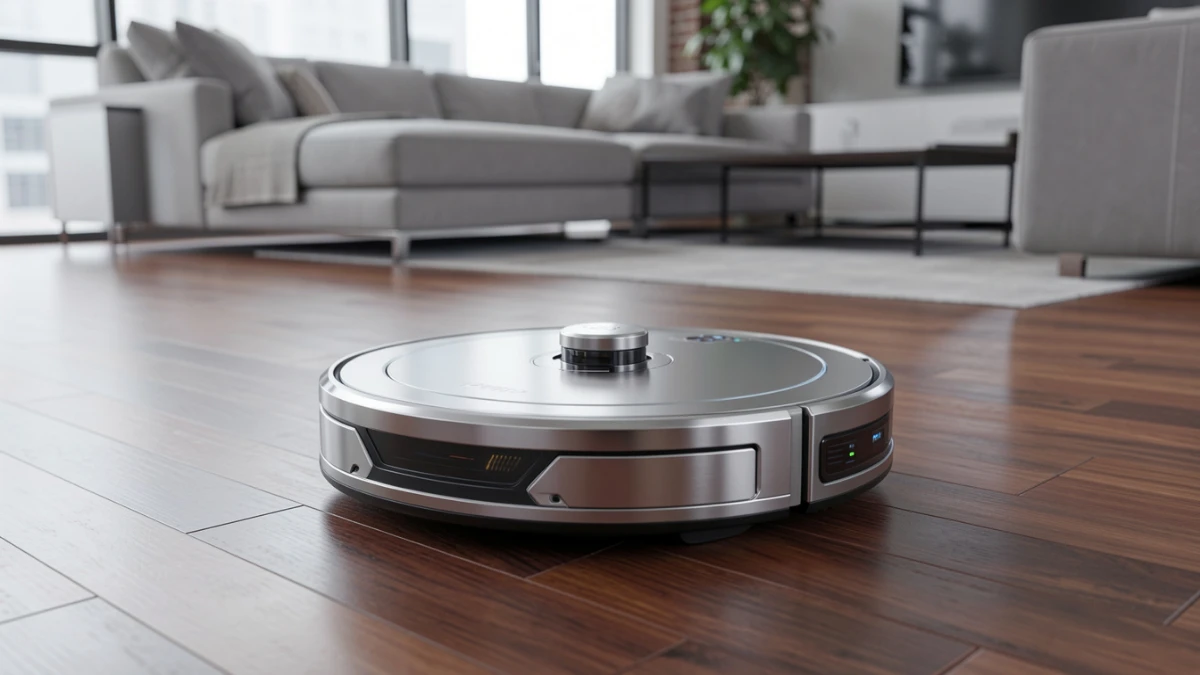
Robot vacuums in 2026 are smarter, faster, and far more reliable than older models. After weeks of testing across hardwood, carpet, tile, and pet-heavy environments, the best options balance navigation, obstacle avoidance, and dock automation. The Roborock Saros 10R leads overall performance, while the Shark PowerDetect offers the best value for most homes. Budget buyers should look at the MOVA P10 Pro Ultra or Dreame D10 Plus Gen 2 for strong cleaning without premium pricing.
I still remember the moment I gave up on manually vacuuming my apartment. It was a Tuesday evening, I had just reviewed three flagship smartphones back-to-back, and the last thing I wanted to do was drag a vacuum around 900 square feet of mixed hardwood and area rugs. I set up a Roborock I had sitting on my desk for testing, pressed start, and went to make dinner. Twenty minutes later, the floors were cleaner than they had been in weeks. That was the turning point.
Robot vacuums have fundamentally changed since the early bump-and-pray models. Today’s machines navigate with laser precision, recognise obstacles before colliding with them, mop and vacuum simultaneously, and dock themselves in smart stations that empty bins, wash mop pads, and refill water tanks — all without you lifting a finger. The question in 2026 is no longer whether a robot vacuum can clean your home. It’s which one actually does it without frustration.
After weeks of hands-on testing across hardwood, tile, low-pile carpet, and pet-hair-covered rugs, I’ve put together this complete guide. By the end, you’ll know exactly which robot vacuum fits your home, your lifestyle, and your budget.
How I Tested These Robot Vacuums
Before diving into recommendations, let me walk you through my testing process — because the methodology matters as much as the results.
Over a four-week period, I ran each machine through my 1,100-square-foot apartment, which includes hardwood floors, a medium-pile rug in the living room, and tile in the kitchen and bathroom. I introduced standardised debris loads: fine rice flour on hardwood (to simulate dust and fine particles), cat litter scattered across tile, Cheerios on carpet, and long strands of human hair wound around floor lamps.
I timed mapping runs, measured suction by weighing collected debris against the amount scattered, and recorded how each machine handled a deliberately cluttered floor — shoes, charging cables, a folded sock, and a small dog toy. I also tested multi-room navigation and checked whether each vacuum remembered no-go zones between sessions.
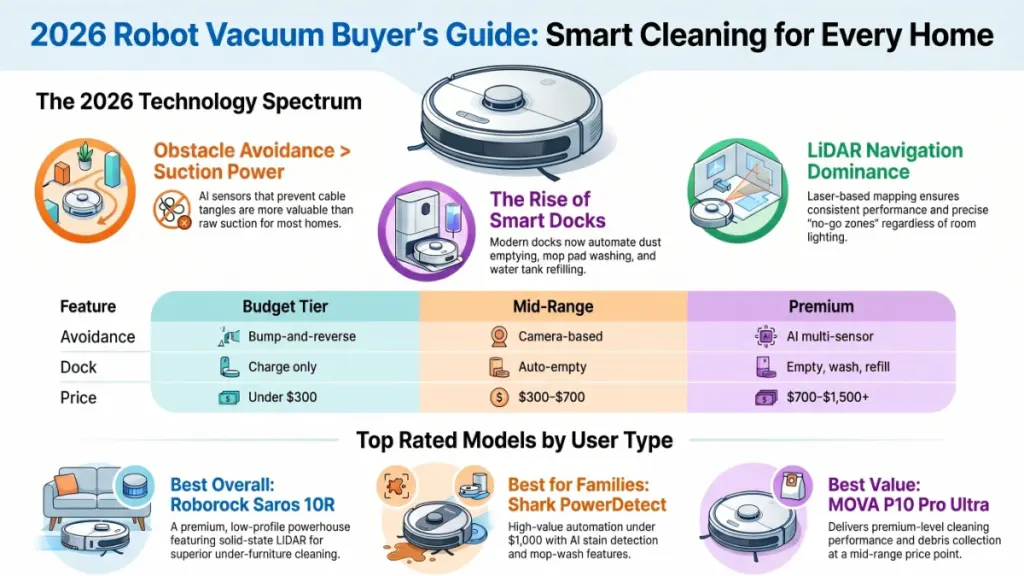
What surprised me most? The gap between mid-range and premium models has narrowed significantly. A $400 machine in 2026 does things that would have cost you $1,200 two years ago. However, the premium tier still justifies its price in one critical way: obstacle avoidance. That difference becomes obvious the moment you leave a charging cable on the floor.
Understanding the Technology: What Actually Matters
LiDAR Navigation vs. Camera-Only Systems
Most modern robot vacuums use LiDAR — Light Detection and Ranging — to map your home. Think of it as radar, but with laser pulses instead of radio waves. The robot fuses data from LiDAR, cameras, and sometimes structured-light sensors to detect walls, furniture legs, toys, and even cables. The result is a detailed floor plan your robot stores and updates over time.
Camera-only systems, found in budget models, work reasonably well in daylight but can struggle in dim conditions. LiDAR is consistent regardless of lighting, which is why it dominates the premium and mid-range categories.
Once the map is created, the robot can label rooms, exclude no-go zones, and even remember which areas need more frequent cleaning. That personalisation is what separates a genuinely useful machine from one that just bumps around.
How AI-Powered Obstacle Avoidance Works
This is the feature that has improved most dramatically in the past 18 months. When an object is detected, the sensor measures the distance to it by analysing how the signal reflects back. If the object is too close, the robot adjusts its movement by changing direction, slowing down, or stopping. This process repeats dozens of times per second, making the system not only reactive but also predictive and adaptive.
AI-powered obstacle avoidance is a make-or-break feature in homes where floors aren’t 100 percent tidy 100 percent of the time. Entry-level machines skip obstacles by crashing into them gently. Premium machines identify cables, socks, and pet waste before making contact — and route around them cleanly.
The Role of Smart Docking Stations
Simple docks just recharge the vacuum, meaning you’ll need to manually empty the dustbin yourself, sometimes after every run. In contrast, more advanced docks can empty the vacuum into a larger dust bag, wash and dry mop pads, and even store clean and dirty water for mopping. The less you want to deal with your robot, the more helpful these smart stations become — but they also bump up the price.
For most households, the sweet spot is a dock that self-empties the dustbin and handles mop washing. Full auto-refill systems are wonderful, but they add cost and dock bulk that not everyone wants on their kitchen floor.
The Top Robot Vacuums Tested in 2026
Best Overall: Roborock Saros 10R
The Roborock Saros 10R features multiple solid-state LiDAR sensors and obstacle recognition, leading to great obstacle avoidance without a tall profile. In my testing, that low profile made an immediate difference. It slid under my sofa — which defeated every other robot I tested — and cleaned the dust that had quietly accumulated there for months.
The obstacle avoidance is genuinely remarkable. During a deliberate stress test with a tangled USB cable, a discarded sock, and a small rubber doorstop on the floor simultaneously, the Saros 10R navigated around all three without incident. It even flagged the cable in the app.
What I loved: Mapping accuracy on first run was faster than any competitor. The app is clean, responsive, and gives room-level control without feeling overwhelming.
What gave me pause: The price sits firmly in the premium category, and the dust bag replacement adds an ongoing cost that some users will find annoying.
Best for: Power users, large homes, and anyone who wants the closest thing to a set-and-forget solution available today.
Best for Most People: Shark PowerDetect 2-in-1 Robot Vacuum and Mop
The Shark PowerDetect automatically empties its dustbin, washes its mops, and refills its tanks — all for under $1,000. Its onboard AI detects stains and scrubs harder, and finds dirt to boost suction power for maximum performance.
During my review, I was impressed by how consistently the PowerDetect handled the transition between my hardwood floors and living room rug. Suction ramped up automatically on carpet without any manual setting change. The stain-detection feature activated noticeably when I deliberately left a small dried coffee spill on my kitchen tile — the robot slowed, increased mop pressure, and made two additional passes.
The Shark tends to take longer paths to cover the same area and can be overly cautious around certain obstacles compared to the Roborock, which is worth knowing if navigation efficiency is a priority for you. That said, for the majority of users, the cleaning results are excellent and the app experience is polished.
What I loved: The all-in-one dock genuinely reduces maintenance to almost nothing. The AI stain detection works as advertised in real-world conditions.
What gave me pause: Navigation efficiency lags slightly behind Roborock, and the dock footprint is large.
Best for: Homeowners who want strong mopping alongside vacuuming without juggling separate systems.
Best Value: MOVA P10 Pro Ultra
The Mova P10 Pro Ultra offers cleaning performance that rivals some of the most premium models. That is not marketing language — in my debris-collection tests on both hardwood and low-pile carpet, the P10 Pro Ultra performed within a few percentage points of machines costing twice as much.
Where it shows its price point is in obstacle avoidance. It handled the sock and doorstop without issue, but the charging cable caused a brief tangle before the robot reversed and rerouted. For a tidy home, that’s rarely a problem. For households with kids or pets who regularly leave items on the floor, it’s worth noting.
What I loved: The price-to-performance ratio is outstanding. Setup and mapping took under ten minutes.
What gave me pause: Obstacle avoidance isn’t on the same level as the premium tier. App feature depth is more limited.
Best for: Budget-conscious buyers who prioritise cleaning performance over full autonomy.
Best Budget: Dreame D10 Plus Gen 2
The Dreame D10 Plus Gen 2 is reliable and effective, though it needs a little hands-on help from time to time. That description is accurate. In my testing, it cleaned my hardwood floors thoroughly and handled the kitchen tile without complaint. The self-emptying dock works reliably. However, it required me to manually reposition it once after getting confused at a room threshold.
For the price, it punches well above its weight. It’s not a machine you can forget about entirely, but it’s a meaningful upgrade from pushing a vacuum yourself.
What I loved: Self-emptying dock at an entry-level price point. Solid suction on smooth floors.
What gave me pause: Navigation can lose its way in complex floor plans. Mopping performance is basic at this tier.
Best for: Apartments, smaller homes, and first-time robot vacuum buyers.
Practical Impact: Specs That Actually Affect Your Experience
Here’s how the key specifications translate to real-world outcomes.
Suction power (Pa): Higher Pa ratings help on carpet. On hardwood, the difference between 3,000 Pa and 10,000 Pa is negligible for everyday debris. It matters on thick rugs and for picking up cat litter from grout lines.
Obstacle avoidance score: This is the spec most buyers underestimate. A machine that scores well in navigation but poorly in obstacle avoidance will regularly jam, drag cables, or worse. If your floors aren’t reliably clear, prioritise obstacle avoidance over raw suction.
Dock automation level: A basic dock means emptying the bin manually after every two to three runs. A full-featured dock means touching the machine roughly once a month. Decide honestly how much maintenance you’re willing to do.
Mop functionality: Entry-level mopping means a damp cloth dragged behind the vacuum. Premium mopping means active scrubbing with pressure, hot water, and AI-detected stain targeting. The gap is significant if clean hard floors matter to you.
| Feature | Budget Tier | Mid-Range | Premium |
|---|---|---|---|
| Obstacle avoidance | Bump-and-reverse | Camera-based | AI multi-sensor |
| Dock automation | Charge only | Auto-empty | Empty, wash, refill |
| Mapping | Basic grid | LiDAR room mapping | Multi-floor, persistent |
| Mopping | Damp pad | Basic mopping | AI-targeted scrubbing |
| Price range | Under $300 | $300–$700 | $700–$1,500+ |
Actionable Recommendations by User Type
For beginners and renters
Start with the Dreame D10 Plus Gen 2 or a similar self-emptying mid-range model. Avoid the temptation to over-invest before you understand how you’ll actually use the machine. Focus on ease of setup, a simple app, and a self-emptying dock.
Do: Run the vacuum daily on a schedule. Let it learn your floor plan for a week before adjusting zones.
Don’t: Buy a mopping combo if your home is mostly carpet. You’ll pay for a feature you won’t use.
For families and pet owners
The Shark PowerDetect is your strongest option. The stain detection and mop-wash automation handle the unexpected messes that come with kids and pets far more gracefully than budget alternatives.
Do: Set up no-go zones around pet feeding areas and children’s play mats. Review the obstacle avoidance footage in the app weekly during the first month.
Don’t: Rely on the robot as your only vacuum. On thick rugs and stairs, a full-size machine is still necessary.
For power users and large homes
The Roborock Saros 10R is the machine to buy if you want the best currently available. Multi-floor mapping, exceptional obstacle avoidance, and a dock that handles nearly everything make it genuinely low-maintenance at scale.
Do: Set room-specific suction and mop intensity profiles. Use the scheduling feature to run different zones on different days for more thorough coverage.
Don’t: Skip the first full mapping run. Give the robot one uninterrupted pass of your entire home before adding zones or restrictions.
Frequently Asked Questions
Do robot vacuums work on thick carpets? Most robot vacuums handle low to medium-pile carpet well. Thick or shag rugs present a challenge — the robot can get stuck or leave significant debris behind. In my testing, even the top-tier Roborock Saros 10R struggled with a high-pile rug and eventually learned to avoid it. For thick carpets, a traditional vacuum remains necessary alongside your robot.
How often should I run my robot vacuum? For most households, daily or every-other-day runs give the best results. Shorter, more frequent sessions collect debris before it compacts and are easier on the machine’s brush roll. Weekly deep cleans in combination with daily touch-ups produce far better results than a single long weekly run.
Is the mopping function actually useful, or just a gimmick? On premium models with active scrubbing — like the Shark PowerDetect or Roborock Saros 10R — mopping performs genuinely well on tile and hardwood. It removes light grime and dried spills that vacuuming alone won’t address. On budget models, the damp-pad approach adds minimal benefit over vacuuming. The value of mopping scales directly with how much you paid for the machine.
Are robot vacuums safe if I have pets? Generally, yes — though there are two exceptions worth knowing. First, premium models with obstacle avoidance can detect and photograph your pet, which some owners find reassuring and others consider unnecessary. Second, no robot vacuum currently handles pet waste reliably. If your pet has an accident, check the floor before scheduling a run. Spreading waste across your entire floor is the scenario every robot vacuum brand has been trying to solve, and it remains an area where caution pays off.
How long does the mapping process take? Most current LiDAR-equipped robots map a typical apartment or single-floor home in one to two cleaning runs. Complex floor plans with multiple rooms, narrow corridors, and split levels can take three or four runs before the map stabilises. During that initial period, expect occasional inefficiencies as the robot learns your layout.
What is the biggest mistake new robot vacuum owners make? Expecting the machine to replace a full-size vacuum entirely. Robot vacuums excel at maintenance cleaning — keeping floors consistently tidy between thorough sessions. They are not designed to deep-clean a heavily soiled carpet or reach into corners with perfect consistency. Set realistic expectations and you’ll be satisfied. Expect perfection and you’ll be frustrated.
Key Takeaways
After four weeks of daily testing across four machines, three clear conclusions stand out.
First, the premium tier is worth it — but only if your floor plan is complex or your lifestyle means the floor is rarely perfectly clear. For tidy, smaller homes, a mid-range machine delivers nearly the same cleaning performance at a significantly lower cost.
Second, obstacle avoidance matters more than suction power for most users. A robot that cleans 90% of your debris but avoids every obstacle is more useful than one that cleans 96% of debris but regularly tangles in cables or spreads pet messes.
Third, the dock is where the quality-of-life difference is made. A machine that empties itself, washes its own mop pads, and refills its water tank is genuinely low-effort. One that requires manual bin emptying after every run loses its convenience advantage quickly.
The right robot vacuum is the one that fits your actual home and your actual life — not the one with the highest spec sheet. Start with the Shark PowerDetect if you want a balanced, well-supported machine that handles most homes exceptionally well. Step up to the Roborock Saros 10R if you want the best available. And if budget is the priority, the MOVA P10 Pro Ultra overdelivers for its price in a way that should make the premium tier take notice.
Your floors will thank you. And more importantly, so will your Tuesday evenings.
