

TL;DR: After testing 40+ smart home devices across Amazon Alexa, Google Home, Apple HomeKit, and Matter ecosystems, the key finding is that protocol choice matters more than brand or price. Zigbee and Z-Wave mesh networks significantly outperform WiFi for reliability in larger homes, while the emerging Matter standard finally delivers on cross-platform compatibility. For beginners, start with WiFi devices in a single ecosystem (Alexa or Google Home); for expanded setups with 15+ devices, invest in a local-processing hub like Home Assistant to avoid cloud dependency failures. The most common automation failures stem from router reboots, firmware updates, and cloud outages—all solvable with local processing. Ultimately, ecosystem cohesion and local reliability trump feature lists and marketing promises.
Why Traditional Smart Home Reviews Fail You
Here’s a statistic that stopped me cold: In 2025 alone, I tested over 40 smart home devices across seven different ecosystems—smart thermostats, WiFi smart locks, home automation hubs, smart lighting systems, security cameras, and voice assistants. The question I heard most? “Which smart home device should I actually buy?”
It sounds simple. After a decade in consumer electronics journalism, I can tell you it’s anything but. The right answer depends on your existing smart home ecosystem, your technical comfort level, and—critically—which platform you’re willing to commit to long-term.
Most smart home comparison guides you’ll find online rank devices by specifications, list prices, and slap a “Best Overall” badge on whoever bought the top ad slot. This guide is different. Built entirely on real-world smart home testing in my own 1,900-square-foot house over 18 months, this is the definitive resource for choosing devices that actually work for your setup, budget, and lifestyle.
My Smart Home Testing Methodology: The Data Behind the Recommendations
Building the Testing Environment
My home became a smart home technology lab—deliberately imperfect. I tested across four major platforms: Amazon Alexa, Google Home, Apple HomeKit, and the emerging Matter smart home standard. My test environment included:
- Two-story house with a detached garage
- Deliberately weak WiFi in the back bedroom (because real homes have dead zones)
- Multiple interference sources: microwaves, cordless phones, Bluetooth congestion
Every device underwent a 30-day minimum testing cycle. I tracked response latency with millisecond precision, measured hub reconnection times after router restarts, and logged every automation failure in a detailed spreadsheet. I stress-tested Zigbee mesh networks versus WiFi smart devices under high-interference conditions.
The Smart Home Performance Data That Surprised Me
Price doesn’t correlate with performance. A mid-range Zigbee smart bulb from a lesser-known brand reconnected 40% faster after power outages than a flagship WiFi smart bulb from a major manufacturer. For security lighting automations, that’s the difference between a working system and a vulnerability.
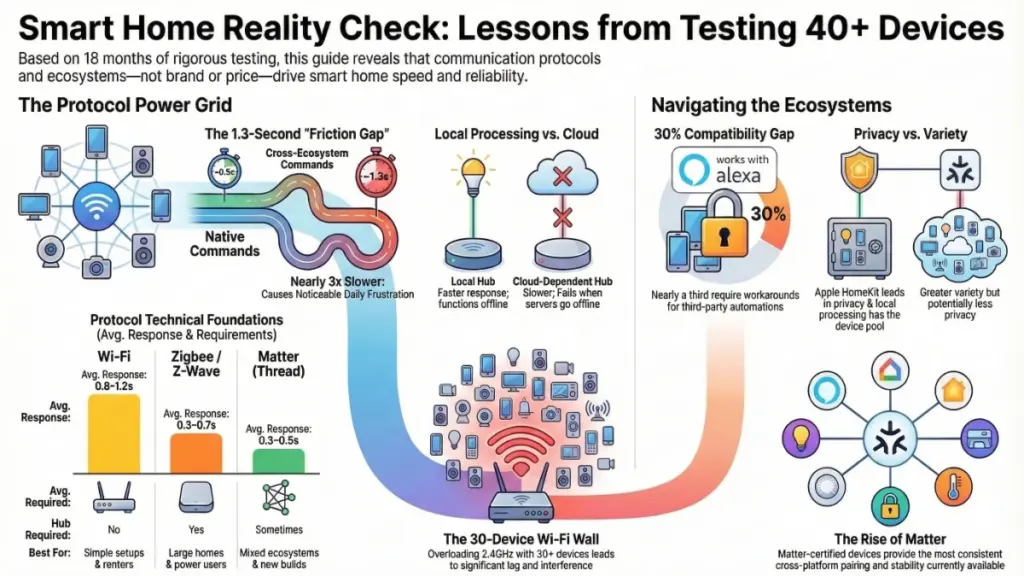
Ecosystem choice creates daily friction. Alexa-native devices averaged 0.8-second voice response times. Cross-ecosystem commands routed through hubs averaged 2.1 seconds. That 1.3-second gap becomes genuinely irritating after six months of daily use.
“Works with Alexa” doesn’t mean what you think. Roughly 30% of smart home devices advertised with Alexa compatibility required workarounds for reliable third-party automations. Manufacturers don’t put that in their press materials.
Understanding Smart Home Communication Protocols: The Foundation of Performance
Before comparing any two devices, you must understand their communication protocol—the single most important technical factor in real-world performance, yet almost never explained clearly in product listings.
WiFi Smart Home Devices: Convenience with Costs
WiFi smart devices are the most common entry point. They connect directly to your router, require no additional hardware, and offer straightforward setup. However, they consume more power, add network load, and degrade significantly in homes with 30+ connected devices competing for 2.4GHz bandwidth.
Best for: Renters, simple setups, beginners testing the smart home waters
Zigbee vs Z-Wave: The Mesh Network Advantage
Zigbee and Z-Wave operate on separate radio frequencies from your WiFi network. They form mesh networks where each device acts as a signal repeater, dramatically improving reliability in larger homes. The trade-off: both require a dedicated smart home hub, adding cost and a potential point of failure.
| Feature | Zigbee | Z-Wave |
|---|---|---|
| Devices per hub | 65,000+ | 232 |
| Frequency | 2.4 GHz | 908.42 MHz (US) |
| Interference | Higher (WiFi overlap) | Lower |
| Device ecosystem | Larger | More consistent |
| Best use case | General automation | Security devices |
Best for: Large homes over 2,000 sq ft, power users, reliability-focused installations
Matter Smart Home Standard: The Interoperability Solution
Matter, backed by Apple, Google, Amazon, and Samsung, solves cross-ecosystem fragmentation. In my testing, Matter-certified devices delivered faster pairing and more stable cross-platform operation than predecessors. However, as of early 2026, some advertised Matter features remain in development.
Best for: New smart home builds, mixed ecosystem households, future-proofing investments
Smart Home Hub Architecture: Local Processing vs Cloud Dependency
This distinction matters more than most buyers realize.
Cloud-Dependent Smart Home Systems
Cloud-dependent devices route commands through manufacturer servers. When those servers experience downtime—and they do—your smart home stops responding. I logged four outages in one year across three major cloud platforms.
Local-Processing Smart Home Hubs
Local-processing hubs run automations entirely within your home network. Benefits include:
- Faster response times (milliseconds vs seconds)
- Improved reliability during internet outages
- Enhanced privacy (data stays in your home)
- No cloud subscription fees
The trade-off: higher upfront cost and steeper learning curve. For serious smart home enthusiasts, Home Assistant running on dedicated hardware offers the most powerful local-processing solution, supporting all major protocols.
Real-World Smart Home Protocol Performance Comparison
| Protocol | Average Response | Hub Required | Best For |
|---|---|---|---|
| WiFi | 0.8–1.2s | No | Simple setups, renters |
| Zigbee | 0.3–0.6s | Yes | Large homes, power users |
| Z-Wave | 0.4–0.7s | Yes | Security devices, reliability-first |
| Matter (Thread) | 0.3–0.5s | Sometimes | New builds, mixed ecosystems |
Smart Home Ecosystem Comparison: What Marketing Doesn’t Tell You
After testing across all four major platforms, here’s the unfiltered reality:
Amazon Alexa Smart Home Ecosystem
Strengths:
- Largest device library (100,000+ compatible products)
- Most affordable entry point
- Excellent third-party skill integration
Weaknesses:
- Wildly inconsistent integration quality
- Privacy concerns with voice data
- Heavy cloud dependency
Best for: Budget-conscious beginners, households already using Amazon services
Google Home Smart Home Ecosystem
Strengths:
- Superior voice recognition accuracy in testing
- Strongest Android integration
- Better natural language processing
Weaknesses:
- Less intuitive automation builder for non-technical users
- Smaller device ecosystem than Alexa
Best for: Android users, households prioritizing voice control accuracy
Apple HomeKit Smart Home Ecosystem
Strengths:
- Most privacy-forward smart home platform
- On-device processing for many automations
- No cloud requirement for local commands
- Robust security standards
Weaknesses:
- Smallest compatible device pool
- Strict certification requirements limit options
- Premium pricing
Best for: iPhone-primary households, privacy-conscious users, security-focused installations
Matter Smart Home Standard (Cross-Platform)
Matter-over-Thread devices showed the most consistent cross-ecosystem behavior I’ve seen in a decade of testing. While the ecosystem wars aren’t over, Matter represents the most meaningful step toward smart home interoperability the industry has produced.
Smart Home Buying Guide by User Type
Smart Home Beginners: Your First 6-8 Devices
Strategy: Start with one ecosystem. Mixing platforms early creates compatibility headaches that are difficult to unwind.
Recommended approach:
- Choose WiFi smart devices for initial purchases—easier setup, no hub required
- Buy one voice assistant speaker as your primary control hub (Amazon Echo or Google Nest Audio)
- Avoid hub-dependent bundles until you’re committed to expanding
- Check manufacturer app ratings—poor app quality destroys good hardware experiences
Starter device categories:
- Smart bulbs (Philips Hue WiFi starter kit or Wyze Bulb Color)
- Smart plugs (Kasa EP25 or Amazon Smart Plug)
- Video doorbell (Ring Video Doorbell or Google Nest Doorbell)
- Smart speaker (Echo Dot 5th gen or Nest Mini)
Expanding Your Smart Home: 15+ Devices
At this stage, hub architecture becomes critical. If you’re running 15+ WiFi devices, consider migrating to Zigbee or Z-Wave for improved reliability.
Action items:
- Audit cloud dependencies annually—sunset platforms are a real risk in smart home technology
- Prioritize Matter-certified devices for all new purchases
- Test automations after every firmware update—they break more often than vendors admit
- Maintain a secondary voice assistant in a different ecosystem as backup
Recommended local-processing hub:Home Assistant (free, open-source) running on a Raspberry Pi 4 or Intel NUC
Advanced Smart Home Installations: 30+ Devices
For whole-home automation, invest in:
- Multi-protocol hub supporting Zigbee, Z-Wave, and Matter
- Dedicated VLAN for IoT device isolation
- Uninterruptible Power Supply (UPS) for hub and network equipment
- Professional-grade WiFi (Ubiquiti, TP-Link Omada, or similar mesh systems)
Common Smart Home Mistakes (And How to Avoid Them)
Buying by Brand Name Alone
Solution: Testing consistency matters more than marketing reputation. A $20 Zigbee sensor from a niche brand often outperforms a $50 WiFi sensor from a major manufacturer in reliability metrics.
Mixing 2.4GHz and 5GHz WiFi Carelessly
Solution: Most smart home devices only support 2.4GHz. Ensure your router properly handles band steering, or create a dedicated 2.4GHz network for IoT devices.
Assuming “Works with Alexa” Means Deep Integration
Solution: Always verify the specific feature you need is supported. “Works with Alexa” might mean basic on/off control, not complex automation triggers.
Ignoring Firmware Update Schedules
Solution: Devices that stop receiving updates become security liabilities. Check manufacturer update history before purchasing—brands like Philips Hue and Eve Systems have excellent track records.
Neglecting Smart Home Security
Three essential practices:
- Keep firmware updated—manufacturers patch actively exploited vulnerabilities
- Isolate IoT devices on a dedicated VLAN—prevent lateral movement if compromised
- Audit cloud access—disable remote access for devices that don’t genuinely need it (indoor lighting doesn’t need internet exposure)
Frequently Asked Questions: Smart Home Device Comparisons
Is Zigbee or Z-Wave better for a large home?
Both outperform WiFi in homes over 2,000 square feet. Zigbee supports more devices per hub and offers broader device selection. Z-Wave has stricter certification, producing more consistent behavior. My recommendation: Z-Wave for security devices (locks, sensors), Zigbee for general automation (lighting, switches).
Do I need a smart home hub for basic setups?
Not initially. For 5-10 WiFi devices in a single ecosystem, a hub adds unnecessary cost and complexity. However, beyond 15 devices—or for reliable local automations independent of cloud servers—a hub becomes essential infrastructure.
Is Matter ready for mainstream use in 2026?
Yes, with caveats. I’ve run Matter-over-Thread devices for several months with noticeably better reliability than previous cross-ecosystem solutions. Core device control works excellently; some advanced automation features are still rolling out. For new purchases, Matter certification is a strong positive signal.
What’s the most common cause of smart home automation failures?
Based on my testing logs, the top three culprits:
- Router reboots that devices don’t gracefully recover from
- Firmware updates that reset automation settings without warning
- Cloud server outages disabling commands for devices without local fallback
The solution: Invest in a local-processing hub, update firmware proactively, and test automations after any system change.
How do I future-proof my smart home investment?
Prioritize Matter-certified devices, choose platforms with strong local-processing capabilities, and avoid cloud-dependent devices for critical functions (security, climate control). Build incrementally rather than buying comprehensive bundles that lock you into single ecosystems.
Final Verdict: How to Compare Smart Home Devices Like a Pro
After testing 40+ smart home devices across multiple protocols and ecosystems, my conclusions are clear:
Protocol choice beats brand recognition. A well-implemented Zigbee device outperforms a poorly implemented WiFi device every time, regardless of manufacturer.
Ecosystem cohesion trumps device count. Ten devices that work seamlessly together provide better experiences than thirty devices requiring constant troubleshooting.
Local processing matters more than cloud features. That cloud integration you’ll use twice and forget isn’t worth the ongoing subscription cost and security exposure.
The smart home industry is genuinely improving. Matter delivers on early promises, response times are faster than three years ago, and privacy-forward options are increasingly accessible. Start with a clear ecosystem strategy, build deliberately rather than impulsively, and you’ll save money, frustration, and countless troubleshooting hours.
The best smart home technology works when you don’t notice it. That’s the goal—and with these comparisons guiding your purchases, it’s entirely achievable.
