


I’ll be honest—I used to be terrified of buying refurbished electronics. The idea of purchasing someone else’s “returned” laptop or smartphone felt like playing Russian roulette with my money. But after a decade of testing hundreds of devices and watching the refurbished market evolve, I’ve not only changed my mind—I’ve saved thousands of dollars and discovered some of the best tech deals available today.
Here’s what changed my perspective: I bought a refurbished iPad Pro three years ago that’s still running flawlessly, saved $400 in the process, and realized I’d been missing out on incredible value because of outdated assumptions about what “refurbished” actually means. The refurbished electronics market has matured dramatically, with major manufacturers now offering certified programs that rival new product quality. But—and this is crucial—there’s a massive difference between a manufacturer-certified refurbished device and a random “refurbished” listing from an unknown seller.
The refurbished market is projected to reach $65 billion globally by 2025, driven by sustainability concerns, rising new device costs, and dramatically improved refurbishment standards. If you know what to look for, buying refurbished can be one of the smartest tech purchases you’ll make. If you don’t? Well, I’ve seen those horror stories too, and I’m here to make sure you avoid them.
Understanding What “Refurbished” Actually Means (And Why It Matters)
Before we dive into the buying process, let’s clear up the terminology—because not all refurbished devices are created equal, and the label itself can mean wildly different things depending on who’s selling.
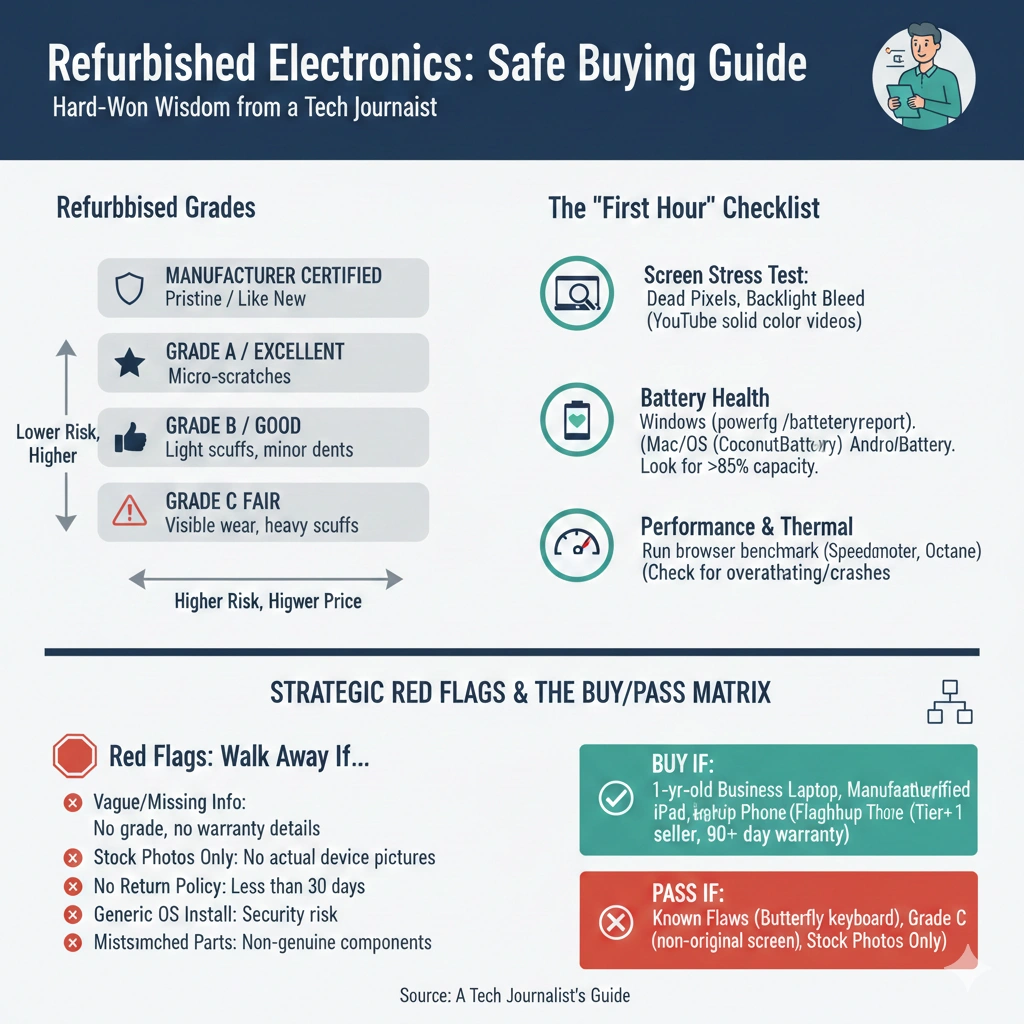
Manufacturer-Certified Refurbished: These are devices returned to the original manufacturer (Apple, Samsung, Dell, etc.) and restored to factory specifications. In my experience, these are virtually indistinguishable from new devices. Apple’s refurbishment process, for instance, includes replacing the battery, outer shell, and any defective parts, then putting each device through the same quality tests as new products. I’ve purchased four manufacturer-refurbished Apple products over the years, and every single one arrived in perfect condition with full warranty coverage.
Seller-Refurbished: Retailers like Amazon, Best Buy, or specialized refurbishers purchase returned or off-lease devices and refurbish them in-house. Quality varies significantly here. Best Buy’s Geek Squad Certified refurbishment program is solid—I’ve tested several items from them with good results. Amazon Renewed products, however, can be hit-or-miss because they come from various third-party refurbishers with different standards. I once received an “Amazon Renewed” laptop with a wonky trackpad that clearly hadn’t been properly tested.
Third-Party Refurbished: Independent companies specialize in buying bulk electronics, refurbishing them, and reselling. Companies like Gazelle, BackMarket, and Decluttr have established decent reputations, but you’re taking on more risk than with manufacturer-certified options. I’ve had mixed experiences—a smartphone from BackMarket arrived with a battery that died after six months, while a MacBook from the same company has been rock-solid for two years.
Grading Systems: Most refurbishers use grades to indicate cosmetic condition:
- Grade A/Excellent: Minimal to no cosmetic wear, looks nearly new
- Grade B/Good: Light scratches or minor cosmetic imperfections, fully functional
- Grade C/Fair: Visible wear, possible dents or scratches, but fully operational
What surprised me most when I started researching this article was learning that many “refurbished” devices aren’t actually returned products at all—they’re often open-box items that were never used, or display models from stores. A manufacturer rep once told me that roughly 30% of their certified refurbished inventory comes from devices that were simply opened and immediately returned without ever being powered on.
The Five Non-Negotiable Safety Rules I Follow
After buying (and occasionally regretting) dozens of refurbished devices, I’ve developed a strict set of criteria that has saved me from bad purchases. These aren’t suggestions—they’re requirements I won’t compromise on.
1. Always Prioritize Manufacturer-Certified When Available
I cannot stress this enough: if the manufacturer offers certified refurbished models, that’s your first stop. Apple Certified Refurbished, Samsung Certified Re-Newed, Dell Refurbished—these programs are the gold standard because the original manufacturer controls quality and warranties. Yes, you’ll pay more than third-party options, but the peace of mind is worth every penny.
When I needed a MacBook Pro last year, I paid $1,699 for an Apple Certified Refurbished model instead of $2,099 for new. It arrived in a plain white box (not the fancy retail packaging), but the device itself was immaculate—new battery, new outer shell, not a scratch anywhere. More importantly, it came with a full one-year Apple warranty and the option to purchase AppleCare+, exactly like a new device.
2. Verify the Warranty—This Is Your Safety Net
Never, and I mean never, buy a refurbished electronic device without a warranty of at least 90 days. Ideally, you want a full year. The warranty is your insurance policy against hidden defects that might not surface immediately. I learned this lesson the expensive way with a “great deal” on a refurbished gaming laptop that had no warranty—the GPU failed after five weeks, and I was stuck with a $600 paperweight.
Here’s what I look for:
- Minimum 90-day warranty (anything less is a red flag)
- Coverage that includes parts AND labor
- Clear return policy—at least 30 days
- Option to extend warranty coverage
- Transparent warranty provider information
Manufacturer refurbished typically includes a 1-year warranty matching new products. Third-party refurbishers vary wildly—some offer 90 days, others just 30. If a seller offers less than 90 days or no warranty at all, that tells me they don’t stand behind their refurbishment quality, and I walk away.
3. Buy From Established, Reputable Sellers Only
The refurbished market has plenty of sketchy operators looking to offload poorly refurbished or even broken devices. Stick with sellers who have established reputations, clear return policies, and customer reviews you can verify.
My trusted sources include:
- Apple Certified Refurbished Store (apple.com/shop/refurbished)
- Samsung Certified Re-Newed Program
- Best Buy Outlet (Geek Squad Certified)
- Amazon Renewed (with caution—read reviews carefully)
- Newegg Refurbished
- Manufacturer websites (Dell Outlet, HP Renew, Lenovo Outlet)
- BackMarket (reputable third-party aggregator)
- Gazelle (specializes in smartphones and tablets)
I generally avoid eBay refurbished listings unless the seller is a well-established refurbisher with thousands of positive reviews. Same goes for individual sellers on Facebook Marketplace or Craigslist claiming devices are “refurbished”—that usually just means “I factory reset it.”
4. Research the Specific Model Thoroughly
Not all devices age equally well, and some models have known defects that make them risky purchases even when refurbished. Before buying any refurbished device, I spend 20-30 minutes researching that specific model:
- Check for recalls or widespread issues (keyboard problems, battery failures, overheating)
- Look up how the model has aged (is it still receiving software updates?)
- Verify parts availability (can it be repaired if something breaks?)
- Read reviews from when it was new to understand common problems
- Check the release date—I avoid devices more than 3-4 years old
For example, Apple’s 2016-2019 MacBook Pro models had notorious butterfly keyboard issues. Even though you can find them refurbished at attractive prices, I’d never recommend one because the keyboard problem was so widespread. Similarly, certain Samsung Galaxy Note models had battery issues that make them risky refurbished purchases.
5. Inspect Thoroughly Upon Arrival—Don’t Wait
Most return windows are 14-30 days, and you need to use that time wisely. When a refurbished device arrives, I immediately set aside 2-3 hours to thoroughly test it. Here’s my inspection protocol:
Physical Inspection:
- Check for scratches, dents, or damage not disclosed in listing
- Examine ports and connections for wear or damage
- Test all buttons and switches
- Verify serial number matches documentation
- Check for moisture damage indicators (if accessible)
Functional Testing:
- Power on and verify it boots properly
- Check display for dead pixels, backlight bleeding, or discoloration
- Test all ports (USB, headphone jack, HDMI, etc.)
- Verify WiFi, Bluetooth, and cellular connectivity (if applicable)
- Test cameras, microphones, and speakers
- Run battery health diagnostics
- Check for software issues or missing drivers
For laptops, I run a benchmark test and compare results to reviews of new models—if performance is significantly lower, something’s wrong. For smartphones, I test the cameras extensively since that’s often the first component to degrade.
I once caught a “Grade A” refurbished iPad with significant backlight bleeding that was only visible against dark backgrounds. If I hadn’t tested it immediately, I would’ve missed the return window.

Advanced Safety Checks: What Tech Reviewers Do (And You Should Too)
Beyond the basics, there are several advanced checks I perform that have saved me from bad purchases. These require a bit more technical knowledge, but they’re worth learning.
Verify Specs Match the Listing: This sounds obvious, but you’d be surprised how often refurbishers get specifications wrong—sometimes accidentally, sometimes deliberately. I use these tools:
- CPU-Z or Speccy (Windows) to verify processor, RAM, and storage
- About This Mac (macOS) for complete system information
- AIDA64 (detailed hardware information)
- Phone Info apps for smartphones to verify model and specs
I bought a “refurbished” gaming PC once that was advertised with 16GB RAM but actually had 8GB. A quick check with CPU-Z revealed the discrepancy, and the seller immediately offered a partial refund or return.
Check Battery Health: Battery degradation is the most common issue with refurbished devices, and many refurbishers don’t replace batteries unless they’re completely dead. For laptops and smartphones, battery health is critical:
- Windows: Generate a battery report using PowerShell command
powercfg /batteryreport - macOS: Hold Option and click the battery icon for condition status
- iPhone: Settings > Battery > Battery Health shows maximum capacity
- Android: Use apps like AccuBattery to check battery health
I won’t accept a refurbished laptop with less than 85% battery health or a smartphone below 90%. In my testing, batteries below these thresholds show noticeably reduced runtime and accelerated degradation. If the battery health is poor, I immediately contact the seller—many will offer a discount or replacement.
Run Stress Tests: For computers, I run stress tests to verify stability and thermal performance. Overheating or crashes during these tests indicate problems the refurbisher missed:
- Prime95 (CPU stress test)
- FurMark (GPU stress test)
- MemTest86 (RAM testing)
- CrystalDiskInfo (check storage health and SMART data)
These tests reveal issues that only appear under heavy load. I discovered a refurbished gaming laptop with a failing GPU this way—it worked fine for basic tasks but crashed within minutes during FurMark testing.
Check Software Activation and Licensing: Ensure all software is properly licensed and activated. I’ve encountered refurbished computers with pirated Windows installations or software that stops working after activation checks. Verify:
- Operating system is genuinely activated (not using volume license keys)
- No pre-installed bloatware or suspicious software
- Recovery partition is intact and functional
- BIOS/UEFI firmware is official manufacturer version
Red Flags That Scream “Walk Away”
Over the years, I’ve learned to recognize warning signs that indicate a seller or listing is trouble. Here are the red flags that make me immediately close the browser tab:
Vague or Missing Information: If a listing doesn’t clearly specify the refurbishment grade, who refurbished it, what was replaced, or warranty details, I don’t trust it. Legitimate refurbishers are transparent about their process and what condition to expect.
Stock Photos Only: If the listing uses only manufacturer stock photos instead of actual photos of the device, that’s suspicious. Reputable sellers photograph the actual device, especially if there’s cosmetic wear they need to disclose.
Too Good to Be True Pricing: If a refurbished flagship smartphone is listed at 70% off retail, something’s wrong. Legitimate refurbished devices typically sell for 20-40% below new prices, depending on condition and age. Extreme discounts usually mean counterfeit, stolen, or severely damaged goods.
No Return Policy or Very Short Windows: Any seller who doesn’t allow returns or only gives 7-14 days doesn’t stand behind their products. I need at least 30 days to thoroughly test a device.
Mixed or Mostly Negative Reviews: I always read seller reviews carefully, looking for patterns. If multiple reviews mention the same issues (broken devices, poor customer service, warranty claims denied), I trust those patterns over the seller’s promises.
Pressure Tactics: “Limited time offer!” “Only 2 left!” These urgency tactics are designed to prevent you from doing proper research. Legitimate refurbished inventory is constantly available—there’s no rush.
Where I Actually Buy Refurbished Electronics (And Where I Don’t)
Based on hundreds of purchases and years of testing, here’s my honest assessment of various refurbished marketplaces:
Tier 1 – Manufacturer Certified (Always My First Choice):
Apple Certified Refurbished: The gold standard. Every device I’ve purchased has been flawless. Full 1-year warranty, looks and functions like new, significant savings (15-20% off). Only downside is limited inventory—popular models sell out quickly.
Dell Outlet: Consistently good experiences with Dell refurbished laptops. Clear grading system, frequent sales, good warranty options. I bought a Dell XPS 13 refurbished that I used for three years without a single issue.
Samsung Certified Re-Newed: Solid program for Galaxy phones and tablets. Comes with 1-year warranty and certified by Samsung technicians. Pricing is competitive, though not always dramatically cheaper than sales on new devices.
Tier 2 – Major Retailers (Good with Caution):
Best Buy Geek Squad Certified: Generally reliable, especially for open-box items. I’ve had good luck with their refurbished Apple products and TVs. The ability to inspect in-store before buying is a huge advantage.
Amazon Renewed: This is tricky because Amazon Renewed is actually dozens of third-party refurbishers selling under one umbrella. Quality varies wildly. I read seller-specific reviews carefully and stick with sellers who have thousands of positive reviews. Amazon’s return policy is excellent, which provides good protection.
Newegg Refurbished: Good for PC components and peripherals. Less impressed with their laptop refurbishment quality—received one with a dying hard drive that should’ve been caught during testing.
Tier 3 – Specialized Refurbishers (Do Your Research):
BackMarket: They’re an aggregator connecting you with various refurbishers. Quality depends entirely on the specific refurbisher. I’ve had mixed results—great MacBook, problematic smartphone. Their customer service has been responsive when I’ve had issues.
Gazelle: Specializes in smartphones and tablets. Reliable but pricing isn’t always competitive. Good if you want a trusted specialist for mobile devices.
Decluttr: Similar to Gazelle—specialized in phones. Reasonable prices, decent quality, but limited inventory.
Tier 4 – Generally Avoid:
eBay Individual Sellers: Too inconsistent unless the seller is an established refurbishment business with extensive feedback. I’ve been burned here more than anywhere else.
Facebook Marketplace/Craigslist “Refurbished”: Almost never actually refurbished, just factory reset. No buyer protection, no warranty, no recourse if something goes wrong.
Unknown Third-Party Websites: If I haven’t heard of the company and can’t find substantial reviews, I don’t risk it. The refurbished market attracts fly-by-night operators.
Smart Timing: When to Buy Refurbished for Maximum Value
The refurbished market has predictable cycles that savvy buyers can exploit. Here’s when I’ve found the best deals:
2-3 Months After New Model Releases: When Apple launches new iPhones in September, refurbished prices on the previous generation drop significantly by November. Same pattern with Samsung Galaxy phones, major laptop lines, and other flagship devices. I saved $450 on an iPhone 13 Pro by waiting until the iPhone 14 launch, then buying refurbished.
Holiday Sales Events: Black Friday, Cyber Monday, and January sales apply to refurbished inventory too. I’ve seen additional 15-20% discounts during these periods.
End of Fiscal Quarters: Many refurbishers offer discounts at quarter-end to clear inventory. March, June, September, and December often bring unexpected deals.
Back-to-School Season: August-September brings education-focused deals on laptops and tablets, including refurbished options.
Sweet Spot Age: For maximum value, I target devices that are 1-2 years old. They’re modern enough to handle current software and get updates for several more years, but depreciation has already knocked 30-40% off the price. Buying refurbished devices older than 3 years is usually false economy—they’re approaching obsolescence and won’t receive software updates much longer.
What About Warranties and Protection Plans?
Extended warranties on refurbished electronics are one area where I’ve changed my stance over time. Initially, I thought they were a waste of money. Now, after seeing both outcomes, here’s my nuanced take:
For Manufacturer-Certified Refurbished: The included 1-year warranty is usually sufficient, but if you plan to keep the device for 3+ years, consider extended coverage. AppleCare+ on a refurbished MacBook makes sense to me because it extends both warranty and accidental damage coverage. I bought it for my refurbished iPad Pro and filed a successful claim when I cracked the screen—saved $299 on the repair.
For Third-Party Refurbished: I always buy the longest available warranty or protection plan. These devices carry higher risk, and the extended coverage has paid for itself multiple times. When that BackMarket smartphone’s battery died after six months, my SquareTrade protection plan covered the replacement battery entirely.
What to Look For in Extended Warranties:
- Accidental damage coverage, not just mechanical failure
- Reasonable deductibles (under $100)
- No usage restrictions or excessive exclusions
- Clear claim process with good customer service reputation
- Transferable coverage if you sell the device
Where I Skip Extended Warranties:
- On devices under $200 (the coverage costs too much relative to replacement value)
- Desktop computers (easier and cheaper to repair yourself)
- Accessories and peripherals
Common Mistakes Even Tech-Savvy Buyers Make
I’ve made most of these errors myself, so I know how easy they are to fall into:
Assuming All Refurbished Devices Come From Returns: Many people think “refurbished” means “defective device that was returned and fixed.” In reality, a huge portion of refurbished inventory comes from canceled orders, overstock, display models, and open-box items that were never used. This is especially true for manufacturer-certified refurbished—you’re often getting a nearly-new device at a discount.
Forgetting to Check Accessory Inclusion: Some refurbished devices come with original accessories, some with generic alternatives, and some with no accessories at all. I bought a refurbished smartphone once that arrived without a charging cable—I assumed it was included and didn’t read carefully. Now I always verify what’s included.
Not Comparing to New Sale Prices: Sometimes new devices go on sale for prices comparable to or even lower than refurbished. I almost bought a refurbished iPad, then discovered Best Buy had new ones on sale for $30 more—with full warranty and guaranteed new battery. Always comparison shop.
Buying Refurbished Tech With Known Design Flaws: Certain products had fundamental design problems that refurbishment can’t fix. Those butterfly keyboard MacBooks? Still problematic even when refurbished. Google Pixel 2 XL screen burn-in issues? Refurbishment doesn’t prevent that inherent OLED problem.
Ignoring Software Support Lifecycle: A refurbished 4-year-old Android phone might seem like a deal at $150, but if it’s no longer receiving security updates, you’re buying a security risk. I check the manufacturer’s update policy before buying any refurbished device—if it’s near end-of-support, I pass.
Real-World Scenarios: Should You Buy Refurbished?
Let me walk you through specific scenarios where I do and don’t recommend refurbished:
Scenario 1: Budget-Conscious Student Needs a Laptop Recommendation: Absolutely buy refurbished A manufacturer-certified refurbished laptop from Dell, HP, or Lenovo can save 30-40% while providing identical functionality to new. I’d target a business-class model (ThinkPad, Latitude, EliteBook) that’s 1-2 years old—these are built durably and receive long software support.
Scenario 2: iPhone User Wants Latest Model Recommendation: Buy new, or wait 12 months for refurbished Current-generation flagship devices rarely have compelling refurbished options. Wait for the next generation launch, then buy the previous model refurbished at significant savings.
Scenario 3: Building a Home Office on a Budget Recommendation: Mix of refurbished and new Buy refurbished laptop/desktop and monitors (huge savings, low risk), but buy new keyboards, mice, and webcams (minimal cost, these don’t refurbish well).
Scenario 4: Gift for Someone Else Recommendation: Only manufacturer-certified refurbished, or buy new Gift recipients expect pristine condition. Don’t risk cosmetic imperfections or shorter warranties unless you’re certain the recipient understands and appreciates refurbished value.
Scenario 5: Smartphone for Heavy Power User Recommendation: Refurbished, but verify battery health Smartphones are excellent refurbished purchases if battery health is 90%+. I’d only buy manufacturer-certified or top-tier refurbishers, and I’d always add protection plan coverage.
The Bottom Line: Is Buying Refurbished Worth It?
After buying dozens of refurbished devices over the past decade—some fantastic, a few disappointing—here’s my honest take: buying refurbished electronics is absolutely worth it if you follow the safety guidelines I’ve outlined.
The key is being selective. Manufacturer-certified refurbished devices are nearly indistinguishable from new and offer incredible value. Third-party refurbished can be good, but requires more careful vetting and always needs warranty coverage. Random sellers claiming devices are “refurbished” should be avoided entirely.
I’ve saved approximately $4,500 over the past five years by buying refurbished laptops, tablets, and smartphones instead of new. Every single manufacturer-certified device I’ve purchased has performed flawlessly. The third-party refurbished devices have been more mixed—I’d estimate 80% worked perfectly, 15% had minor issues I could live with, and 5% had problems serious enough that I returned them (which is where that warranty became crucial).
The biggest value proposition? You’re getting 90-95% of the functionality of a new device at 60-70% of the price. That’s hard to beat, especially when device prices keep climbing. A refurbished flagship from two years ago often outperforms a brand-new budget device while costing the same or less.
But—and this is important—don’t compromise on the safety rules. If a deal seems too good to be true, it probably is. If a seller won’t provide warranty coverage, walk away. If you can’t verify the source or reputation, don’t risk it. The money you save isn’t worth the headache of a defective device with no recourse.
Your Action Plan for Safe Refurbished Purchases
If you’re ready to buy refurbished electronics, follow this step-by-step approach:
1. Research the specific model you want—confirm it’s reliable, still supported, and suits your needs
2. Check manufacturer-certified options first—Apple, Dell, Samsung, HP, Lenovo all have programs
3. If no manufacturer option exists, stick with reputable retailers—Best Buy, Amazon Renewed (carefully), BackMarket
4. Verify warranty coverage—minimum 90 days, ideally one year, with clear return policy
5. Compare to new sale prices—sometimes new on sale beats refurbished pricing
6. Read recent reviews—both of the specific model and the specific seller
7. Inspect thoroughly upon arrival—use my testing checklist, don’t delay
8. Consider extended warranty/protection—especially for third-party refurbished or expensive devices
The refurbished market has matured dramatically, and buying refurbished electronics is no longer the gamble it was a decade ago. With proper precautions, you can score excellent deals on quality devices while reducing electronic waste. Just be smart, be selective, and always prioritize established sellers with strong warranties.
I’ll continue buying refurbished devices for the foreseeable future—the value is simply too compelling to ignore. But I’ll never cut corners on the safety checks that protect my investment. Follow these guidelines, and you can confidently join the millions of consumers who’ve discovered that refurbished electronics offer some of the best value in tech today.
