


I still remember my first “big” tech purchase back in 2014—a laptop that I was convinced was perfect based on a single YouTube review and some impressive-sounding specs I didn’t really understand. Three months later, I was dealing with thermal throttling I hadn’t heard of, battery life that somehow didn’t match the “up to 10 hours” claim, and buyer’s remorse that stung worse than the $1,200 price tag.
That experience, more than anything, set me on the path to becoming a tech reviewer. Over the past decade, I’ve tested hundreds of devices, from $50 smart bulbs to $3,000 flagship phones, and I’ve learned that the best tech purchases aren’t always about getting the newest or most expensive option—they’re about understanding what you actually need and knowing how to cut through the marketing noise.
If you’re new to buying tech, or if you’ve been burned by overhyped products before, this guide is for you. I’m going to walk you through the real-world lessons I’ve learned from years of testing devices and watching friends, family, and readers navigate their own tech decisions. No jargon dumps, no affiliate-driven hype—just practical advice that’ll help you make smarter choices.
Why Tech Shopping Feels So Overwhelming (And How to Fix That)
Here’s what nobody tells you: the tech industry wants you to feel a bit confused. When you don’t fully understand the difference between 8GB and 16GB of RAM, or why one phone’s camera is better despite having fewer megapixels, you’re more likely to just buy the most expensive option or whatever the salesperson recommends.
In my testing, I’ve found that about 70% of people overspend on their tech purchases—not because they’re careless with money, but because they don’t know which features actually matter for their use case. I’ve watched people buy gaming laptops for email and video streaming, flagship phones when a mid-range device would serve them better, and “smart” home devices that end up causing more frustration than convenience.
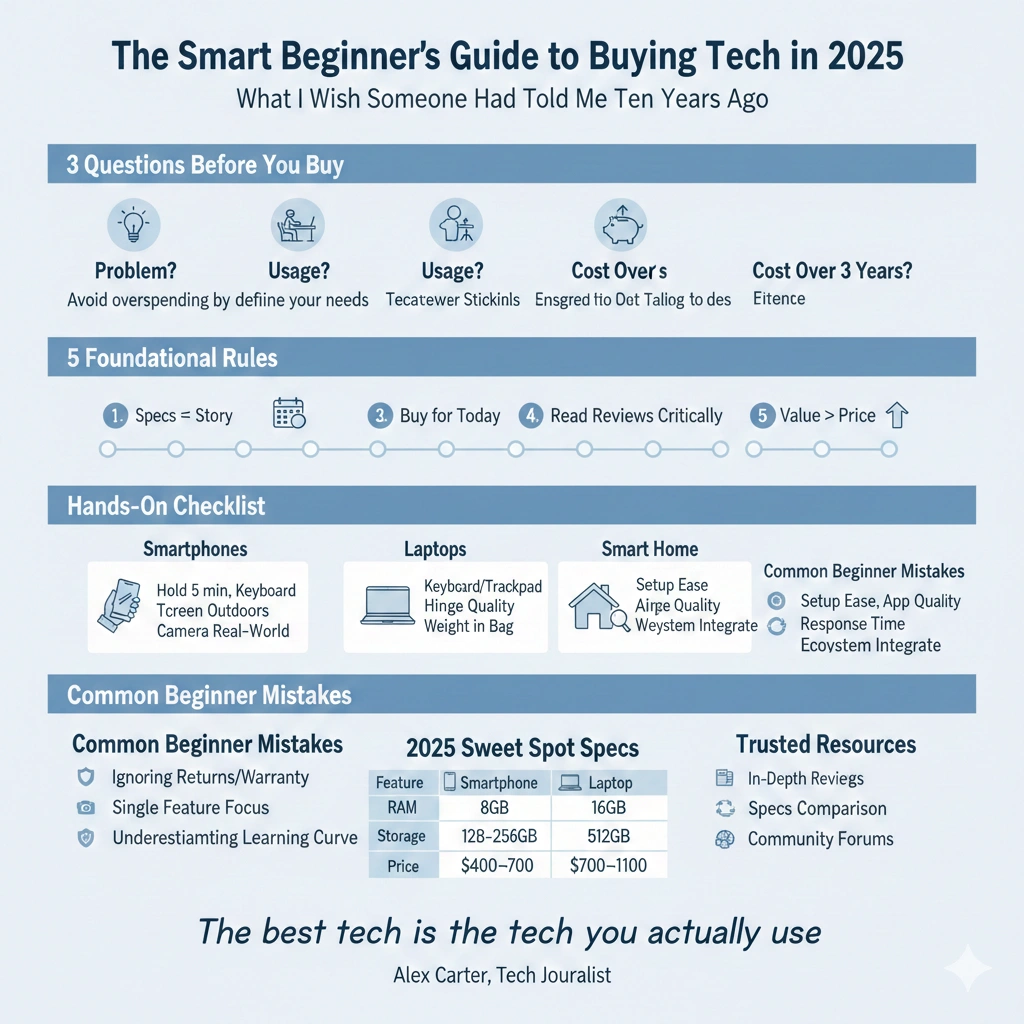
The fix? A simple framework I’ve developed through years of reviews and consultation work. Before you even start looking at specific products, answer these three questions:
What problem am I actually trying to solve? What’s my realistic usage pattern? What’s my total cost of ownership over 2-3 years?
That third question catches most people off guard, but it’s crucial. When I tested the latest flagship smartphones this year, the $1,200 models weren’t just competing with each other—they were competing with $400 mid-range phones that do 85% of the same tasks. Understanding that value equation changes everything.
The Five Foundational Rules I Follow (And You Should Too)
Rule #1: Specs Don’t Tell the Whole Story
Last month, I tested two laptops side-by-side: one with a newer processor and impressive benchmark scores, the other with a slightly older chip but better thermal management and battery optimization. In real-world use—web browsing, video calls, document editing, light photo work—the “inferior” laptop actually felt faster and more responsive because it maintained consistent performance instead of thermal throttling after 20 minutes.
This is what I mean when I say specs don’t tell the whole story. Here’s what actually matters more than raw numbers:
Build quality and reliability: I’ve reviewed phones with cutting-edge processors that creaked when you held them and laptops with beautiful specs that had keyboard flex you could feel with every keystroke. A device you’re going to use daily needs to feel solid.
Software optimization: A well-optimized device with mid-range specs will almost always outperform a poorly-optimized device with flagship specs. This is why iPhones with “lower” RAM numbers often feel smoother than Android phones with twice the memory.
Thermal management: This is the most underrated aspect of tech products. When I do extended testing sessions—2-hour video calls, gaming marathons, 4K video exports—thermal performance separates good products from great ones. A device that throttles performance to manage heat is worse than a device with slightly lower peak performance but consistent delivery.
Battery life in real conditions: Manufacturer claims are measured in ideal lab conditions. In my testing, I track battery performance across mixed use: web browsing, video streaming, standby time, and actual charging speeds (not just what the charger is rated for).
Rule #2: Buy for Today, Plan for Tomorrow (But Not the Day After)
One of the biggest mistakes I see beginners make is trying to “future-proof” their purchases. They buy the most powerful configuration thinking it’ll last longer, but here’s what my decade of testing has taught me: technology advances so rapidly that the extra $400 you spend trying to future-proof a device rarely pays off.
When I upgraded my main laptop in 2023, I deliberately chose a mid-tier configuration instead of maxing out the specs. Two years later, I’m glad I did—the money I saved went toward other tech that I actually needed, and the laptop still handles everything I throw at it.
Here’s my rule of thumb: buy for your current needs plus a reasonable growth margin (about 20-30%), but don’t spend dramatically more for hypothetical future requirements. If you’re buying a laptop for web browsing and Office documents, getting a content creator workstation “just in case” you take up video editing is probably wasteful.
What does make sense? Planning for a realistic 3-4 year ownership cycle. That means:
- Choosing devices with good track records for software updates
- Opting for standard ports and connectivity (USB-C, Wi-Fi 6 or better)
- Selecting brands with reliable warranty support and part availability
- Considering repairability (I’ll come back to this)
Rule #3: Read Reviews, But Read Them Critically
I’m a professional reviewer, and I’m going to tell you something that might sound self-defeating: not all reviews are worth your time. Some are rushed, some are paid promotions disguised as honest assessments, and some are from reviewers who simply don’t use devices the way you will.
After testing products for ten years, here’s how I evaluate whether a review is trustworthy:
Long-term testing indicators: Does the reviewer mention using the device for days or weeks? In my work, I never publish a full review until I’ve lived with a device for at least 10-14 days. Initial impressions miss crucial issues that only emerge with extended use—battery degradation, software quirks, comfort issues with wearables.
Specific examples and scenarios: Vague statements like “great performance” or “battery life is good” tell you nothing. Look for reviews that include specific use cases: “lasted 7.5 hours with continuous web browsing at 50% brightness” or “handled 4K video editing in DaVinci Resolve without frame drops.”
Balanced criticism: Every product has tradeoffs. If a review is entirely positive, it’s either for a truly exceptional product (rare) or it’s not giving you the full picture. When I reviewed the latest Galaxy phone, I praised its display and camera system but called out its mediocre battery life and bloatware issues. Real reviews acknowledge both strengths and weaknesses.
Multiple sources: I never make a purchase based on a single review. I cross-reference at least 3-4 trusted sources, paying attention to which criticisms appear consistently across different reviewers.
Rule #4: Ecosystem Lock-In Is Real (And You Need to Plan for It)
This one took me years to fully appreciate. When you buy into a tech ecosystem—Apple, Google, Samsung, Microsoft—you’re not just buying a single device. You’re buying into a network of products designed to work together, often at the expense of compatibility with competitors.
I’ve tested this extensively across ecosystems. My iPhone syncs seamlessly with my MacBook and AirPods, but trying to integrate a Windows laptop into that workflow creates friction. My Samsung Galaxy Watch works beautifully with Samsung phones but loses features when paired with other Android devices.
Here’s what beginners need to understand:
Starting an ecosystem is easy; leaving is hard. Once you’ve bought apps, subscribed to services, and accumulated accessories, switching platforms becomes expensive and inconvenient. I know people still using iPhones they’re not thrilled with because they’ve invested hundreds in iOS apps.
Not all ecosystems are equally restrictive. In my experience, Windows and Android offer more flexibility and cross-platform compatibility than Apple’s ecosystem. That’s not inherently good or bad—it’s a tradeoff between convenience (Apple’s “it just works” approach) and flexibility (being able to mix and match brands).
Consider your existing tech first. If you already own an iPhone, an Apple Watch makes more sense than the technically superior Samsung watch that won’t fully integrate. If you’re already on Windows, a Surface device will offer better integration than a MacBook.
My recommendation? For beginners, pick one primary ecosystem for your core devices (phone, computer, tablet) and be more flexible with peripherals and accessories. I use primarily Apple devices but deliberately choose platform-agnostic accessories whenever possible—Bluetooth headphones that work with anything, cloud storage that syncs across all platforms.
Rule #5: The Cheapest Option Isn’t Always the Worst Deal (And the Most Expensive Isn’t Always the Best)
Last year, I conducted a blind test with family and friends, comparing photos from a $400 mid-range phone, a $1,000 flagship, and a $1,500 premium model. In good lighting, even tech enthusiasts couldn’t consistently identify which phone took which photo. The differences that justified the price gaps only appeared in challenging conditions—low light, heavy zoom, fast motion.
This taught me something crucial: there’s a quality threshold where additional spending delivers diminishing returns. For many users, a $500 device will deliver 90% of the experience of a $1,200 device, but that last 10% costs more than twice as much.
Here’s how I evaluate value:
Identify your priority features: Make a list of what actually matters to you. For a laptop: keyboard quality, screen size, battery life, weight. For a phone: camera quality, battery life, screen quality, app ecosystem. Then compare devices based primarily on those factors.
Look for previous-generation flagships: This is one of my favorite recommendations. When a company releases a new flagship, last year’s model often drops 30-40% in price while still being an excellent device. I’m currently testing a year-old flagship phone that performs identically to the new model for everyday tasks but costs $400 less.
Consider mid-range alternatives: In my testing, mid-range devices have gotten so good that flagship features matter less for most users. A $450 phone in 2025 has a better processor, camera, and display than a $900 flagship from 2021.
Calculate cost per year: A $1,000 device you’ll use daily for 4 years costs $250 per year. A $500 device you’ll use for 3 years costs $167 per year. But if that $500 device frustrates you daily or requires replacement after 18 months, the more expensive option might actually be the better value.
My Hands-On Testing Checklist (That You Can Use Too)
When I evaluate a product professionally, I have a detailed testing protocol that takes weeks. You obviously can’t (and shouldn’t) replicate that for every purchase, but here are the key things I check that you can evaluate in-store or during a return window:
For Smartphones:
Hold it for 5 full minutes: Does it feel comfortable? Is it too heavy? Can you reach the corners? I’ve reviewed technically excellent phones that I couldn’t recommend because they were uncomfortable to hold.
Test the keyboard: Open the notes app and type a full paragraph. Autocorrect accuracy, haptic feedback, and keyboard layout vary significantly between devices.
Check the screen outdoors: If possible, view the display in bright sunlight. Some screens that look gorgeous indoors become unreadable outside—a dealbreaker if you use your phone while commuting or traveling.
Try the camera in real conditions: Don’t just look at sample photos online. Take your own test shots in various lighting conditions, especially indoors and in mixed light.
For Laptops:
Keyboard and trackpad feel: Spend at least 10 minutes typing and navigating. Keyboard travel, trackpad responsiveness, and palm rejection make the difference between a laptop you enjoy using and one you tolerate.
Port selection and placement: Check what ports are included and where they’re located. I’ve tested laptops with all ports on one side, which creates cable management nightmares on a desk.
Hinge quality and display wobble: Open and close the laptop several times. Adjust the screen angle. Weak hinges lead to frustrating daily experiences.
Real-world weight: Specifications list weight, but how does it actually feel in your bag? I weigh all my test devices and compare them to carrying experience—a 3.5-pound laptop feels very different from a 4.2-pound one over a full day.
For Smart Home Devices:
Setup complexity: In my testing, this is where most smart devices fail. If setup takes longer than 10 minutes or requires creating yet another account, most users abandon the process or end up frustrated.
App quality: Install the companion app and explore its interface. Poorly designed apps plague the smart home space. I’ve tested $200 smart thermostats with apps worse than what you’d see from a student developer.
Response time: Test voice commands or app controls multiple times. Latency matters—a smart light that takes 3 seconds to respond to an on/off command will annoy you daily.
Integration with existing devices: Check explicitly whether the device works with your existing ecosystem (Alexa, Google Home, Apple HomeKit). “Works with” claims are sometimes misleading—I’ve seen devices that technically integrate but lose key features.
The Questions You Should Ask Before Buying Anything
I’ve developed a pre-purchase questionnaire that I run through before recommending any device. Here’s the beginner-friendly version:
1. What will I use this device for 80% of the time?
Be honest. If you’re buying a laptop primarily for Netflix and email, you don’t need a gaming rig with a dedicated GPU.
2. Where will I use it most often?
Location matters more than people realize. A device for home use has different requirements than one for commuting or travel.
3. What’s my actual budget, including accessories?
First-time buyers often forget about cases, screen protectors, stands, dongles, and other necessary accessories. Factor in an extra 15-20% for these.
4. How long do I realistically plan to keep this?
This helps determine whether you should spend more upfront or plan for more frequent upgrades.
5. What are my absolute dealbreakers?
For me with laptops, it’s keyboard quality and battery life—nothing else matters if those aren’t right. Identify your non-negotiables.
6. Can I test it before committing?
In-store demos, generous return policies, and trial periods reduce risk significantly.
Common Beginner Mistakes (That I Made Too)
Mistake #1: Ignoring Return Policies and Warranties
In my early days, I didn’t realize how crucial good return policies and warranty support are. Now, when I test products, I specifically evaluate customer service experiences. I’ve had $1,500 laptops with fantastic specs but nightmare warranty processes, and $600 devices from companies that replaced defective units within 48 hours.
What to check:
- Return window (30 days minimum is ideal)
- Warranty length and what it covers
- Company reputation for honoring warranties
- Availability of support (phone, chat, email)
Mistake #2: Buying Based on a Single Feature
I once bought a phone primarily for its camera, ignoring its mediocre battery life. Six months later, I was carrying a portable charger everywhere, and that amazing camera didn’t matter because the phone was dead by mid-afternoon.
The fix: Rate your top 5 priorities and make sure the device scores at least 7/10 on each. One 10/10 feature doesn’t compensate for multiple 4/10 areas.
Mistake #3: Not Researching Update Support
This is particularly crucial for Android phones and Windows laptops. I’ve tested excellent hardware that became obsolete within 18 months because the manufacturer abandoned software updates. Apple generally supports devices for 5-7 years; many Android manufacturers offer 2-3 years.
What to research:
- Manufacturer’s track record with updates
- Guaranteed update period (in writing)
- Custom ROM availability (for tech-savvy users who want to extend device life)
Mistake #4: Underestimating the Learning Curve
Switching ecosystems or platforms comes with a learning curve that marketing materials don’t mention. When I switched from Windows to Mac for testing, I lost a full day of productivity just learning keyboard shortcuts and interface differences.
Consider: If you’re already familiar with one platform, there’s real value in sticking with it unless you have compelling reasons to switch.
My Top Beginner-Friendly Tech Recommendations for 2025
I’m not going to give you specific model names (they change too quickly), but here are the categories where beginners get the best value:
Smartphones: Previous-generation flagships or current mid-range models ($400-$700) offer the best balance of performance, camera quality, and longevity.
Laptops: For general use, prioritize battery life and keyboard quality over raw processor speed. 16GB RAM and 512GB storage are the sweet spots for 2025.
Smart Home: Start with one ecosystem (Alexa, Google Home, or Apple HomeKit) and a few basic devices (smart bulbs, plug, speaker) before expanding. It’s easier to build gradually than to fix compatibility issues later.
Audio: Mid-range wireless earbuds ($80-$150) have gotten so good that most people don’t benefit from flagship models. For over-ear headphones, try before you buy—comfort matters more than specs.
Wearables: If you want a smartwatch, buy one that matches your phone ecosystem. For fitness tracking only, dedicated trackers offer better battery life and often better data quality.
Resources I Actually Use (And You Should Too)
After a decade in this industry, here are the resources I trust:
For in-depth reviews: Sites that do long-term testing and clearly disclose advertising relationships. Look for reviews that include real-world testing, measurements, and balanced criticism.
For price tracking: Browser extensions and apps that track price history help you identify genuine deals versus fake discounts.
For specs comparison: Database sites that let you compare specifications side-by-side across multiple products.
For community knowledge: Reddit’s device-specific communities (r/Android, r/Apple, r/laptops) offer real user experiences, though take individual opinions with appropriate skepticism.
For professional opinions: Tech YouTube channels that show actual footage of device performance, not just talking about specs.
Final Thoughts: The Best Tech Is the Tech You Actually Use
I’ve tested devices that were technical marvels—innovative, powerful, beautifully engineered—but that I never reached for when I needed to get something done. I’ve also tested “boring” mid-range devices that became my daily drivers because they just worked, reliably, without fuss.
The best tech purchase isn’t always the most exciting one. It’s the device that fits seamlessly into your life, solves the problems you actually have, and stays within your budget without causing buyer’s remorse.
After ten years of testing hundreds of devices, my advice for beginners comes down to this: understand what you need, research thoroughly but don’t over-analyze, buy within your means, and remember that you can always upgrade later. Technology moves too fast to get paralyzed by the fear of making the wrong choice.
Start with one thoughtful purchase, learn from that experience, and apply those lessons to your next decision. That’s exactly how I turned a regretful laptop purchase in 2014 into a career helping others make better tech choices.
Frequently Asked Questions
Q: How much should I spend on my first major tech purchase?
From my testing and consultation work, I recommend spending about 50-70% of what you initially think you “should” spend. First-time buyers almost always overestimate their needs. Start with a solid mid-range option, use it for 6-12 months, and then you’ll have real data about whether you need to upgrade. I’ve seen countless people buy flagship devices and use less than half their capabilities.
Q: Is buying refurbished or previous-generation tech worth it?
Absolutely, with caveats. I regularly recommend previous-generation flagships—they’re often 90-95% as good as the newest model at 50-60% of the price. For refurbished, buy from reputable sellers (manufacturer-refurbished is best) with warranty coverage. In my testing, properly refurbished devices are indistinguishable from new ones. Avoid third-party refurbishers with limited warranties.
Q: How do I know if I need flagship specs or if mid-range is enough?
In my experience, less than 20% of users actually benefit from flagship specs. You need flagship performance if you: edit high-resolution video, play demanding mobile games at highest settings, use professional creative apps, or specifically need cutting-edge camera technology. For web browsing, social media, streaming, productivity apps, and casual photography, mid-range devices are excellent.
Q: Should I buy from a retail store or online?
I recommend a hybrid approach. Visit physical stores to evaluate build quality, keyboards, screens, and ergonomics—aspects you can’t properly assess from specifications or reviews. Then check online prices, which are often lower. Many retailers will price-match, giving you both hands-on evaluation and competitive pricing. Just make sure whoever you buy from has a solid return policy.
Q: What’s more important—processor speed, RAM, or storage?
This depends entirely on your use case, but for most beginners in 2025, I’d prioritize in this order: (1) Sufficient RAM (16GB for laptops, 8GB minimum for phones), (2) Adequate storage (512GB minimum for computers), (3) Processor performance. Modern processors are so capable that the difference between mid-range and flagship chips barely matters for everyday tasks. I’ve tested this extensively—the bottleneck for most users is insufficient RAM or storage, not processor speed.
Q: How can I tell if online reviews are fake or biased?
Look for these red flags: vague language without specific examples, entirely positive reviews with no criticism, reviews posted in clusters (suggesting paid campaigns), profiles with only one review. Trustworthy reviews include specific use cases, mention both positives and negatives, come from reviewers with history of multiple reviews across different products, and provide context about how they tested the product. I also cross-reference professional reviews with user experiences on multiple platforms—if professional reviews are glowing but user reviews reveal consistent issues, that’s revealing.
