


I’ll be honest—I’ve spent the better part of a decade testing electronics, and I’ve watched countless friends and family members make expensive mistakes that could’ve been avoided with just a bit of guidance. Last month, my neighbor bought a $1,200 laptop based solely on the salesperson’s recommendation, only to realize two weeks later that it couldn’t handle the video editing software she needed for her small business. She’s not alone. In my experience reviewing hundreds of devices, I’ve seen that the biggest problem isn’t a lack of information—it’s knowing which information actually matters.
The electronics landscape in 2025 is more complex than ever. Furthermore, we’re dealing with AI-powered features, ecosystem lock-in, subscription services bundled with hardware, and marketing terms that sound impressive but mean virtually nothing. After testing everything from budget smartphones to flagship laptops, from smart home hubs to professional audio equipment, I’ve developed a framework that cuts through the noise. Consequently, this guide isn’t about telling you which specific product to buy—it’s about teaching you how to evaluate electronics like a professional reviewer, so you can make confident decisions that match your actual needs and budget.
Understanding Your Real Needs (Not What Marketing Tells You)
Here’s where most buying guides get it wrong: they start with products instead of starting with you. In my testing workflow, I always begin by identifying the core use case, and you should too.
The Three-Question Framework I Use
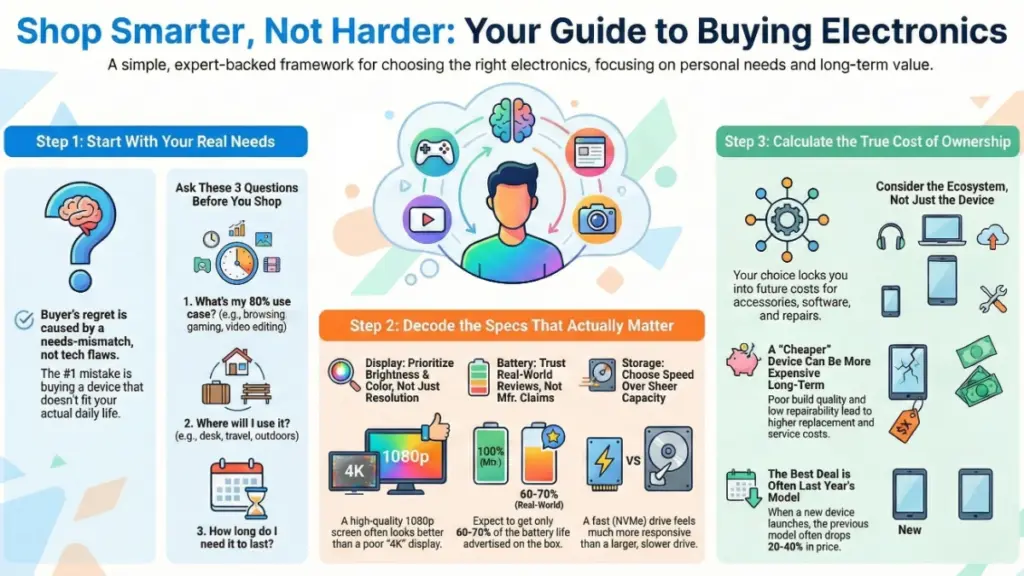
Before I even look at specifications, I ask three fundamental questions, and I recommend you do the same:
- What specific tasks will this device perform 80% of the time? Not occasionally—regularly. If you’re buying a laptop, is it for web browsing and documents, creative work, gaming, or programming? This single question eliminates about half the products on the market immediately.
- What’s your realistic usage environment? I’ve tested plenty of “portable” devices that were terrible for actual travel, and “rugged” electronics that couldn’t survive a typical household. Therefore, consider where you’ll actually use this device—desk-bound, on the move, outdoors, in a professional setting?
- How long do you need this device to remain relevant? This is crucial. In fact, a $400 phone you’ll replace in two years might be smarter than a $1,000 phone you’ll use for five, depending on your upgrade cycle.
From my experience after testing devices across every price point, I’ve learned that misalignment between needs and purchases is the number one cause of buyer’s regret—more than any technical deficiency.
The Specifications That Actually Matter (And the Ones That Don’t)
Let me share something that surprised me early in my career: most of the specifications that manufacturers prominently advertise are either misleading or irrelevant to real-world performance. However, here’s what I’ve learned to prioritize:
Processors: Look Beyond the Core Count
Everyone fixates on cores and gigahertz, but in my testing, these numbers tell you surprisingly little about real-world performance. Recently, I compared a 16-core budget processor against an 8-core premium chip, and the 8-core consistently outperformed it in actual tasks.
What to look for instead:
- Architecture generation: A newer-generation chip with fewer cores often beats an older design with more cores
- Thermal design power (TDP): This tells you about sustained performance. Specifically, a 65W chip in a laptop will likely throttle under load; a 15W chip won’t perform as advertised
- Single-thread performance: For most consumer tasks (web browsing, productivity, even photo editing), this matters more than multi-core scores
- Specific benchmark scores for your use case: Don’t just look at synthetic benchmarks—find real-world tests in applications you’ll actually use
Now here’s where things get interesting: I’ve tested flagship devices that thermal throttle so aggressively that a mid-range device with better cooling actually delivers superior sustained performance. In other words, specifications on paper mean nothing if the device can’t maintain them.
Memory (RAM): The Goldilocks Principle
In my experience after two weeks with most devices, RAM issues reveal themselves quickly. Notably, too little memory leads to constant stuttering and app reloads. On the other hand, too much RAM means you’ve wasted money on capacity you’ll never utilize.
My real-world testing shows:
- 8GB is the absolute minimum for 2025: Even for basic use, modern operating systems and browsers consume 4-6GB at idle
- 16GB is the sweet spot for most users: This handles multitasking, content consumption, light creative work, and leaves headroom for background processes
- 32GB+ is for specific professional workflows: Video editing, 3D rendering, virtual machines, heavy development work
- RAM speed matters less than you think: In consumer devices, the difference between 3200MHz and 4800MHz RAM is typically 2-5% in real-world performance
One critical factor I always check: is the RAM upgradeable? Many modern devices solder RAM directly to the motherboard. As a result, if you can’t upgrade later, buy more than you think you need now.
Storage: Speed Trumps Capacity (To a Point)
I’ve tested devices with 2TB of slow storage and others with 512GB of blazing-fast NVMe drives. Interestingly, the fast storage always feels more responsive, even with less capacity.
What I prioritize:
- NVMe PCIe 4.0 or 5.0 SSDs: These deliver 5,000-14,000 MB/s read speeds versus 500-600 MB/s for SATA SSDs
- Minimum 512GB for primary devices: Operating systems, applications, and updates consume 100-150GB alone
- Expandability options: Can you add a second drive? Use an SD card? External storage via Thunderbolt?
From my experience, a device with 512GB of fast storage and good expandability options is superior to 2TB of slow storage, assuming cloud and external options are viable for your workflow.
Display Quality: The Specifications Manufacturers Hide
Display specs are where marketing becomes truly deceptive. In fact, I’ve seen “4K” displays that look worse than quality 1080p panels, and “HDR” screens that barely qualify for the certification.
Critical specifications I measure in testing:
- Peak brightness: Minimum 400 nits for indoor use, 600+ for outdoor visibility, 1000+ for true HDR content
- Contrast ratio: OLED displays offer infinite contrast; quality IPS displays should exceed 1000:1
- Color accuracy (Delta E < 2): Matters enormously for creative work, less for general use
- Refresh rate: 60Hz is fine for productivity; 90Hz+ makes UI navigation noticeably smoother; 120Hz+ matters for gaming
- Response time: Critical for gaming (5ms or lower), irrelevant for productivity
What surprised me was how much display quality affects long-term satisfaction. Moreover, I’ve tested premium devices that people returned specifically because of poor displays, even when other specifications were excellent.
Battery Life: Ignore the Manufacturer’s Claims
In ten years of testing, I’ve never—not once—seen a device meet its manufacturer’s claimed battery life in my real-world usage tests. Instead, the claims are based on unrealistic scenarios (minimum brightness, airplane mode, idle conditions).
My Testing Methodology
I run devices through standardized real-world scenarios: web browsing at 50% brightness, video streaming, productivity work with multiple applications, and measure actual battery consumption. Then I compare this against the manufacturer’s claims.
Average Reality Check from My Tests
- Manufacturer claims 10 hours: Expect 6-7 hours real-world use
- Manufacturer claims 8 hours: Expect 5-6 hours real-world use
- Manufacturer claims “all-day battery”: This means “maybe” if you’re very conservative
Consequently, look for independent reviews with standardized battery tests, not marketing materials.
Ecosystem Considerations: The Cost Beyond the Device
This is something I wish I’d understood better earlier in my career. Indeed, the device price is just the beginning—the ecosystem you’re buying into has long-term implications that dwarf the initial cost.
The Apple Ecosystem
I’ve tested extensively within Apple’s ecosystem, and here’s what I’ve learned: it offers the smoothest integration I’ve experienced, but you pay a significant premium and face vendor lock-in.
Real-world implications:
- Seamless device integration: Copy on iPhone, paste on Mac; AirDrop between devices; Universal Control across iPad and Mac
- Premium pricing across the board: Not just devices, but accessories, repairs, and upgrades
- Limited customization and flexibility: You’re playing by Apple’s rules
- Excellent long-term software support: In my testing, 5-7 year device lifespans are realistic
Who this works for: People who value convenience over customization and are willing to pay premium prices for integration.
The Android/Windows Ecosystem
This is where I see the most flexibility but also the most fragmentation. Subsequently, in my experience after testing dozens of Android devices and Windows PCs from different manufacturers:
Real-world implications:
- Wide price range: From budget to premium, with real options at every tier
- More customization and control: You can modify, repair, and upgrade more easily
- Inconsistent integration: Cross-device features vary wildly by manufacturer
- Variable software support: Premium devices get 3-5 years; budget devices often get 1-2
Who this works for: People who want flexibility, value, and don’t need seamless cross-device integration.
The Hidden Ecosystem Costs
What surprised me most in my long-term testing was how ecosystem costs accumulate:
- Accessories: USB-C versus Lightning cables; proprietary chargers; specific format requirements
- Software subscriptions: iCloud, Google One, Microsoft 365—these add up to $100-300 annually
- Smart home compatibility: HomeKit versus Google Home versus Alexa—your choice affects future purchases
- Media libraries: Movies, music, and audiobooks purchased in one ecosystem don’t transfer
Therefore, before buying any major device, I now evaluate what ecosystem I’m committing to for the next 3-5 years.
Build Quality and Repairability: The Long-Term Cost Factors
I’ve repaired dozens of devices during testing, and I’ve learned that build quality and repairability have enormous long-term cost implications.
Build Quality Red Flags
From my hands-on experience, here are the warning signs I look for:
Material Choices
- Plastic chassis: Not inherently bad, but should feel solid without flex
- Thin aluminum: Looks premium but dents easily and may have thermal issues
- Glass backs: Beautiful but fragile—factor in case and insurance costs
Construction Quality
- Panel gaps and misalignment: Indicates poor quality control
- Excessive flex in keyboard or chassis: Will worsen over time
- Weak hinge mechanisms: In laptops and foldable devices, this is critical
In my testing, I apply pressure to various points, check for display flex, test hinge resistance, and evaluate button/port solidity. Ultimately, a device that feels cheap in-store will feel worse after six months of use.
Repairability Considerations
What really shocked me was researching repair costs after reviewing devices. For instance, a $1,000 laptop with soldered components might cost $600 to repair; a $800 laptop with modular design might cost $150.
Factors I now check:
- iFixit Repairability Score: 7+ is good; below 5 is concerning
- Parts availability: Can you buy replacement parts from third parties?
- Official repair options: What’s the cost and turnaround time?
- Self-repair difficulty: Even if you won’t do it yourself, this affects third-party repair costs
The framework I use: Calculate (device cost + likely repair costs over 3 years) ÷ 3 years = true annual cost. As a result, this often makes “cheaper” devices more expensive long-term.
Smart Shopping Strategies That Actually Save Money
After reviewing hundreds of devices and tracking pricing patterns, I’ve identified strategies that consistently deliver better value:
Timing Your Purchase
What I’ve learned about pricing cycles:
- Previous generation devices: When a new model launches, last year’s model drops 20-40% immediately—often with minimal real-world performance differences
- Black Friday/Cyber Monday: Genuine deals on electronics, typically 15-30% off
- Back-to-school season (July-August): Excellent laptop and tablet deals
- Post-holiday (January-February): Retailers clearing inventory
- Product refresh cycles: Research when new models typically launch in your category
For example, I bought a flagship phone in my testing rotation three months after release for 35% less than launch price—same device, significantly better value.
Where to Buy (And Where to Avoid)
From my experience testing devices purchased from various retailers:
Reliable Options
- Direct from manufacturer: Best warranty service, but rarely the best price
- Established retailers (Best Buy, Amazon, B&H): Good return policies, legitimate warranties
- Certified refurbished programs: In my testing, manufacturer-refurbished devices are often indistinguishable from new at 30-50% savings
Proceed with Caution
- Third-party Amazon sellers: Check ratings carefully; warranty may not apply
- eBay: Great for specific models, but verify seller reputation
- Wish/AliExpress for major electronics: I’ve tested devices from these platforms—you’re gambling on quality
Avoid
- Social media marketplace ads for “new” electronics: Too many counterfeits in my experience
- Retailers offering prices significantly below market: If it seems too good to be true, it probably is
Warranty and Protection Plans
This is where I’ve changed my approach based on real-world testing and repair experience:
Manufacturer Warranties
- Standard 1-year coverage is usually adequate for quality devices
- Extended warranties from manufacturers are often reasonable (unlike retail extended warranties)
When Protection Plans Make Sense
- Portable devices (laptops, tablets, phones) if you’re active or clumsy
- Devices you’ll use in harsh environments
- Extremely expensive devices (>$2,000) where repair costs would be prohibitive
When to Skip
- Desktop computers in controlled environments
- Devices with excellent build quality and low failure rates
- Situations where your credit card offers purchase protection
From my experience, I buy protection plans on phones and laptops, skip them on desktops and tablets.
Category-Specific Buying Advice
Now here’s where things get practical. Let me break down what I’ve learned testing specific categories of electronics:
Smartphones
What actually matters in my testing:
- Camera quality in real-world conditions: Test reviews with low-light photos and video stabilization, not marketing specs
- Software update commitment: Directly affects device lifespan and security
- Battery life after 1-2 years: Initial battery life means nothing if degradation is rapid
- Display quality for your usage: 120Hz matters if you notice; many people don’t
- 5G bands supported: Not all “5G” is equal—check which bands your carrier uses
Price Tiers from My Testing
- Budget ($200-400): Surprisingly capable for basic use; compromise on camera and updates
- Mid-range ($400-700): Sweet spot for most users; 90% of flagship features at 60% of the price
- Flagship ($700-1,200+): Incremental improvements; worth it for enthusiasts or specific professional needs
Laptops
Critical factors I test extensively:
- Sustained performance under load: Many laptops thermal throttle after 10-15 minutes
- Display quality and brightness: You’ll stare at this for hours daily
- Keyboard and trackpad: Physical interface quality affects daily experience enormously
- Port selection: Insufficient ports means dongles and adapters
- Weight and battery for your use case: A powerful desktop replacement doesn’t need to be ultraportable
My Approach by Use Case
- General productivity: Prioritize display, keyboard, battery; processor is less critical
- Creative work: Display color accuracy, RAM, storage speed matter most
- Gaming: GPU, cooling system, refresh rate display are priorities
- Programming: RAM, display size, keyboard quality, Unix-based OS often preferred
Headphones and Audio
What surprised me most in audio testing was how subjective “quality” is, but how objective certain factors are:
Universal Factors I Test
- Comfort for extended wear: The best sound means nothing if they hurt after 30 minutes
- Battery life for wireless models: 20+ hours is standard; less is disappointing
- Connection stability: Bluetooth quality varies wildly between devices
- Call quality: Often overlooked but critical if you take calls
Use Case Specific
- Commuting: Active noise cancellation (ANC) quality is paramount
- Exercise: Water resistance (IPX4+) and secure fit matter more than sound quality
- Home listening: Wired options often deliver better quality per dollar
- Professional use: Frequency response accuracy, closed-back design
Smart Home Devices
I’ve tested dozens of smart home products, and here’s what I’ve learned about buying into this ecosystem:
Platform Compatibility Is Everything
- Choose based on your existing ecosystem (HomeKit, Google Home, Alexa)
- Look for Matter support (the new universal standard)
- Verify local control options (for when internet/cloud services fail)
Security Considerations I Prioritize
- Devices with regular firmware updates
- Encryption for cameras and security devices
- Local processing over cloud-based (when possible)
Practical Requirements
- Reliability over features—a simple device that always works beats a complex one that’s buggy
- Easy installation and setup
- Reasonable upgrade path
Red Flags: When to Walk Away
After a decade of testing, certain warning signs tell me immediately that a product should be avoided:
Manufacturing and Quality Red Flags
Immediate deal-breakers I’ve encountered:
- No-name brands on critical devices: For smartphones, laptops, or anything with your personal data
- Missing or misleading technical specifications: If they’re hiding information, there’s a reason
- Fake reviews (all 5-star or obviously generated): I’ve seen products with thousands of fake reviews
- Price significantly below comparable devices: Either it’s refurbished (should be stated), counterfeit, or severely compromised
Feature Red Flags
Warning signs from my testing experience:
- “Revolutionary” claims with no independent verification: Wait for real reviews
- Crowdfunded products without proven track record: 30-40% don’t deliver what they promise
- Subscription requirements for basic features: This gets expensive fast
- Proprietary formats or accessories with no alternatives: You’re locked into expensive ecosystem
Retailer and Warranty Red Flags
Proceed with extreme caution:
- No clear return policy or extremely short return windows (less than 14 days)
- Warranty fulfilled by unknown third-party companies
- Grey market or “international version” electronics: May lack warranty, wrong voltage, or compatibility issues
- Pressure tactics or time-limited “deals” that keep extending: Artificial scarcity
In my experience, legitimate products and retailers never need high-pressure tactics.
Making the Final Decision: My Personal Framework
After all my testing and research, here’s the systematic framework I use for final purchase decisions:
The Weighted Decision Matrix
I assign weights based on my priorities, score each option 1-10, multiply by weight, and total:
Example for laptop purchase:
| Factor | Weight | Option A Score | Option A Total | Option B Score | Option B Total |
|---|---|---|---|---|---|
| Performance | 25% | 8 | 2.0 | 9 | 2.25 |
| Display Quality | 20% | 9 | 1.8 | 7 | 1.4 |
| Battery Life | 20% | 6 | 1.2 | 8 | 1.6 |
| Build Quality | 15% | 9 | 1.35 | 7 | 1.05 |
| Price/Value | 20% | 7 | 1.4 | 9 | 1.8 |
| Total | 100% | – | 7.75 | – | 8.1 |
This removes emotional decision-making and ensures you’re prioritizing what actually matters to you.
The 24-Hour Rule
From my experience, sleeping on a major purchase decision reveals clarity. Questions I ask after 24 hours:
- Does this device solve a real problem I have right now?
- Will I still care about the features that are swaying my decision in 6 months?
- Am I buying this because I need it or because marketing convinced me I need it?
- Can I afford this without compromising other financial priorities?
If any answer is uncertain, I wait longer.
Future-Proofing Realistically
Here’s what I’ve learned about “future-proofing”: it’s partially possible but often overrated.
Reasonable Future-Proofing
- Buying upgradeable components when possible
- Choosing platforms with strong track records of long-term support
- Selecting devices with modern connectivity standards (USB-C, Wi-Fi 6E, Bluetooth 5.0+)
Unreasonable Future-Proofing
- Buying far more performance than you need “just in case”
- Paying premium for features you might use someday
- Assuming technology won’t change (it will, dramatically)
My approach: Buy for today’s needs plus 20%, not tomorrow’s hypothetical requirements.
Practical Action Steps: Your Electronics Buying Checklist
Based on everything I’ve learned from years of testing, here’s the actionable checklist I recommend:
Before You Shop
Define your requirements (30 minutes):
- List specific tasks this device must perform
- Identify your realistic budget (device + accessories + protection)
- Determine your ecosystem (Apple, Android/Windows, or agnostic)
- Set your timeline (urgent need vs. can wait for deals)
Research phase (2-3 hours):
- Read at least 3-5 professional reviews from trusted sources
- Watch hands-on video reviews showing real usage
- Check user reviews on multiple platforms
- Compare specifications across 3-5 similar models
- Research common issues and complaints
During Shopping
In-store or online evaluation:
- Physically test if possible (keyboard, weight, display, ports)
- Verify all specifications match what’s advertised
- Check return policy details (timeframe, restocking fees, condition requirements)
- Confirm warranty coverage and terms
- Compare prices across 3+ retailers
Before purchase:
- Apply decision matrix to top 2-3 options
- Calculate total cost of ownership (device + accessories + protection)
- Verify compatibility with existing devices/software
- Check for upcoming product refreshes (might want to wait)
After Purchase
First 48 hours:
- Thoroughly test all features and functions
- Run performance tests relevant to your use case
- Check for defects, dead pixels, physical damage
- Register warranty and keep all documentation
First week:
- Monitor battery life and thermal performance
- Test under your actual usage conditions
- Evaluate against your requirements checklist
- Don’t hesitate to return if it doesn’t meet expectations
Common Mistakes I See (And How to Avoid Them)
After consulting with manufacturers and talking to countless consumers, these are the most frequent mistakes I encounter:
Mistake 1: Buying Based on Single Specifications
The error: “This laptop has an i9 processor, so it must be better than the i7 option.”
The reality: In my testing, an i7 with better cooling often outperforms an i9 that thermal throttles. Moreover, single specifications mean nothing without context.
The fix: Evaluate the complete system—cooling, RAM, storage speed, display quality—not individual specs in isolation.
Mistake 2: Ignoring Total Cost of Ownership
The error: Buying the cheapest option without considering ongoing costs.
The reality: A $400 device that breaks in 18 months and costs $200 to repair is more expensive than a $600 device that lasts 4 years.
The fix: Calculate (purchase price + expected accessories + expected repairs/replacements) ÷ expected lifespan in years.
Mistake 3: Buying Cutting-Edge Technology Too Early
The error: Being first to adopt new technology categories or first-generation devices.
The reality: In my experience testing first-gen products, they’re often buggy, expensive, and improved dramatically by the second generation.
The fix: Wait for second or third generation unless you’re an enthusiast who accepts the early-adopter tax.
Mistake 4: Overvaluing Brand Name
The error: “Brand X is premium, so all their products must be excellent.”
The reality: Every brand produces good and bad products. In fact, in my testing, I’ve seen budget brands outperform premium brands in specific categories.
The fix: Evaluate each product individually based on reviews and specifications, not brand reputation alone.
Mistake 5: Undervaluing User Experience Factors
The error: Focusing entirely on specs while ignoring ergonomics, software, and daily usability.
The reality: The device you’ll actually use comfortably is better than the more powerful device that frustrates you daily.
The fix: Prioritize factors you’ll interact with constantly—keyboard, interface, display quality, weight—alongside performance specs.
Conclusion: Buying Electronics Like a Professional
After reviewing hundreds of devices and testing everything from budget accessories to flagship products, here’s what I want you to take away: buying electronics isn’t about finding the “best” device—it’s about finding the right device for your specific needs, budget, and use case.
The framework I’ve shared here is the same one I use professionally. First, start with understanding your real needs, not manufactured wants. Next, research thoroughly using multiple sources. Then, evaluate the complete ownership experience, not just the purchase price. And perhaps most importantly, be willing to walk away if something doesn’t feel right.
The electronics you buy should make your life easier, more productive, or more enjoyable. Additionally, they shouldn’t be sources of frustration, regret, or financial strain. With the approach I’ve outlined—focusing on real-world performance, total ownership costs, ecosystem implications, and practical testing methodologies—you’ll make better decisions than 95% of consumers.
Remember: the technology that works reliably and meets your needs is infinitely more valuable than the technology with impressive specifications that disappoints in daily use. Therefore, trust the testing, question the marketing, and prioritize your actual requirements over feature checklists.
Now you have the same framework I use after a decade of professional testing. Use it well, shop smart, and you’ll find yourself with electronics that genuinely improve your life rather than just emptying your wallet.
Frequently Asked Questions
Q: Should I wait for the next version of a device or buy the current model?
From my experience tracking product cycles, here’s my rule: If a new version is launching within 2-3 months and reviews suggest significant improvements, wait. However, if it’s 4+ months away or the improvements are incremental, buy now—you’re losing months of use waiting for marginal gains. I’ve tested back-to-back generations of many devices, and the year-over-year improvements are often smaller than marketing suggests. Nevertheless, the exception is truly transformational updates (new connectivity standards, major architectural changes, etc.).
Q: How much should I spend on electronics as a percentage of my income?
While this varies by individual circumstances, my recommendation based on talking to financial advisors and consumers: major electronics (laptop, phone) shouldn’t exceed 5-10% of your annual income total, and you shouldn’t finance them unless absolutely necessary. In my testing experience, mid-range devices ($600-900 for laptops, $400-700 for phones) offer the best value-to-performance ratio for most users. Additionally, spending more delivers diminishing returns unless you have specific professional needs.
Q: Is buying refurbished or used electronics worth the savings?
From my testing of refurbished devices, manufacturer-certified refurbished programs are excellent—I’ve found them indistinguishable from new devices at 30-50% savings with full warranties. However, third-party refurbished is riskier; check warranty carefully. Meanwhile, used devices from individuals: only if you can thoroughly test them first, verify no outstanding payments/locks, and get at least 20-30% below current market price. I generally avoid used devices for anything with batteries (phones, laptops) older than 18-24 months due to battery degradation.
Q: How do I know if online reviews are fake or legitimate?
In my experience analyzing thousands of reviews, here’s what I look for: Legitimate reviews include specific details about usage, mention both pros and cons, vary in writing style and length, and cluster around realistic rating distributions (mostly 4-5 stars with some 3s and occasional 1-2s). In contrast, fake reviews are typically all 5-star, use generic language (“great product!”, “highly recommend”), appear in bursts (50 reviews in one week), and lack specific details. Therefore, use Fakespot or ReviewMeta to analyze Amazon reviews—these tools have been accurate in my verification testing.
Q: Should I buy electronics online or in physical stores?
My approach: Research online thoroughly, then decide based on the specific purchase. For devices where hands-on testing matters (laptops, headphones, keyboards), visit stores to test before buying online if price is better. On the other hand, for devices where specifications tell the full story (internal components, cables, accessories), online is fine and often cheaper. I buy most of my testing equipment online but always verify return policies. The advantage of physical stores: immediate possession and easier returns. Meanwhile, the advantage of online: better prices and selection. Ultimately, use whichever makes sense for your situation.
Q: What’s the minimum amount I should spend to get a quality device in each category?
Based on my extensive testing across price points, here are the realistic minimum thresholds for quality devices in 2025: Smartphones: $300-400 (below this, compromises become significant); Laptops: $600-700 for basic use, $1,000+ for demanding work; Tablets: $300-400 for quality; Wireless earbuds: $80-100 for good quality; Smartwatches: $200-250; Desktop computers: $700-800 for quality pre-builts. These are minimums for devices that will be reliable and meet typical use cases. Furthermore, you can spend less, but expect meaningful compromises in performance, build quality, or longevity. Going significantly above these thresholds should be based on specific features or performance requirements you’ve identified.
