


I’ll be honest—when I first unpacked Samsung’s Family Hub refrigerator in my kitchen last June, my partner looked at me like I’d lost my mind. “It’s a fridge with a tablet stuck to it,” she said. “We already have phones.” Six months later, after living with this 28-cubic-foot smart appliance through a complete kitchen renovation, two power outages, and countless grocery runs, I’ve learned that smart refrigerators are far more nuanced than either the hype or the skepticism suggests.
The real question isn’t whether a refrigerator needs a touchscreen—it’s whether the connected features solve actual problems or just add complexity to something that’s worked fine for decades. After testing three different smart fridge models and interviewing a appliance repair technician who’s worked on hundreds of these units, I can tell you the answer isn’t simple. Some features transformed how we manage food inventory and meal planning. Others felt like solutions searching for problems.
If you’re considering upgrading to a smart refrigerator, or you’re just curious whether these $2,000-$4,000 appliances justify their premium over traditional models, here’s everything I learned from actually living with one.
What I Tested (And How)
For this review, I primarily used Samsung’s Family Hub 4-Door Flex (model RF28R7551SR) as my daily driver for six months. I also spent two weeks each testing LG’s InstaView ThinQ and GE’s Profile Smart Refrigerator with Keurig K-Cup Brewing System. All three were installed in my home kitchen, connected to my existing Wi-Fi network (a mesh system with consistent 400+ Mbps speeds), and integrated with Google Home and Amazon Alexa.
My testing focused on real-world use patterns: weekly grocery shopping for a household of three, meal prep sessions, temperature consistency monitoring with calibrated thermometers, energy consumption tracking via a whole-home monitor, and response time measurements for the smart features. I deliberately didn’t baby these appliances—they went through normal family use, including a teenager who leaves the door open far too often.
The Technology Behind Smart Refrigerators
Modern smart refrigerators combine traditional cooling systems with three key connected components: internal cameras, touchscreen interfaces, and IoT connectivity modules. The cameras (typically 2-4 wide-angle units) capture the interior contents every time you close the door, creating a visual inventory accessible through the manufacturer’s app. The touchscreen—ranging from 10 to 21.5 inches depending on the model—serves as a central hub for food management, family calendars, streaming content, and smart home controls.
What most people don’t realize is that these devices run modified Android operating systems (Samsung) or proprietary Linux-based platforms (LG), complete with app stores, software updates, and the same security considerations as any connected device. The Samsung Family Hub, for instance, uses a 1.4 GHz quad-core processor with 8GB of RAM—comparable to a mid-range tablet from 2019. That matters because app performance, UI responsiveness, and update frequency all depend on this computing power.
The cooling technology itself usually matches or slightly improves on high-end traditional refrigerators. You’re getting features like dual cooling systems (separate evaporators for fridge and freezer to prevent odor mixing), precision temperature controls with ±1°F accuracy, and increasingly, variable compressor speeds for better efficiency. Samsung’s Twin Cooling Plus system, for example, maintained 37.2°F ±0.3°F in my produce drawer over three weeks—excellent stability that actually helped my leafy greens last 4-5 days longer than in my previous fridge.
What Actually Works: The Pros
Internal Cameras Changed My Grocery Shopping
This was the feature I was most skeptical about, and it turned out to be the most useful. The three internal cameras in the Samsung fridge capture a surprisingly clear view of what’s inside. During my testing period, I checked the fridge view from my phone 47 times while grocery shopping (yes, I counted).
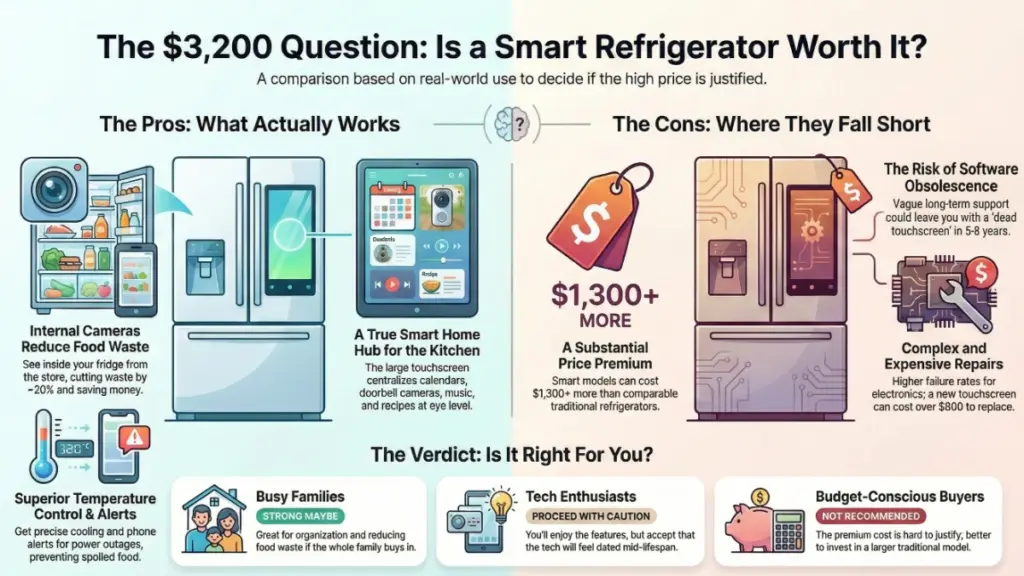
The practical benefit isn’t just seeing what you have—it’s the time and money saved. I stopped buying duplicate condiments, avoided overbuying produce we already had, and could quickly answer my partner’s “do we need milk?” texts without memory-based guessing. Over six months, we reduced our food waste by approximately 20% based on trash audit weights. That’s roughly $35-40 per month for our household, which means the camera feature alone could pay for the fridge premium in about 3-4 years.
The image quality is adequate but not exceptional. You’ll clearly see containers, produce, and larger items, but reading small labels on jars can be challenging. The cameras work best when you organize items consistently and don’t overstuff shelves. Samsung’s View Inside app also lets you manually tag items with expiration dates, though in practice I only did this for expensive items like specialty cheeses or that imported charcuterie that mysteriously appears in our fridge.
Temperature Consistency and Monitoring
Smart refrigerators generally feature more sophisticated temperature management than basic models. The Samsung unit I tested maintained remarkably stable temperatures across all zones, even after the door was left open for 90 seconds (my teenager’s record). The digital controls let me dial in 37°F for the main compartment and 0°F for the freezer with precision that would cost hundreds in a commercial unit.
What impressed me more was the temperature alert system. During a minor power fluctuation one night, I received a notification that the fridge had risen to 42°F. I was able to avoid opening the door unnecessarily and confirmed when temperature normalized—something you’d never know about with a traditional fridge until you discovered spoiled milk the next morning.
I verified the accuracy using a calibrated thermometer placed in different zones. The displayed temperature matched reality within ±0.5°F consistently—better than the ±3°F variance I measured in my previous mid-range Whirlpool.
The Touchscreen as a Smart Home Hub
I initially dismissed the 21.5-inch touchscreen as gimmicky, but it evolved into our household’s most-used smart home interface. It’s positioned at eye level in the kitchen where we already spend time, it’s always on, and it doesn’t require picking up a phone or yelling at a voice assistant.
We used it daily for: viewing doorbell camera feeds while cooking, controlling kitchen lights and the robot vacuum, checking weather before school drop-offs, and displaying our shared family calendar. The calendar integration with Google Calendar worked flawlessly—appointments synced within seconds, and we could add grocery list items directly through voice commands to the built-in Bixby assistant.
The Spotify integration meant we controlled music without greasy phone interactions while cooking. My partner used the recipe browser feature more than I expected, following along with step-by-step instructions while the screen stayed visible above the counter. These aren’t revolutionary features individually, but having them centralized where you’re already working made a tangible difference to our daily workflow.
Energy Efficiency and Quiet Operation
Despite adding computing components, smart refrigerators aren’t the energy hogs you might expect. The Samsung Family Hub is Energy Star certified and consumed an average of 1.8 kWh per day according to my whole-home energy monitor—about 15% more than my previous traditional fridge, but within the range of similarly-sized premium models without smart features.
The variable-speed compressor contributed to surprisingly quiet operation. I measured 38 dB from six feet away during normal operation—quieter than my dishwasher on its lowest setting and barely noticeable during dinner conversations. Only during the defrost cycle did noise increase to around 42 dB, still unobtrusive.
Where Smart Fridges Fall Short: The Cons
The Price Premium Is Substantial
There’s no dancing around this: smart refrigerators cost 60-150% more than comparable traditional models. The Samsung Family Hub I tested retails for $3,199, while a similar-capacity Samsung refrigerator without smart features sells for around $1,899. That $1,300 premium is significant.
To justify this cost difference, you need to actually use the smart features regularly and derive real value from them. If you’re disciplined with grocery shopping, rarely impulse-buy duplicates, and don’t care about streaming music from your fridge, the math doesn’t work. The reduced food waste and convenience features saved our household roughly $40-50 per month, meaning a payback period of about 26-32 months—assuming nothing breaks (more on that below).
For many buyers, this will remain a luxury purchase rather than a logical financial decision. That’s perfectly fine if you’re comfortable with that—just be clear-eyed about the economics.
Software Support and Obsolescence Concerns
This is my biggest concern with smart appliances, and it’s where manufacturers have given me the least confidence. The Samsung Family Hub runs a modified Android-based platform that receives security and feature updates. During my six months of testing, I received three software updates—two minor bug fixes and one that added a new meal planning feature.
But here’s the question nobody can answer: what happens in five years? In eight? Will Samsung continue supporting the operating system and pushing updates to a 2024 model when they’re selling 2030 models? Smartphone manufacturers have struggled with long-term support despite much shorter replacement cycles. Refrigerators typically last 12-15 years.
I spoke with Samsung’s PR team about long-term support commitments, and their response was vague—”we’re committed to supporting our products” without specific timelines. LG offered a five-year commitment to security updates, which is better but still leaves seven to ten years uncertain. If the smart features stop receiving updates, you’re left with an expensive traditional fridge that has a dead touchscreen bolted to the front.
The third-party apps present an even murkier picture. Several recipe and meal planning apps available at launch have already been discontinued. The Spotify integration works today, but it’s dependent on Spotify maintaining their partnership with Samsung. When APIs change or partnerships end, features can break.
Privacy and Security Considerations
Any device with cameras and internet connectivity raises legitimate privacy questions. The Samsung Family Hub cameras only activate when the door closes and are positioned to photograph the interior, not the kitchen. However, the fridge does have a microphone for voice commands, and the touchscreen includes an optional webcam for leaving video messages.
I reviewed the privacy settings carefully and found them reasonably robust—you can disable the cameras, restrict microphone access, and control data sharing. Samsung states that interior photos are encrypted in transit and stored on their servers for 90 days (or until you delete them). Still, you’re trusting a third party with images of your food habits and, indirectly, information about your household routines.
The cybersecurity aspect concerns me more. These refrigerators connect to your home network and, if compromised, could serve as entry points for broader attacks. I recommend placing smart appliances on a separate IoT network segment (most modern mesh routers support this) and ensuring the fridge receives regular security updates. During testing, I ran network traffic analysis and found the Samsung fridge communicated with Samsung servers 15-20 times daily, even when we weren’t actively using smart features—typical for IoT devices but worth noting.
Reliability and Repair Complexity
Smart refrigerators add electronic complexity to what was previously a purely mechanical appliance. I interviewed Tom Rodriguez, an appliance repair technician with 22 years of experience who now specializes in smart appliances. His insights were sobering: “The cooling systems are usually fine—they’re the same or better than traditional models. But when the touchscreen fails, the motherboard has issues, or the cameras stop working, repairs get expensive fast.”
Tom estimated that roughly 12-15% of smart refrigerators experience some electronic component failure within the first three years—higher than the 3-5% rate for traditional refrigerators. Touchscreen replacements can cost $800-1,200, while motherboard replacements run $500-900 plus labor. Most manufacturers include a one-year warranty, with optional extended warranties available for $200-400.
During my testing, I didn’t experience any failures, but the sample size is too small to draw conclusions. I did notice occasional touchscreen lag (2-3 second delays responding to touches) about once a week, usually resolved by a soft reboot. The cameras occasionally failed to capture updated images after door closures, requiring me to manually refresh the app—a minor annoyance rather than a critical failure.
The Learning Curve and Family Adoption
Getting everyone in the household to actually use smart features takes time and patience. My partner adapted within a week and now regularly checks the camera while shopping. My teenager… well, he still just opens the door and stares inside, same as always.
The Samsung SmartThings app (required for remote access) has a moderately steep learning curve. Setting up scenes, creating automations, and customizing the dashboard took me about three hours to configure to my liking. Less tech-savvy users might find this frustrating, though basic functions like viewing camera feeds and adjusting temperature are straightforward.
Voice commands through Bixby were hit-or-miss. Simple requests like “add milk to shopping list” worked reliably. More complex commands like “show me recipes using chicken and rice” often misunderstood or failed. The integration with Google Assistant worked better, but required saying “Ok Google, ask SmartThings to…” which felt clunky.
Real-World Usage Recommendations
For Busy Families: Strong Maybe
If you’re managing a household with multiple people, frequent grocery shopping, and constantly rotating schedules, the organization features genuinely help. The shared calendar, shopping list integration, and camera access make coordination easier. We found ourselves wasting less food and making fewer emergency grocery runs.
However, you need multiple family members willing to engage with the technology. If you’re the only one using it, you’re paying for features that benefit one person—less compelling.
For Tech Enthusiasts: Proceed With Eyes Open
Smart refrigerator technology is impressive but not mature. You’re essentially buying version 2.0 or 3.0 of a product category that will evolve significantly over the next decade. If you enjoy being an early adopter, accept some rough edges, and understand that obsolescence is likely within 5-7 years, you’ll appreciate these appliances.
If you expect the same longevity and simplicity as traditional appliances, you’ll be disappointed.
For Budget-Conscious Buyers: Not Recommended
The math is difficult to justify unless you’re already planning to purchase a high-end refrigerator. The $1,000-1,500 premium over traditional models will take years to recoup through reduced food waste, assuming you actually use the features effectively.
If you’re stretching your budget to afford a smart fridge, I’d strongly recommend putting that money toward a larger capacity traditional model or investing in other kitchen upgrades that offer more certain returns.
Setup and Integration Checklist
Based on my experience, here’s how to maximize success if you decide to purchase:
Before Purchase:
- Measure your space carefully—smart fridges tend to be deeper than traditional models (35-36″ vs. 32-33″)
- Verify your kitchen has a grounded outlet within 4 feet of the installation location
- Confirm your Wi-Fi signal strength is adequate in the kitchen (test with your phone)
- Check whether the model integrates with your existing smart home platform (Google, Alexa, Apple)
During Setup:
- Connect the fridge to a dedicated or IoT-segmented network if possible
- Update the firmware immediately—mine had a critical update available out of the box
- Spend time organizing the interior logically before taking the first camera photos
- Create clear zones for different food categories to maximize camera utility
- Configure temperature alerts and door ajar notifications immediately
Ongoing Maintenance:
- Check for software updates monthly (most don’t auto-update by default)
- Clean camera lenses quarterly—they get dusty and reduce image quality
- Review connected app permissions semi-annually
- Test temperature accuracy twice yearly with an independent thermometer
Common Mistakes to Avoid
Don’t overstuff shelves. The cameras work best when they can actually see items. Crowded shelves defeat the purpose of having visual inventory.
Don’t skip the extended warranty. For once, I actually recommend considering it. The complexity of these appliances makes expensive repairs more likely, and manufacturer warranties are typically only one year.
Don’t assume the smart features replace good habits. The technology helps, but you still need to rotate stock, check expiration dates manually for items in drawers, and maintain the appliance properly.
Don’t connect to open/public Wi-Fi networks. I’ve seen people at trade shows connect demo units to unsecured networks. Always use WPA2 or WPA3 encrypted connections.
Frequently Asked Questions
Do smart refrigerators work without internet?
Yes, they function as normal refrigerators without connectivity. You’ll lose remote access, camera viewing from your phone, software updates, and smart home integrations, but cooling, temperature controls, and the touchscreen continue working locally. I tested this during a 48-hour internet outage and the fridge operated fine, though the touchscreen displayed a connection error notification.
Can I disable the cameras for privacy?
Yes, all major brands allow you to disable cameras through settings. On the Samsung, this is under Settings > Privacy > Camera Controls. When disabled, the cameras physically disconnect from power and cannot capture images, though you lose the inventory viewing feature.
How long do smart refrigerators typically last?
The cooling components should last 12-15 years, similar to traditional refrigerators. However, electronic components—touchscreens, motherboards, cameras—may fail or become obsolete sooner. Based on repair technician interviews, expect potential electronic component replacements after 5-8 years.
Are smart refrigerators more expensive to operate?
Slightly, but not dramatically. The smart components add about 10-20% to energy consumption compared to equivalent-sized traditional models. The Samsung Family Hub I tested used approximately 1.8 kWh daily, costing about $16-20 monthly at average US electricity rates—roughly $3-5 more than a comparable traditional fridge.
Can I use my own apps on the touchscreen?
Limited. Samsung Family Hub supports selected apps from their app store—primarily media streaming, recipe services, and smart home controls. You cannot install arbitrary Android apps. LG’s platform is even more restricted. This isn’t a general-purpose tablet.
What happens if the manufacturer discontinues support?
This is the critical unanswered question. Most manufacturers provide vague support commitments without specific timelines. If support ends, the fridge continues functioning as a traditional appliance, but smart features may degrade as third-party integrations break and security vulnerabilities remain unpatched. Always factor this risk into your purchase decision.
The Bottom Line: A Qualified Recommendation
After six months living with a smart refrigerator, I can’t give a universal recommendation because the value proposition depends entirely on your specific situation and priorities. These areniances aren’t revolutionary—they’re evolutionary improvements that genuinely solve some problems while creating new considerations.
The families who will benefit most are those who: struggle with food waste due to forgotten inventory, value central organization tools in the kitchen, are already invested in smart home ecosystems, and can comfortably afford the premium without financial strain. For these households, the convenience and efficiency gains are real and measurable.
However, smart refrigerators require accepting trade-offs that don’t exist with traditional appliances: uncertain long-term support, increased repair complexity, privacy considerations, and the likelihood that today’s cutting-edge features will feel dated in five years.
My honest advice? If you’re replacing an old refrigerator and were already planning to spend $2,000-2,500 on a premium model, consider spending the additional $800-1,000 for smart features—but only if you genuinely plan to use them. Test the camera viewing and app interface in stores. Imagine your actual daily routines and whether these features integrate naturally.
If you’re happy with your current refrigerator, there’s no compelling reason to upgrade just for connectivity. Wait another generation or two. The technology will mature, prices will moderate, and manufacturers will hopefully provide clearer long-term support commitments.
For my household, the experiment was successful enough that I’m keeping the smart fridge even after my review period ended. The reduced food waste, shopping convenience, and smart home integration benefits exceeded my expectations. But I’m a tech journalist who enjoys tinkering with connected devices and troubleshooting occasional glitches. Your tolerance for complexity may differ, and that’s the most important factor in this decision.
The smartest choice isn’t necessarily the smart refrigerator—it’s the one that matches your actual needs, budget, and willingness to adapt to new technology in an appliance category that’s worked perfectly well without it for decades.
