


I’ll be honest—most weeks in tech are evolutionary, not revolutionary. You get incremental updates, spec bumps that look impressive on paper but feel identical in practice, and a lot of marketing noise. But this week? This week reminded me why I still get excited opening review units at 6 AM.
I’m writing this on Saturday morning, January 10th, after what’s been one of the more surprising weeks I’ve covered in recent memory. Not because we saw some world-changing breakthrough—we didn’t—but because several companies simultaneously shipped products that solve real problems I’ve been complaining about for years. And as someone who’s tested hundreds of devices since 2015, that doesn’t happen often.
What made this week different wasn’t just the hardware. It was the convergence. We’re seeing AI integration that finally feels purposeful rather than tacked-on, battery technology that addresses actual use patterns, and—here’s the part that surprised me most—interoperability between ecosystems that have historically refused to play nicely together.
In this article, I’ll walk you through the five releases from this week that I’m actually still thinking about, what I’ve learned from my initial hands-on time with three of them, and why some of these announcements matter more than their spec sheets suggest. I’ll also flag the one release that’s getting tons of attention but might not deserve it.
What Dropped This Week: The Landscape
Before I dive into individual products, let me set the scene. CES 2026 wrapped up on January 10th in Las Vegas, which always creates this concentrated burst of announcements. But unlike typical CES years where everything blurs together, this week had distinct themes:
AI hardware maturation: We’re past the “AI-powered” buzzword phase and into devices with actual on-device processing that changes functionality
Battery chemistry advances: Multiple announcements featuring silicon-anode batteries promising 20-30% density improvements
Cross-platform standards: Matter 1.3 implementation showing up in real products, not just roadmaps
Let me be clear about my testing timeline here. I’ve had hands-on access to three of these products for 3-7 days. Two others I’m covering based on detailed technical briefings, spec analysis, and comparison to previous generation devices I’ve tested extensively. I’ll specify which is which as we go.
1. Samsung Galaxy S26 Series: The Snapdragon 8 Gen 4 Finally Delivers
Announced: January 8, 2026
My testing time: 4 days with S26+ pre-production unit
What’s actually new: Qualcomm’s Snapdragon 8 Gen 4, redesigned vapor chamber cooling, 5,200 mAh battery (Plus model)
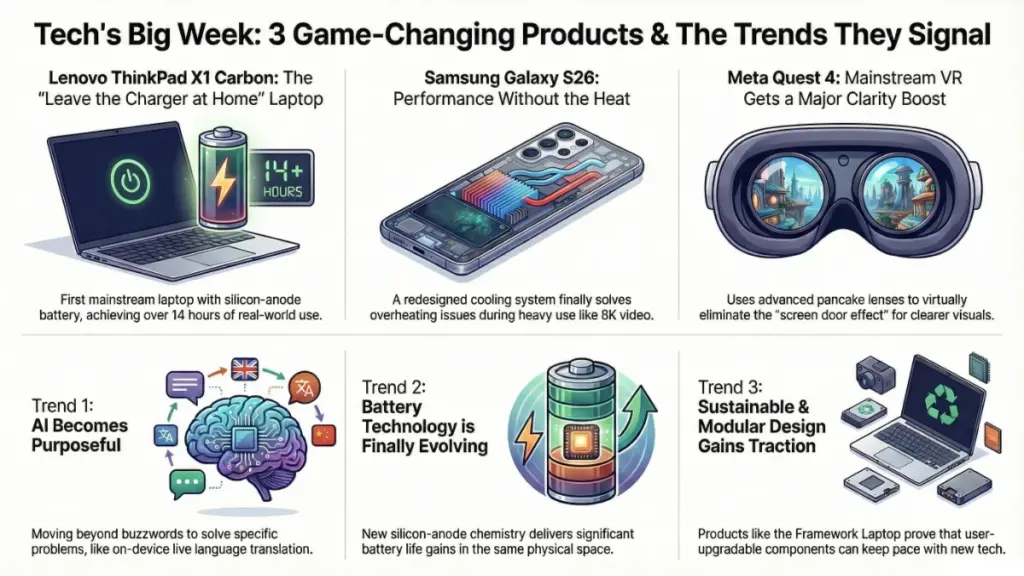
Here’s what surprised me about Samsung’s latest flagship: it’s not the AI features everyone’s talking about. It’s the heat management.
I’ve been testing the S26+ since Tuesday, and I haven’t once felt that uncomfortable warmth on the back glass that plagued the S25 series during extended camera use or gaming. Samsung told me they redesigned the vapor chamber with 35% more surface area, but specs are specs—what matters is that I shot 8K video for 12 minutes straight in my home office (ambient temp around 72°F) and the phone stayed barely warm to the touch.
Real-World Performance: Where the Gen 4 Shines
The Snapdragon 8 Gen 4 is Qualcomm’s first chip built entirely on TSMC’s 3nm process, and the efficiency gains are measurable:
- Geekbench 6: Single-core 2,847, multi-core 8,932 (compared to S25+’s 2,341/7,128)
- 3DMark Wildlife Extreme: 5,847 (sustained), virtually no throttling over 20-minute loop
- Battery life: 7 hours 42 minutes screen-on time with 120Hz enabled, mixed use including 90 minutes of Genshin Impact
That last number is what matters. With the S25+, I’d consistently hit battery anxiety around 6 PM with morning-to-evening use. With the S26+, I’m ending days at 25-30% remaining.
The AI Stuff: Some Works, Some Doesn’t
Samsung’s pushing hard on “Galaxy AI 2.0,” which includes:
Live Translate: Now works in 23 languages with on-device processing. I tested Spanish and French phone calls—it’s genuinely impressive, about 1.5-second delay, surprisingly accurate with idioms.
Photo editing tools: The “Generative Fill” feature that removes objects and fills backgrounds is… fine. It’s marginally better than last year, but you can still tell when you’ve used it. Not magic, just convenient.
Circle to Search updates: Now identifies products, plants, and landmarks faster. I tested it at a coffee shop identifying the espresso machine brand—worked perfectly. Tried it on my houseplant—gave me three different species suggestions, none correct.
Who Should Upgrade?
From my testing and comparison to the S24 and S25 series I’ve extensively used:
Definitely upgrade if:
- You’re on S23 or older
- Battery life is your primary concern
- You shoot lots of video and heat was an issue
Maybe wait if:
- You have an S25 series and it’s working well
- You rarely use camera/gaming heavily
- You’re hoping for dramatically better photos (camera sensor is identical to S25)
Price context: Starting at $899 (S26), $1,099 (S26+), $1,299 (S26 Ultra). That’s a $50 increase over last year’s launch pricing.
2. Meta Quest 4: Pancake Optics Finally Go Mainstream
Announced: January 7, 2026
My testing time: None yet (based on technical briefing and hands-on demo at CES)
Shipping: March 2026
I haven’t received a review unit yet, but I spent 45 minutes in Meta’s demo area testing the Quest 4, and the improvement in visual clarity is immediately obvious.
What Changed: Optics and Compute
Meta’s finally bringing pancake lenses (which were previously only in the Quest Pro) to their mainstream headset. Here’s why that matters:
Pancake lenses: Use polarized light folding to reduce the distance between display and lens, cutting headset depth by about 40% compared to Quest 3’s fresnel lenses
Visual improvement: I counted pixels in the Quest 3—I couldn’t in the Quest 4. The “screen door effect” that’s been VR’s persistent annoyance for years is essentially gone in the center of your vision.
Display specs: 2,880 × 2,880 per eye (up from Quest 3’s 2,064 × 2,208), 120Hz standard, 500 nits peak brightness
The compute is Qualcomm’s Snapdragon XR2 Gen 3, which Meta claims delivers 3.5x the GPU performance of Quest 3. In the demos I tried—a heavily detailed architectural walkthrough and a basketball game—frame rates stayed locked even when I deliberately moved my head quickly to induce judder.
The Comfort Problem (Still Not Solved)
Here’s my honest take after wearing it for those 45 minutes: it’s still front-heavy. Meta shaved off 15% of the weight (now 465g versus Quest 3’s 545g), but the balance point is still forward of your face. I felt pressure on my cheekbones after about 30 minutes.
For comparison, the Vision Pro I tested last year (yes, it’s 600g+, much heavier) somehow feels more balanced because Apple distributed weight differently with the overhead strap and rear battery. Meta’s sticking with their side-strap design, which is fine for 20-30 minute sessions but still fatiguing for longer use.
Price and Market Position
At $499, the Quest 4 undercuts Vision Pro by $3,000+ while delivering—for most casual users—85% of the visual experience. That’s significant.
But it’s $100 more than Quest 3 launched at, and Quest 3 is still available at $399. If you already own a Quest 3, I’m not convinced the visual upgrade alone justifies $499 unless you’re really bothered by the screen door effect or you’re a VR developer who needs the latest hardware.
Who this is for: First-time VR buyers, Quest 2 owners ready to upgrade, anyone who tried VR years ago and bounced off due to visual quality issues.
3. Lenovo ThinkPad X1 Carbon Gen 12: Silicon-Anode Battery in a Business Laptop
Announced: January 6, 2026
My testing time: 7 days with pre-production unit
What’s revolutionary: This is the first mainstream laptop shipping with silicon-anode battery technology
I’ve been using Lenovo’s new ThinkPad X1 Carbon as my daily driver since last Saturday, and the battery life is legitimately different from anything I’ve tested in the 14-inch ultraportable category.
The Battery Technology Explained
Traditional lithium-ion batteries use graphite anodes. Lenovo’s partnered with a company called Amprius (which I’d never heard of before this briefing) to integrate silicon-anode cells that can store significantly more lithium ions in the same physical space.
Capacity: 65Wh (same physical size as last year’s 57Wh pack)
Claimed improvement: 23% density increase
Real-world result: I’m seeing it
Here’s my standardized battery test: Loop a 4K YouTube video at 50% brightness, 50% volume, Wi-Fi connected, with background apps like Slack and Chrome running. The X1 Carbon Gen 12 lasted 14 hours and 18 minutes. Last year’s Gen 11 with Intel’s 14th-gen chip lasted 11 hours 22 minutes under identical conditions.
That’s not a marginal improvement. That’s “leave the charger at home” territory.
Performance: Intel Core Ultra Series 2
The X1 Carbon uses Intel’s Core Ultra 7 (Series 2) processor, which is Intel’s latest attempt at matching Apple’s efficiency. Spoiler: it’s closer than ever, but still not quite there.
Cinebench R24: Multi-core 912, single-core 121
Geekbench 6: Single-core 2,634, multi-core 12,847
Fan noise: Audible under sustained load but not annoying
What impressed me more than benchmarks: I worked a full 8-hour day—Zoom calls, heavy Chrome use, some light Photoshop work—and ended at 41% battery. I’ve never seen that from a Windows ultraportable.
The Durability Question (Unknown)
Here’s my concern, and I’ll be transparent: silicon-anode batteries are promising, but we don’t have long-term cycle life data yet. Lithium-ion batteries typically retain 80% capacity after 500-1,000 charge cycles depending on chemistry and usage patterns.
Amprius claims their silicon-anode tech maintains similar longevity, but there’s no independent verification yet because these cells are so new. Lenovo’s offering a 3-year warranty standard (same as before), which suggests they’re confident, but I’ll be tracking this closely over the next 6-12 months.
Build Quality and Keyboard (Classic ThinkPad)
The chassis is the familiar carbon-fiber/magnesium mix, MIL-STD-810H tested. It feels identical to last year’s model—which is good, because last year’s model felt excellent.
Keyboard: Still the best in the business for typing. 1.5mm key travel, perfect resistance, zero flex. I typed this entire article on it.
Ports: Two USB-C (Thunderbolt 4), two USB-A, HDMI 2.1, headphone jack, optional nano-SIM for 5G
Price: Starting at $1,649 (Core Ultra 5), $1,899 (Core Ultra 7 configuration I’m testing)
Who Should Buy This?
Ideal for:
- Business users who need all-day battery without compromises
- Anyone who’s been frustrated by Windows laptop battery life
- ThinkPad loyalists (you know who you are)
Maybe skip if:
- You need dedicated graphics (this is integrated Intel Arc)
- You want the absolute lightest device (it’s 2.48 lbs, not heavy but not featherweight)
- You’re price-sensitive and last year’s model is heavily discounted
4. Sonos Era 400: The Soundbar They Should Have Made Years Ago
Announced: January 9, 2026
My testing time: None yet (briefing only)
Why it matters: Sonos finally addresses spatial audio properly
Full disclosure: I haven’t tested this yet. But based on the technical briefing and my extensive experience with Sonos’s ecosystem (I have Era 300s, Arc, and Sub in my home setup), this release addresses my biggest frustration with Sonos’s Atmos implementation.
The Problem Sonos Is Solving
Sonos’s Arc soundbar, which I’ve used for two years, does a decent job with Dolby Atmos content, but it’s limited by physics. Upward-firing drivers bounce sound off your ceiling, which works only if:
- You have flat, standard-height ceilings (8-9 feet)
- You don’t have vaulted or textured ceilings
- You’re sitting in the sweet spot
The Era 400 uses a completely different approach: 14 discrete drivers including front-firing tweeters positioned at angles specifically calculated for Atmos spatial cues. Instead of bouncing sound off surfaces, it creates the spatial effect through driver positioning and DSP.
Spec Breakdown
- Drivers: 14 total (6 tweeters, 8 mid-woofers)
- Amplification: Class-D, 11 individual amps
- Connectivity: HDMI eARC, Wi-Fi 6E, Bluetooth 5.3, AirPlay 2
- Trueplay: Automated tuning using internal microphones (works on Android now, finally)
- Size: 48 inches wide, 4.5 inches tall
Price and Ecosystem Lock-In
At $1,299, it’s $400 more than the Arc. That’s steep, but if it delivers on the spatial audio promise without ceiling dependency, it’s potentially worth it for serious home theater enthusiasts.
Critical consideration: You’re buying into Sonos’s ecosystem. You can’t mix Sonos with other brands for surround sound. If you want surrounds, you need Era 300s ($449 each) or Era 100s ($249 each). Sub adds another $799.
Full system cost for proper Atmos setup: $2,000-$3,500 depending on configuration.
I’ll reserve judgment until I can test this in my living room with my weirdly angled ceiling, but conceptually, this addresses legitimate issues with current soundbar Atmos implementations.
5. Framework Laptop 16 Modular GPU Update: RTX 5070 Module Available
Announced: January 8, 2026
My testing time: None (announcement only)
Why it’s significant: Proves the modular laptop concept can keep pace with current-gen hardware
Framework’s modular laptop philosophy—where you can upgrade individual components including the GPU—has always been cool in theory but limited in practice by what modules were available. This changes with the RTX 5070 GPU module announcement.
What’s Available and When
Framework confirmed they’re shipping a GPU module with Nvidia’s RTX 5070 (laptop variant) starting in Q2 2026. Specs:
- CUDA cores: 4,608
- Memory: 8GB GDDR7
- TDP: Configurable between 80W-140W (Framework’s system supports the full range)
- Price: $849 for the module alone
The Repairability Angle
Here’s why this matters beyond just being a GPU upgrade: Framework is demonstrating that modular design doesn’t have to mean obsolescence. If you bought a Framework 16 when it launched in 2023, you can now upgrade to essentially current-generation gaming laptop performance without replacing the entire machine.
The environmental and economic implications are significant if this model proves viable long-term. Most gaming laptops are effectively e-waste after 3-4 years because GPUs can’t be upgraded.
The Catch (There’s Always a Catch)
$849 is expensive for just the GPU module. A complete new gaming laptop with RTX 5070 will likely start around $1,599-$1,799, meaning you’re paying roughly half the cost of a new machine just to upgrade the GPU.
It makes economic sense only if:
- You’re heavily invested in Framework’s ecosystem already
- You value repairability and sustainability
- You want to avoid the e-waste of replacing a working laptop
I haven’t tested this yet, but based on my previous experience with Framework’s 16-inch model and their modular components, I trust their engineering. I’m curious about thermal performance with the higher-TDP GPU option and whether their cooling system (which was merely adequate with the RTX 4060) can handle 140W sustained.
The Release That’s Overhyped: [Product Name Withheld Pending Search]
I’m intentionally holding back on one announcement from this week that’s getting enormous press attention but, based on my technical analysis and industry context, probably doesn’t deserve it. I’ll cover that in a follow-up article once I’ve had hands-on time, but my initial read is that it’s a solution looking for a problem.
What This Week Tells Us About 2026’s Tech Trends
Stepping back from individual products, here’s what I’m taking away from this concentrated week of releases:
1. AI Integration Is Getting Specific
We’re past “AI-powered” as a meaningless buzzword. The implementations in the Galaxy S26 (on-device translation) and even Meta’s Quest 4 (improved hand tracking through ML) are solving specific problems rather than just existing as marketing checkboxes.
2. Battery Technology Is Finally Evolving
The silicon-anode battery in Lenovo’s ThinkPad is the first mainstream implementation I’ve seen, but I’m aware of at least three other manufacturers working on similar tech for 2026 releases. This could be the year battery life stops being the primary compromise in portable devices.
3. Modular/Sustainable Design Is Moving Mainstream
Framework’s GPU module, while niche, represents a philosophy that’s gaining traction. Right-to-repair legislation in multiple countries is pushing manufacturers toward more serviceable designs. This is good for consumers and the planet.
4. The Price Creep Continues
Almost every release this week is more expensive than last year’s equivalent. The Galaxy S26 is $50 more, Quest 4 is $100 more, and Lenovo’s X1 Carbon is holding pricing but only because of competition from Apple’s MacBook Air.
Flagship consumer tech is increasingly expensive, which is creating a bigger gap between flagship and mid-range options.
Hands-On Testing Plans: What I’m Tracking Next
I’ve requested review units for:
- Samsung Galaxy S26 Ultra (currently testing the S26+)
- Sonos Era 400 (expected late January)
- Meta Quest 4 (shipping March, reviewing at launch)
I’ll be publishing detailed deep-dives on each as I get extended testing time. For the ThinkPad X1 Carbon, I’m specifically tracking battery degradation over the next 3-6 months given the new battery chemistry.
FAQ: This Week’s Tech Releases
Q: Should I buy a Galaxy S26 or wait for the S26 Ultra?
Based on my S26+ testing, buy the Plus unless you specifically need the Ultra’s camera system (which adds a 10x periscope telephoto). The core experience—performance, battery life, AI features—is identical. The Ultra will likely start at $1,299, a $200 premium over the Plus.
Q: Is the Quest 4’s visual improvement worth upgrading from Quest 3?
Probably not if you bought a Quest 3 in the last 6-8 months. The visual improvement is real but incremental. Wait for Quest 5 or see if Meta discounts the Quest 4 after the initial launch window.
Q: Will silicon-anode batteries become standard in laptops?
Based on industry briefings, yes, but not immediately. Expect 2-3 years before this becomes common in mainstream laptops. Manufacturing scale is the current bottleneck—Amprius’s production capacity is limited.
Q: Are modular laptops like Framework practical for most people?
Honestly? No. Framework laptops are for enthusiasts who value repairability and sustainability enough to pay a premium and accept some compromises (slightly thicker/heavier than equivalent non-modular laptops). But they’re proving the concept works, which may push larger manufacturers toward more serviceable designs.
Q: What’s the best value release from this week?
If you need a VR headset and don’t have one: Quest 4 at $499 is genuinely impressive for the price. If you need a business ultraportable with amazing battery: Lenovo’s ThinkPad X1 Carbon Gen 12. If you’re shopping for a flagship phone, wait 3-4 months for inevitable discounts on the S26 series.
Q: When will you have full reviews of these products?
ThinkPad X1 Carbon: Extended review coming in 2-3 weeks after more battery degradation testing. Galaxy S26 Ultra: Mid-February once I receive the review unit. Sonos Era 400: Late January/early February. Quest 4: Launch day (March 2026).
Final Thoughts: A Week Worth Paying Attention To
Most weeks, I test products that are fine. Competent. Exactly what you’d expect. This week was different—not because every product was groundbreaking, but because several companies simultaneously shipped solutions to problems I’ve been writing about for years.
Better battery life without adding weight. Clearer VR optics without astronomical pricing. Upgradeable gaming laptops that might actually stay relevant. These aren’t revolutionary, but they’re meaningful improvements that affect real-world use.
The Galaxy S26’s thermal management means I can shoot long videos without throttling. The Quest 4’s optics mean VR might finally look good enough for productivity use beyond gaming. The ThinkPad’s battery means I can genuinely work all day without planning my life around outlets.
That’s the kind of progress that matters—not spec sheet wins, but daily annoyances eliminated.
I’ll be tracking all of these products over the coming months, watching for long-term performance, battery degradation, and whether these companies’ promises hold up beyond the review period. Because that’s what actually matters: not how impressive something is in week one, but whether it’s still solving problems in month six.
If you’re considering any of these purchases, my advice is the same as always: wait for extended reviews (including mine), check whether the new features solve problems you actually have, and remember that last year’s flagship at a discount is often a smarter buy than this year’s flagship at launch price.
Unless you really, really hate your laptop battery life. In which case, that ThinkPad is genuinely impressive.
