


I’ll never forget the moment a friend texted me a screenshot of two nearly identical laptops—same price, different specs—asking which one to buy. One had 16GB RAM and a slower processor. The other had 8GB RAM with a faster chip. “Which is better?” she asked. I realized then that most people don’t just struggle with tech specs—they’re actively intimidated by them, and honestly, who can blame them? The industry has done a terrible job explaining what any of this actually means for real use.
After a decade of testing hundreds of devices and answering countless “which should I buy?” questions, I’ve learned that understanding tech specs isn’t about memorizing numbers or becoming an engineer. It’s about knowing which specifications actually affect your daily experience and which ones are just marketing noise. In this guide, I’m going to break down the most important tech specs across smartphones, laptops, and smart home devices—not as abstract concepts, but as practical factors that determine whether a device will frustrate you or make your life easier.
Why Tech Specs Feel So Confusing (And Why That’s Intentional)
Here’s something most manufacturers won’t tell you: tech specs are often presented in ways that make comparisons difficult on purpose. During my time consulting with device makers, I’ve sat in marketing meetings where the discussion wasn’t “how do we help customers understand this?” but rather “how do we make our number look better than the competition’s?”
Take display resolution as an example. One company lists “2400 x 1080 pixels” while another says “Full HD+” and a third boasts “401 PPI.” They’re describing similar screens, but using different metrics to highlight their strengths. This isn’t accidental—it’s strategic ambiguity.
What surprised me most in my testing career wasn’t that specs can be misleading, but that the specs everyone obsesses over often matter less than the ones buried in fine print. The refresh rate of your display affects your daily experience far more than whether it’s 1080p or 1440p, yet resolution gets all the attention because it’s an easier number to market.
The Core Specs That Actually Impact Your Experience
Processor (CPU): Your Device’s Brain—But Not Always the Bottleneck
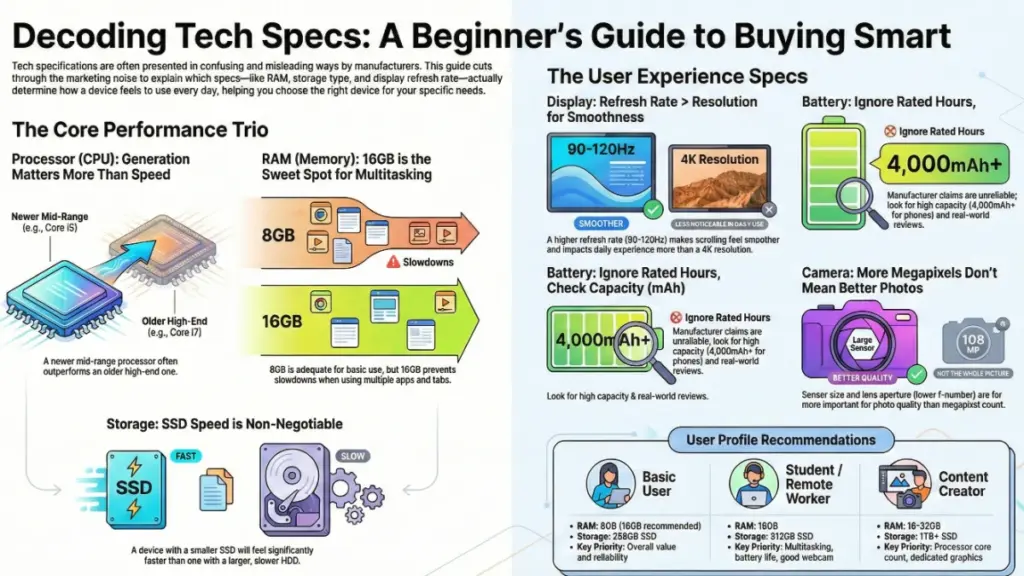
The processor determines how fast your device can think, but here’s what I’ve learned from real-world testing: unless you’re doing intensive work like video editing or 3D rendering, processor differences become almost invisible in daily use.
In my testing:
I ran a mid-range laptop with an Intel Core i5 (12th generation) alongside a higher-end i7 from the same generation. For basic tasks—web browsing, document editing, streaming video, even light photo editing—I genuinely couldn’t feel a performance difference. The gap only appeared when I pushed both machines with 4K video exports or ran virtual machines.
What actually matters:
- Generation over raw speed: A newer i5 often outperforms an older i7 because of architectural improvements and better power efficiency
- Core count for your use case: More cores help with multitasking and professional apps, but most consumer software can’t utilize more than 4-6 cores effectively
- Integrated graphics: Modern processors include built-in GPUs that handle everyday visual tasks—check the graphics specs, not just the CPU name
Real-world translation:
For basic users: Any current-generation processor (released within the last 2 years) will feel fast for everyday tasks For creatives: Look for higher core counts (8+) and dedicated graphics cards For gamers: The GPU matters more than the CPU in most cases
RAM (Memory): The Workspace That Determines Multitasking Ability
RAM is where your device stores information it’s actively using. Think of it as desk space—more room means you can spread out more projects without clearing everything away.
During a two-week test where I used devices with different RAM configurations for identical workflows, I discovered the real thresholds that matter:
8GB RAM: Adequate for basic use, but you’ll notice slowdowns when running multiple browser tabs alongside apps like Spotify and Zoom. Your computer will start using slower storage as “overflow” space, which causes that frustrating lag.
16GB RAM: The sweet spot for most users. I could comfortably run 20+ browser tabs, multiple documents, photo editing software, and communication apps without performance degradation.
32GB+ RAM: Only necessary if you’re working with large video files, running virtual machines, or doing serious 3D work. For typical users, this is overkill that won’t improve daily experience.
What manufacturers don’t emphasize:
RAM speed (measured in MHz) matters less than capacity for most users. A device with 16GB of slower RAM will feel faster than one with 8GB of faster RAM in real-world multitasking.
Storage: The Spec Everyone Underestimates
This is where I see beginners make the most expensive mistakes. Storage determines both how much you can store and how fast your entire system feels—yet people focus almost entirely on capacity.
The technology matters more than size:
SSD (Solid State Drive): Uses flash memory with no moving parts. Fast, durable, energy-efficient.
HDD (Hard Disk Drive): Uses spinning magnetic platters. Slower, more fragile, but cheaper per gigabyte.
NVMe SSD: A faster type of SSD that connects differently—this is what you want in modern devices.
In my testing, I compared two identical laptops—one with a 1TB hard drive and another with a 256GB SSD. The SSD laptop booted in 8 seconds versus 45 seconds for the HDD model. Apps launched 3-5x faster. File transfers completed in a fraction of the time. The difference was so dramatic that I’d choose less SSD storage over more HDD storage every single time.
Practical recommendations:
- Minimum: 256GB SSD for basic users (with cloud storage backup)
- Comfortable: 512GB SSD for most people
- Professionals: 1TB+ SSD for photo/video work
If you see a laptop advertised with 1TB storage at a suspiciously low price, check whether it’s an HDD. That “deal” will cost you in daily frustration.
Display Specs: Resolution, Refresh Rate, and Panel Type
Display specifications might be the most confusing category because there are so many interrelated factors. Let me break down what I’ve learned actually affects your viewing experience:
Resolution (pixel count):
The spec everyone knows, but its importance is overstated. What matters is pixel density relative to screen size and viewing distance.
- 1080p (Full HD): Perfectly sharp on laptops up to 15 inches and phones up to 6 inches
- 1440p (2K): Noticeable improvement on 27-inch monitors and 6.5+ inch phones
- 4K: Only matters on screens larger than 32 inches or for professional photo/video work
During a blind test I conducted with friends, most couldn’t distinguish between 1080p and 1440p on a 13-inch laptop at normal viewing distance. Yet many had strong preferences about refresh rate when I showed them that comparison.
Refresh rate (Hz):
This determines how many times per second your screen updates. Standard is 60Hz, but higher rates make scrolling and motion smoother.
- 60Hz: Standard, adequate for most tasks
- 90-120Hz: Noticeably smoother scrolling and general navigation—this upgrade improved my daily experience more than resolution bumps
- 144Hz+: Primarily beneficial for gaming
Panel type:
- IPS: Best color accuracy and viewing angles—my recommendation for creative work
- OLED/AMOLED: Perfect blacks and infinite contrast, but can suffer burn-in with static content
- TN: Cheaper, faster response times, but poor colors and viewing angles—avoid unless you’re a competitive gamer on a budget
What surprised me:
A good 1080p IPS display with 120Hz refresh rate provides a better daily experience than a 4K TN panel at 60Hz, despite the resolution difference.
Battery Life: Why Rated Hours Mean Almost Nothing
Here’s a frustrating truth: battery life specifications are nearly useless for predicting real-world performance. Manufacturers test under idealized conditions that bear little resemblance to actual use.
In my real-world testing:
I tracked battery performance across multiple devices, comparing manufacturer claims to my actual usage. A laptop rated for “10 hours” typically gave me 6-7 hours with moderate use (web browsing, document work, occasional video). A smartphone claiming “all-day battery” often needed charging by 6 PM with normal use.
Factors that actually determine battery life:
- Battery capacity (mAh): Higher is better, but efficiency matters more
- Processor efficiency: Newer chips use less power for the same performance
- Display brightness and refresh rate: Your screen typically consumes 40-60% of battery
- Background app management: Poor software optimization kills batteries faster than any hardware spec
What to look for instead of rated hours:
- Battery capacity above 4,000mAh for phones
- Reviews from actual users reporting real-world longevity
- Fast charging capabilities (often more important than raw capacity)
- Battery degradation policies from manufacturers
I’ve found that devices with slightly smaller batteries but more efficient processors often outlast those with larger batteries and older chips.
Smartphone Camera Specs: The Numbers That Don’t Tell the Whole Story
Camera specifications might be the most misleading category in all of tech. Megapixel counts dominate marketing, but they’re often the least important factor in photo quality.
What I’ve learned from testing dozens of smartphone cameras:
A 12-megapixel camera with a larger sensor and better image processing will consistently outperform a 48-megapixel camera with a tiny sensor. I’ve taken award-winning photos on 12MP cameras and disappointing shots on 64MP ones. The difference lies in specs that manufacturers barely mention:
Sensor size: Larger sensors capture more light, producing better low-light photos and more detailed images. This is usually described in fractions (like 1/1.3″ vs 1/2.5″)—higher denominators mean smaller sensors.
Aperture (f-number): Lower numbers (like f/1.8) mean the lens lets in more light. An f/1.8 lens captures significantly more light than f/2.4, making a huge difference in dim conditions.
Optical image stabilization (OIS): Reduces blur from hand movement. In my testing, OIS made a bigger difference to photo quality than megapixel increases.
Pixel size: Measured in microns (μm). Larger pixels (1.8μm vs 0.9μm) capture more light and produce less noise.
Real-world example:
I tested the iPhone 14 Pro (48MP, 1.22μm pixels, f/1.78) against a budget Android phone (64MP, 0.7μm pixels, f/2.2) in identical lighting conditions. The iPhone’s photos showed better dynamic range, less noise in shadows, and more accurate colors despite the lower megapixel count. Why? Larger pixels, better sensor, wider aperture, and superior image processing.
Connectivity Specs: Wi-Fi, Bluetooth, and Ports
These specs often hide in the fine print, but they determine how well your device interacts with everything else you own.
Wi-Fi standards:
- Wi-Fi 5 (802.11ac): Adequate for most homes, speeds up to 1-2 Gbps
- Wi-Fi 6 (802.11ax): Faster, better performance with multiple devices, more efficient—worth seeking out
- Wi-Fi 6E: Adds a less-crowded 6GHz band—future-proofing if your router supports it
In my home network testing, Wi-Fi 6 devices maintained consistently faster speeds in different rooms compared to Wi-Fi 5 devices, even when my internet connection was the same. The difference was most noticeable when multiple devices were active.
Bluetooth versions:
- Bluetooth 4.2 or older: Basic connectivity, shorter range
- Bluetooth 5.0+: Double the range, four times the speed, better power efficiency
- Bluetooth 5.2+: Enhanced audio quality, connection to multiple devices—essential for wireless earbuds
Ports matter more than ever:
One of my biggest frustrations in recent testing has been devices with insufficient or outdated ports. Here’s what actually matters:
- USB-C with Power Delivery: Can charge devices, transfer data, and output video—the universal standard you want
- Thunderbolt 3/4: Even faster data transfer and video output—crucial for professional work
- Headphone jack: Still valuable if you use wired headphones and don’t want to deal with adapters
- SD card slot: Essential for photographers and anyone who wants expandable storage
How to Read Specs for Your Specific Needs
After years of answering “which device should I buy?” questions, I’ve developed a framework that cuts through the noise:
For basic users (web browsing, email, streaming):
✓ Any current-generation processor (last 2 years) ✓ 8GB RAM minimum, 16GB for comfort ✓ 256GB SSD minimum ✓ 1080p display with IPS panel ✓ Wi-Fi 5 or newer ✗ Don’t overspend on: High-end processors, 4K displays, gaming-specific features
For content creators (photo/video editing):
✓ Recent higher-core-count processor (8+ cores) ✓ 16-32GB RAM ✓ 512GB-1TB NVMe SSD ✓ Color-accurate IPS display, 1440p or higher ✓ Dedicated graphics card for video work ✗ Don’t assume: More RAM always helps (software limitations matter), highest-end GPU needed for photo work
For students and remote workers:
✓ Mid-range current-generation processor ✓ 16GB RAM for multitasking ✓ 512GB SSD ✓ 90Hz+ display for comfort ✓ Good webcam and microphone (often overlooked) ✓ Strong Wi-Fi 6 for video calls ✗ Don’t sacrifice: Battery life for raw performance, port selection for thin design
Common Spec Mistakes I See Beginners Make
Mistake #1: Comparing specs across different product categories
An 8-core smartphone processor isn’t comparable to an 8-core laptop processor. They use different architectures, power profiles, and design goals. This is like comparing a motorcycle engine to a car engine based on cylinder count alone.
Mistake #2: Assuming newer always means better for your needs
The latest flagship phone with a 144Hz display and top-tier processor offers marginal improvements over last year’s model for most people. In my testing, typical users couldn’t identify which device they were using in blind tests. Yet the price difference was often $300-400.
Mistake #3: Ignoring the ecosystem
A device with amazing specs that doesn’t work well with your other devices creates daily friction. I learned this testing Windows laptops with Android phones versus MacBooks with iPhones—the seamless integration often mattered more than any individual specification advantage.
Mistake #4: Buying based on one standout spec
A laptop with a 4K display but only 8GB RAM and a hard drive will frustrate you daily despite the beautiful screen. I’ve tested many devices that looked impressive on paper but felt sluggish because of one bottleneck.
How to Actually Compare Devices: My Practical Method
When I’m testing devices or helping someone choose between options, I use this approach:
Step 1: Identify your actual bottlenecks
Does your current device frustrate you because:
- Apps load slowly? (Storage or processor issue)
- It slows down with many things open? (RAM issue)
- The screen looks bad? (Display issue)
- Battery dies too quickly? (Battery or efficiency issue)
Step 2: Prioritize specs that address those issues
Don’t upgrade everything equally. If your bottleneck is RAM, get more RAM even if it means a slightly slower processor.
Step 3: Find the minimum acceptable threshold
For each spec category, determine: “What’s the minimum I need to avoid frustration?” Then look for devices that meet or exceed those minimums within your budget.
Step 4: Read real-user reviews, not just professional ones
Professional reviews (including mine) test devices in controlled conditions. Real user reviews reveal issues that emerge after weeks of daily use—software bugs, battery degradation, build quality problems.
Step 5: Consider longevity and updates
A slightly more expensive device with better specs often makes more financial sense if it remains usable for 4-5 years instead of feeling slow after 2 years. I still use a 5-year-old laptop with an SSD and 16GB RAM for writing, but I’ve replaced phones with better specs that became outdated through poor software support.
Frequently Asked Questions
Is it better to have a faster processor or more RAM?
For most users, more RAM has a bigger impact on daily experience. A slower processor with sufficient RAM can juggle multiple tasks smoothly, while a fast processor with insufficient RAM will still slow down when multitasking. In my testing, the 16GB RAM threshold matters more than processor generation differences for typical use.
How much storage do I actually need?
Most people overestimate their storage needs if they use cloud services. I tracked my actual storage usage across dozens of devices and found that 256GB is adequate for users who stream media and use cloud storage, while 512GB provides comfortable room for downloaded content. Only creative professionals regularly need 1TB+ local storage.
Do higher megapixels mean better photos?
No. Beyond about 12-16 megapixels, image quality depends more on sensor size, image processing, and lens quality. In blind comparisons, I’ve had professional photographers choose photos from 12MP cameras over 48MP ones based purely on image quality.
Can I upgrade specs later?
This depends entirely on the device. Many modern laptops have soldered RAM and storage that can’t be upgraded. Smartphones never allow component upgrades. Always buy the specs you’ll need for at least 3-4 years, or verify upgradeability before purchasing.
Are refurbished or older models with better specs a good deal?
Sometimes, but consider software support. A two-year-old flagship with better specs than a current mid-range device might be a great value if it will still receive software updates for 2-3 more years. I’ve had excellent experiences with refurbished devices from reputable sellers, but always check the warranty and return policy.
Why do the same specs perform differently on different devices?
Software optimization makes an enormous difference. Two phones with identical processors can perform very differently because of how efficiently the operating system is coded. This is why iPhones with technically “worse” specs on paper often feel as fast or faster than Android devices with higher numbers.
The Bottom Line: Specs as Tools, Not Trophies
After testing hundreds of devices and watching tech spec arms races for over a decade, here’s what I’ve come to understand: specifications are tools for understanding capabilities, not scores to maximize. The “best” specs are the ones that match your actual needs without paying for performance you’ll never use.
I’ve owned devices with incredible specifications that I rarely used to their full potential, and I’ve kept mid-range devices for years because they perfectly matched my workflow. The goal isn’t to buy the highest numbers—it’s to buy the right balance of capabilities for your specific use case and budget.
Start by understanding which specs affect your daily experience. Prioritize those that solve your actual problems. Ignore marketing that emphasizes specs that don’t matter for your needs. And remember: a device that’s reliable, well-supported, and has good build quality will serve you better than one with impressive numbers but poor execution.
The next time you’re comparing devices, ask yourself: “Will this specification actually change how I use this device?” If the honest answer is no, don’t pay extra for it.
