


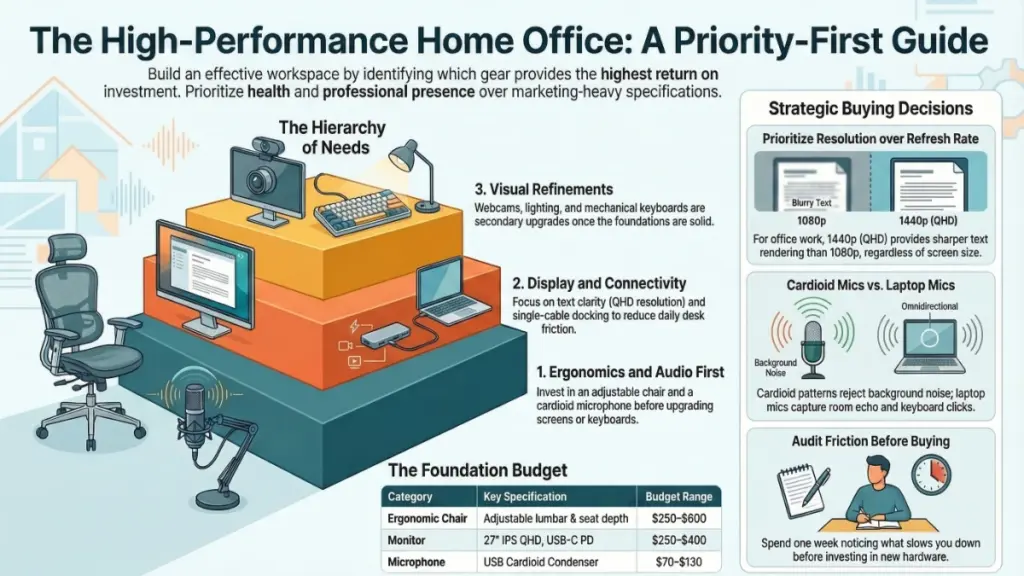
TL;DR: Build your 2026 home office around chair, audio, and monitor—in that order. Prioritize a quality ergonomic chair with lumbar support, a USB cardioid microphone for professional calls, and a 27″ QHD IPS monitor with USB-C power delivery. Add AI productivity tools to save 30+ minutes daily. Skip the 4K monitor and gaming chair. Spend intentionally on friction-fixers, not flashy specs.
Why Your Home Office Setup Matters More Than Ever in 2026
The way we work has fundamentally changed. According to Gallup’s latest research, hybrid workers now spend approximately 46% of their workweek at home—roughly 2.3 days per week . This isn’t a temporary shift; it’s the new professional reality. Yet after two years of systematically testing gear across three different home setups, I’ve discovered a critical truth: most home offices are built backwards.
People invest in flashy monitors before fixing their chair. They buy 4K webcams while using laptop microphones that make them sound like they’re broadcasting from a wind tunnel. They chase specs instead of solving the daily friction points that quietly destroy productivity.
Microsoft’s 2025 Work Trend Index revealed a startling statistic: the average knowledge worker faces 275 interruptions per day, with distractions occurring every two minutes during core work hours. Your home office isn’t just a convenience—it’s your primary defense against this “infinite workday.”
This comprehensive guide distills two years of hands-on testing across dozens of devices. Whether you’re building your first home office or upgrading a setup that never quite clicked, I’ll walk you through every category that matters, explain what to actually look for in 2026, and show you exactly where to spend—and where to save.
What Two Years of Real-World Testing Revealed
My testing methodology was deliberately unglamorous. I didn’t run these devices in pristine lab conditions. Instead, I used them through real deadlines, back-to-back video calls, marathon writing sessions, and chaotic afternoons where everything needed to happen simultaneously.
The Audio Revelation
The first surprise was how dramatically audio quality affects professional perception. During one revealing week, I alternated between a built-in laptop microphone and a USB cardioid condenser mic for the same video calls. The feedback was immediate and striking. With the dedicated mic, colleagues stopped asking me to repeat myself. One editor told me I sounded “like a radio presenter.” That single $90 upgrade changed my professional relationships more than any software tool I’d ever adopted.
2026 Update: AI-powered noise suppression is now built into most conferencing platforms, but hardware still matters. The trend has shifted toward pro-grade audio over pro-grade video—because clear communication trumps visual polish in hybrid work environments.
The Monitor Ergonomics Discovery
I spent three months working on a single 27-inch display, then switched to a dual-monitor configuration. My context-switching time dropped measurably, and I stopped losing reference materials mid-task. The improvement was immediate, tangible, and sustained.
The Core Principle
“The gear that genuinely changed my work was never the most expensive option—it was the option that solved a specific, recurring problem I had been quietly tolerating.”
The single biggest productivity gains came from eliminating friction, not buying faster hardware. A cluttered desk with cable chaos costs you mental energy every single day. Solving that costs almost nothing but pays dividends constantly.
The Six Pillars of Home Office Performance
A well-built home office comes down to six functional categories. Each affects a different dimension of your workday. Here’s what actually drives performance in 2026.
1. Display Technology: Your Visual Command Center
The 2026 Reality: Dual-screen setups have become the default for serious knowledge work. The market has shifted decisively toward QHD (2560×1440) as the minimum standard, with 4K becoming worthwhile only for specific professional use cases.
Resolution and Panel Type: What Actually Matters
Resolution and panel technology matter significantly more than raw screen size. An IPS or OLED panel at QHD delivers sharper text rendering and wider viewing angles than a cheaper TN panel at 1080p, even if the TN panel is physically larger.
For text-heavy work—writing, spreadsheets, coding, email—QHD at 27 inches hits the sweet spot. The jump from 1080p to 1440p is immediately visible and reduces eye strain during long sessions. A 4K monitor becomes genuinely worthwhile only if you’re doing photo editing, detailed graphic design, or working with high-resolution reference materials where fine detail is critical.
Refresh rate, heavily marketed for gaming, matters far less for office work. A 60Hz IPS panel is perfectly adequate for writing, video calls, and document work. Where refresh rate does matter: video editing or high-frequency creative work involving motion.
Connectivity: The USB-C Revolution
USB-C with Power Delivery (PD) has become non-negotiable in 2026. A monitor that charges your laptop while acting as a hub for peripherals dramatically simplifies your setup and reduces cable count. Look for 90W+ power delivery to ensure compatibility with professional laptops.
Recommended 2026 Models:
- LG 27UP850N-W: 27″ IPS QHD with 90W USB-C PD, excellent color accuracy
- Dell U2722D: Reliable business-grade option with comprehensive ergonomic stand
- Samsung Odyssey OLED G8: For those wanting premium OLED technology
2. Audio Equipment: The Category Most Professionals Neglect
The 2026 Shift: Audio quality now determines professional credibility more than video quality. With hybrid meetings the norm, how you sound shapes how you’re perceived.
Microphone Technology: Directionality is Everything
Polar patterns determine how much background noise contaminates your calls. A cardioid condenser microphone captures primarily what’s directly in front of it, rejecting sound from the sides and rear. This is the pattern you want for desk setups.
Omnidirectional mics—commonly built into laptops—pick up everything in the room with equal enthusiasm: keyboard clatter, air conditioning, barking dogs, construction outside. This is rarely useful for professional calls.
2026 Recommendation: USB cardioid condensers have become the standard. The Blue Yeti Nano and Rode NT-USB Mini deliver professional results without requiring audio interfaces. Both feature integrated pop filters and desktop stands.
Headset Technology: Comfort for Extended Use
Driver size and frequency response define accuracy and comfort over long sessions. Look for:
- Frequency response: 20Hz–20kHz (full human hearing range)
- Driver size: 40mm or above for better low-end response without distortion
- Active Noise Cancellation (ANC): Essential for focus in noisy environments
2026 Top Picks:
- Sony WH-1000XM6: Industry-leading ANC, 30-hour battery, exceptional comfort
- Jabra Evolve2 75: Purpose-built for calls with boom mic and busy light
- Bose QuietComfort Ultra Earbuds: For those preferring true wireless
3. Connectivity: The Hidden Bottleneck
A docking station’s bandwidth determines how many peripherals it can power simultaneously without performance degradation.
Thunderbolt 4 vs. USB-C: Making the Right Choice
| Specification | Thunderbolt 4 | USB-C 3.2 Gen 2 |
|---|---|---|
| Bandwidth | 40Gbps | 10Gbps |
| Dual 4K Support | Yes, uncompressed | Limited/compromised |
| High-Speed Storage | Full performance | Potential throttling |
| Price Range | $180–$350 | $80–$150 |
Choose Thunderbolt 4 if: You run dual 4K displays, connect high-speed external storage (NVMe SSDs), and maintain multiple USB peripherals simultaneously.
Choose USB-C if: You use a single monitor, moderate peripherals, and primarily need laptop charging and basic connectivity.
Critical 2026 Note: Check your laptop’s port specification first. A Thunderbolt 4 dock connected to a USB-C-only port will run at USB speeds regardless of the dock’s capability.
Recommended Models:
- Caldigit TS4: The Thunderbolt 4 gold standard
- Anker 575 USB-C Docking Station: Excellent USB-C option for single-monitor setups
4. Ergonomics: The Health-Performance Connection
Ergonomics has evolved from “luxury category” to performance infrastructure. The right setup doesn’t just prevent pain—it sustains energy and focus throughout the workday.
Chair Selection: The Non-Negotiable Foundation
Lumbar support and seat depth adjustment are the two specifications most closely linked to lower back comfort during long sessions. A chair with independently adjustable lumbar support and seat depth that accommodates your leg length reduces compressive load on the lumbar spine. This isn’t marketing language—it’s biomechanics supported by occupational health research.
2026 Market Update: The standing desk market continues explosive growth, now valued in the multi-billion-dollar range with sustained growth projected through 2035. Under-desk treadmills and walking pads are also gaining traction, with market forecasts estimating growth from $0.14B (2025) toward $0.22B by 2031.
Top-Rated 2026 Office Chairs:
- Branch Ergonomic Chair Pro ($349) — Best Overall
- 14 points of adjustment
- Memory foam cushioning
- 7-year warranty
- “Double-stuffed” comfort with exceptional lumbar support
- Steelcase Karman ($$$) — Premium Alternative
- Advanced weight-activated mechanism
- Exceptional build quality
- Autonomous ErgoChair Ultra 2 ($$) — Best for Larger Frames
- Supports up to 300 lbs
- Metal wheel hub construction
- Breathable fabric for temperature regulation
Monitor Positioning: Precision Matters
The top of your screen should sit at or slightly below eye level, with viewing distance between 50cm and 70cm. A monitor arm (rather than a fixed stand) lets you dial this in precisely while reclaiming significant desk real estate.
5. Input Devices: The Tactile Interface
Your laptop’s keyboard and touchpad are serviceable for travel—not for eight-hour workdays.
Keyboard Technology in 2026
Mechanical and low-profile switches have dominated the market, with many innovations coming from the gaming peripheral industry. However, 2026 has seen a surge in professional-focused designs that prioritize subtle aesthetics alongside performance.
Key Specifications:
- Switch type: Low-profile mechanical for speed, full mechanical for tactile feedback
- Layout: Consider 75% or TKL (tenkeyless) for desk space efficiency
- Connectivity: Multi-device Bluetooth essential for hybrid workflows
2026 Recommendations:
- Razer Pro Type Ultra ($159.99): Low-profile, professional aesthetic, excellent battery life
- Logitech MX Mechanical ($169.99): Smart switching between devices, perfect for hybrid work
- Cherry KC 200 MX ($89): Budget-friendly with genuine mechanical switches
Mouse and Pointing Devices
The Logitech MX Master 4 ($119) remains the productivity gold standard in 2026, with MagSpeed electromagnetic scrolling and multi-device workflow support
. For ergonomic concerns, consider the Kensington Expert Mouse Wireless Trackball ($99.99) to reduce wrist strain.
6. AI Productivity Tools: The 2026 Game-Changer
The most significant shift in home office technology for 2026 isn’t hardware—it’s AI integration. Microsoft and LinkedIn research shows AI power users report saving 30+ minutes per day, with productivity gains increasing over time as workflows mature.
AI Meeting Assistants
The AI-powered meeting assistant market is projected to grow from $3.14B (2025) to $3.91B (2026). These tools automatically capture decisions, action items, and owners—exporting directly to your task management system.
2026 Essential AI Tools:
- Notion AI: Integrated workspace assistant for drafting, summarizing, and searching content
- Reclaim AI: Smart calendar optimization that automatically blocks focus time
- Clockwise: Team scheduling optimization that protects deep work blocks
- Otter.ai or Fireflies: Automated meeting transcription and action item extraction
Async Video Communication
Atlassian has documented millions of minutes saved by replacing status meetings with async video using tools like Loom. Essential for 2026:
- Loom or Vidyard: Quick screen recording with instant sharing
- Reliable microphone (see Audio section)
- Decent webcam or smartphone-as-webcam setup
Complete 2026 Home Office Specifications Guide
| Category | Key Specification | Real-World Impact | Budget Range |
|---|---|---|---|
| Monitor | 27″ IPS QHD, USB-C PD 90W+ | Sharper text, single-cable setup, laptop charging | $250–$450 |
| Microphone | USB Cardioid Condenser | Professional audio presence, reduced repetition | $70–$130 |
| Headset | ANC, 40mm+ drivers | Focus in noisy environments, reduced fatigue | $100–$450 |
| Webcam | 1080p/60fps minimum, autofocus | Credible video presence, responsive framing | $60–$150 |
| Docking Station | Thunderbolt 4 or USB-C PD 100W | Single-cable connectivity, multi-monitor support | $100–$350 |
| Keyboard | Mechanical/low-profile switches | Typing accuracy, comfort on long sessions | $60–$180 |
| Mouse | Multi-device, ergonomic design | Reduced wrist strain, workflow efficiency | $60–$120 |
| Chair | Adjustable lumbar, seat depth, 5+ year warranty | Reduced back strain, sustained focus | $250–$900 |
| Desk | Standing capability (manual or electric) | Movement variety, energy maintenance | $200–$800 |
| Lighting | Bicolor LED, 2700K–6500K range | Reduced eye strain, professional video presence | $30–$150 |
| AI Tools | Meeting assistant, calendar optimization | 30+ minutes saved daily, automated workflows | $0–$25/month |
Priority Framework: Where to Invest First
After testing dozens of configurations, here’s my evidence-based prioritization:
Priority 1: The Chair (Non-Negotiable)
Eight hours daily in the wrong chair isn’t a comfort issue—it’s a health issue. Studies show proper ergonomic chairs with lumbar support and adjustable seat depth can reduce back pain by up to 60% and improve concentration by 40%. This is your foundation. Everything else builds on top of it.
Priority 2: Audio Equipment
Your professional reputation travels through your microphone on every call. In 2026’s hybrid work environment, audio quality increasingly determines how “professional” you seem. Upgrade your microphone and headset before chasing 4K webcam specifications.
Priority 3: Display Technology
More screen space with better clarity literally changes how you think and work. QHD resolution at 27 inches is the 2026 minimum standard. USB-C connectivity with power delivery simplifies your entire setup.
Priority 4: Connectivity Infrastructure
A quality docking station that enables single-cable connectivity pays dividends every morning when you sit down and everything just works. This eliminates daily friction—surprisingly underrated for long-term satisfaction.
Priority 5: AI Productivity Integration
The fastest productivity gains in 2026 come from AI tools that reduce “blank-page time,” summarize complexity, and automate administrative work. Build a personal operating system with AI for drafting, summarizing, brainstorming, and polishing.
Priority 6: Refinements
Webcam, keyboard, lighting, and cable management matter—but they’re refinements once the foundations are solid.
Actionable Recommendations by User Profile
If You’re Starting From Scratch
Focus entirely on chair, microphone, and monitor—in that order. These three items will have greater impact on your daily experience than every other purchase combined.
Starter Configuration ($650–$750):
- Chair: Branch Verve or similar ergonomic option ($300–$400)
- Microphone: Blue Yeti Nano or Rode NT-USB Mini ($80–$100)
- Monitor: 27″ IPS QHD with USB-C PD ($250–$350)
Use these for a month. Then assess what’s still bothering you. The incremental approach forces honesty about which friction points are real versus which just seem appealing to solve.
If You’re Upgrading an Existing Setup
Audit your friction points before spending anything. Spend one week deliberately noticing what slows you down:
- Cable clutter?
- Poor call audio?
- Monitor at wrong height?
- Neck pain by 3pm?
- Constant interruptions?
The answer tells you exactly where to invest next. A targeted $100–$150 fix for a specific problem beats a broad $400 upgrade across several mediocre improvements.
High-Value 2026 Upgrades:
- Second monitor or ultrawide: If you feel visually cramped
- Monitor arm: To reclaim desk space and enable precise positioning
- Single-cable dock transition: One of the most satisfying quality-of-life improvements
- AI meeting assistant: Immediate time savings on note-taking and follow-up
If You’re Building a High-Performance Setup
At this level, focus shifts to:
- Dual QHD or ultrawide display configurations
- Thunderbolt 4 docking infrastructure
- Acoustic treatment for your space
- Dedicated lighting for video presence
Acoustic Treatment (Critical and Often Overlooked): A room with hard floors and bare walls undermines even excellent microphones. Simple interventions make dramatic differences:
- Acoustic panels behind your desk
- Bookshelves filled with irregular objects
- Rugs on hard floors
- Heavy curtains
Lighting for Professional Presence: A camera pointed at a window backlights your face, creating silhouette effects. A simple LED desk lamp positioned in front of you at 5000K color temperature eliminates this immediately. For premium setups, consider a dedicated key light like the Logitech Litra Glow ($59.99).
Webcam 2026 Recommendations:
- Logitech Brio 500: Consistent performer with excellent software
- Elgato Facecam Pro: For those wanting DSLR-quality without the complexity
- Obsbot Tiny 2: AI-powered tracking and gesture control ($329)
2026 Home Office Tech: Do’s and Don’ts
| DO | DON’T |
|---|---|
| Prioritize chair and audio above everything else | Buy a gaming chair expecting ergonomic benefits—they rarely deliver |
| Test your microphone on real calls before purchasing alternatives | Chase refresh rate specs for non-gaming office work |
| Use a monitor arm for precise eye-level positioning | Use omnidirectional laptop mics for professional calls |
| Choose docking stations based on actual peripheral count | Skip the dock and tolerate cable chaos |
| Invest in cable management early—it pays back daily | Overlook room acoustics when evaluating audio gear |
| Implement AI tools for meeting notes and calendar protection | Ignore the “infinite workday” interruption problem |
| Create protected deep-work blocks (60–90 minutes) | Allow notifications to fragment your attention every 2 minutes |
| Set up async video workflows to replace status meetings | Schedule meetings that don’t produce decisions or actions |
Frequently Asked Questions (2026 Edition)
Do I really need a separate microphone if my laptop has one built-in?
Yes—particularly for regular video calls or recorded meetings. Built-in laptop microphones use omnidirectional patterns that capture keyboard noise, room echo, and ambient sound. A dedicated USB cardioid mic consistently sounds more professional and reduces cognitive load on your listeners. In 2026’s hybrid work environment, audio quality is increasingly prioritized over video quality for professional credibility.
Is a 4K monitor worth the premium over QHD for office work?
For most office tasks—writing, spreadsheets, email, video calls—QHD at 27 inches hits the sweet spot. The pixel density provides excellent text sharpness without requiring significant GPU power. A 4K monitor becomes genuinely worthwhile only for photo editing, detailed graphic design, or high-resolution reference work. For general office use, redirect the price difference toward better audio or ergonomics.
What’s the minimum budget for a genuinely functional home office in 2026?
Based on current testing, $650–$750 gets you a setup that removes all major friction points: a solid ergonomic chair ($300–$400), USB cardioid microphone ($80–$100), and 27-inch QHD monitor ($250–$350). That combination transforms a struggling home office into one that supports real productivity. Everything above that threshold is refinement, not foundation.
How important is lighting for video calls?
More than most people realize. Poor lighting creates backlit silhouettes that undermine professional presence. A simple LED desk lamp positioned in front of you at 5000K color temperature eliminates this immediately. Combined with a quality webcam, proper lighting creates presence that genuinely differs from the shadowy look of typical home office calls.
USB-C or Thunderbolt 4 dock—which should I choose in 2026?
It depends on your peripheral load:
- USB-C (10Gbps): Adequate for single monitor, moderate USB accessories, laptop charging
- Thunderbolt 4 (40Gbps): Essential for dual 4K displays, high-speed external storage, heavy peripheral loads without bandwidth contention
Critical: Check your laptop’s port specification first. A Thunderbolt 4 dock connected to a USB-C-only laptop port will run at USB speeds regardless of the dock’s capability.
Can I build a great home office without buying everything at once?
Absolutely—and this approach is recommended. Start with chair and microphone. Use them for a month. Then assess what still bothers you. The incremental approach forces honesty about which friction points are real. The best home office setups are built in layers, not purchased in single trips.
What about AI tools? Are they essential in 2026?
AI productivity tools have moved from “nice-to-have” to default workflow for competitive professionals. Microsoft and LinkedIn research shows AI power users save 30+ minutes daily. The key is building a repeatable “personal operating system” for drafting, summarizing, brainstorming, and polishing—not just using AI for occasional tasks.
The 2026 Home Office Security Stack
With hybrid work permanent, home office security has become mainstream. Minimum professional standards:
Essential:
- Password manager (1Password, Bitwarden)
- Multi-factor authentication on all accounts
- Automatic backups (cloud + local)
- Regular router firmware updates
For Sensitive Work:
- Separate work device profile
- Privacy screen for monitors
- Encrypted external storage
- VPN for all work connections
Final Takeaway: The Intentional Approach
After two years and dozens of devices, the clearest lesson is this: the home office gear that actually changes your work isn’t the gear with the longest spec sheet. It’s the gear that fixes a specific, daily problem you’ve been quietly tolerating.
The 2026 work environment demands more from home setups than ever. With hybrid work settled at 46% of the workweek, AI tools saving 30+ minutes daily, and interruption rates at 275 per day, your home office is either a competitive advantage or a liability.
Start with what hurts most—usually your chair, your audio, or your monitor—and solve that one thing properly. Then wait. Notice what becomes the new friction point. Solve that next. This patient, deliberate approach consistently produces better results than trying to build perfection all at once.
The technology available for home offices in 2026 is genuinely excellent across every price tier. You don’t need to spend a fortune to work well. You need to spend intentionally—and pay attention to what your working day is actually telling you it needs.
