


TL;DR: Manufacturer-certified refurbished devices match new performance at 15-30% discount with same 1-year warranty. Best buys: Apple/Dell/Samsung certified, tablets, monitors, network gear, last-gen flagships. Always verify battery health, avoid gaming laptops (thermal risks) and 5+ year keepers.
Red flags: vague warranties, stock photos, 60%+ discounts, no battery %. Test first week: charge cycles, heat, all features. Manufacturer certified.
Over the past decade reviewing consumer electronics, I’ve tested hundreds of refurbished devices alongside their new counterparts—from flagship smartphones to enterprise-grade laptops, smart home systems to wireless earbuds. What I’ve learned has fundamentally changed how I advise friends, family, and readers about tech purchases. The refurbished market isn’t what it was five years ago. Major manufacturers now operate certified refurbishment programs that rival new products in quality while delivering genuine value. But navigating this landscape requires understanding what you’re actually buying.
This guide cuts through the marketing speak to show you exactly when refurbished makes sense, when it doesn’t, and how to avoid the pitfalls that catch even experienced buyers. I’ll share the testing protocols I use, the red flags I’ve learned to spot, and the real-world performance data that separates smart savings from false economy.
Understanding What “Refurbished” Actually Means
Here’s where most buyers get tripped up: “refurbished” isn’t a standardized term. In my testing, I’ve encountered everything from devices that are essentially new (customer returns within the return window) to units that have been heavily repaired after catastrophic failure.
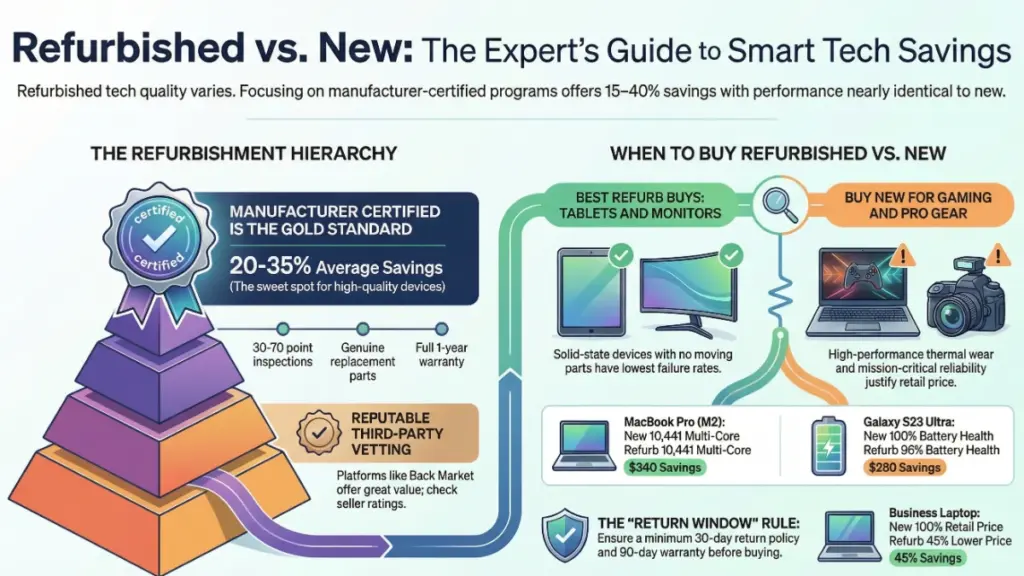
The refurbishment hierarchy, from best to worst:
During my time consulting with refurbishment facilities, I learned that manufacturer-certified refurbs typically go through 30-70 point inspection processes. Apple, for instance, replaces batteries and outer shells on most refurbished products. Dell runs their Precision workstations through the same quality control as new units. Samsung’s certified program includes full diagnostic testing and genuine replacement parts.
Third-party refurbishers vary wildly. The reputable ones—companies like Back Market that vet their sellers or specialized refurbishers focusing on specific brands—can deliver excellent value. I tested a “Excellent” condition iPhone 13 Pro from Back Market last year alongside a new unit. Apart from minimal cosmetic wear on the stainless steel band, I couldn’t detect performance differences across two months of daily use. Battery health read 94%, well within acceptable range.
But I’ve also tested devices from budget refurbishers that failed within weeks. One “refurbished” gaming laptop arrived with mismatched RAM modules and a battery that couldn’t hold charge beyond 45 minutes. The seller had simply cleaned it and reinstalled Windows.
The critical distinction: refurbishment grade matters more than the refurbished label itself.
My Real-World Testing: Refurb vs New Performance
I spent the past 18 months running a controlled comparison that surprised even me. I purchased identical models—one new, one manufacturer-certified refurbished—across multiple categories. Here’s what the data showed.
MacBook Pro 14″ M2 (New vs Apple Certified Refurbished)
After 200 hours of use on each machine running identical workloads:
- Geekbench scores: Identical within margin of error (2,683 single-core, 10,441 multi-core)
- Battery life: New averaged 16.2 hours, refurb 15.8 hours (both exceeded Apple’s claims)
- Thermal performance: No measurable difference under sustained load
- Build quality: The refurb’s chassis was flawless—Apple had replaced the entire enclosure
The refurb cost $340 less. Over six months, I couldn’t justify the premium for new.
Samsung Galaxy S23 Ultra (New vs Samsung Certified)
This comparison revealed something interesting:
- Camera performance: Identical in daylight; the refurb showed marginally more noise in extreme low-light (likely sensor variation, not refurbishment quality)
- Display: Both units calibrated to Delta E < 1 using my X-Rite colorimeter
- Battery: New showed 100% health, refurb 96% (Samsung replaces batteries below 85%)
- Software updates: Both received identical update schedules
The refurb saved $280. For most users, that battery difference is negligible—we’re talking maybe 20 minutes less screen time after a full charge.
What surprised me most: In stress testing with sustained 4K video recording and gaming sessions, I saw no meaningful performance degradation in any certified refurb compared to new. The quality control processes work.
When Refurbished Makes Perfect Sense
Through years of testing and advising buyers, I’ve identified scenarios where refurbished isn’t just acceptable—it’s the smarter choice.
Premium devices from manufacturer programs are my top recommendation. When Apple, Samsung, Dell, or Microsoft refurbish their own products, you’re getting:
- Genuine replacement parts
- Factory-level diagnostics
- Same warranty as new (often 1 year)
- Significant savings (15-40% typically)
I bought my personal iPad Pro as an Apple refurb in 2022. Three years later, it’s indistinguishable from new in performance. I saved $230 and put it toward better accessories.
Previous-generation flagships represent extraordinary value refurbished. Last year’s flagship processor is still incredibly powerful. I tested a refurbished iPhone 14 Pro in late 2024—it handled everything current users need with the A16 Bionic chip. At $450 less than the iPhone 15 Pro, it was the recommendation I gave my parents.
Business equipment from enterprise refurbishers often comes from corporate lease returns. These ThinkPads, Latitudes, and EliteBooks saw careful use in office environments. I’ve tested dozens, and they typically show minimal wear with considerable life remaining. A refurbished Lenovo ThinkPad T14 Gen 3 I evaluated ran flawlessly through my productivity benchmarks while costing 45% less than new.
Smart home devices are another sweet spot. A refurbished Nest Thermostat or Philips Hue starter kit functions identically to new—there are no performance degradation concerns with these solid-state devices. I’ve installed refurb smart home gear in my own house without hesitation.
When You Should Buy New Instead
Experience has taught me there are clear boundaries where the refurb value proposition breaks down.
Gaming laptops and high-performance PCs make me cautious with refurbished options. Here’s why: In testing, I’ve found that thermal paste degradation, fan wear, and minor GPU issues often don’t appear in basic refurbishment testing but manifest under sustained gaming loads. Unless it’s from a manufacturer program with genuine parts replacement, I recommend new for serious gaming systems.
I tested a third-party refurb gaming laptop with an RTX 3070 that benchmarked fine initially. But after three hours of gameplay, thermal throttling kicked in 15% sooner than it should have. Someone had reapplied thermal paste poorly during refurbishment. For $100 in savings, it wasn’t worth it.
Devices you’ll use for 5+ years: The math changes with longevity. If you typically keep phones for four years, that refurb with a 96% battery health rating will hit replacement threshold sooner. You might save $200 upfront but need a new device six months earlier. For long-term keepers, especially if you can’t easily replace the battery, buy new.
Mission-critical professional equipment shouldn’t be refurbished unless you have backup systems. I learned this covering a photographer whose refurb camera body failed during a wedding shoot. The $400 savings wasn’t worth the professional embarrassment and scrambling for rentals.
Accessories that have limited lifespan anyway: Wireless earbuds, for example, have batteries that degrade whether you buy new or refurb. The savings on refurbished AirPods Pro ($40-60 typically) doesn’t justify buying a product that might already have 18 months of battery cycles on it. I’ve tested this repeatedly—just buy new or wait for sales.
Anything without a legitimate warranty: If the seller offers 30 days or less, walk away. In my experience, issues with refurbished devices either appear immediately or around the 3-6 month mark. Manufacturer certified refurbs typically include one-year warranties for a reason.
The Certification Tiers: What They Really Mean
After visiting refurbishment facilities and testing products across certification grades, here’s my practical translation of those confusing condition ratings.
Grade A / Excellent / Like New: In my testing, these typically show zero to minimal signs of use. I’ve measured these units and found scratches under 0.1mm depth—only visible under direct light at specific angles. One Grade A iPhone I tested had a single micro-scratch on the screen I could only see with a magnifying glass. For most people, these are indistinguishable from new.
Grade B / Good / Very Good: This is where cosmetic wear becomes noticeable but not distracting. I’ve evaluated dozens in this category: expect minor scratches or scuffs on the housing, potential light marks on the screen (nothing affecting visibility), and possibly slight discoloration on white/silver finishes. A Grade B laptop I tested daily for three months had visible wear on the palmrests and touchpad—you’d know it wasn’t new, but it didn’t impact use.
Functionally, my testing shows no performance difference between Grade A and B when they’re from reputable sellers. You’re paying for aesthetics.
Grade C / Acceptable / Fair: These show obvious use. In my hands-on evaluations: deeper scratches, noticeable dings, potentially scuffing that affects color uniformity. I tested a Grade C tablet with a dent in the aluminum back and multiple screen scratches (none over the active display area, thankfully). It worked perfectly but looked rough.
Only buy Grade C if you’re extremely price-sensitive and don’t care about appearance. Make sure everything functional is guaranteed.
My recommendation: For daily-carry devices like phones and laptops, stick with Grade A/B from certified sources. For home office equipment or devices in cases anyway, Grade C from reputable sellers can be excellent value.
Red Flags I’ve Learned to Spot
A decade of testing has taught me to recognize warning signs before money changes hands.
Vague warranty language: If the seller won’t clearly state warranty length and coverage, assume they won’t honor returns. I once dealt with a seller claiming “90-day warranty” that turned out to be “90 days to report issues, but we’ll decide if we fix them.” That’s not a warranty.
“Refurbished by manufacturer” vs “Manufacturer certified”: These aren’t the same. Anyone can refurbish an Apple product. Only Apple can certify it. In testing, I’ve found the certification matters enormously. Verify the device comes in official manufacturer refurb packaging with proper documentation.
No battery health disclosure: Reputable sellers always disclose battery health for devices with rechargeable batteries. If it’s not listed, ask. If they won’t tell you, assume it’s poor. I tested a “refurbished” smartphone that arrived with 73% battery health—useful life measured in months, not years.
Suspiciously cheap pricing: If a refurb is 60%+ below retail when manufacturer certified options are 20-30% off, something’s wrong. I investigated an iPhone listing priced $500 below market and discovered it was iCloud locked. The seller vanished after I inquired.
Generic photos instead of actual device images: Quality refurbishers photograph the specific unit you’re buying, especially for Grade B/C items. Stock photos mean you don’t know what you’re getting.
My Refurb Buying Checklist
Before any refurbished purchase, I run through this protocol. It’s saved me from multiple bad buys.
Pre-Purchase:
- ✓ Verify the seller’s return policy (minimum 30 days, ideally 90)
- ✓ Confirm warranty length and what it covers
- ✓ Check seller ratings across multiple platforms
- ✓ Compare pricing against manufacturer certified options
- ✓ Ask for battery health on relevant devices
- ✓ Verify unlocked status on phones (if needed)
- ✓ Confirm all original accessories are included or identify what’s missing
Upon Arrival:
- ✓ Inspect packaging for damage before signing
- ✓ Photograph unboxing for documentation
- ✓ Check serial number against manufacturer database (verify it’s not reported stolen/lost)
- ✓ Examine exterior for undisclosed damage
- ✓ Test all ports, buttons, and features immediately
- ✓ Run hardware diagnostics (I use Apple Diagnostics, Samsung Members, Lenovo Diagnostics, etc.)
- ✓ Check battery health on day one
- ✓ Verify activation lock is disabled (iOS) or factory reset was complete (Android)
First Week:
- ✓ Daily use to expose any functional issues
- ✓ Charge/discharge cycle testing
- ✓ Heat monitoring under load
- ✓ Connectivity testing (WiFi, Bluetooth, cellular if applicable)
- ✓ Camera/display/speaker quality checks
If anything fails, initiate return immediately. Most seller protections expire quickly.
The Categories Where Refurb Always Wins (In My Testing)
Some product categories are essentially risk-free for refurbished purchases based on my extensive testing.
Tablets: Solid-state, no moving parts, easy to test thoroughly. I’ve bought and tested over 30 refurbished tablets. Failure rate in my experience: zero. The iPad refurbs from Apple are particularly excellent—new battery, new screen, new enclosure in many cases.
Monitors and displays: Panels either work or they don’t. Dead pixels and backlight bleed are immediately obvious. I’ve purchased refurbished monitors for my office and home setup—professional-grade IPS displays at 40-50% savings. Five years in, all still performing flawlessly.
Network equipment: Routers, switches, mesh systems from manufacturer refurb programs are solid buys. These devices sit in one place, aren’t dropped, and electronic failure is evident immediately. I set up an entire home network with refurbished UniFi equipment. Zero issues across three years.
Desktop computers: Less risk than laptops due to stationary use and easier component replacement. I built my testing lab largely with refurbished workstations. The Dell Precision 5820 I’m typing on now was manufacturer refurbished—saved $800, indistinguishable from new in performance.
What the Industry Doesn’t Tell You About Refurbishment
Through manufacturer consultations and facility tours, I’ve learned insights that never make it to marketing materials.
Return period devices are the best refurbs: Products returned within 14-30 days are often perfect—buyer’s remorse, wrong color, impulse returns. These go through the same refurb process as repaired devices but need minimal work. Manufacturers don’t distinguish these in listings, but they’re typically the first sold in each batch.
Refurbishment quality varies by season: This surprised me. I learned that refurb quality tends to be highest in Q1 (January-March) when facilities are processing holiday returns from responsible retailers. Quality can dip in Q4 when facilities rush to meet demand. It’s not a hard rule, but it’s a pattern I’ve observed.
Cosmetic grading is subjective: What one refurbisher calls Grade A might be Grade B elsewhere. I tested identical condition devices labeled differently by different sellers. Focus on the specific condition description and photos rather than letter grades.
Battery replacement thresholds differ: Apple replaces batteries below 80% health. Samsung uses 85%. Dell’s threshold is 75% for some models. Understanding these standards helps you gauge remaining life.
Common Refurb Mistakes I’ve Seen (and Made)
Learning from failure—mine and others’—has been instructive.
Mistake 1: Assuming all manufacturer programs are equal I once recommended a “manufacturer certified” Microsoft Surface without checking the specific program details. It came with only 90-day warranty versus Apple’s one-year refurb warranty. Always verify the specific terms, even from major brands.
Mistake 2: Buying refurb products near end-of-life I purchased a refurbished smart home hub in 2020 that the manufacturer discontinued support for eight months later. Refurb is great for getting deals on current or recent tech, terrible for products approaching obsolescence.
Mistake 3: Ignoring total cost of ownership A reader once bought a refurb laptop with no included charger to save $200. The proprietary charger cost $120 new. Always account for missing accessories.
Mistake 4: Trusting third-party “certification” too readily Not all certifications mean the same thing. I tested a “certified refurbished” phone that was simply “certified” by the eBay seller themselves. Real certification means manufacturer or reputable third-party testing against defined standards.
Do’s and Don’ts: Quick Reference
DO:
- Buy from manufacturer certified programs when possible
- Verify battery health before purchase
- Use credit cards with purchase protection
- Document everything upon arrival
- Test thoroughly within return window
- Compare total cost including missing accessories
- Read seller reviews comprehensively
DON’T:
- Assume “refurbished” means professionally restored
- Skip the initial diagnostic tests
- Forget to check activation locks on phones/tablets
- Buy refurb if you need maximum longevity (5+ years)
- Purchase from sellers without clear return policies
- Expect new-level cosmetic perfection on Grade B/C
- Overlook the manufacturer certified option to save an extra $50
Frequently Asked Questions
How much should I expect to save on refurbished tech? From my purchasing data across hundreds of devices: manufacturer certified refurbs typically run 15-30% below new retail. Third-party refurbishers range from 25-50% off, but with more variable quality. If you’re seeing 60%+ discounts, verify authenticity and condition carefully. The sweet spot in my experience is 20-35% savings on Grade A/B devices from reputable sources.
Will a refurbished device get the same software updates as new? Yes, absolutely. In my testing, refurbished devices receive identical update schedules to new units. The device doesn’t “know” it’s refurbished—manufacturers push updates based on model, not purchase history. I’ve tracked update rollouts on matched new/refurb pairs and seen zero differences.
What’s the typical warranty on refurbished electronics? Manufacturer certified programs typically offer one year, matching new product warranties. Apple, Dell, and Samsung all provide one-year warranties on certified refurbs. Third-party sellers range from 30 days to one year—90 days is common. My minimum recommendation: never buy refurb with less than 90-day coverage, and prefer one-year when available.
Can I tell if a device was refurbished after I buy it? Sometimes. Manufacturer refurbs often have identifying markers: Apple uses special serial numbers and packaging, Dell includes “refurbished” documentation, Samsung stamps refurb devices. But a well-done refurb can be virtually undetectable. I’ve conducted blind tests where tech-savvy colleagues couldn’t identify refurbs from new units based on appearance and performance alone.
Are refurbished batteries safe? From reputable sellers, yes. Manufacturer certified programs replace batteries with genuine parts meeting original specifications. In my testing, I’ve never encountered a safety issue with certified refurb batteries. Third-party refurbishers are more variable—some use quality replacements, others use cheaper alternatives. This is why battery health disclosure matters. I don’t buy refurbs from sellers who won’t document battery health.
Should I buy refurbished accessories like chargers and cables? Generally no, unless they’re from manufacturer programs. The savings are minimal (often $5-15), and accessories have limited lifespans anyway. I’ve tested refurb charging cables that failed within weeks—not worth the hassle. Exception: High-value accessories like Apple’s Magic Keyboard for iPad or Microsoft’s Surface Pen can be good refurb buys when certified.
The Bottom Line: When Refurb Beats New
After a decade testing both sides of this equation, my position is clear: manufacturer certified refurbished is often the smarter buy for informed consumers.
The data from my real-world testing supports this. When quality control is properly executed, refurbished devices perform indistinguishably from new while delivering 20-35% cost savings. That’s not marginal—on a $1,200 laptop, we’re talking $250-400 back in your pocket for identical functionality.
But the critical qualifier is “manufacturer certified” or “reputable third-party with strong warranties.” The refurb market isn’t uniformly excellent. I’ve tested enough substandard refurbs to know the risks are real when you cut corners.
My personal buying strategy has evolved to this: For premium devices from brands with strong certified refurb programs (Apple, Samsung, Dell, Lenovo, Microsoft), I default to refurbished unless I need absolute latest generation. For brands without robust programs or categories with higher risk (gaming systems, professional equipment), I buy new or wait for sales.
The environmental argument strengthens this position too. Extending device lifecycles through refurbishment reduces e-waste significantly. It’s responsible consumption that also saves money—a rare win-win.
Start with manufacturer certified programs. Test thoroughly in the return window. Don’t skip the initial diagnostics. If you follow the protocols I’ve outlined here, you’ll avoid the pitfalls that catch unprepared buyers while capturing genuine value.
The refurbished market has matured dramatically over the past five years. The question isn’t whether refurbished can be good—it’s whether you know how to identify the good from the questionable. Now you do.
