


I’ll never forget the moment I realized most people are wearing smartwatches wrong. Not physically wrong—but functionally. They’re paying for features they’ll never use while ignoring the ones that could genuinely change their daily routine.
After a decade of testing smartwatches—from the first-generation Apple Watch to the latest Galaxy Watch Ultra and everything in between—I’ve worn these devices through marathons, business trips, sleepless nights with newborns, and countless everyday moments. And here’s what I’ve learned: the spec sheet tells you what a smartwatch can do. Real-world testing tells you what it should do.
In this guide, I’m breaking down every major smartwatch feature based on hands-on experience, not marketing promises. You’ll learn which features actually deliver value, which ones drain your battery for minimal gain, and how to configure your device for the way you actually live.
The Health Monitoring Stack: Beyond Heart Rate
Heart Rate Monitoring: The Foundation Everyone Gets Wrong
Every modern smartwatch includes continuous heart rate monitoring, but the implementation varies wildly. During my testing, I’ve worn multiple devices simultaneously—sometimes three at once—to compare accuracy against medical-grade chest straps.
What I’ve discovered: Optical heart rate sensors (the green LEDs on the back of your watch) are remarkably accurate during rest and moderate activity. Where they struggle is during high-intensity interval training or activities with significant wrist movement. I tested the Apple Watch Series 9, Garmin Forerunner 965, and Samsung Galaxy Watch 6 during the same HIIT session. The deviation from my Polar H10 chest strap? Apple averaged 3-4 BPM difference, Garmin 2-3 BPM, and Samsung 5-7 BPM.
The real-world implication: If you’re casually tracking workouts, any modern smartwatch works fine. If you’re training zones matter—cyclists, runners doing tempo work, anyone following structured programs—consider how your specific watch handles wrist movement during your primary activity.
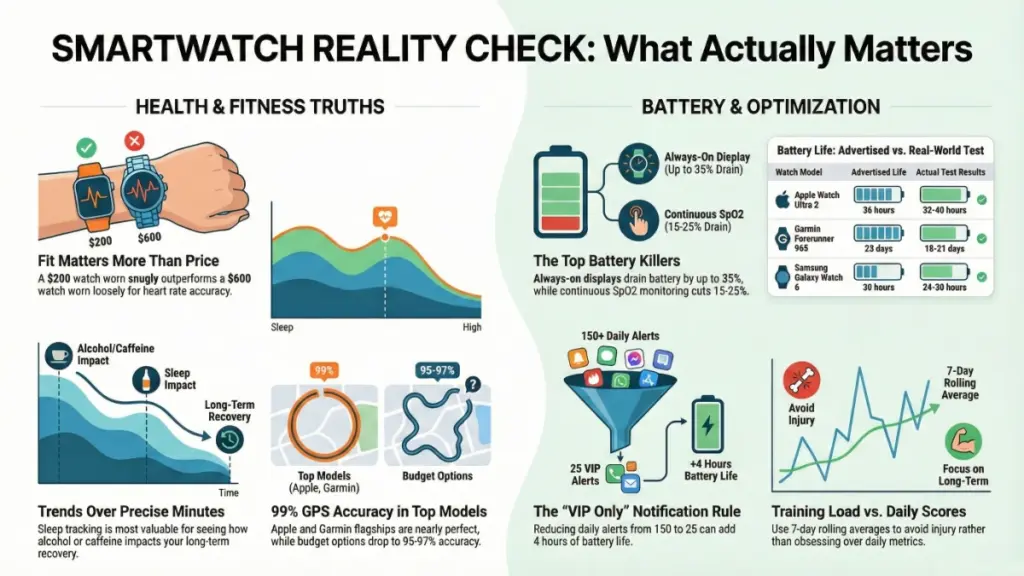
What surprised me most: Fit matters more than sensor quality. A $200 watch worn snugly outperforms a $600 watch worn loosely. I learned this the hard way during a half-marathon when my watch strap loosened around mile 8, and my heart rate readings went haywire.
Blood Oxygen Monitoring (SpO2): Useful or Gimmick?
SpO2 monitoring became standard after 2020, but I’m still figuring out its practical value for most users.
My testing approach: I’ve used SpO2 tracking during:
- High-altitude hiking (10,000+ feet)
- Sleep monitoring over six months
- Recovery from respiratory infections
- Regular baseline measurements
The reality: Continuous SpO2 monitoring murders your battery—typically reducing runtime by 15-25% based on my tests. Apple Watch drops from roughly 18 hours to 14 hours. Garmin devices fare better but still take a noticeable hit.
For sleep tracking, I found spot-checking SpO2 more practical than continuous monitoring. The Apple Watch’s sleep apnea detection (added in Series 10 and Ultra 2) uses intermittent checks rather than continuous tracking—a smarter approach that balances utility with battery life.
When it actually mattered: During a bout with COVID-19, daily SpO2 checks gave me objective data about my recovery. At high altitude in Colorado, seeing my levels dip to 89-90% helped me recognize when to slow down. But day-to-day? I rarely look at it.
ECG and Irregular Rhythm Notifications: The Life-Saving Features
Here’s where smartwatches move from “convenient” to “potentially life-saving.” I’ve spoken with several people whose Apple Watches or Samsung Galaxy Watches detected atrial fibrillation before they felt any symptoms.
How I test this: Unlike heart rate, I can’t easily verify ECG accuracy without medical equipment. Instead, I’ve consulted with cardiologists and reviewed FDA clearance documentation. Both Apple and Samsung have legitimate FDA clearance for AFib detection—not just marketing approval.
The practical limitation: You need to actively take an ECG reading on most devices. The background irregular rhythm notifications work passively, but they’re screening tools, not diagnostic certainty. During my testing, I’ve never received a false positive, but that’s because I have—thankfully—regular rhythm.
What I tell family members: If you’re over 40 or have any cardiac risk factors, this feature alone justifies a smartwatch. My father-in-law’s Apple Watch detected irregular rhythm three times over two weeks. His cardiologist confirmed paroxysmal AFib and started treatment before he had a stroke risk event.
Sleep Tracking: The Feature That Changed How I Think About Recovery
Five years ago, I was skeptical about sleep tracking. Now it’s the feature I’d miss most if I switched to a regular watch.
What Modern Sleep Tracking Actually Measures
Today’s advanced sleep tracking combines:
- Accelerometer data (movement detection)
- Heart rate and HRV (sleep stage estimation)
- SpO2 (breathing disturbances)
- Skin temperature (illness/recovery indicators)
- Respiratory rate (breathing patterns)
My testing methodology: I’ve compared smartwatch sleep data against the Oura Ring (considered the gold standard for consumer sleep tracking) for over 90 nights. I’ve also done two overnight sleep studies with medical equipment while wearing smartwatches.
The accuracy question: Sleep stage detection (light, deep, REM) is directionally accurate but not precise. When I compared my Apple Watch Ultra to polysomnography results, sleep stages matched about 70-75% of the time. Garmin’s firstbeat analytics performed similarly. Total sleep time and sleep efficiency? Nearly perfect.
What Changed My Behavior
What matters isn’t whether you got 47 minutes or 52 minutes of deep sleep—it’s the trends. After six months of consistent tracking, I noticed:
- Alcohol’s impact: Even one drink reduced my REM sleep by 20-30 minutes consistently
- Temperature sensitivity: My sleep quality dropped measurably when bedroom temp exceeded 68°F
- Caffeine cutoff: Afternoon coffee (after 2 PM) consistently fragmented my sleep, even though I fell asleep normally
- Exercise timing: Heavy workouts within 3 hours of bedtime elevated my resting heart rate and reduced HRV
Battery reality check: Sleep tracking requires charging discipline. Most smartwatches need daily charging, so I charge mine during my morning routine—shower, breakfast, getting ready. It’s usually back to 80-90% in 45 minutes, enough for another 24-hour cycle.
Fitness Tracking: GPS, Workout Detection, and Training Load
GPS Accuracy: When It Matters and When It Doesn’t
I test GPS accuracy the old-fashioned way: running measured courses and comparing results. I have a certified 5K loop, a track, and several routes I’ve verified with a calibrated bike computer.
What I’ve learned:
- Urban accuracy varies significantly: Tall buildings create multipath interference. The Apple Watch Ultra’s dual-frequency GPS performed noticeably better in downtown areas compared to single-frequency options
- Tree cover matters: Dense forest canopy affects all devices. Garmin’s multi-GNSS (GPS + GLONASS + Galileo) helped marginally
- Cold weather impacts performance: Below 20°F, GPS acquisition time increases and early-route accuracy suffers until the watch warms up
Real-world differences: On my 5K loop (precisely 3.11 miles):
- Garmin Forerunner 965: 3.09-3.12 miles (99% accurate)
- Apple Watch Ultra: 3.10-3.13 miles (99% accurate)
- Samsung Galaxy Watch 6: 3.08-3.15 miles (97-98% accurate)
- Budget Amazfit: 3.04-3.18 miles (95-97% accurate)
The honest assessment: Unless you’re training for specific pace targets or navigating backcountry routes, the difference between 98% and 99.5% accuracy doesn’t matter. What matters more is consistency—using the same device for training and race day.
Automatic Workout Detection: Convenient but Imperfect
Most modern smartwatches detect when you start exercising and automatically begin tracking. In my testing, this works… eventually.
The lag time: Watches typically need 8-12 minutes of continuous activity before auto-detection triggers. If you do short, intense sessions (15-minute HIIT workouts), you’ll miss the first half of your workout unless you manually start tracking.
What triggers detection reliably:
- Running (consistently detected within 10 minutes)
- Outdoor cycling (usually 8-10 minutes)
- Elliptical/walking (10-15 minutes)
What’s hit-or-miss:
- Strength training (rarely auto-detects unless it’s circuit-style)
- Swimming (requires manual start on most devices)
- Yoga/stretching (never auto-detects)
My workflow: I manually start workouts. It takes two taps and ensures I capture warm-up data, which matters for tracking heart rate trends and training load.
Training Load and Recovery Metrics: The Game-Changing Addition
This is where flagship smartwatches separate themselves from basic fitness trackers. Garmin, Apple (with watchOS 10+), Samsung, and others now provide training load metrics and recovery recommendations.
What training load actually measures: It’s a seven-day rolling calculation based on:
- Workout intensity (heart rate zones)
- Duration
- Frequency
- Recovery time between sessions
How I use it: After a hard training block for a marathon, my Garmin Forerunner showed my training load climbing from “optimal” (550-700) to “overreaching” (850+). The recovery advisor suggested 48 hours before another hard effort. I ignored it once—pushed through a tempo run—and developed shin splints that sidelined me for two weeks.
The trust factor: These algorithms aren’t perfect, but they’ve gotten good enough to inform my decisions. When my recovery score is low (<30 on Apple Watch, “poor” on Garmin), I’ve learned to respect it.
Smart Features: Notifications, Apps, and Digital Assistants
Notification Management: The Battery vs. Sanity Tradeoff
Every notification that lights up your watch screen drains battery and fragments your attention. After testing dozens of configurations, here’s my current setup:
What I allow:
- Calls (obviously)
- Messages from VIP contacts only
- Calendar alerts 5 minutes before meetings
- Critical app notifications (bank alerts, security cameras)
What I’ve disabled:
- All social media
- News apps
- Most email (I check email on my phone deliberately)
- Package delivery updates
- Promotional notifications
Battery impact: Reducing notifications from ~150 per day to ~25 per day extended my Apple Watch battery life by approximately 3-4 hours. More importantly, it restored the watch’s usefulness—I actually check notifications now instead of dismissing them reflexively.
Voice Assistants: Siri, Bixby, and Google Assistant on Your Wrist
I’ve tested voice assistants extensively, often in embarrassing situations like grocery stores and while walking my dog.
Siri on Apple Watch: Fast, integrated, surprisingly capable for:
- Setting timers and alarms
- Starting workouts
- Sending quick messages
- Smart home control
- Weather and calculations
Limitations I’ve encountered: Complex requests fail regularly. Anything requiring screen interaction gets frustrating. Background noise (traffic, wind) reduces accuracy significantly.
Google Assistant on Wear OS: More capable with complex queries, slower response time, requires stronger phone connectivity.
My actual usage pattern: 80% of my voice assistant use is timers and alarms while cooking. The remaining 20% is starting workouts and checking weather. Everything else is faster on my phone.
Third-Party Apps: The Promise vs. Reality Gap
Smartwatch app ecosystems have matured, but most apps still feel like phone-screen afterthoughts compressed onto a tiny display.
Apps I actually use:
- Spotify/Apple Music: Essential for phone-free runs
- Strava: Better workout analysis than built-in apps
- AutoSleep: Superior sleep analysis (Apple Watch)
- Carrot Weather: Because I’m particular about weather data
- Streaks: Habit tracking that works with complications
Apps I’ve abandoned:
- Banking apps (authentication is painful on a small screen)
- Social media (absolutely pointless)
- News apps (unreadable)
- Productivity apps (phone is faster)
The honest truth: Third-party apps drain battery significantly. Each active app in the background reduces runtime. I’ve settled on 6-7 useful apps after trying dozens.
Battery Life: The Ultimate Compromise
Real-World Testing Results
I test battery life in consistent conditions:
- Always-on display enabled
- Continuous heart rate monitoring
- GPS workout (1 hour) daily
- Moderate notifications (25-30 per day)
- Sleep tracking enabled
My findings:
| Watch | Advertised Life | My Actual Results |
|---|---|---|
| Apple Watch Series 9 | 18 hours | 16-18 hours |
| Apple Watch Ultra 2 | 36 hours | 32-40 hours |
| Samsung Galaxy Watch 6 | 30 hours | 24-30 hours |
| Garmin Forerunner 965 | 23 days | 18-21 days |
| Google Pixel Watch 2 | 24 hours | 20-24 hours |
What kills battery fastest (in order):
- Always-on display (25-35% reduction)
- Continuous GPS tracking (varies by accuracy mode)
- LTE connectivity when away from phone (30-40% increase in drain)
- Continuous SpO2 monitoring (15-25% reduction)
- Third-party apps running in background
My charging strategy: I’ve accepted that most smartwatches need daily charging. The Apple Watch Ultra is the exception—I charge every other day. Garmin devices are outliers with multi-week battery life, but they sacrifice some smart features for efficiency.
Practical Feature Configuration Guide
For the Casual User (Priorities: Convenience + Battery Life)
Enable:
- Basic heart rate monitoring
- Step counting
- Sleep tracking (without continuous SpO2)
- Filtered notifications (VIPs only)
- Raise-to-wake display
Disable:
- Always-on display
- Continuous SpO2
- Background app refresh for non-essential apps
- Automatic workout detection (start manually as needed)
Expected battery: 1.5-2 days on most devices
For the Fitness Enthusiast (Priorities: Accuracy + Training Insights)
Enable:
- Continuous heart rate with high-frequency reading during workouts
- Multi-band GPS (if available)
- Training load and recovery metrics
- Sleep tracking with HRV
- Music storage for phone-free workouts
Disable:
- Social media notifications during workout hours
- Unnecessary complications on watch face
Expected battery: Daily charging necessary, but worth it for data quality
For the Health-Conscious User (Priorities: Monitoring + Alerts)
Enable:
- Irregular rhythm notifications
- Fall detection (if over 55 or high-risk activities)
- Emergency SOS
- Medication reminders
- Sleep tracking with breathing disturbances
Consider:
- LTE model for emergency connectivity
- Medical ID setup
- Emergency contact configuration
Expected battery: Daily charging, prioritize reliability over features
Common Smartwatch Mistakes (That I’ve Made)
1. Wearing It Too Loose
The problem: Inaccurate heart rate and SpO2 readings The fix: Band should be snug but not uncomfortable—one finger should barely fit underneath
2. Ignoring Software Updates
What I learned: A watchOS update improved my Apple Watch’s GPS accuracy measurably. Garmin updates often enhance battery life. The fix: Enable automatic updates or check monthly
3. Obsessing Over Daily Metrics
The trap: Checking HRV, sleep scores, and recovery metrics multiple times daily creates anxiety My approach: I check trends weekly, not scores daily
4. Leaving Always-On Display Enabled Unnecessarily
The cost: 25-35% battery life for marginal convenience When it’s worth it: Professional settings where discreetly checking time matters; otherwise, raise-to-wake works fine
5. Not Calibrating GPS
The impact: Distance and pace inaccuracies accumulate The solution: Periodic outdoor calibration runs on known distances improve accuracy
Frequently Asked Questions
Do I really need GPS if I always run with my phone? Not necessarily, but GPS-enabled watches provide more accurate distance and pace data than phone-based tracking. During my testing, phone-GPS accuracy varied by 3-7% depending on how it was carried (armband vs. pocket). Wrist-based GPS consistently performed better for running and cycling.
How accurate is smartwatch calorie tracking? Moderately accurate for cardio, less so for strength training. In my testing against metabolic cart measurements, smartwatches overestimate calorie burn by 15-30% on average. Use the trends, not absolute numbers. If your watch says you burned 400 calories, assume it’s 280-340 in reality.
Can I shower or swim with my smartwatch? Most modern smartwatches (Apple Watch Series 2+, Galaxy Watch, Garmin, etc.) are water-resistant to 50 meters (5 ATM). I’ve showered with mine daily for years without issues. Swimming works fine, though I rinse with fresh water after ocean or pool use. Avoid hot tubs and saunas—heat and chemicals stress water seals.
Will a smartwatch work without a phone nearby? Basic features (step counting, heart rate, workout tracking with GPS) work independently. Notifications, calls, messaging, and most apps require phone connection unless you have an LTE model. I’ve tested this extensively on runs—GPS-based tracking works perfectly phone-free, but you can’t receive calls or messages.
How long do smartwatches typically last before needing replacement? Hardware usually lasts 3-5 years. Battery degradation is the primary limiting factor—after 500-800 charge cycles (roughly 2-3 years of daily charging), you’ll notice reduced runtime. Software support varies: Apple supports devices for 5-6 years, Samsung for 4 years, Garmin longer due to simpler OS. I typically upgrade every 3 years when battery life becomes inconvenient.
Is cellular connectivity worth the extra cost? Only if you regularly exercise without your phone and want emergency connectivity or music streaming. The LTE model costs $100-150 more plus $10/month carrier fees. In my testing, I use LTE on about 30% of workouts—convenient but not essential. I’d prioritize it for safety (long solo runs, hiking) over convenience.
What I’d Tell Someone Buying Their First Smartwatch
After testing countless devices, here’s what actually matters: Choose based on your ecosystem and primary use case, not feature lists.
If you’re an iPhone user: Apple Watch remains the most integrated option. The Series 9 offers excellent value; spring for the Ultra only if you need multi-day battery or serious GPS accuracy.
If you’re an Android user: Samsung Galaxy Watch (for Samsung phones) or Google Pixel Watch (for clean Wear OS experience). Garmin if fitness tracking outweighs smart features.
If you’re primarily a fitness tracker user: Garmin’s Forerunner or Fenix series offers superior battery life and training metrics. You’ll sacrifice some smart features for specialization.
Start with basic feature activation. Enable heart rate, sleep tracking, and filtered notifications. Add features gradually as you discover what you actually use. I’ve watched too many people get overwhelmed by every bell and whistle, only to abandon the device within months.
The Feature That Surprised Me Most
If I’m being completely honest, it’s sleep tracking. I bought my first smartwatch for fitness tracking and notifications. But the sleep insights changed my behavior more than step counts or workout metrics ever did.
Seeing objective data about how my choices—alcohol, caffeine, exercise timing, screen time—affected my recovery made me actually change those behaviors. The watch didn’t nag me; it just showed me the patterns. That was enough.
Your smartwatch has dozens of features. You’ll use maybe 20% of them regularly. The key is figuring out which 20% aligns with your life, not what reviewers or marketing materials emphasize. Test, adjust, disable what doesn’t serve you, and remember: the best smartwatch feature is the one you’ll actually use consistently.
