

Wear OS 7 brings meaningful upgrades with faster performance, better battery life, live widgets, improved cross-device controls, and smarter daily interactions. After testing on both the Pixel Watch and Galaxy Watch, the update delivers real usability improvements, though AI features and manufacturer-specific updates are still rolling out. Overall, it’s a worthwhile upgrade for most Android smartwatch users.
I almost missed the update entirely. My Pixel Watch buzzed one morning in June, and I swiped it away without reading it. Three days later, a widget I’d never seen before showed up on my watch face. That’s usually how it goes with wearable software. The changes creep in sideways instead of announcing themselves.
I’ve spent the past several weeks running Wear OS 7 across a Pixel Watch and a Galaxy Watch. I went back and forth between them, the way I do with every platform update I cover. So, is this the release that finally makes Wear OS feel indispensable? Mostly, yes. But there are trade-offs worth knowing before you upgrade. There are also a few claims from Google worth checking against real use. That’s what this article walks through.
Why Wear OS Matters Right Now
Smartwatches stopped being a novelty years ago. For most Android owners, though, the watch is still treated as a notification mirror rather than a genuine second screen. Wear OS 7 is Google’s attempt to change that. It arrives at an interesting moment, too. Android XR glasses, Live Updates, and on-device AI assistants are all converging on the wrist as a control surface right now.
By the end of this piece, you’ll know exactly what’s new. You’ll also know what it feels like day to day, which watches actually benefit, and whether it’s worth updating now or waiting for your manufacturer’s skinned version to catch up.
Real-World Experience: Two Weeks, Two Watches, One Charger Cable
My Testing Setup
My testing setup was straightforward but deliberate. I wore the Pixel Watch as my daily driver. I swapped to a Galaxy Watch running equivalent firmware for a few days at a time. That way, I could compare the same tasks on both watches. Texting, workout tracking, and media control all got the side-by-side treatment. Consequently, most of what follows reflects direct comparison rather than a single device in isolation.
First Impressions After the Update
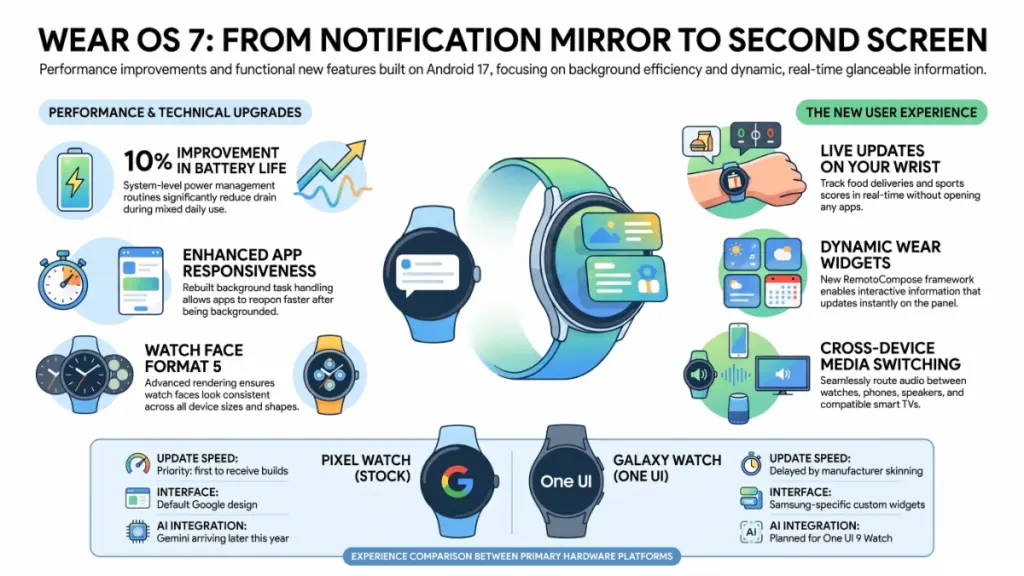
The first thing I noticed wasn’t a headline feature. It was how the watch handled background tasks. Apps reopened faster after sitting idle for a day. The always-on display also felt slightly less taxing on the battery than before. Google’s own figures put the gain at up to 10 percent improvement in battery life for devices moving from Wear OS 6 to Wear OS 7. After two weeks of mixed use, my numbers landed in that same neighborhood. Workouts, GPS runs, and sleep tracking all factored into that estimate. The gain felt real, though it fell short of the dramatic leap some headlines implied.
Widgets and Live Updates in Daily Use
What surprised me was the widget system. Wear OS 7 introduces Wear Widgets, built on Jetpack Glance and a new rendering framework called RemoteCompose. In practice, swiping to your widget panel now shows information that updates in place. Weather, calendar events, and playback controls no longer feel frozen the moment you glance at them.
Live Updates was the feature I used the most, almost by accident. During testing, I ordered food through a delivery app. I watched the tracker update directly on my watch face without opening anything. The same happened with a basketball game running in the background one evening. These were small moments. But they added up to a watch that finally felt aware of what was happening on my phone, instead of just echoing it a few seconds later.
Where It Still Falls Short
Not everything impressed me equally. Raise-to-talk lets you speak to the assistant just by lifting your wrist. Google’s own release notes call it “more robust and accurate,” thanks to an improved gesture model. In my testing, it did trigger more reliably than the previous version. It still occasionally activated during a bike ride, though, whenever I glanced at the time. It’s a small annoyance. But it’s worth knowing if you tend to check your watch mid-workout.
Technical Explanation: What’s Actually Under the Hood
The Foundation: Android 17
Here’s where things get interesting from an engineering standpoint. Wear OS 7 runs on Android 17 at its core. That matters less for the version number and more for what it enables underneath. Google rebuilt several system-level power management routines. This is the real source of the battery gains, rather than any single flashy feature.
Watch Face Format 5
The Watch Face Format also jumped to version 5. This affects you even if you never touch a developer tool. WFF5 gives designers finer control over text alignment, auto-sizing, and blend modes on watch faces. In plain terms, watch faces from the Play Store should render more consistently now. They should also look less stretched or misaligned across different watch sizes compared to previous generations.
From Tiles to Widgets
Wear Widgets deserve a bit more unpacking, since the underlying shift is bigger than it sounds. Previously, Wear OS used a system called Tiles, built on a separate layout library from your phone’s UI. Widgets now use the same Compose-based approach as modern Android apps. Developers can share more code between phone and watch as a result. For you, the practical result is fewer half-finished watch apps that feel like an afterthought next to their phone counterparts.
Cross-Device Control and Android XR
Cross-device control is the other structural change worth understanding. Wear OS 7 lets your watch manage playback and audio routing across compatible speakers, earbuds, and TVs through a Media Output Switcher. It’s also designed with an eye toward Android XR smart glasses. Watches running this version can already display images captured by XR-powered glasses from early hardware partners. That’s a signal Google is building toward a unified wearable ecosystem, not just polishing the watch in isolation.
Practical Impact Analysis: What This Means for Daily Use
Numbers and architecture are one thing. What actually changes when you’re standing at a bus stop glancing at your wrist? Quite a bit, it turns out.
Battery life: Expect a modest but real improvement, roughly in line with Google’s stated figures. That assumes you’re comparing against Wear OS 6 on the same hardware. Older watches from several generations back won’t see gains this large. The power optimizations target the current chip generation most closely.
App responsiveness: Widgets and Live Updates reduce how often you need to unlock your phone just to check something. In my case, phone pickups dropped noticeably during a workday. Order tracking, sports scores, and calendar changes all surfaced directly on the wrist instead.
Voice assistant reliability: Raise-to-talk is meaningfully better, though not flawless. Test it yourself before assuming it will behave perfectly in your specific routine, especially if you rely on voice commands during exercise.
Ecosystem depth, depending on your watch brand:
| Factor | Pixel Watch (stock Wear OS 7) | Galaxy Watch (via One UI Watch) |
|---|---|---|
| Update timing | First to receive new Wear OS builds | Delayed while Samsung layers One UI Watch on top |
| Interface | Closer to Google’s default design | Samsung’s Now Bar and custom widgets integrated |
| AI features | Gemini Intelligence planned later in the year | Expected to follow once One UI 9 Watch ships |
That timing gap matters more than people expect. Galaxy Watch owners are currently waiting on One UI 9 Watch. Samsung has been testing it internally. It’s expected to arrive alongside its next flagship watches, not as an immediate update to existing devices.
Actionable Recommendations
For Beginners
Start with whichever watch matches your phone brand, rather than chasing the newest software number. Pixel Watches get Wear OS updates first. Still, a Galaxy Watch with a slightly older build covers the fundamentals well: notifications, fitness tracking, and basic voice control.
- Do enable Live Updates for at least one app you check often, like food delivery or sports scores. That way, you can judge the feature on something relevant to you.
- Don’t assume every third-party app supports widgets yet. Adoption is still catching up to the new framework.
For Intermediate Users
Check your specific model’s update eligibility before assuming Wear OS 7 is coming. Older Pixel Watches, including the original model, have already reached end of life and won’t receive it.
- Do a battery baseline test for a few days before updating. Compare it after the update, so you can judge the real gain on your own device rather than relying on published averages.
- Don’t skip clearing out unused watch faces and tiles after updating. Leftover Tiles-based layouts can behave inconsistently alongside new Widgets.
For Advanced Users
The shift to Jetpack Glance and RemoteCompose is worth exploring directly if you build or sideload watch apps. The performance ceiling is noticeably higher than the old Tiles system.
- Do test cross-device media switching with your actual earbuds or speakers. Real-world Bluetooth handoff can behave differently than the demo suggests.
- Don’t expect Gemini Intelligence features immediately. Google says those are coming later in the year on select devices, not with this initial rollout.
A Common Mistake to Avoid
Don’t assume a slow notification or a missed Live Update means your watch is broken. In my testing, background sync occasionally lagged behind by a minute or two. This happened mostly on Bluetooth-only models without a Wi-Fi connection nearby. Toggling airplane mode on and off resolved it every time.
Industry Context
Wear OS’s biggest competitor is still Apple’s watchOS, which remains tightly closed to its own ecosystem. Google’s approach spreads Wear OS across multiple manufacturers instead. That’s both its strength and its long-standing weakness. Samsung, Google, and a handful of smaller brands all ship the same underlying platform with different skins layered on top. This is why update timing varies so much between a Pixel Watch and a Galaxy Watch, even on related software.
The move toward Android XR integration also puts Wear OS in conversation with the broader smart glasses category. Google and Samsung have both signaled interest here through early partnerships with eyewear brands. Whether that becomes meaningful for average buyers, or stays a developer-facing feature for now, remains to be seen.
FAQ
Does Wear OS 7 work on my current watch? It depends on your model. Google has confirmed rollout to recent Pixel Watch models. Older devices that have already reached end of life won’t receive it. Samsung and other manufacturers layer their own timelines on top, so check your specific watch’s support page rather than assuming.
Will updating to Wear OS 7 hurt my battery life? Based on my testing, the opposite is more likely. Google’s stated improvement of up to 10 percent held up reasonably well in daily use. Your mileage will vary depending on which apps and always-on features you have enabled.
What is Live Updates, exactly? It’s a system that lets compatible apps push real-time status straight to your watch face or notification shade. A delivery tracker or a live score can update without you opening the app manually.
Is Wear Widgets the same as the old Tiles feature? No. Widgets replace Tiles with a Compose-based framework. It allows richer, more consistent visuals and faster development for third-party apps. Existing Tiles still work during a transition period, but new apps increasingly use Widgets instead.
When will Gemini Intelligence come to my watch? Google says it’s arriving on select devices later in the year, separate from the initial Wear OS 7 rollout. There’s no confirmed date for broader availability as of this writing.
Should Galaxy Watch owners update now or wait? If you’re waiting specifically for Samsung’s version, patience is the better call. One UI 9 Watch is currently in internal testing. It’s expected alongside Samsung’s next watch launch, so the polished experience will likely arrive a bit later than the stock Wear OS 7 release.
Conclusion and Key Takeaways
Wear OS 7 isn’t a reinvention, and it doesn’t need to be. The real story is in the details. Background performance is faster, the widget system finally feels alive, and cross-device features quietly reduce how often you reach for your phone. Those are the improvements that matter most in daily use, even without a flashy headline.
If you’re deciding whether to update, do it. The battery and responsiveness gains are real, not marketing spin, and I confirmed both across two different watch brands. Just keep your expectations realistic about AI features. Those are still on the way, not fully here yet.
Wearable software rarely announces itself loudly. But after two weeks of living with it, Wear OS 7 is the first update in a while that changed how often I actually looked at my phone. Honestly, that’s the whole point of wearing a watch in the first place.
