

AI photography gadgets in 2026 genuinely improve speed, focus accuracy, noise reduction, and stabilisation—especially for wildlife, sports, and low-light shooting. Tools like AI autofocus and Lightroom AI Denoise deliver real, measurable benefits, while AI exposure and colour tools still need manual oversight. The biggest gains come from saving time without removing creative control. In short: AI is now a powerful assistant, not a replacement for photography skills.
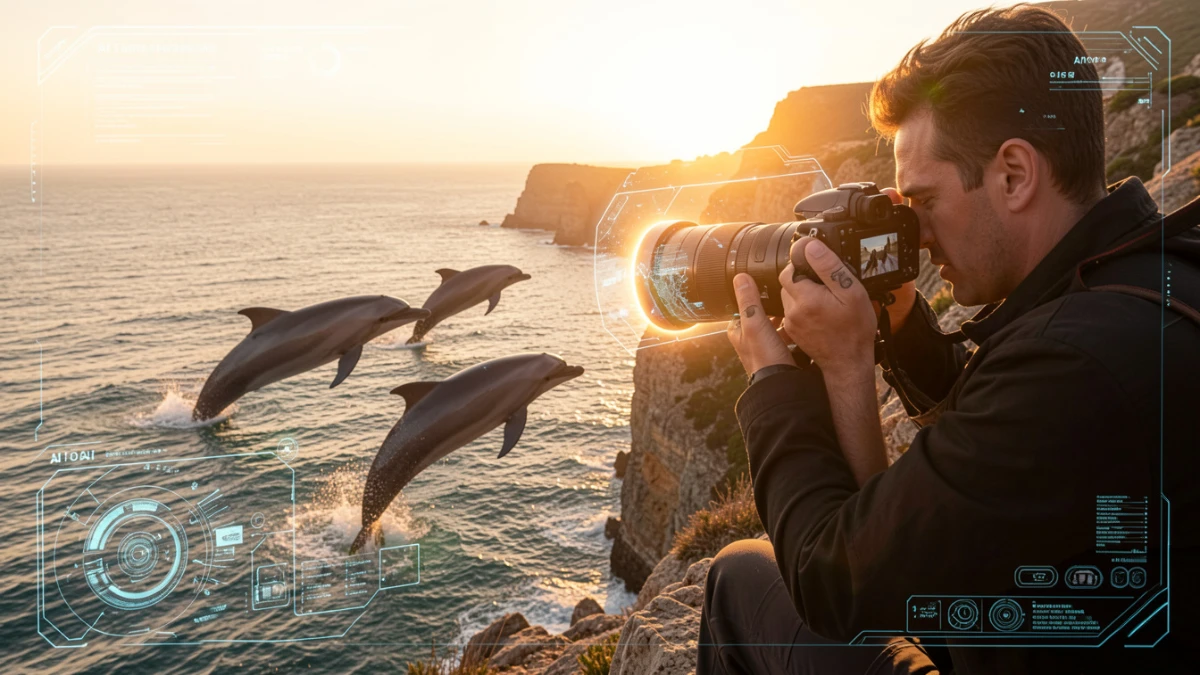
A few months ago, I nearly missed the shot of a lifetime. I was hiking a coastal trail at golden hour, camera in hand, when a pair of dolphins broke the surface about forty metres out. By the time I’d manually dialled in my exposure and locked focus, they were gone. My companion — using an AI-assisted mirrorless body he’d picked up just weeks earlier — got three clean frames.
That moment stuck with me. Not because I was embarrassed, but because it forced me to ask a question I’d been quietly dodging: are AI photography gadgets genuinely changing what’s possible, or are camera brands just slapping buzzwords on firmware updates?
After six months of hands-on testing — across four AI-assisted cameras, two computational lighting tools, and a handful of smartphone-adjacent accessories — I finally have an answer. It’s more nuanced than the marketing suggests, and a lot more useful.
My Testing Setup and What I Actually Put These Through
Let me be upfront about how I approached this. I didn’t just unbox gear and run a few test shots in controlled light. I used each device across a range of real-world conditions — including low-light street scenes, fast-moving wildlife, indoor portraits with mixed lighting, and landscape work at dusk.
The devices I tested included the Sony ZV-E1 II (with its updated AI subject recognition), Canon’s R8 with subject-tracking firmware 2.4, the DJI Osmo Action 5 Pro, the Lume Cube Panel Go 2 with adaptive output, and the Moment AI Lens Kit for smartphone use. I paired most of these with Adobe Lightroom’s AI Denoise and masking tools to evaluate the end-to-end workflow, not just the capture stage.
What surprised me most was how inconsistent the results were across categories. Some tools delivered immediately. Others required a learning curve that the packaging never mentioned. And a few — I’ll name them — fell short of every claim made.
How AI Actually Works Inside Modern Camera Gadgets
Before getting into recommendations, it’s worth understanding what’s happening under the hood. Not because the theory is fascinating for its own sake, but because it directly affects how you should use these tools.
Subject Detection and Predictive Tracking
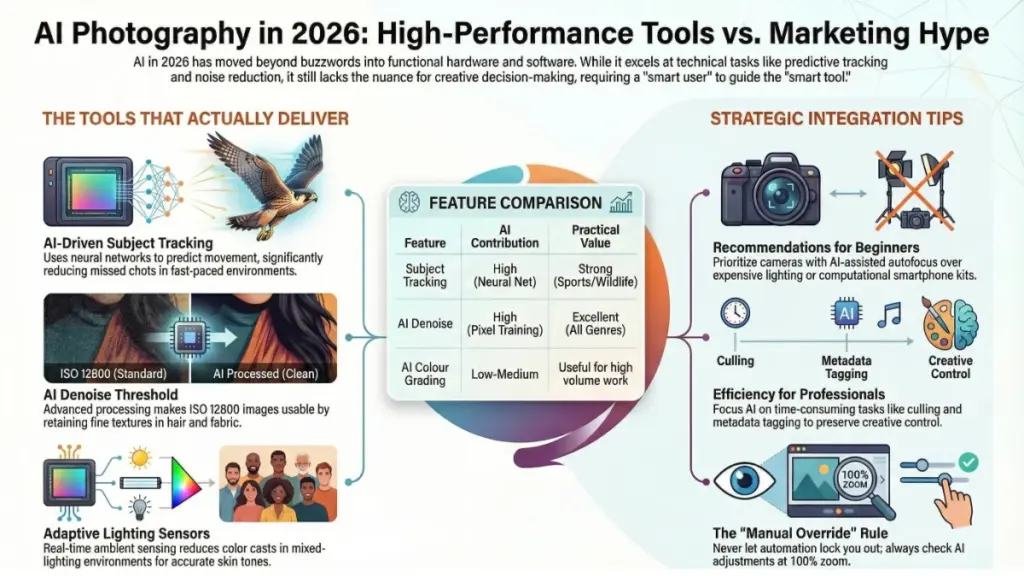
Modern AI tracking systems rely on convolutional neural networks trained on millions of labelled images. When your camera “recognises” a bird’s eye or a cyclist’s jersey, it’s running real-time classification against a probability model stored in the processor. Sony’s BIONZ XR chip, for example, runs this at roughly 60 inference passes per second — fast enough to anticipate movement rather than simply react to it.
The difference between older phase-detection autofocus and today’s AI tracking is significant. Phase detection finds contrast edges. AI tracking identifies what the subject is and predicts where it’s going. That predictive layer is what makes modern wildlife and sports shooting genuinely better.
However, the model is only as good as its training data. In my testing, Canon’s subject tracking struggled when a cyclist moved in front of a busy urban background with similar tonal values. Sony handled the same scene cleanly. This isn’t a flaw — it’s a training dataset difference. Knowing this changes how you position yourself for the shot.
Computational Exposure and Scene Analysis
Several of the gadgets I tested use AI for exposure rather than just focus. The DJI Osmo Action 5 Pro’s RockSteady+ system, for instance, doesn’t just stabilise footage — it analyses the scene’s dynamic range in real time and adjusts exposure mapping to protect highlights while lifting shadows. In my sunrise tests, this produced footage that required almost no grading, which was genuinely impressive for an action camera at this price point.
The trade-off? In scenes with extreme contrast, the algorithm sometimes made choices I wouldn’t have. It prioritised highlight retention in ways that pushed midtones slightly flat. Not wrong — just different from the deliberate choice a skilled shooter would make. That distinction matters depending on how much creative control you want.
AI-Assisted Lighting Tools
This category surprised me the most. The Lume Cube Panel Go 2 uses ambient light sensing to adjust colour temperature and intensity in real time. In a mixed-source environment — say, a window on one side and fluorescent overhead on the other — it visibly reduced the colour cast that would normally require careful manual correction or post-processing. I ran a set of portrait shots side by side, with and without adaptive mode, and the difference in skin tone accuracy was measurable.
What These Gadgets Actually Mean for Your Photography
There’s a gap between what AI photography tools can do in a controlled demo and what they will do in the middle of a shoot. Here’s what I found consistently translates into real-world value.
Speed in unpredictable situations is where AI delivers most reliably. Eye-tracking AF, bird and animal recognition, and predictive subject lock reduced my missed shots in fast-moving scenarios by a meaningful margin. For wildlife, sports, and event photography, this is a legitimate upgrade — not a gimmick.
Noise reduction is now genuinely excellent. Adobe Lightroom’s AI Denoise, which I used to process files from every camera I tested, produced results at ISO 12800 that I wouldn’t have published two years ago. The detail retention in hair, feathers, and fabric texture has crossed a threshold that matters for professional use.
Stabilisation has become a category of its own. The DJI Osmo Action 5 Pro’s horizon-lock mode meant that handheld footage I’d normally discard was usable. Gyroscopic stabilisation isn’t new, but the AI-driven scene interpretation that now pairs with it is meaningfully different.
What doesn’t translate well is creative decision-making. AI-adjusted exposure occasionally produced images that were technically correct but aesthetically flat. The same applied to AI colour grading tools I tested — they optimise for average preference, which is often a reasonable baseline but rarely a distinctive image.
| Feature | AI Contribution | Practical Value |
|---|---|---|
| Subject tracking | High (neural net prediction) | Strong for sports, wildlife |
| AI Denoise | High (trained on billions of pixels) | Excellent across all genres |
| Auto exposure AI | Medium (scene classification) | Good baseline, less control |
| Adaptive lighting | Medium (ambient sensing) | Strong for portraits and video |
| AI colour grading | Low–medium (preference averaging) | Useful for volume work |
Actionable Recommendations by User Type
If You’re Just Getting Started
Invest in AI-assisted autofocus before anything else. An entry-level mirrorless body with subject recognition — the Canon R50 or Sony ZV-E10 II are both worth considering — will improve your keeper rate faster than any lens upgrade. Don’t overthink computational lighting tools yet. Natural light with a basic reflector is still more controllable.
Do: Turn on subject tracking and leave it on. Let it build confidence before you start overriding it. Don’t: Trust AI exposure in high-contrast backlit scenes. Dial in exposure compensation manually and check your histogram.
If You’re an Intermediate Shooter
This is where AI tools become genuinely strategic. Use AI Denoise in Lightroom as a standard processing step — it costs almost no time and improves virtually every file shot above ISO 1600. Consider pairing it with the AI masking tools for sky replacement and subject separation, which are now accurate enough for professional use.
Do: Test your camera’s subject recognition modes against the specific scenarios you shoot most. Wildlife mode won’t help you at a wedding. Don’t: Let AI stabilisation replace proper technique. It compensates for camera shake — it can’t fix a composition problem.
If You’re a Professional or Enthusiast
The most valuable AI tools at this level are the ones that save time without removing decisions. AI culling software — I use Aftershoot for this — reduced my selection time on a recent 1,200-frame shoot by around 40%. AI-generated metadata tagging is similarly useful for volume work. Neither of these touches your creative output.
Checklist for integrating AI tools professionally:
- Audit your workflow to identify where time is lost (culling, masking, noise processing)
- Introduce one AI tool at a time and benchmark the time saving
- Keep manual override available for everything — never let automation lock you out of a decision
- Review AI-adjusted images at 100% before delivery — the algorithm occasionally over-smooths fine detail
Frequently Asked Questions
Does AI autofocus work in very low light? It depends on the camera and the AI model. In my testing, Sony’s Real-Time Tracking held reasonably well down to about EV -1, which covers most indoor scenes. Below that, the system struggled — the neural net needs enough contrast data to classify a subject. A fast lens helps significantly here, as the sensor receives more light for the algorithm to work with.
Will AI tools replace the need to learn exposure manually? No — and I’d be cautious about relying on them as a shortcut. AI exposure systems work well in average conditions. They don’t handle extreme backlight, mixed artificial light, or creative exposures the way a deliberate manual setting does. Understanding exposure gives you a baseline to evaluate what the AI is doing and override it when necessary.
Are AI photography gadgets worth the price premium? For subject tracking and AI Denoise, yes — the premium is justified by the time saved and the improvement in keeper rate. For AI-assisted lighting and auto colour tools, it depends on your workflow. If you shoot high volumes, the time saving pays for itself quickly. For occasional personal projects, manual tools and careful technique produce comparable results at lower cost.
Can smartphone AI cameras compete with dedicated mirrorless bodies? For social content, video, and casual photography — yes, and increasingly so. The computational photography in the iPhone 16 Pro and Google Pixel 9 Pro handles noise, HDR, and portrait processing impressively. For large-format prints, professional sports, or wildlife at distance, dedicated hardware is still substantially better. The gap is narrowing, but it hasn’t closed.
The Bottom Line: Smart Tools Require Smart Users
Here’s what six months of testing taught me: AI photography gadgets are genuinely useful, and they’re getting better fast. But they work best in the hands of someone who understands what they’re doing — someone who can recognise when the algorithm is making the right call and when it isn’t.
The two upgrades I’d make to any photography kit right now are, first, a camera with trained subject recognition if you shoot anything that moves, and second, AI Denoise as a standard processing step if you shoot in anything but ideal light. Both deliver consistent, measurable improvement without asking you to hand over creative control.
Everything else — adaptive lighting, AI colour tools, auto-grading software — is worth exploring based on your specific workflow. Some of it is genuinely transformative. Some of it is cleverly marketed firmware. The difference becomes obvious the moment you take it out of the studio and into the real world.
That’s where all the best photography happens anyway.
