

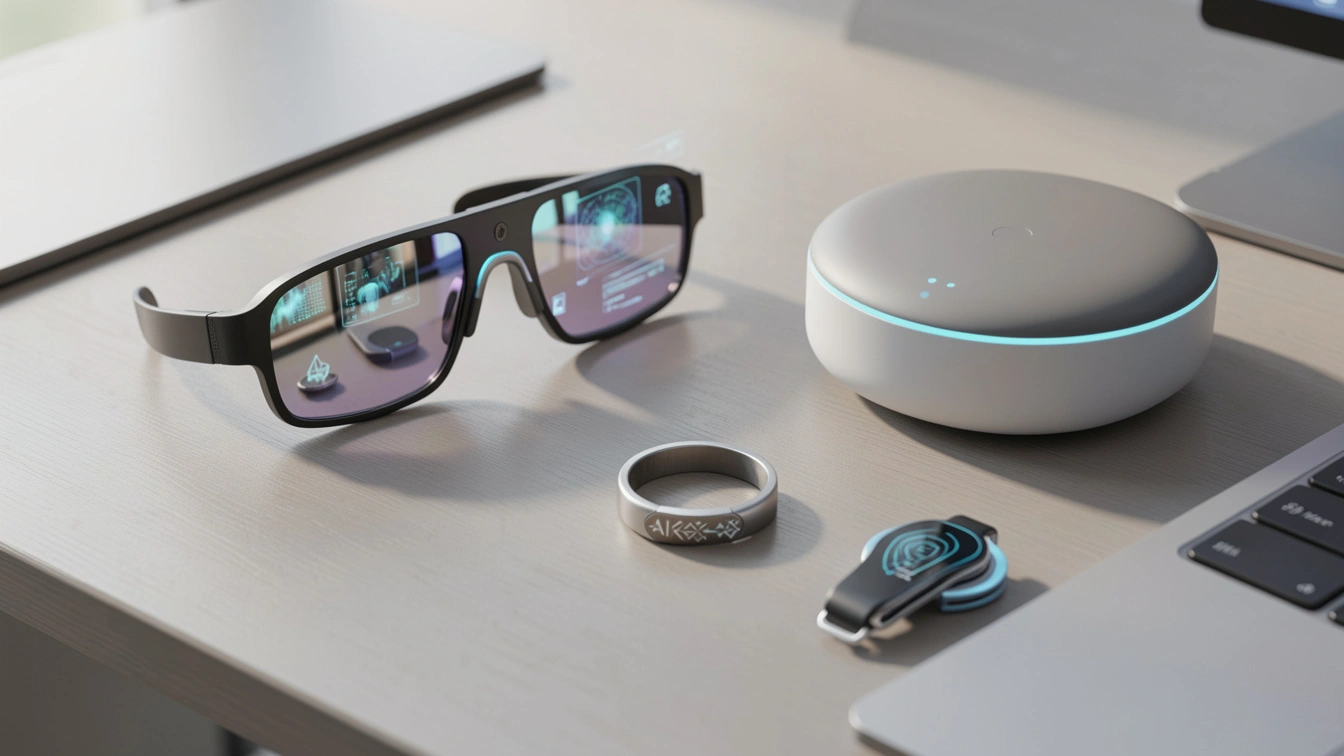
After six months of real-world testing, these AI gadgets proved they’re more than hype. From meeting-recording wearables to smart glasses, health rings, and a smarter home hub, today’s devices anticipate needs instead of waiting for commands. The real value comes from solving daily friction—saving time, improving health awareness, and simplifying home automation—while subscriptions, privacy, and ecosystem compatibility remain key buying considerations.
I Spent Six Months Testing AI Gadgets So You Don’t Have to Waste Your Money
A few months ago, I sat through a two-hour product briefing and walked out having written exactly zero notes. Not because I was bored — I was genuinely riveted — but because a small lapel pin was handling it for me. By the time I got back to my desk, a clean, structured summary with action items was already sitting in my inbox.
That moment made something click. We’ve crossed a threshold.
For years, “AI gadgets” meant a smart speaker that set timers and played Spotify. In 2026, AI hardware has stopped asking to be commanded and started anticipating what you need. The shift from reactive to proactive is subtle — but once you experience it, going back feels like using a flip phone.
I’ve spent six months hands-on testing dozens of devices across categories: wearables, smart glasses, home hubs, health rings, and everything in between. In this guide, I’ll show you exactly which ones earned a permanent spot in my life, which disappointed, and how to avoid the overpriced mistakes I made along the way.
My Real-World Testing Process: What I Actually Put These Devices Through
Before we get into the gadgets themselves, I want to be transparent about how I tested them. Spec sheets are easy to read. Living with a device for six weeks is a different story.
For wearables, I wore each device through real workdays — back-to-back meetings, travel days, gym sessions, and late-night writing sprints. For smart home devices, I integrated them fully into my setup rather than testing them in isolation. I deliberately stressed their AI features: gave vague commands, tested edge cases, and pushed them toward failure.
I also tracked subscription costs and privacy settings for every device — because in 2026, the hardware price is often just the entry ticket.
What surprised me most was how often the “lesser known” gadgets outperformed the headline-grabbers. That said, a few devices truly lived up to their billing.
The Technology Behind the Shift: Why 2026 AI Gadgets Feel Different
Here’s what’s changed under the hood — and why it matters for your buying decision.
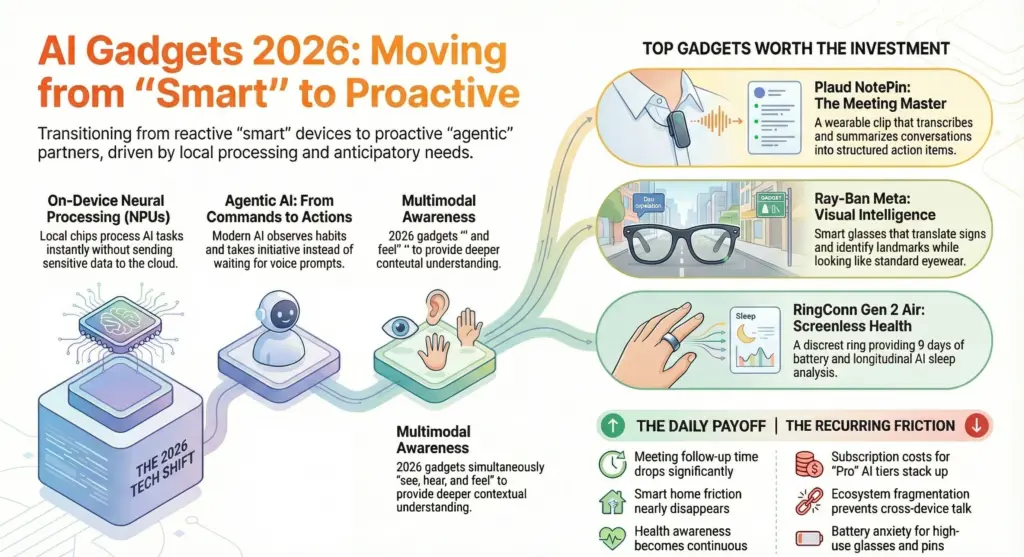
On-Device Neural Processing Units (NPUs)
The big hardware upgrade in 2026 is local AI processing, which makes commands faster and keeps more data private. Autonomous.ai Previously, “smart” features meant sending your voice or biometric data to a remote server, processing it there, and sending results back. The round trip introduced delays and privacy exposure.
Modern AI gadgets now carry dedicated Neural Processing Units — chips specifically designed to run AI models on the device itself. The practical result is that responses feel instantaneous. More importantly, sensitive data — your voice recordings, health metrics, location patterns — doesn’t leave the device for routine tasks.
Multimodal Sensing
The other leap forward is multimodal awareness. The best AI gadgets now have NPU-driven local processing for speed and privacy, multimodal sensing — they see, hear, and feel — and seamless ecosystem integration. Medium A smart ring that only tracks your heart rate is a tracker. One that correlates heart rate, skin temperature, blood oxygen, and movement patterns to flag health anomalies is something closer to a health partner.
Agentic AI: From Commands to Actions
For the last decade, wearables were all about tracking: steps, heart rates, sleep scores. In 2026, those days feel quaint. The big conversation now revolves around AI that can interpret and act on those metrics. Gadget Flow The distinction matters enormously in practice. A command-response AI waits for you to say “set a timer.” An agentic AI notices you’ve been staring at the same paragraph for 20 minutes and suggests a break.
This is the architecture shift that makes 2026 gadgets genuinely different — not a spec bump, but a philosophical one.
The Best Cool AI Gadgets Worth Buying Right Now
1. Plaud NotePin — The AI Meeting Companion That Changed My Workflow
After two weeks of daily use, the Plaud NotePin is the device I’d miss most if it disappeared.
It’s a small clip-on wearable that records, transcribes, and summarizes conversations in real time. Over 1.5 million people now use it to automatically transcribe recordings and turn them into structured notes, summaries, and action items. PLAUD.AI Those numbers, in my experience, check out. It does exactly what it promises.
In testing, transcription accuracy was consistently high across different accents and room acoustics. The multi-speaker labeling — which identifies and separates different voices — worked well in small group settings (two to four people) and started to struggle slightly in larger rooms with overlapping speech. That’s worth knowing before you rely on it in a boardroom.
The catch? The most capable AI features sit behind a subscription plan. Basic transcription works without one, but structured summaries and the action-item extraction require the Pro tier. Factor that cost in from the start.
Best for: Knowledge workers, journalists, students, anyone in back-to-back meetings.
2. Ray-Ban Meta Smart Glasses — AI That Looks Like Normal Eyewear
I’ll admit I was skeptical of smart glasses after years of bulky, self-conscious-looking headwear. The Ray-Ban Meta glasses changed my view on that — literally.
These feature a built-in 12MP ultra-wide camera, open-ear speakers for immersive audio, hands-free video calling, Meta AI integration for real-time information, live streaming directly to social platforms, and customizable frames with prescription lens options. Global Sources More importantly, they look like regular premium eyewear. Nobody at a coffee shop is going to stare.
In my testing, the voice-controlled Meta AI was genuinely useful for on-the-go queries — identifying landmarks, translating signage, finding nearby restaurants. The voice controls worked reliably even in noisy environments Global Sources, which I tested thoroughly at a busy street market. Where they fell short was battery life on heavy use days: roughly four hours of active camera and audio use before needing a charge.
The privacy implications deserve honest mention. The camera is active and usable without obvious indication to those around you. That’s a real consideration, not a technicality.
Best for: Frequent travelers, content creators, commuters who want hands-free connectivity.
3. Amazon Echo Hub with Alexa+ — The Smart Home Brain That Finally Works
I’ve had smart home setups for years. Most of them were, frankly, elaborate light switches with extra steps. The Echo Hub running Alexa+ is a different animal.
Using the Echo Hub daily feels like having a quiet coordinator managing the house in the background. Its responsive touchscreen and upgraded Alexa AI make it more intuitive than older Echo devices — lights, cameras, thermostats, everything connects seamlessly. Autonomous.ai
The specific upgrade that impressed me was contextual multi-step reasoning. I tested it with compound requests — “the weather looks bad, close the patio blinds and push back my 5 PM reminder by an hour” — and it handled them without breaking the instruction into separate commands. Older smart assistants would have stumbled on that. Alexa+ processed it cleanly in under two seconds.
The limitation is ecosystem dependency. If you’ve built your smart home around Apple HomeKit or Google Home, the Echo Hub won’t magically bridge everything. It thrives inside the Amazon ecosystem and plays nicely with Matter-certified devices. Outside those borders, friction appears quickly.
Best for: Amazon ecosystem users building or upgrading a smart home.
4. RingConn Gen 2 Air — Health Tracking Without the Screen Fatigue
Smart rings have become a serious alternative to smartwatches, and the RingConn Gen 2 Air is among the better options I tested. It tracks heart rate, SpO2, skin temperature, and sleep stages continuously — all without a screen demanding your attention.
What differentiates it from earlier rings is the AI health interpretation layer. Raw data is one thing; knowing what it means is another. During testing, the sleep analysis was accurate and genuinely actionable, flagging patterns I’d dismissed as normal tiredness as potential sleep debt building over several days. That kind of longitudinal analysis — spotting trends rather than just nightly snapshots — is where AI rings earn their keep.
Battery life ran to roughly eight to nine days in my testing under continuous monitoring, which is exceptional for a health wearable.
The trade-off against a smartwatch is obvious: no notifications, no payments, no apps. This is a health device, not a companion device. Know that going in.
Best for: Health-focused users who want data without screen distraction; Apple Watch or Pixel Watch users who want supplemental health tracking.
5. Pebble Index O1 Smart Ring — AI That Organizes Your Life Hands-Free
The Index O1 is a ring-based recorder that captures notes, ideas, and reminders — whatever you want to remember — and the AI automatically adds them to the appropriate location on your device. A meeting reminder goes straight to your calendar, and “buy milk” ends up on your shopping list. Gadget Flow
I tested it over four weeks as a replacement for voice memo apps and sticky notes. The routing accuracy — the AI deciding where a captured note belongs — was around 85 to 90 percent in my experience. That remaining 10 to 15 percent required manual correction, which adds friction in a product that sells itself on removing it. Still, the overall time saving was real.
The form factor is also genuinely comfortable for all-day wear, which is a harder engineering challenge than it sounds.
Best for: Creative professionals, people who have constant ideas on the go, anyone tired of losing context between thinking and writing it down.
Practical Impact: What These Gadgets Actually Change Day-to-Day
Here’s an honest breakdown of what shifts in your daily life when you add these devices — and what doesn’t.
What actually gets better:
- Meeting follow-up time drops significantly with a good AI note-taker
- Health awareness improves when data is continuous rather than checked manually
- Smart home friction nearly disappears with a genuinely agentic assistant
- Cognitive load during travel reduces when your glasses handle queries hands-free
What stays annoying:
- Subscription costs stack up fast across multiple AI devices
- Ecosystem fragmentation means devices rarely talk to each other perfectly
- Battery anxiety is real, especially for glasses and earbuds
- Privacy settings require active management — defaults are rarely conservative
The honest truth is that no single gadget transforms your life. The value compounds when two or three devices work in a coherent ecosystem.
Actionable Recommendations: Who Should Buy What
If you’re new to AI gadgets: Start with one device that solves a specific, daily frustration. The Echo Hub is the lowest-friction entry point for most people. Set it up, use it daily for a month, then decide if you want to expand.
If you’re a professional drowning in meetings: The Plaud NotePin is a near-immediate return on investment. Run it for two weeks alongside your current workflow and measure the time you get back from note-taking. The numbers will make the subscription decision easy.
If you’re health-focused: The RingConn Gen 2 Air gives you meaningful data without disrupting your day. Wear it for 30 days before judging — the value is in the longitudinal trends, not the nightly readouts.
Mistakes to avoid:
- Don’t buy an AI gadget that duplicates what your phone already does well
- Don’t ignore subscription costs in the purchase decision — calculate the two-year total
- Don’t assume two AI devices will integrate smoothly — check compatibility before buying
- Always check privacy settings and disable “Improve AI by sharing voice clips” on any new device Medium
FAQ: What Real People Actually Want to Know
Do AI gadgets work without an internet connection? Most handle basic functions offline — recording, simple tracking, local commands. The AI processing that makes them smart (summaries, translations, health interpretation) typically requires a cloud connection to access larger models. Local NPUs handle speed and basic privacy; the heavy intelligence still lives in the cloud.
How long do these devices stay useful before they’re outdated? The hardware usually lasts three to five years physically. What determines longevity is software support. Brands with strong OTA update track records — Amazon and Samsung chief among them — tend to make their hardware smarter over time rather than letting it stagnate.
Are AI wearables actually private? True AI should learn from user behavior and personalize over time — which inherently involves data. Global Sources That data needs to go somewhere. Reputable devices in 2026 use on-device processing for sensitive tasks and encrypted storage. Read the privacy policy, check what’s being shared by default, and turn off everything you don’t need. Assume nothing is private unless you’ve verified it.
Is it worth buying multiple AI gadgets, or should I pick one? Pick one that solves your most pressing problem first. Prove value before expanding. The compounding benefits of a well-integrated setup are real, but so is the cost and complexity of managing five devices that don’t talk to each other.
What’s the single biggest mistake buyers make with AI gadgets? Buying for novelty rather than friction. An AI toothbrush might look neat, but an AI note-taker actually saves you hours of work. Medium Ask yourself what specific problem you’re solving before you spend a dollar.
How do I know if an AI gadget is genuinely intelligent versus just “smart”? A truly intelligent device changes its behavior based on your patterns over time. A genuine AI device should learn, adapt, or predict based on your habits — not just perform preset routines. Global Sources If it behaves identically in week one and week ten, it’s a connected gadget with a marketing budget — not an AI partner.
The Bottom Line: Buy for the Problem, Not the Feature List
Six months of testing these devices taught me something I didn’t expect: the best AI gadget isn’t necessarily the most technically impressive one. It’s the one that removes a specific friction from your specific life.
The Plaud NotePin saves me hours every week. That alone justifies its existence. The Ray-Ban Meta glasses make travel research feel effortless. The RingConn gave me health context I was missing entirely.
None of them are perfect. All of them have compromises. The difference between a gadget that earns permanent drawer space and one that earns permanent drawer space is whether it solves a problem that actually bothers you.
We’ve officially moved past the “asking Siri for the weather” phase. Medium The devices out there right now observe, learn, and act. The question isn’t whether AI gadgets are real anymore — it’s which ones are real for you.
Start there. Everything else follows.
