


If you’ve ever shopped for a gaming mouse, you’ve probably noticed one specification that manufacturers love to highlight more than almost anything else: DPI. Big numbers dominate product pages—12,000 DPI, 20,000 DPI, even 30,000 DPI—making it seem like higher is always better. For many gamers, especially beginners, this creates a simple assumption: more DPI equals better aim and higher performance.
The reality is very different.
After years of using gaming mice across FPS, MOBA, MMO, and strategy games, and after testing dozens of models at different sensitivity levels, it becomes clear that DPI is one of the most misunderstood aspects of PC gaming. Used correctly, it can improve precision, comfort, and consistency. Used incorrectly, it can actively make your gameplay worse.
This guide explains what DPI really is, how it works with in-game sensitivity, why pros use surprisingly low values, and how to find the best DPI setting for your own playstyle.
What Is DPI in a Gaming Mouse?
DPI stands for “Dots Per Inch.”
In simple terms, it measures how sensitive your mouse sensor is.
- At 800 DPI, moving your mouse one inch causes the cursor or crosshair to move 800 pixels.
- At 1600 DPI, the same physical movement moves the cursor twice as far.
So:
- Higher DPI = faster cursor movement
- Lower DPI = slower, more controlled movement
DPI is a hardware setting, controlled by the mouse itself. This is important because DPI alone does not determine how fast or slow your aim feels in-game.
DPI vs In-Game Sensitivity
One of the most common mistakes gamers make is confusing DPI with sensitivity.
- DPI comes from your mouse
- Sensitivity is controlled inside the game
What really determines how your aim feels is the combination of both, often called effective DPI (eDPI):
eDPI = Mouse DPI × In-Game Sensitivity
For example:
- 400 DPI × 2.0 sensitivity = 800 eDPI
- 800 DPI × 1.0 sensitivity = 800 eDPI
- 1600 DPI × 0.5 sensitivity = 800 eDPI
All three setups result in the same general turning speed. However, they do not always feel identical, especially when making small adjustments.
How Gaming Mouse Sensors Work
Modern gaming mice use optical sensors that function like tiny, high-speed cameras. These sensors take thousands of images per second of the surface beneath the mouse and compare them to detect movement.
What happens when you increase DPI?
- The sensor becomes more sensitive to smaller movements
- Tiny hand motions are detected more easily
- Micro-adjustments become smoother—up to a point
However, extremely high DPI can also:
- Amplify hand tremors
- Detect surface imperfections
- Create jitter instead of smooth tracking
This is why max DPI is rarely useful in real gameplay.
Native DPI vs Interpolated DPI
Not all DPI values are equal.
Most sensors have native DPI steps, which are values the sensor can measure directly without extra processing. Common native steps include:
- 400
- 800
- 1600
- 3200
- 6400
When you choose a value like 1000 or 2500 DPI, the mouse often uses interpolation—mathematical scaling between native steps.
In practice:
- Native DPI = cleaner, more consistent tracking
- Interpolated DPI = slightly less precise (usually unnoticeable, but measurable)
For this reason, many experienced players stick to 800 or 1600 DPI, which are native on almost all modern sensors.
Does Higher DPI Improve Aim?
This is where things get interesting.
At the same eDPI, higher DPI can feel smoother during small movements. That’s because the sensor reports more data points per inch of movement. This reduces “pixel skipping,” especially noticeable on high-resolution monitors.
However, the improvement plateaus quickly.
In real-world gameplay:
- Going from 400 → 800 DPI often feels better
- Going from 800 → 1600 DPI can improve micro-control
- Going beyond 3200 DPI rarely provides meaningful benefits
At very high DPI values, control often becomes worse, not better.
Why Professional Gamers Use Low DPI
Many professional FPS players use DPI values that seem low compared to what modern mice advertise—often 400 or 800 DPI.
There are several reasons for this:
- Muscle Memory
Large arm movements are easier to repeat consistently than tiny wrist movements. - Stability
Lower DPI reduces the effect of hand shake and accidental micro-movements. - Legacy Habits
Many pros started playing years ago when sensors were less reliable at high DPI, and they stuck with what worked. - Game Design
Tactical shooters reward precision and crosshair placement more than fast camera turns.
That said, newer players and modern sensors are slowly shifting preferences upward, with 800 DPI becoming more common than 400 DPI in competitive play.
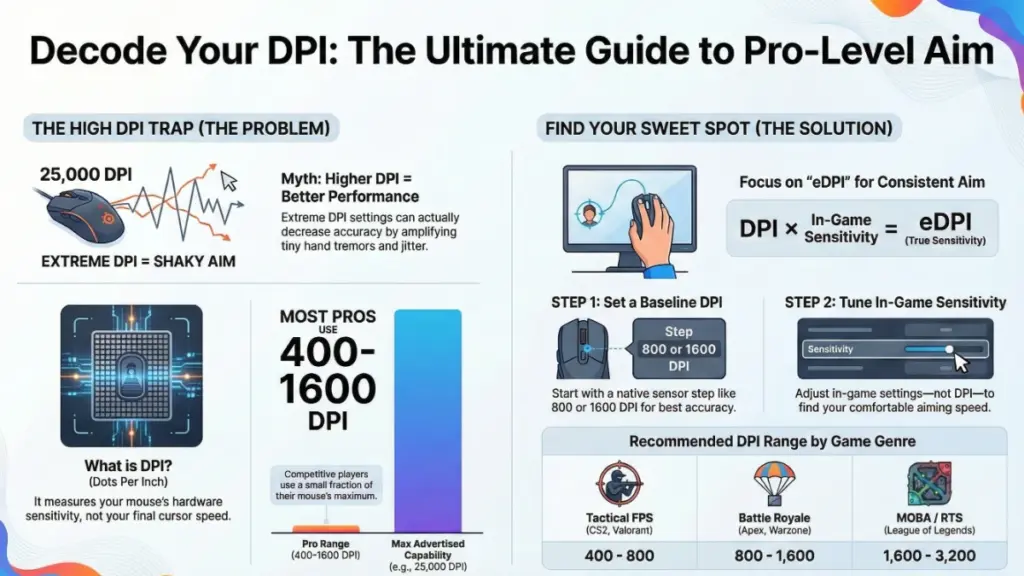
Best DPI Settings by Game Genre
FPS Games (CS2, Valorant, Rainbow Six Siege)
- Recommended DPI: 400–800
- Why: Maximum control, better recoil management, consistent flicks
Low DPI paired with low sensitivity encourages arm aiming, which is more stable for precision shooting.
Battle Royale Games (Apex Legends, Warzone, Fortnite)
- Recommended DPI: 800–1600
- Why: Balance between fast turns and long-range accuracy
Battle royale games require quick reactions at close range and precise tracking at distance. Slightly higher DPI helps cover both.
MOBA & RTS Games (League of Legends, Dota 2, StarCraft II)
- Recommended DPI: 1600–2400
- Why: Faster screen traversal with less physical movement
These games prioritize cursor speed and multitasking over pixel-perfect aim.
MMO & RPG Games (World of Warcraft, Final Fantasy XIV)
- Recommended DPI: 1200–1800
- Why: Comfortable UI navigation and camera control
Very low DPI can feel slow, while very high DPI can make clicking small UI elements frustrating.
Common DPI Myths Explained
Myth 1: “Higher DPI Always Means Better Performance”
False. Beyond a certain point, higher DPI increases noise, not accuracy.
Myth 2: “You Should Use Your Mouse’s Maximum DPI”
That number is mainly marketing. It shows what the sensor can do, not what you should use.
Myth 3: “DPI Doesn’t Matter If Sensitivity Is Adjusted”
Partially false. DPI still affects micro-precision and smoothness, even at the same eDPI.
How to Find the Right DPI for You
Finding the best DPI is about comfort and consistency, not copying pro settings.
Step 1: Start Simple
- Choose 800 or 1600 DPI
- Set Windows mouse speed to 6/11
- Disable mouse acceleration
Step 2: Adjust In-Game Sensitivity
Change sensitivity inside the game until turning and tracking feel natural.
Step 3: Test Micro-Movements
Try lining up small targets or making tiny crosshair adjustments.
If movements feel jumpy → slightly higher DPI
If aim feels shaky → slightly lower DPI
Step 4: Long Session Test
Play for 2–3 hours and pay attention to:
- Wrist or arm fatigue
- Consistency over time
- Comfort during intense moments
Your best DPI is the one you can use comfortably for long sessions.
DPI and Polling Rate: What’s the Difference?
Polling rate measures how often the mouse reports its position to the PC:
- 125 Hz = every 8 ms
- 500 Hz = every 2 ms
- 1000 Hz = every 1 ms
DPI does not affect input lag, but polling rate does.
For most players:
- 1000 Hz is ideal
- Higher values offer diminishing returns and can increase CPU usage
Recommended System Settings
Windows
- Pointer speed: 6/11
- Disable “Enhance pointer precision”
Mouse Software
- DPI: 800 or 1600
- Polling rate: 1000 Hz
- Disable smoothing and angle snapping
In-Game
- Keep DPI consistent
- Adjust sensitivity per game
- Use ADS sensitivity sliders instead of DPI shift buttons
Frequently Asked Questions
Is 400 DPI still good in 2025?
Yes, especially for tactical FPS games, but 800–1600 DPI often feels smoother on modern monitors.
Does DPI affect input lag?
No. Polling rate affects latency, not DPI.
Should I use different DPI for different games?
It’s better to keep DPI consistent and adjust in-game sensitivity instead.
Is DPI shift useful?
Generally no. It can harm muscle memory. ADS sensitivity settings are a better solution.
Final Thoughts
DPI is not a magic stat that improves your aim overnight. It’s a tool—one part of a much larger system that includes sensitivity, mousepad size, posture, and practice.
For most gamers:
- 800–1600 DPI is the sweet spot
- Consistency matters more than numbers
- Comfort leads to better long-term performance
Instead of chasing extreme specs, focus on building stable muscle memory and practicing with settings that feel natural to you. A well-trained player at 800 DPI will always outperform someone constantly changing settings in search of the “perfect” number.
