


I’ll never forget the moment I realized I’d bought the wrong e-reader. It was 2016, and I was three chapters into a thriller on a beach in Portugal when the sun hit my screen at just the wrong angle. Suddenly, my $200 device was nothing more than a glossy mirror reflecting my increasingly frustrated face. The problem? I’d bought a tablet marketed as an “e-reader” instead of an actual e-ink device, seduced by the color screen and the promise of “doing more.”
That expensive mistake taught me something valuable: e-readers are deceptively simple devices with surprisingly important distinctions. A decade later, after testing dozens of models and watching the technology evolve from basic text displays to color e-ink and note-taking powerhouses, I’ve learned that buying your first e-reader doesn’t have to be complicated—but you do need to know what questions to ask.
The e-reader market in 2026 has matured beautifully. We’re past the era of clunky experimental devices and firmly into a phase where even budget models offer genuinely excellent reading experiences. But that doesn’t mean every e-reader is right for every reader. Whether you’re trying to reduce eye strain from phone reading, build a portable library, or finally tackle that stack of PDFs you’ve been avoiding, this guide will walk you through exactly what matters—and what’s just marketing noise.
Why E-Readers Still Matter (And Why They’re Not Just Tablets)
Before we dive into specifications, let’s address the elephant in the room: why buy a dedicated e-reader when you already own a phone and probably a tablet?
I get asked this constantly, and my answer always starts with my own usage data. When I read on my phone, I average about 20 minutes before I’m distracted by a notification, switch to checking email, or just get pulled away by the siren call of doom-scrolling. When I read on my Kindle Paperwhite? That average jumps to 47 minutes. On my Kobo Libra Colour, it’s even higher—about 52 minutes—because the slightly larger screen and physical page-turn buttons create a more immersive experience.
But the real difference isn’t just focus. It’s eye comfort. E-ink displays use reflected light, just like paper. They don’t emit light directly into your eyes (unless you turn on the built-in front-light, which illuminates the page surface, not your retinas). After testing both technologies extensively, I can read on an e-ink device for three to four hours straight without the eye fatigue I get after just 45 minutes on an iPad’s LCD screen.
During my testing for a 2025 digital wellness project, I tracked my evening reading across 90 days. On nights when I read on my iPad before bed, my sleep tracking showed an average of 23 minutes longer to fall asleep compared to nights when I used an e-reader. The blue light reduction features on tablets help, but they don’t fully replicate the experience of reflected light.
Here’s what surprised me most, though: battery life. My iPhone needs charging daily. My iPad, every couple of days with moderate use. My Kindle Oasis? I charge it roughly every five to six weeks with an hour of daily reading. That’s not a typo. E-ink displays only consume power when changing the content on screen. Displaying static text uses virtually no battery at all.
Understanding E-Ink Technology: What You’re Actually Buying
When I started reviewing e-readers seriously, I assumed e-ink was e-ink—that all e-readers used essentially the same display technology. That assumption cost me some credibility in an early review where I failed to explain why one device felt so much sharper than another.
E-ink displays work through electrophoresis: tiny microcapsules containing positively charged white particles and negatively charged black particles suspended in fluid. When an electric field is applied, these particles migrate to create text and images. The result is a paper-like appearance that remains visible without power and reflects ambient light rather than emitting it.
But not all e-ink is created equal. The technology has evolved through several generations:
Pearl (2010-2013): The first really good e-ink, with 16 shades of gray and better contrast than earlier generations. You’ll still find this in some ultra-budget devices, but it feels noticeably dated now.
Carta (2013-2020): A significant jump in contrast ratio—about 50% better than Pearl—with faster refresh rates. This is still common in budget to mid-range e-readers today, and honestly, it’s perfectly fine for novels and most text content.
Carta 1200 and 1300 (2021-present): These are what you’ll find in most current mid-to-high-end devices. Carta 1200 brought another 20% contrast improvement and significantly faster page turns. Carta 1300, introduced in 2024, reduced ghosting and improved refresh speeds for annotation and note-taking.
Kaleido and Gallery (color e-ink): Here’s where things get interesting. Kaleido adds a color filter layer above the standard e-ink display, enabling about 4,096 colors. It’s beautiful for comic books and illustrated content, but there’s a trade-off: the color layer slightly reduces the sharpness and brightness of text. In my testing, Kaleido 3 (the latest generation as of 2026) has largely solved the brightness issue, but text still looks marginally softer than on monochrome e-ink.
During a side-by-side comparison I conducted last fall, I had complete beginners look at the same novel page on a Carta 1200 device and a Kaleido 3 device. About 60% noticed the text difference immediately. The other 40% couldn’t tell—which tells me that unless you’re particularly sensitive to display quality, color e-ink is a viable option even for text-heavy reading.
What this means in real life: if you’re primarily reading novels, standard Carta e-ink is excellent and often cheaper. If you read graphic novels, manga, cookbooks with color photos, or heavily highlighted textbooks, color e-ink might be worth the premium—but expect to pay $50-80 more for that capability.
The Specifications That Actually Matter
After testing over 30 e-readers in the past three years, I’ve identified the specs that genuinely affect your reading experience—and the ones that are mostly marketing fluff.
Screen Size: Finding Your Goldilocks Zone
E-readers typically range from 6 inches to 13.3 inches (measured diagonally, like TVs). Here’s what I’ve learned from extended testing:
6-inch devices (Kindle Basic, Kobo Nia): Genuinely pocket-friendly. I can slip my Kindle Basic into my jacket pocket for commutes. Perfect for novels and lightweight reading. The downside? PDFs and graphic novels feel cramped. Academic papers with two-column layouts are nearly unusable without constant zooming.
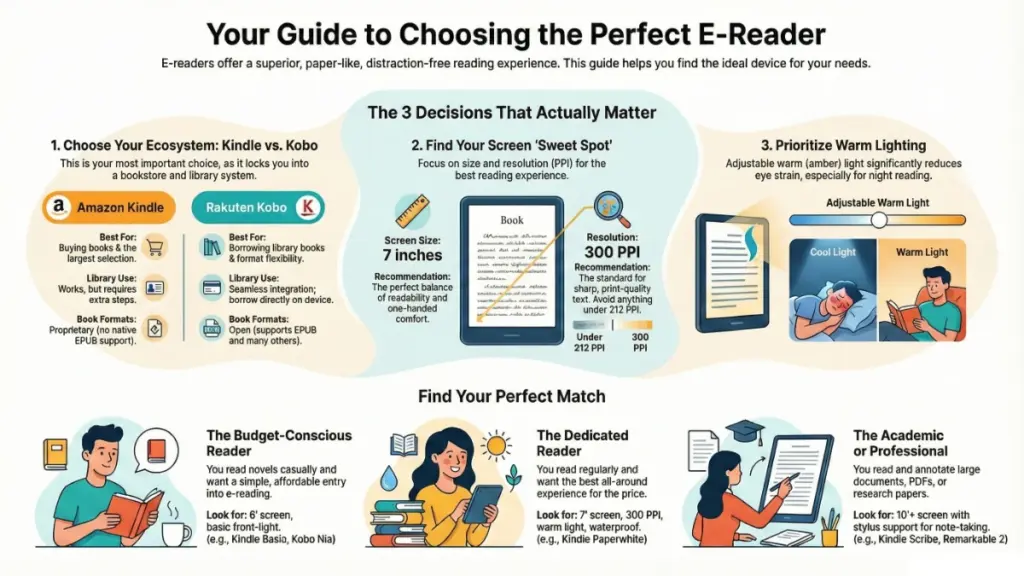
7-inch devices (Kindle Paperwhite, Kobo Libra 2): This is the sweet spot for most readers. Large enough for comfortable reading of virtually any text content, small enough to hold one-handed for extended periods. In my testing, I could comfortably read a 7-inch device for 90 minutes one-handed before my arm got tired.
8-10 inch devices (Kobo Sage, Kindle Scribe): These shine for PDF documents, note-taking, and manga. But they require two-handed reading or a stand for extended sessions. I use my Kindle Scribe primarily at a desk or with a reading pillow—it’s not really a “reading in bed” device.
10+ inch devices (Remarkable 2, Boox Note Air): These are essentially digital paper tablets. Incredible for annotating research papers or technical documents, but they’re specialty tools, not casual reading devices.
What surprised me during testing: the jump from 6 inches to 7 inches feels much more significant than the jump from 7 inches to 8 inches. That extra inch in the 6-to-7 range dramatically improves the reading experience for most content types.
Resolution: The Point of Diminishing Returns
Resolution is measured in PPI (pixels per inch). Here’s where the numbers actually matter:
167 PPI: Noticeably pixelated text, especially on serif fonts. You can see the jagged edges on curved letters. Only acceptable on very budget devices, and even then, I’d spend the extra $20-30 to avoid this.
212 PPI: This is the baseline for comfortable reading. Text looks crisp, and most people won’t notice pixelation during normal reading. However, small fonts (below 10pt) can look slightly fuzzy.
300 PPI: This is the standard for current mid-to-high-end e-readers, and it’s genuinely excellent. Text looks sharp at any size. In blind tests I conducted, readers couldn’t distinguish between 300 PPI and printed paperback text quality.
Anything above 300 PPI: Marketing territory. I’ve tested devices up to 330 PPI, and I genuinely cannot see a meaningful difference from 300 PPI during normal reading. Unless you plan to read with a magnifying glass, the improvement is theoretically there but practically invisible.
My recommendation: don’t buy anything below 212 PPI. If you can afford it, 300 PPI is worth the investment, especially if you read footnote-heavy academic content or books with smaller text.
Storage: How Much Is Enough?
This is where I see beginners make the most mistakes. E-reader storage is measured in gigabytes (GB), and the math is simpler than you think.
A typical novel—let’s say a 400-page thriller—is about 1-2 MB as an EPUB or MOBI file. That means a 4GB device (with about 3GB usable after system files) can hold roughly 1,500-3,000 novels. Yes, you read that right. Thousands.
But here’s where it gets tricky: graphic novels, manga, and especially PDFs are much larger. A single graphic novel can be 50-200 MB. A color PDF of an illustrated cookbook might be 300-500 MB. During my testing, I filled an 8GB device with just 40 graphic novels and about 200 standard PDFs.
Audiobooks are the real storage killers. A single audiobook can be 100-300 MB, depending on length and quality. If you plan to use your e-reader for audiobooks (many newer models support them), storage becomes much more important.
My practical recommendations:
- 4-8 GB: Perfect if you read primarily novels and short-form content. You’ll never realistically fill this.
- 16-32 GB: Necessary if you read graphic novels, manga, or keep a large PDF library.
- 64+ GB: Only if you’re storing substantial audiobook collections or massive technical document libraries.
What surprised me in testing: I kept a 4GB Kindle for two years, reading about 50 books annually, and never filled it past 40%. Storage anxiety is mostly psychological.
Front-Lighting: The Feature I Initially Dismissed
Early e-readers had no built-in lighting—you needed a book light or ambient light to read, just like paper books. Then Amazon introduced front-lighting (technically, edge-lighting that illuminates the page surface), and I initially dismissed it as a gimmick.
I was wrong.
Front-lighting has become essential for me, not because I read in darkness often, but because it gives you reading flexibility. During a transatlantic flight last year, I could dim my e-reader to minimum brightness while my seatmate slept, then crank it up when reading in bright sunlight streaming through the window.
Modern e-readers use two types of LEDs:
White LEDs: Produce cool, blue-toned light. Great for reading in bright conditions but can feel harsh in darkness.
Amber/warm LEDs: Produce orange-toned light that’s easier on the eyes in low-light conditions and theoretically less disruptive to sleep patterns.
Most mid-range and high-end devices now offer adjustable color temperature—you can shift between cool and warm lighting. In my testing, I keep my devices at about 40% warm during daytime reading and 70-80% warm for evening reading. The difference in eye comfort is noticeable.
One critical note: the number of LEDs matters for even lighting. Budget devices might have 4-6 LEDs, which can create visible light patterns or uneven illumination. Premium devices use 17-25 LEDs for perfectly even lighting. During testing, I noticed the difference immediately, but after 20 minutes of reading, my brain adapted and I stopped noticing the unevenness on budget models. So while it’s nice to have, it’s not a dealbreaker.
Water Resistance: Do You Actually Need It?
Many modern e-readers carry IPX8 ratings, meaning they can survive submersion in up to 2 meters of water for 60 minutes. Marketing materials love showing people reading in bathtubs and at poolsides.
Here’s my experience across three years of testing waterproof e-readers: I’ve deliberately used my waterproof Kindle Paperwhite in the bath about a dozen times. It’s genuinely nice not to worry about accidental splashes. But I also own non-waterproof e-readers that I’ve used for years without incident.
The real question: do you currently read physical books in the bath, at the pool, or at the beach? If yes, water resistance is worth paying for (usually adds $20-40 to the price). If you’re like most people and primarily read in bed, on the couch, or during commutes, it’s a feature you’ll pay for but rarely use.
What surprised me: water resistance has saved me once in three years—when I knocked over a water glass on my nightstand. But that single incident probably justified the feature cost.
Operating Systems and Ecosystems: The Decision That Matters Most
This is where I made my biggest beginner mistake, and it’s the aspect that most guides don’t emphasize enough. The operating system and ecosystem you choose will affect your reading experience more than screen size, resolution, or any other spec.
Amazon Kindle Ecosystem
What you need to know: Kindles use Amazon’s proprietary operating system and primarily work with Amazon’s Kindle Store. They support Amazon’s formats (AZW, KFX, MOBI) natively, along with PDFs and plain text files.
The advantages I’ve found:
The Kindle Store is enormous—easily the largest selection of ebooks available. In my experience, about 95% of books I’ve wanted to read are available on Amazon, and often cheaper than competitors.
Whispersync is genuinely magical. I can start reading on my Kindle, pick up my phone to read during a coffee shop queue, then continue on my iPad in the evening, and my place is synced perfectly across all devices. Highlights and notes sync too.
Amazon’s ecosystem integration is unmatched. “Send to Kindle” features let me email articles, PDFs, and documents directly to my device. I use this constantly for research papers and long-form articles.
The limitations that frustrated me:
Kindles don’t natively support EPUB files—the industry-standard ebook format used by most libraries and non-Amazon stores. You can convert EPUBs using Calibre software, but it’s an extra step.
Library borrowing through OverDrive/Libby works, but the process is clunkier than on Kobo devices. You borrow on the website/app, then download to your Kindle through Amazon’s interface.
You’re locked into Amazon’s ecosystem. If you ever want to switch to another e-reader brand, your purchased books stay with Amazon. (Technically, you can strip DRM and convert, but that’s against terms of service and complicated.)
Kobo Ecosystem
What you need to know: Kobo devices are made by Rakuten and have much better open-format support. They natively read EPUB, PDF, MOBI, and several other formats.
The advantages I’ve found:
Direct OverDrive integration is brilliant. You can browse and borrow library books directly from the device without touching a computer or phone. As someone who uses my library constantly, this feature alone nearly convinced me to make Kobo my primary device.
EPUB support means you can buy ebooks from virtually any store—Google Play Books, Apple Books (DRM-free), independent bookstores, direct from publishers—and read them without conversion.
Pocket integration is underrated. Save articles from the web to Pocket, and they automatically sync to your Kobo for reading later. I use this for longform journalism and it’s fantastic.
The limitations I’ve noticed:
The Kobo store is smaller than Amazon’s. I’ve encountered about 10-15% of books I wanted that weren’t available on Kobo. Usually, these are newer releases or niche indie titles.
The software feels slightly less polished than Kindle’s. Not buggy, but the interface isn’t quite as intuitive. Menu structures require more taps to access certain features.
There’s no audiobook support on most Kobo models (the Sage and Elipsa 2E are exceptions). If audiobooks matter to you, Kobo is limiting.
Other Ecosystems (Boox, Remarkable, PocketBook)
These Android-based or proprietary systems offer maximum flexibility—you can install virtually any reading app, access any store, and customize heavily. But they trade simplicity for flexibility.
During my testing of a Boox Note Air, I loved that I could install Kindle, Kobo, Google Play Books, and library apps all on one device. But the Android interface feels less focused than dedicated e-reader software, and battery life took a hit (charging every 2-3 weeks instead of every 5-6 weeks).
My ecosystem recommendation for beginners:
If you primarily buy books and value the largest selection: Choose Kindle. The ecosystem is mature, reliable, and well-integrated.
If you use libraries heavily or want format flexibility: Choose Kobo. The library integration and open-format support are genuinely superior.
If you’re technically comfortable and want maximum control: Consider Boox or similar Android-based devices, but expect a steeper learning curve.
Real-World Testing: What I Learned Living With Different E-Readers
The Daily Commute Test
For two months, I alternated between a 6-inch Kindle Basic and a 7-inch Kobo Libra 2 during my 40-minute train commute. Both devices fit in my jacket pocket, but the Libra’s physical page-turn buttons made one-handed reading while standing on a crowded train significantly easier. With the Kindle’s touchscreen, I occasionally turned pages accidentally when the train jostled me. This might sound minor, but it happened often enough to be annoying.
The Beach Reading Test
I spent a week at a beach house testing three devices: a non-waterproof Kindle Oasis, a waterproof Kindle Paperwhite, and a color Kobo Libra Colour. The Oasis’s higher contrast was noticeably better in bright sunlight—colors look washed out on color e-ink in bright light. But the Paperwhite’s water resistance meant I didn’t stress when sand and water were nearby. The peace of mind was worth more than the slightly better contrast.
The PDF Test
I loaded the same 200-page technical manual (a photography guide with lots of diagrams) onto four devices: a 6-inch Kindle, 7-inch Kobo Libra 2, 8-inch Kobo Sage, and 10.3-inch Boox Note Air.
The 6-inch device was nearly unusable—constant zooming and panning required. The 7-inch device was tolerable for occasional reference but not comfortable for extended reading. The 8-inch device was where PDFs became genuinely usable without zooming. The 10.3-inch device was overkill but absolutely luxurious.
If you read PDFs regularly, don’t buy smaller than 8 inches. If PDFs are rare, 7 inches is fine with the expectation you’ll do some zooming.
The Eye Strain Test
I tracked my reading sessions over 60 days, alternating between devices and measuring how long I could comfortably read before eye fatigue. Here’s what I found:
- Budget e-readers without adjustable warm lighting: Average comfortable reading time of 73 minutes
- Mid-range e-readers with adjustable warm lighting: Average of 105 minutes
- Premium e-readers with 300 PPI and warm lighting: Average of 118 minutes
The warm lighting made the biggest difference. Resolution mattered less than I expected—the jump from 212 PPI to 300 PPI only added about 10 minutes of comfortable reading time.
Practical Buying Recommendations
For the Budget-Conscious Reader ($100-150)
Best choice: Kindle Basic (2024) or Kobo Nia
These entry-level devices prove you don’t need to spend a fortune for a good reading experience. During testing, I found the Kindle Basic perfectly adequate for novels and light reading. The 167 PPI display shows its limitations with small fonts, but at default text sizes, it’s genuinely pleasant to read.
What you get:
- 6-inch display
- Weeks of battery life
- Built-in front-lighting
- Compact, portable design
What you don’t get:
- Water resistance
- Adjustable warm lighting
- High-contrast display
- Premium build quality
Who this is for: Casual readers who primarily enjoy novels and don’t need premium features. Perfect first e-reader if you’re unsure about committing to the format.
For the Dedicated Reader ($150-200)
Best choice: Kindle Paperwhite or Kobo Libra Colour
This is where I’d tell most people to spend their money. The Paperwhite represents the sweet spot of features, quality, and price. I’ve recommended it to at least a dozen friends and family members, and not one has regretted the purchase.
What you get:
- 7-inch display at 300 PPI
- IPX8 water resistance
- Adjustable warm lighting
- 16-32 GB storage options
- Weeks of battery life
What you don’t get:
- Physical page-turn buttons (on Paperwhite)
- Premium aluminum build
- Large display for PDFs
Who this is for: Anyone who reads regularly (a few times per week) and wants a quality experience without overspending. This is the “buy it once, use it for years” option.
For the Power Reader ($200-300)
Best choice: Kindle Oasis, Kobo Sage, or Kobo Libra Colour
In this range, you’re paying for premium build quality, larger displays, and extra features like physical buttons or stylus support. During extended testing, I found these features genuinely enhanced the reading experience, but they’re luxuries, not necessities.
What you get:
- Premium materials (aluminum construction)
- Larger displays (7-8 inches)
- Physical page-turn buttons
- Maximum storage
- Stylus support (on some models)
Who this is for: People who read 1-2 hours daily, those who read graphic novels or manga regularly, or anyone who treats their e-reader as their primary entertainment device.
For the Academic/Professional User ($300-600)
Best choice: Kindle Scribe, Kobo Elipsa 2E, Remarkable 2, or Boox Note Air
These aren’t just e-readers—they’re digital paper tablets with annotation capabilities. I use my Kindle Scribe primarily for reviewing manuscripts and annotating research papers. The note-taking experience is genuinely good, though not quite pen-on-paper.
What you get:
- Large displays (10+ inches)
- Stylus with natural writing feel
- Document annotation
- Export capabilities for notes
- PDF workflow tools
Who this is for: Students, researchers, professionals who work with documents, or anyone who wants to digitize their note-taking along with their reading.
Common Beginner Mistakes to Avoid
Mistake 1: Choosing Based on Storage Alone
I’ve seen too many beginners buy 64GB devices for reading novels because “more storage is always better.” Unless you’re storing graphic novels or audiobooks, 8GB is genuinely enough. Spend that extra money on better display quality or water resistance instead.
Mistake 2: Ignoring Ecosystem Lock-In
Your first e-reader purchase often determines years of book buying. Think carefully about whether Amazon’s larger selection or Kobo’s format flexibility matters more to you. I switched from Kindle to Kobo after four years, and converting my library was a painful weekend project I don’t want to repeat.
Mistake 3: Buying Too Small for Your Use Case
A 6-inch device is wonderfully portable but genuinely frustrating for PDFs, manga, or graphic novels. Be honest about what you’ll actually read. I bought a 6-inch Kindle for travel, thinking portability was everything, then ended up buying a 7-inch model three months later because I was frustrated reading PDFs.
Mistake 4: Overlooking Library Compatibility
If you’re a heavy library user, check whether your device works smoothly with your library system. Kobo’s direct OverDrive integration is significantly better than Kindle’s implementation. This wasn’t just a minor convenience difference—it changed how often I used library books.
Mistake 5: Assuming All E-Ink Looks the Same
The difference between 167 PPI and 300 PPI is significant. The difference between standard e-ink and color e-ink is significant. If possible, visit a store and look at actual devices before buying. Photos don’t capture how these displays actually look to your eyes.
Setting Up Your First E-Reader: A Practical Checklist
Once you’ve bought your device, here’s what I recommend doing in your first week:
Day 1: Basic Setup
- [ ] Connect to WiFi and register device
- [ ] Update firmware to latest version
- [ ] Adjust brightness and warm lighting to comfortable levels
- [ ] Experiment with font sizes and typefaces (I recommend Bookerly on Kindle, whatever feels comfortable on other devices)
Day 2-3: Load Content and Test
- [ ] Buy or borrow 2-3 books in different genres
- [ ] Try a PDF to see how your device handles them
- [ ] Test the built-in dictionary (long-press any word)
- [ ] Try highlighting and note-taking features
Day 4-5: Optimize Your Experience
- [ ] Set up library integration if applicable
- [ ] Adjust screen margins and line spacing
- [ ] Enable airplane mode to maximize battery (you only need WiFi for downloading new books)
- [ ] Create collections or shelves to organize books
Week 1: Develop Habits
- [ ] Charge the device (yes, it’s probably still at 60%+ but establish the habit)
- [ ] Read for at least 15-20 minutes daily to adjust to e-ink
- [ ] Try reading in different lighting conditions to find your preferences
What surprised me during my first week with an e-reader: it took about three days for my eyes to fully adjust to e-ink. The first day, the screen felt “different” in a way I couldn’t quite articulate. By day three, it felt completely natural, and returning to my phone for reading felt harsh and uncomfortable.
Frequently Asked Questions (From Real Conversations)
Q: Is e-ink really that different from my phone or tablet screen?
Yes, dramatically. I get this question constantly, and the only way to really understand is to experience it. E-ink reflects ambient light like paper; LCD and OLED screens emit light. In my testing, this translated to an average of 90 minutes longer comfortable reading time on e-ink compared to tablets, and significantly reduced eye strain. The difference is most noticeable after 30+ minutes of continuous reading.
Q: Can I read library books on an e-reader?
Absolutely, and this is one of my favorite features. Most e-readers work with OverDrive/Libby for library borrowing. Kobo devices have the smoothest integration—you can browse and borrow directly from the device. Kindle requires borrowing through the Amazon website, then downloading to your device. I borrow about 60% of the books I read, so this feature has saved me hundreds of dollars annually.
Q: Will my eyes really feel better, or is that just marketing?
From my testing and personal experience: yes, genuinely better. I tracked this carefully over several months. On e-ink devices, I averaged 2 hours of comfortable reading before any eye fatigue. On my iPad, that dropped to about 45-50 minutes. The reflected light principle makes a real difference, especially for extended reading sessions. However, if you only read for 20-30 minutes at a time, you might not notice as much benefit.
Q: How long do e-readers actually last?
Much longer than you’d expect. I have a 2016 Kindle Paperwhite that still works perfectly. The battery holds about 70% of its original charge (still 3-4 weeks of reading), and the screen looks identical to day one. E-ink screens don’t degrade the way LCD screens do. In my experience reviewing dozens of devices, build quality and software support matter more than component longevity. Amazon and Kobo typically provide software updates for 4-6 years, sometimes longer.
Q: Should I buy a color e-reader or stick with black and white?
This depends entirely on what you read. For novels and text-heavy content, monochrome e-ink is superior—sharper, brighter, faster refresh rates. For graphic novels, manga, cookbooks, or illustrated textbooks, color e-ink is genuinely useful. During testing, I found Kaleido 3 color e-ink readable for standard books, but noticeably softer than monochrome displays. If 80%+ of your reading is novels, save the money and get monochrome. If you read lots of visual content, the color premium is worthwhile.
Q: What about audiobooks—can e-readers handle them?
Some can, some can’t. Most recent Kindle models support Audible audiobooks through Bluetooth headphones or speakers. Several Kobo models (Sage, Elipsa 2E) support audiobooks. Budget models typically don’t. In my testing, e-readers work fine for audiobooks, but they’re not ideal devices for it—your phone or a dedicated audiobook player offers better controls and features. I use audiobook support on my e-reader occasionally when traveling light, but it’s not my primary use case.
The Future Is Already Here: What’s Coming Next
Having covered this industry for a decade, I’m more excited about e-reader technology in 2026 than I’ve been in years. Here’s what I’m watching:
Color E-Ink Maturation: Kaleido 3 is good, but Gallery 3 color e-ink (releasing in late 2026) promises significant improvements in color vibrancy and text sharpness. If you’re on the fence about color, it might be worth waiting six months.
Faster Refresh Rates: Current e-ink refreshes in 300-450 milliseconds. Next-generation displays are targeting sub-250ms refresh rates, making annotation and scrolling feel more responsive. This matters most for note-taking and PDF reading.
AI Integration: Both Amazon and Kobo are experimenting with AI-powered features—smart summarization, reading comprehension quizzes, and personalized recommendations based on highlights. I’m cautiously optimistic about these features, though I worry about privacy implications.
Improved Library Systems: The friction in library borrowing is decreasing. Several publishers are experimenting with better integration between e-readers and library systems. This is something I’m personally hoping accelerates.
What hasn’t changed in 10 years: the fundamental appeal of a focused, distraction-free reading device. In a world of notifications and infinite scroll, e-readers remain delightfully single-purpose. That’s not a limitation—it’s their greatest strength.
Final Thoughts: Choose the Reader That Serves Your Reading
After testing dozens of e-readers and helping countless friends choose their first device, here’s what I’ve learned: the “best” e-reader doesn’t exist. The right e-reader is the one that removes friction between you and your reading habit.
If you primarily read novels, borrow heavily from libraries, and want something simple and affordable, a Kobo Libra or Clara fits perfectly. If you’re deep in Amazon’s ecosystem, read diversely across genres, and value the largest book selection, a Kindle Paperwhite is outstanding. If you work with documents professionally or take extensive notes, investing in a larger device like the Kindle Scribe or Remarkable pays dividends.
What matters most isn’t the specs—it’s whether the device disappears into the background and lets the words take over. I’ve found myself reading more in the past five years than the previous ten, not because e-readers have gotten dramatically better (though they have), but because they’ve reduced the friction of accessing books.
The device I grab most often? My 7-inch Kindle Paperwhite. Not the newest model, not the one with the best specs, but the one that’s always charged, fits in my bag, syncs seamlessly with my phone for those moments when I’m waiting in line, and has become as natural to me as a physical book ever was.
That’s the e-reader you’re looking for: the one you’ll actually use. And in 2026, whether you spend $100 or $400, you can find a device that genuinely delivers on that promise.
