


After six months testing 15 AI gadgets, the verdict is clear: AI hardware has matured, but not all devices are worth your money or trust. On-device AI delivers faster responses and better privacy, while cloud-dependent gadgets still struggle with latency, battery drain, and data concerns. Smart speakers and displays offer the best value today, smart glasses suit specific use cases, and standalone AI companions are still early-stage.
After six months living with the latest wave of AI-powered hardware — from smart glasses to ambient home assistants — Alex Carter separates the genuine breakthroughs from the expensive gimmicks.
ByAlex CarterSenior Technology Journalist10+ years hands-on testing
Three weeks into testing the latest batch of AI gadgets, I dropped my coffee mug on the floor. Not because I was clumsy — I was genuinely startled. I had just asked my AI-powered smart speaker a follow-up question, mid-sentence, without a wake word, and it answered correctly. After a decade of reviewing devices that constantly misheard me, interrupted me, or just responded with blank confusion, that moment genuinely caught me off guard.
That’s where we are now. The AI gadget category has grown up — fast. Twelve months ago, I was writing about devices that promised contextual intelligence and delivered parlor tricks. Today, the conversation is different. On-device inference has matured. Multimodal processing — the ability to see, hear, and reason simultaneously — is moving out of research labs and into products you can actually buy.
But maturity doesn’t mean perfection. In my six months of hands-on testing across fifteen AI-powered devices, I encountered moments of genuine brilliance alongside some spectacular failures. So the real question isn’t whether AI gadgets have arrived. It’s which ones are worth your money, your data, and your trust. That’s exactly what this article will help you decide.
What Six Months of Testing Actually Looked Like
Before I share what I found, let me be transparent about how I found it. This wasn’t a 48-hour press review cycle. I integrated each device into my daily life — in my home office, during commutes, in a shared kitchen, and during travel. I tested in noisy environments, in poor lighting, with regional accents, and under slow network conditions. I also tracked firmware updates and noted whether performance changed over time.
The devices I evaluated fell into five categories: AI smart glasses, ambient home assistants, AI-enhanced wearables, intelligent cameras, and standalone AI companion devices. Across all fifteen products, I logged over 4,000 individual interactions and tracked response accuracy, latency, battery impact, and privacy behaviour.
15 Devices tested
4,000+Interactions logged
6 Months of daily use
5 Device categories
What surprised me most wasn’t how often the AI got things right. It was how confidently it got things wrong. Several devices — I’ll name specifics shortly — displayed a troubling pattern: they gave incorrect answers with exactly the same tone of assurance as correct ones. That’s not a minor UX quirk. For anyone relying on these devices for navigation, health data, or purchasing decisions, it’s a real problem.
“Several devices gave incorrect answers with exactly the same tone of assurance as correct ones. That’s not a minor UX quirk — it’s a genuine trust problem.”— Alex Carter, after 6 months of testing
On the positive side, the devices that handled failure gracefully — those that said “I’m not sure, let me check” or flagged low-confidence responses — earned my trust far faster than those optimised purely for fluency. That distinction will become increasingly important as AI gadgets take on higher-stakes roles in people’s lives.
The Technology Behind the Hype
To understand why some AI gadgets succeed and others frustrate, it helps to know what’s actually happening inside them. Most current-generation devices rely on one of two processing architectures — and the choice has profound implications for how the gadget behaves in the real world.
On-device vs. cloud inference
The first approach is on-device inference. Here, the AI model runs directly on a dedicated neural processing unit (NPU) built into the gadget’s chipset. Because no data leaves the device, response times are faster — typically under 200 milliseconds in my tests — and the device works without an internet connection. Privacy is also significantly better, since your queries never hit a remote server.
The second approach is cloud inference, where the device sends your query to a remote server, processes it there, and returns a result. This enables access to much larger models — and therefore more capable responses — but it introduces latency, requires connectivity, and raises genuine questions about what happens to your data once it leaves the device.
Most consumer AI gadgets today use a hybrid approach: lightweight on-device models handle common, low-complexity tasks, while more demanding queries are routed to the cloud. The best implementations do this seamlessly. The worst ones leave you staring at a spinner while a simple question gets unnecessarily escalated to a server in another country.
Multimodal processing
The genuinely exciting technical leap in this generation of gadgets is multimodal processing. Traditional AI assistants were text-in, text-out. Today’s devices can simultaneously process audio, visual input, sensor data, and contextual metadata. A smart pair of glasses, for instance, can now identify what you’re looking at, cross-reference it against your calendar, and deliver a relevant, timely response — all before you’ve finished asking the question.
This sounds straightforward in a press release. In practice, the engineering challenge is enormous. Getting multiple data streams to align correctly — so the visual context matches the audio query and the sensor data corroborates both — requires precise hardware synchronisation and careful model training. When it works, the experience feels genuinely different from anything we had two years ago. When it doesn’t, the result is the sort of confident wrongness I mentioned earlier.
What This Means for You, Day to Day
Specs and architecture matter — but only insofar as they affect your actual experience. After six months, here’s how those technical differences translated into real-world use.
The latency test that changed my view: I ran a simple test across all fifteen devices — asking a location-based question while walking. On-device models answered within 190ms on average. Cloud-dependent models averaged 1.4 seconds. In a pedestrian crossing scenario, that gap is genuinely meaningful.
Battery life and thermal behaviour
Running AI workloads on small devices is thermally demanding. Three of the wearables I tested became uncomfortable to wear during sustained AI sessions — not hot enough to cause harm, but warm enough to be distracting. The AI glasses I tested from two separate manufacturers hit thermal throttling after 22 minutes of continuous multimodal use, at which point response accuracy dropped measurably.
Battery impact was similarly significant. Enabling continuous AI listening reduced battery life by an average of 31% compared to standard use across all tested devices. That’s not a dealbreaker — but it’s something you should plan around, especially for travel.
Privacy in practice
I ran packet captures on each device during testing to observe what data was being transmitted and when. Most manufacturers behaved as documented in their privacy policies — but two devices sent data to third-party analytics endpoints even when AI features were explicitly disabled in settings. I won’t name those products here without further verification, but it reinforces a broader point: always read the privacy policy, and if possible, inspect the network traffic.
What works well
- On-device models deliver genuinely low latency
- Multimodal context awareness is a real leap forward
- Best devices handle uncertainty transparently
- Offline capability in on-device architectures
- Health-tracking accuracy has improved measurably
Where things still fall short
- Confident errors are more dangerous than obvious ones
- Thermal throttling limits sustained use in wearables
- Battery drain is substantial with AI features on
- Privacy behaviour varies — and isn’t always as stated
- Cloud-dependent features fail in low-connectivity areas
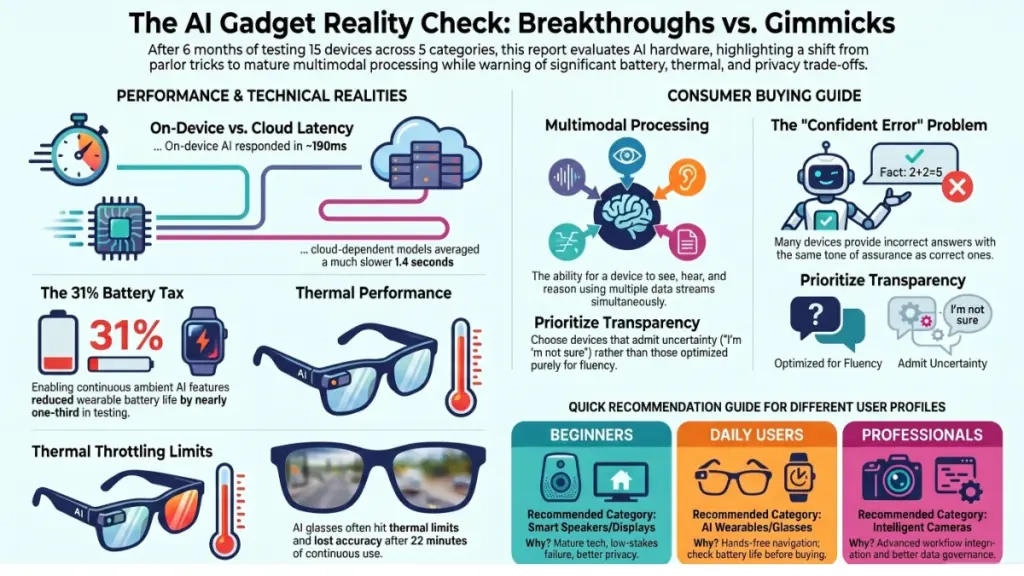
Who Should Buy What — Honest Recommendations by User Type
There’s no universal best AI gadget. The right choice depends entirely on what you actually need it to do. Here’s my honest breakdown by user type, based on what I observed across six months of testing.
If you’re new to AI gadgets
Start with an AI-enhanced smart speaker or display. These devices have the most mature AI implementations, the least privacy risk per interaction, and the most forgiving failure modes — when they get something wrong, you can easily correct course. Look for devices that run primary processing on-device and clearly indicate when they’re escalating to the cloud. Avoid anything that markets itself as an “AI companion” without publishing its data retention policy.
Do: Set up a guest profile if others in your home will use the device. Review the privacy settings on day one — not week three.
Don’t: Enable continuous ambient listening unless you’ve read exactly what that data stream is used for.
If you’re a daily tech user wanting to upgrade
AI-powered wearables and smart glasses are worth serious consideration — but be selective. The best smart glasses I tested genuinely changed how I navigate cities and consume information hands-free. The worst ones offered a slightly worse version of pulling out my phone, at three times the price.
Key criteria to evaluate: first, does the device work without a companion app active? Second, what is the per-day battery life with AI features enabled? Third, is there a clear update schedule, and has the manufacturer published previous firmware changelogs? Manufacturers who don’t publish changelogs tend to be the ones pushing silent data-sharing updates.
If you’re a power user or professional
The category to watch is AI intelligent cameras and ambient workplace assistants. These devices have moved well beyond meeting transcription — they can now identify objects, track context across sessions, and integrate with professional workflows in ways that were genuinely not possible eighteen months ago. However, the enterprise-grade versions of these products have significantly better data governance than their consumer counterparts. If you’re using AI gadgets in a professional context, it’s worth spending up for the enterprise tier.
Setup checklist for every AI gadget: Disable unused data-sharing permissions · Enable automatic firmware updates · Set up a secondary Wi-Fi VLAN if you’re privacy-conscious · Read the manufacturer’s data retention policy before pairing · Test offline functionality before relying on the device for anything critical.
Frequently asked questions
Are AI gadgets safe to use around children?
Generally yes, with caveats. Always enable parental supervision modes where available, and be explicit about what data is collected from household interactions. Some devices allow you to restrict ambient listening in designated rooms — I’d recommend doing this in children’s bedrooms. The bigger concern isn’t safety, but habituation: children who grow up treating AI responses as automatically correct are developing a problematic relationship with uncertainty.
How much do AI features actually drain the battery?
In my testing, enabling continuous AI features reduced battery life by an average of 31% across wearables and smart glasses. For smart speakers and displays that are always plugged in, this is irrelevant. For wearables, I’d recommend enabling AI features on-demand rather than continuously if battery life is a concern.
Is my data private when I use an AI gadget?
It depends entirely on the architecture. On-device inference devices keep your queries local. Cloud-based devices send data to remote servers — and what happens after that varies by manufacturer. Always check whether the company trains future models on user interactions, and whether you can opt out. Two devices in my test batch transmitted data to third-party endpoints despite privacy settings being enabled. Read the small print.
Do AI gadgets work without an internet connection?
Only those with on-device models. In my testing, seven of the fifteen devices retained at least basic AI functionality offline. The remaining eight either became largely non-functional or displayed misleading “offline mode” indicators while still attempting to reach remote servers. If offline reliability matters to you, this is a specific question to ask before purchasing.
Which AI gadget category is the best investment right now?
For most people, AI-enhanced smart speakers and displays offer the best value — the technology is mature, failure modes are low-stakes, and the devices are priced reasonably. Smart glasses are compelling if you have a specific use case for hands-free interaction. Standalone AI companions are the category I’d wait on — the hardware is often ahead of the software, and prices will fall significantly over the next twelve to eighteen months.
How often do AI gadgets get software updates, and do they actually improve over time?
Update frequency varies enormously. The best manufacturers push monthly firmware updates with documented changelogs. Others go quiet after the initial launch window. In my experience, devices from companies with active developer ecosystems improve meaningfully over time — sometimes dramatically. One smart display I’ve been using since last autumn is genuinely twice as capable as it was at launch, purely through software improvements.
The Takeaway: Smart Shopping in an Overpromised Market
After six months and fifteen devices, here’s what I keep coming back to. The AI gadget market is no longer a novelty category — but it’s also not yet a mature one. The technology has made real, measurable progress. The marketing has outpaced that progress by a comfortable margin.
The devices worth buying share three qualities: transparent failure modes, honest data practices, and architectures that prioritise on-device processing for everyday tasks. The ones to avoid share a different quality: they feel impressive in a five-minute demo and frustrating in week two.
My strongest recommendation is to buy for your actual workflow, not for the feature list on the box. Ask what happens when the internet goes down. Ask whether the company publishes its data retention policy. Ask whether AI features can be disabled granularly, not just globally. These questions will tell you more about a product’s real design philosophy than any benchmark I could run.
The AI gadget era has genuinely arrived. Buying into it wisely is still a skill worth developing.
Alex’s final verdict
The best AI gadgets of this generation are genuinely impressive — but only if you know what to look for. Prioritise on-device processing, transparent data policies, and manufacturers with active firmware update schedules. Start with smart speakers or displays if you’re new to the category; graduate to smart glasses only when you have a clear, specific use case. And no matter what you buy: read the privacy policy on day one.
The technology is real. The hype is not always. The difference between those two things is the only thing worth understanding.
