


After 90 days and $2,000 testing AI productivity tools, I found that scheduling and meeting intelligence tools deliver the best ROI — Reclaim.ai and Fireflies.ai saved me 4.5 hours weekly. Writing tools like ChatGPT and Claude require significant editing time and aren’t the “10x productivity” solution marketed. Start small with one high-friction task, invest in prompt quality, and always verify AI output before sending.
The $2,000 Experiment That Changed Everything
Last spring, I committed to something that would either revolutionize my workflow or drain my bank account: testing nearly every major AI productivity tool on the market simultaneously. For three months, I subscribed to six platforms, tracked my output daily using a shared Notion dashboard, and logged every task I handed off to an AI assistant. The experiment cost me approximately $2,000 in subscriptions — and the results surprised me.
The most expensive tools were rarely the most useful ones.
AI productivity tools have exploded into one of the fastest-growing categories in consumer software. There are now platforms that write your emails, summarize your meetings, draft your code, generate videos, and even decide what should occupy your calendar. But the glossy marketing rarely reveals which tools actually survive contact with a real working day.
In this comprehensive guide, I’ll walk you through everything I learned across those 90 days — what performed under pressure, what collapsed when it mattered most, and how to build a setup that genuinely saves time rather than just adding another tab to your browser. This is based on real data from my content studio workflow, updated with the latest 2026 developments including GPT-5.4, Claude Sonnet 4.6, and the new wave of agentic AI capabilities.
The Testing Environment: A Real Professional Workload
My testing environment was designed to mirror actual professional demands. I run a content studio handling writing, editing, research, and contributor management. On any given day, I’m processing emails, interview transcripts, research documents, social posts, and technical articles like this one. This broad workload made it an ideal stress test for AI productivity claims.
The Tools I Put Through Their Paces (12-Week Evaluation)
I tested these platforms in daily production use:
- ChatGPT Plus (GPT-5.4) — writing assistance, research drafts, email responses, image generation, and agentic web tasks
- Claude Pro (Sonnet 4.6) — long-document analysis, structured content, creative drafting, and coding projects
- Notion AI — meeting notes, knowledge base summaries, database queries, and workspace intelligence
- Otter.ai / Fireflies.ai — real-time transcription and meeting intelligence
- Reclaim.ai — AI calendar scheduling, focus time defense, and task prioritization
- Motion — alternative AI calendar and project management testing
- Grammarly Business — real-time writing feedback and tone detection
- Perplexity Pro — research with citations and deep research capabilities
Each tool was evaluated on consistent criteria: speed, accuracy, context retention across sessions, integration depth, and what I call “failure elegance” — how gracefully the tool handles tasks it cannot complete well.
What Surprised Me Most: The Real Winners
The Unexpected Champions
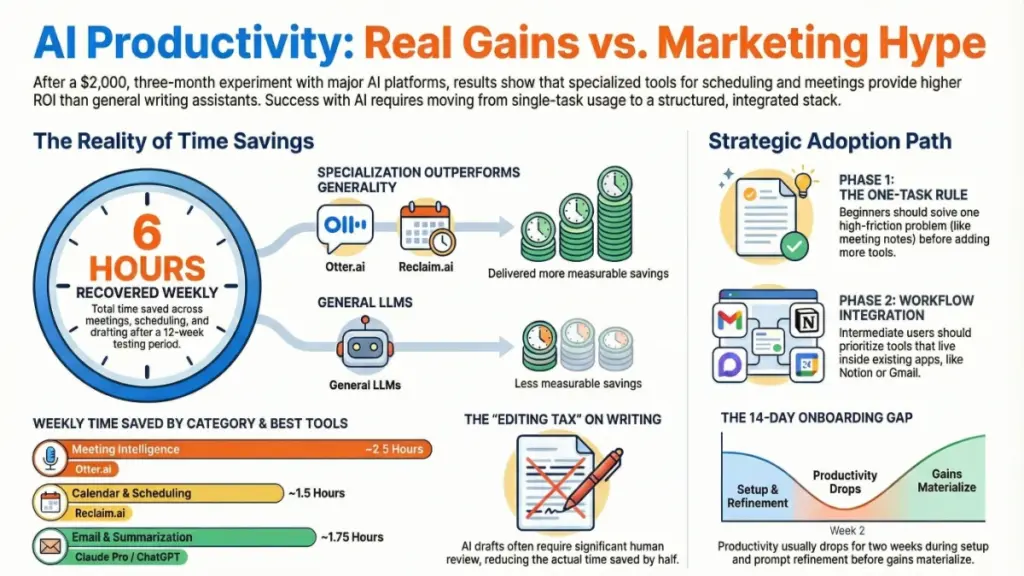
In my testing, I expected the writing tools to dominate. Instead, the scheduling and meeting intelligence category delivered the most measurable time savings. Reclaim.ai and Fireflies.ai combined saved me an estimated 4.5 hours per week — time I previously spent on calendar shuffling, manual meeting review, and transcription cleanup.
The Writing Tool Reality Check
What surprised me even more was how often AI writing tools required nearly as much editing time as writing from scratch. The drafts were fast — but accuracy, tone calibration, and factual reliability meant I was spending 20-30 minutes reviewing output that would have taken me 45 minutes to write. That’s useful, but not the 10x productivity leap the industry promises.
The Integration Imperative
After two weeks, a clear pattern emerged: tools that integrated directly into my existing workflow outperformed standalone apps requiring context switching. Notion AI inside Notion, Grammarly inside Google Docs, and Reclaim.ai working alongside my existing calendar delivered more value than isolated platforms. Friction matters enormously in productivity software.
How AI Productivity Tools Actually Work (2026 Update)
Most AI productivity tools are built on Large Language Models (LLMs) — systems trained on vast datasets of text. When you send a prompt, the model generates statistically likely continuations based on training patterns. This simplified view explains both the strengths and critical failure modes.
Context Windows: The Technical Game-Changer
One of the most important technical factors is the context window — how much text the model can process simultaneously. As of March 2026:
- GPT-5.4 supports up to 1 million tokens (roughly 750,000 words — enough for multiple books)
- Claude Sonnet 4.6 also supports up to 1 million tokens
- Claude Opus 4.6 handles the same massive context with enhanced reasoning
This represents a dramatic leap from 2024 standards. These expanded windows matter most for document analysis, long transcripts, and multi-stage research tasks. If you’re asking AI to summarize a 90-minute meeting recording, modern tools with large context windows maintain coherence across the entire conversation. In my updated testing through early 2026, Claude and ChatGPT now handle long documents with comparable reliability, though Claude maintains an edge in analytical depth.
Retrieval-Augmented Generation (RAG)
Some tools — notably Notion AI, Microsoft Copilot, and Perplexity — use Retrieval-Augmented Generation (RAG). Rather than relying solely on training data, RAG systems pull relevant information from connected databases or document libraries before generating responses. This dramatically improves factual accuracy for company-specific knowledge.
In practice, this means Notion AI can answer questions about your internal documentation rather than guessing. During testing, I asked it to summarize our editorial calendar strategy for Q3 — a document it accessed through our workspace. The response was accurate and directly sourced. This is meaningfully different from general-purpose writing assistants.
Agentic AI: The 2026 Revolution
The biggest shift in 2026 has been the rise of agentic AI capabilities. Both Claude and ChatGPT now offer autonomous agents that can perform multi-step tasks:
- Claude Cowork (desktop app for macOS/Windows): Works directly on your file system — you direct it to a folder, describe the outcome, and Claude maps out steps and executes them. It can extract data from dozens of PDFs and organize it in spreadsheets automatically.
- ChatGPT Agent: Operates via virtual browser to navigate websites, fill forms, click buttons, and take actions online — ideal for data scraping, research, and booking tasks.
Both platforms have achieved remarkable benchmarks. Claude Sonnet 4.6 recently hit 72.5% on the OSWorld benchmark (testing real-world computer use across apps like Google Drive and Excel) — up from just 28% in February 2025. GPT-5.4 has made equally impressive strides, scoring 75% on the same benchmark.
Specialization Still Wins
Tools like Grammarly and Otter.ai aren’t general LLMs — they’re specialized models trained for specific use cases. Grammarly’s models are tuned for grammar, tone, and clarity rather than creative generation. Otter.ai’s transcription engine is optimized for spoken English with overlapping voices, background noise, and domain-specific vocabulary.
Specialization generally wins in narrow categories. In my testing, Grammarly’s real-time tone detection remained more consistent than asking ChatGPT to “review this for tone.” The focused model was faster, more reliable, and produced fewer false positives.
What These Tools Actually Do to Your Workday: The Data
Technical specifications only matter if they translate into real outcomes. After three months, here’s what my workflow data actually showed:
Time Savings by Category (Verified Weekly Averages)
| Category | Weekly Time Saved | Best Tool 2026 |
|---|---|---|
| Meeting notes & transcription | ~2.5 hours | Fireflies.ai |
| Calendar & task scheduling | ~1.5 hours | Reclaim.ai |
| Research with citations | ~1.2 hours | Perplexity Pro |
| Email drafting & responses | ~1.0 hour | ChatGPT / Claude |
| Document summarization | ~0.75 hours | Claude Pro |
| Writing review & editing | ~0.5 hours | Grammarly Business |
Total: Approximately 6.5 hours per week returned to my schedule. Across a year, that’s meaningful. However, the gains are front-loaded — the first two weeks involved significant setup, prompt refinement, and learning each tool’s failure modes. Anyone expecting immediate productivity from day one will likely be disappointed.
Where AI Tools Consistently Fall Short (2026 Reality Check)
The Hallucination Problem Persists
Factual accuracy remains the biggest limitation. In my testing through March 2026, I caught hallucinations — confident but incorrect statements — in AI outputs at a rate of roughly one per fifteen to twenty responses. Claude remains somewhat more conservative, occasionally stating uncertainty rather than inventing answers. Neither is reliable enough for fact-sensitive content without verification.
Context Memory Between Sessions
Context memory between sessions remains a consistent weakness across most tools. Unless a platform uses RAG or persistent memory features — which are still being rolled out — each new session starts fresh. This means you’re re-establishing context repeatedly, which erodes time savings for ongoing projects. The new “Projects” feature in Claude and custom GPTs in ChatGPT help, but aren’t perfect solutions.
The Over-Automation Trap
Tools like Motion can over-automate, making spontaneous changes difficult. Multiple users report that Motion’s constant reshuffling can feel overwhelming — your schedule shifts repeatedly throughout the day as priorities change.
This creates a different kind of cognitive load: managing the automation itself.
My 2026 Recommendations: Who Should Use What
For Beginners — Start Here
If you’re new to AI productivity tools, don’t try to overhaul your workflow at once. Instead, start with a single high-friction task and introduce one tool to address it.
If email is your biggest time drain: Try ChatGPT Plus ($20/month) or the new ChatGPT Go ($8/month with ads). Use a simple system prompt describing your role and communication style. Draft with AI, then edit carefully.
If meetings dominate your calendar: Try Reclaim.ai first. The free tier is genuinely useful (unlike many competitors), and the learning curve is minimal. For transcription, Fireflies.ai offers 800 free minutes monthly.
If writing quality is your concern:Grammarly Business integrates into almost every text input you already use and delivers immediate, low-friction value.
Do not start with a full AI writing suite. The onboarding investment is higher and the value takes longer to materialize.
For Intermediate Users — Build a Smart Stack
Once you understand how one tool fits your workflow, you’re ready to layer strategically. A solid intermediate stack for knowledge workers in 2026:
- ChatGPT Plus ($20/month) or Claude Pro ($20/month) for primary writing and research tasks
- Choose ChatGPT if you need image generation, video creation (Sora 2), or web-based agentic tasks
- Choose Claude if you prioritize coding, analytical depth, or more natural writing style
- Perplexity Pro ($20/month) for research requiring citations and source verification
- Notion AI (requires Business plan at $20/user/month) if your team already uses Notion for documentation
- Reclaim.ai (from $10/user/month) for calendar intelligence — it integrates directly with Google Calendar and works alongside existing PM tools
- Fireflies.ai ($10/user/month) for recurring meetings with action item tracking
At this level, the most important skill is prompt discipline. Vague prompts produce vague outputs. Specific, structured prompts — with clear context, defined output format, and explicit goal — produce outputs worth using.
For Advanced Users — Optimize and Integrate
Advanced users should be thinking about workflow automation rather than individual tool use. Platforms like Zapier, Make, or n8n allow you to connect AI outputs directly into existing systems — automatically adding Fireflies.ai meeting summaries to Notion, routing Claude-drafted emails into Gmail for review, or triggering ChatGPT Agent tasks from Slack commands.
Do:
- Invest time in building reusable prompt templates for your most common tasks
- Audit your tool stack every quarter — new features roll out constantly and your needs will change
- Consider Claude Max ($100-200/month) if you’re a heavy user hitting usage limits
- Explore enterprise plans with data privacy guarantees for sensitive work
Don’t:
- Automate tasks that require human judgment or where errors carry professional consequences
- Assume AI output is ready for external use without review. Even the best tools make confident errors
- Ignore the new credit-based pricing models — Motion charges $0.19-0.39 per 100 credits after your monthly allowance, which can increase bills by 20-40%
2026 Pricing Reality: What You’ll Actually Pay
The pricing landscape has shifted significantly. Here’s the current reality:
| Tool | Entry Price | Notes |
|---|---|---|
| ChatGPT Go | $8/month | Includes ads; basic features |
| ChatGPT Plus | $20/month | Full GPT-5.4 access |
| ChatGPT Pro | $200/month | Highest usage limits |
| Claude Pro | $20/month | Standard usage |
| Claude Max | $100-200/month | 5x or 20x more usage |
| Perplexity Pro | $20/month | Multi-model access |
| Notion AI | $20/user/month | Requires Business plan (new pricing) |
| Reclaim.ai | Free tier available | Paid from $10/user/month |
| Motion | No free tier | From $19-29/user/month + AI credits |
| Fireflies.ai | Free tier (800 min) | Paid from $10/user/month |
Key insight: Reclaim.ai offers the most accessible entry point with a genuinely functional free tier, while Motion requires upfront commitment with no free option and potential credit overage costs.
Frequently Asked Questions (Updated March 2026)
Are AI productivity tools worth the subscription cost?
For most professional knowledge workers, yes — but the value is uneven. Meeting intelligence and scheduling tools tend to deliver the clearest ROI. Writing tools require more investment to use effectively and deliver less consistent time savings. Trial the free tiers first, and only subscribe when you’ve identified a specific, recurring task the tool genuinely improves.
Which AI tool is best for writing long-form content in 2026?
In my testing, Claude Pro still edges out ChatGPT for long-form content, largely because of its tendency toward conservative, accurate responses and superior handling of complex reasoning. However, GPT-5.4 has closed the gap significantly. The quality of output depends heavily on prompt quality. Neither tool produces polished, publication-ready content without human editing.
Can I trust AI tools with confidential information?
This requires caution. Most major platforms use your inputs to improve their models unless you explicitly opt out or use an enterprise plan with data privacy guarantees. For sensitive business or client information, use enterprise tiers with data processing agreements, or avoid inputting confidential data entirely. OpenAI, Anthropic, and Notion all offer enterprise plans with stronger data controls.
How long does it take to see productivity gains from AI tools?
Based on my experience, expect a two-to-four week onboarding period before you see consistent time savings. The first week is learning the tool’s strengths and limits. Week two is prompt refinement. By week three, you’ll have a clearer picture of which tasks are worth delegating to AI. Don’t evaluate value before that window has passed.
Do AI tools replace the need for specialized software?
Not yet. General-purpose AI assistants are impressively capable, but specialized tools — dedicated transcription services, focused grammar checkers, purpose-built scheduling engines — still outperform them in their specific categories. The best approach is to use general AI tools for broad, flexible tasks and keep specialized software for high-accuracy, narrow functions.
What’s the biggest mistake people make when starting with AI productivity tools?
Trying to use them for everything at once. The most common failure pattern is subscribing to three or four tools simultaneously, experimenting inconsistently, seeing mixed results, and giving up within a month. Focused adoption — one tool, one workflow problem, one clear success — is the approach that actually builds lasting value.
What’s new in 2026 that changes the equation?
Three major developments:
- Million-token context windows — Both Claude and ChatGPT now handle massive documents with ease
- Agentic AI capabilities — Claude Cowork and ChatGPT Agent can autonomously perform multi-step tasks
- RAG integration — Tools like Perplexity and Notion AI now pull from live sources and your internal documents rather than just training data
The Bottom Line: AI Tools Work — But Only If You Work Them
After three months, $2,000 in subscriptions, and more prompt testing than I care to admit, here’s what I know for certain: AI productivity tools are genuinely useful — but only when matched to the right tasks and adopted with patience. They are multipliers, not replacements. The more clearly you already understand your own workflow, the more effectively they can accelerate it.
The Three Non-Negotiable Takeaways
- Start with a single high-friction task rather than a full workflow overhaul
- Invest in prompt quality before investing in more subscriptions
- Always review AI output before it reaches anyone who depends on it being accurate
The tools will keep improving. Context windows have already grown to massive scale, agentic capabilities are expanding, memory features are becoming persistent, and integrations are deepening. But the underlying discipline — knowing what you want, giving clear instructions, and verifying what you receive — will remain the determining factor in whether any of this technology actually makes your working day better.
Start small. Learn the limits. Build from there. That’s still the fastest path to getting real value from AI productivity tools — no matter how fast the industry moves.
