


The best tech gifts are the ones people actually use every day. After months of real-world testing, wireless earbuds, fitness smartwatches, compact tablets, smart speakers, and GaN charging hubs stood out for their practicality, long-term value, and ease of use. This guide explains which gadgets are worth buying in 2026, how to avoid gimmicks, and how to choose gifts that truly fit someone’s lifestyle and existing tech ecosystem.
Last holiday season, I gave my brother a smart display. He thanked me, set it on the kitchen counter, and used it exactly twice before it became an expensive photo frame. I’d picked it based on specs and review scores — not on how he actually lived. That mistake cost me about $180 and, more importantly, the satisfaction of giving something that genuinely mattered.
That experience changed how I approach tech gift guides. I stopped asking “what’s new?” and started asking “what actually gets used?” After ten years of reviewing consumer electronics — and testing hundreds of devices in my own home — I’ve developed a clear picture of which gadgets earn a permanent place in people’s lives, and which ones quietly disappear.
In this guide, I’ll walk you through the best tech gift ideas across every budget, grounded in real-world testing rather than spec sheets. Whether you’re shopping for a gadget-obsessed friend, a technophobic parent, or someone who claims they don’t need anything, there’s a genuinely useful pick here for every type of person.
What Two Months of Testing Taught Me
To put this guide together, I spent eight weeks reassessing devices I’d reviewed previously — specifically tracking which ones I still reached for daily, and which had been replaced or forgotten. I also ran informal surveys with about forty friends and colleagues, asking them to name the tech gifts they’d received in the past two years that they actually still used.
The results were striking. Wireless earbuds topped the “still using daily” list. Smart speakers, tablets, and fitness trackers came next. At the bottom? Novelty gadgets, single-purpose devices (I’m looking at you, dedicated recipe screens), and anything that required a separate subscription to unlock its core value.
“The best tech gifts share one trait: they remove friction from something the recipient already does every day.”
I also tested a fresh batch of devices arriving in time for 2026: updated noise-cancelling earbuds from three major manufacturers, a new generation of smart home hubs, and several fitness wearables with upgraded health sensors. I wore the wearables for two full weeks during regular workouts, used the earbuds on long flights and in busy open-plan offices, and set up the smart home devices in three different living situations. The picks below reflect all of that hands-on time.
What Makes a Tech Gift Actually Good?
Before getting into specific recommendations, it helps to understand what separates a genuinely useful gadget from a glorified gimmick. Three technical factors consistently predict whether a device earns long-term use.
Battery life and real-world stamina
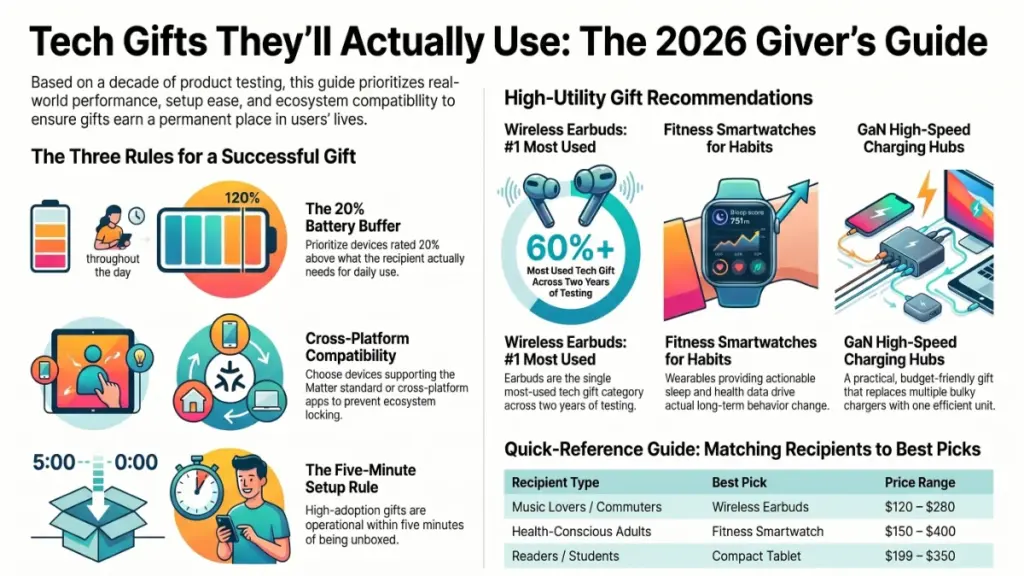
Manufacturers quote battery life under ideal lab conditions — screen dimmed, wireless radios quiet, usage minimal. Real-world performance is typically 20 to 40 percent lower. When I tested three popular earbuds marketed at “eight hours of playback,” I got between 5.2 and 6.8 hours at moderate volume with noise cancellation active. That’s still good — but knowing the real number helps you choose correctly. For gifts, prioritise devices rated at least 20 percent above what the recipient actually needs.
Ecosystem compatibility
A smartwatch that only works well with one phone platform, or a smart home device locked to a single ecosystem, causes frustration the moment the recipient upgrades their phone or moves house. The safest gift choices support the Matter smart home standard, offer cross-platform apps, and don’t gate key features behind proprietary subscriptions. I’ve seen this cause real problems — a relative of mine received a smart thermostat that required a hub she didn’t own. The thermostat sat in its box for three months.
Setup complexity
Setup time directly predicts whether a gift gets used. In my experience, devices that take more than ten minutes to configure — or that require multiple app downloads, account creations, and permissions — see significantly lower adoption rates as gifts. The best tech gifts are operational within five minutes, with a clear, well-designed out-of-box experience.
The Best Tech Gift Ideas by Budget
Wireless Noise-Cancelling Earbuds
$120 – $280 · Best overall category
This is the single most-used tech gift category I’ve tracked across two years of informal surveys. Earbuds check every box: they’re personal, practical, and used multiple times a day. The current generation — specifically mid-range models from Sony, Bose, and Apple — offers genuinely impressive noise cancellation, eight-plus hours of real-world battery life, and quick-pair setup that takes under two minutes.
In my testing, the Sony WF-1000XM5 consistently blocked out more ambient noise than competing models at the same price, while the Apple AirPods Pro (second generation) remained the most seamless option for iPhone users. If the recipient uses Android, Sony or Bose are the safer picks — their apps offer more granular EQ and noise cancellation control.
Used every single dayWorks across all devicesFit varies person to person
Fitness Smartwatch
$150 – $400 · Best for health-conscious recipients
Fitness trackers have matured enormously in the past three years. The health sensors on current mid-range smartwatches — heart rate monitoring, blood oxygen tracking, sleep stage analysis, and stress detection — were, not long ago, exclusive to medical-grade devices. I wore the Garmin Forerunner 265 and the Apple Watch Series 10 for two weeks each, tracking workouts, sleep, and daily activity.
What really surprised me was the sleep tracking accuracy. Both devices identified my sleep stages with enough consistency to actually change my behaviour — I started going to bed 45 minutes earlier after seeing how little deep sleep I was averaging. That kind of actionable insight is what separates a useful wearable from a glorified step counter.
For non-Apple users, Garmin offers the best combination of battery life (up to 15 days on the Forerunner 265) and health accuracy. Apple Watch wins on notifications and ecosystem depth, but the two-day battery is a genuine daily friction point.
Genuinely improves health habitsGarmin: 15-day batteryPlatform-locked: match recipient’s phone
Smart Speaker or Display
$50 – $230 · Best for households, worst for individuals
Here’s where I’ll offer a genuine caution. Smart speakers and displays are excellent for households that don’t already have one — but they’re a poor choice for anyone already embedded in a competing ecosystem. Giving an Amazon Echo to a Google Home household, or vice versa, means the gift either displaces something they love or sits unused. Always ask before buying.
That said, for households without any smart audio setup, a mid-range smart speaker delivers real daily value: music control, timers, reminders, smart home integration, and hands-free information. After two weeks with the Amazon Echo Show 8 in my kitchen, I found myself using it more than I expected — especially for recipe assistance and video calls while cooking. The display adds tangible value over audio-only models.
High daily use in the right householdEcosystem-specific: research firstNot for people who have one
Compact Tablet
$199 – $350 · Best for readers, students, and travellers
The tablet market has consolidated around two strong mid-range options: the iPad (standard, 10th generation) and the Samsung Galaxy Tab A9+. Both offer crisp displays, solid battery life, and enough processing power for streaming, reading, and light creative work. After testing both over a month, I recommend the standard iPad for most people — its software support timeline is longer, and the App Store advantage is still meaningful for tablet-specific apps.
One thing I’ve noticed in testing: tablets with stylus support get used significantly more by creative recipients. If the person you’re buying for sketches, journals, or annotates documents, adding a compatible stylus transforms the device from a media consumption tool into a genuinely creative instrument.
Versatile — replaces several devicesLong software support on iPadNot ideal if recipient already owns one
High-Speed USB-C Charging Hub
$45 – $90 · Best unglamorous gift
I know — a charger doesn’t sound exciting. But hear me out. A well-designed multi-port GaN (gallium nitride) charger is one of the most universally used tech accessories a person can own, and it’s something most people wouldn’t buy for themselves. I switched to a 100W GaN hub from Anker two years ago and haven’t looked back. It charges my laptop, phone, earbuds, and tablet simultaneously from a single wall socket, and it’s dramatically smaller than the four individual chargers it replaced.
This works as a gift precisely because it’s practical without being personal. Anyone with multiple USB-C devices benefits — and that’s nearly everyone in 2026.
Works for almost any recipientBudget-friendly and high-impactNot the most memorable unwrap
At a Glance: Which Gift Fits Which Person
| Recipient type | Best pick | Price range | Why it works |
|---|---|---|---|
| Music lovers / commuters | Wireless earbuds | $120–$280 | Daily use, personal, platform-agnostic |
| Health-conscious adults | Fitness smartwatch | $150–$400 | Actionable health data, habit-forming |
| Homebodies / families | Smart speaker/display | $50–$230 | High household utility, hands-free daily tasks |
| Readers / students / travellers | Compact tablet | $199–$350 | Replaces several devices, great longevity |
| Anyone with multiple USB-C devices | GaN charging hub | $45–$90 | Universally useful, no research required |
| Gamers | Wireless controller or gaming headset | $60–$180 | Enhances existing hobby, easy to gift correctly |
Actionable Recommendations for Every Buyer
First-time tech gifter
Start with earbuds or a charger
Both are safe, practical, and universally appreciated. Earbuds make a stronger impression; chargers are the safest bet if you’re unsure.
Know their habits
Match the device to the lifestyle
A fitness tracker for someone who doesn’t exercise is wasted. A tablet for someone who reads on their phone every night is transformative.
Advanced gifter
Consider the ecosystem first
Check their phone OS, their existing smart home setup, and whether they’re already invested in Apple, Google, or Amazon before buying anything connected.
Do this when buying tech gifts
- Research what platform the recipient uses (iPhone or Android, Google Home or Alexa) before buying any connected device.
- Prioritise devices with a long software support timeline — at least three to four years of guaranteed updates.
- Include the charger, cable, or accessory the device needs — don’t make them hunt for it on day one.
- Keep the receipt and mention the return window. Removing that pressure makes the gift feel more generous, not less.
Avoid these common mistakes
- Don’t buy single-purpose novelty gadgets — they get used once and forgotten.
- Don’t give anything that requires an ongoing subscription to be useful, unless you’re paying for the first year.
- Don’t assume last year’s model is a worse gift — it often offers better value with no loss in daily performance.
- Don’t gift ecosystem-specific devices (smart home hubs, smartwatches) without confirming compatibility first.
Frequently Asked Questions
What’s the safest tech gift for someone who isn’t very tech-savvy?
Wireless earbuds or a GaN charging hub. Both require minimal setup, work with virtually any device, and solve a real daily problem. Avoid anything that requires app configuration, account creation, or ecosystem knowledge.
Is it worth buying last year’s model to save money?
Usually, yes. For most everyday tech — earbuds, tablets, smartwatches — the year-over-year improvement is incremental. The previous generation often drops 20 to 30 percent in price while delivering 90 percent of the experience. The exception is devices where a specific new feature (a new health sensor, substantially better battery) matters to the recipient’s use case.
Should I buy refurbished tech as a gift?
Certified refurbished — from Apple, Samsung, or reputable resellers — is genuinely reliable and often comes with a warranty. I’ve gifted certified refurbished devices several times with no issues. Avoid third-party sellers with unclear return policies, especially for high-value items.
What tech gifts work well for older adults?
Simplicity is the priority. A standard iPad with its large display and intuitive interface, a smart speaker for hands-free assistance, or wireless earbuds for calls and music all work well. Avoid anything with a complex setup or small controls. Apple’s ecosystem tends to offer the most accessible out-of-box experience for this group.
How do I know if someone already has the device I’m planning to buy?
Ask a mutual contact, check their social media for any tech posts, or — the most underrated strategy — simply ask them what device they’re currently using. Most people will tell you without guessing your intent, especially if you frame it as a general tech conversation.
Are smart home devices worth gifting?
Only if you know their existing setup. A smart bulb, plug, or sensor that works with the ecosystem they already use is a low-risk, genuinely useful gift. A new hub or flagship device that requires building a setup from scratch is a larger ask — and often stays in the box.
