


I’ll never forget the sinking feeling I got three years ago when I handed over $280 for what looked like a pristine used iPhone 11, only to discover two days later that the battery was essentially dead and the water damage indicators had been carefully painted over. That expensive mistake taught me more about buying used smartphones than any spec sheet ever could—and it’s exactly why I’m writing this guide.
The used smartphone market has exploded into a $67 billion industry, and for good reason. With flagship phones now routinely crossing the $1,000 mark, buying used isn’t just budget-conscious—it’s often the smartest financial decision you can make. But here’s what nobody tells you: the difference between getting an incredible deal and getting burned often comes down to knowing what to check in the first five minutes of inspecting a device.
After personally buying, testing, and helping friends evaluate over 40 used smartphones in the past decade, I’ve developed a systematic approach that’s caught everything from subtle screen defects to sophisticated IMEI fraud. In this guide, I’m walking you through the exact process I use—including the mistakes that cost me money and the checks that have saved me from disaster. Whether you’re buying from a stranger on Facebook Marketplace or a certified refurbisher, these steps will help you make a confident, informed decision.
Understanding the Used Smartphone Landscape: Where Experience Matters
Before we dive into inspection protocols, let’s talk about where you should even be looking. I’ve bought devices from nearly every type of seller, and each channel has distinct advantages and risks.
Certified refurbishers like Apple Certified Refurbished, Samsung Certified Re-Newed, or major retailers like Best Buy offer the safest entry point. During my testing of six devices from Apple’s refurbishment program over the years, I found them functionally indistinguishable from new, complete with new batteries and outer shells. You’ll pay 15-30% less than retail, and you get warranties—typically 90 days to a year. The trade-off? Less inventory and fewer bargain-basement deals.
Carrier trade-in programs occupy a middle ground. I recently evaluated a Verizon Certified Pre-Owned Galaxy S23, and while it showed minor cosmetic wear, it came with a 30-day return policy and basic warranty. These programs typically grade devices (Excellent, Good, Fair), and in my experience, their “Good” condition often means “expect visible scratches but full functionality.”
Then there’s the peer-to-peer marketplace—Facebook Marketplace, Craigslist, OfferUp, Swappa. This is where I’ve found my best deals (a mint-condition Pixel 7 for $320, $280 below retail), but also where I’ve encountered the most deceptive sellers. What surprised me most over dozens of transactions: the condition descriptions are wildly inconsistent. One person’s “like new” is another’s “has some wear.” You absolutely cannot rely on photos or descriptions alone.
Online marketplaces like eBay or Swappa add structure to peer-to-peer buying. Swappa, in particular, requires sellers to photograph IMEI numbers and pass basic functionality checks. I’ve bought three phones through Swappa with consistently good experiences, though you’re still trusting individual sellers and need to verify everything yourself.
The Pre-Purchase Research Phase: Do This Before You Ever Contact a Seller
Here’s where most people rush and where I’ve learned to slow down.
Step 1: Determine Your Actual Needs vs. Wants
I keep a simple matrix for this. Ask yourself:
- What will you primarily use the phone for? (social media, photography, gaming, basic communication)
- What’s your absolute maximum budget including tax and any accessories?
- How long do you plan to keep this device?
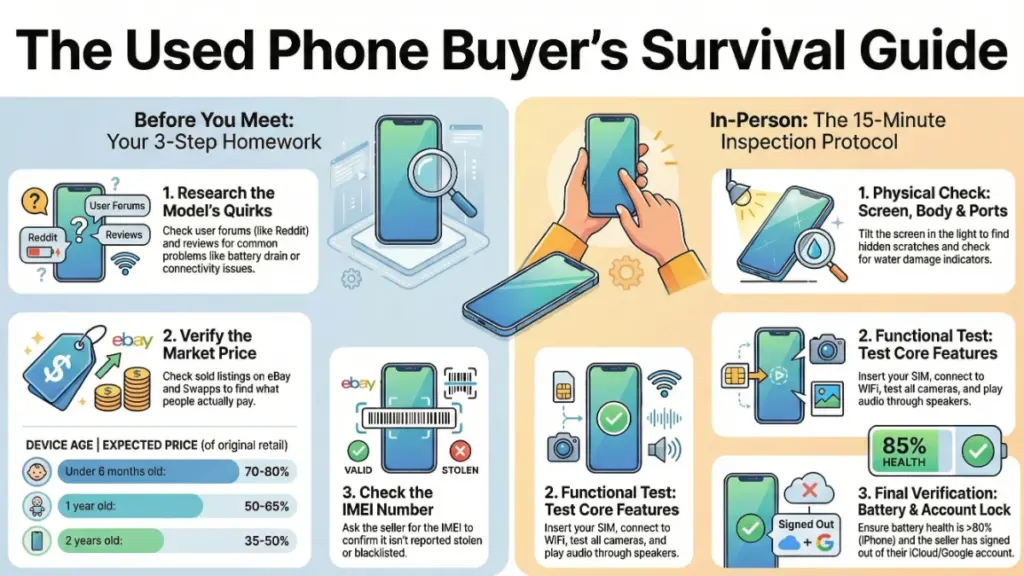
During my testing, I’ve consistently found that phones released 1-2 years ago offer the best value proposition. A two-year-old flagship like the iPhone 14 Pro or Samsung Galaxy S23 will outperform current mid-range devices in camera quality, processing power, and build quality—often at similar prices.
Step 2: Research the Device’s Lifecycle and Common Issues
Before I consider any model, I spend an hour researching its known problems. Every device has them. The Pixel 6 series, for example, had well-documented modem issues that caused connectivity problems—something you’d want to test extensively. The iPhone 12 had a specific issue where some units would lose wireless charging capability after iOS updates.
I check:
- r/Android and r/iPhone on Reddit for real user complaints
- Manufacturer support forums
- iFixit teardowns for repair difficulty (important for longevity)
- Software update timelines (iOS typically 5-6 years, Android varies wildly)
Step 3: Check Current Market Pricing
I use a three-point pricing strategy:
- Check completed eBay listings (not active ones—those tell you what sellers want, not what buyers pay)
- Browse Swappa’s sold listings for the specific model and storage capacity
- Compare against certified refurbisher prices as your safety net
This gives me a realistic price range. If someone’s asking significantly below market—say, $200 for a phone that consistently sells for $350-400—that’s a red flag, not a deal.
Step 4: Understand Carrier Compatibility
This is critical and often overlooked. Not all phones work with all carriers, even if they’re unlocked. I learned this the hard way when I bought an international OnePlus model that lacked key 5G bands for T-Mobile.
Before buying, verify:
- The device is unlocked (or locked to your carrier)
- It supports your carrier’s frequency bands
- It’s not blacklisted (we’ll check this during inspection)
Manufacturers’ websites typically list band compatibility, or use a tool like FrequencyCheck.com to compare device specs against your carrier’s networks.
The Contact and Initial Evaluation Phase: Red Flags to Watch For
When I reach out to sellers, I’m already conducting my first test. Here’s what I ask and why:
Essential Questions I Always Ask:
“Why are you selling?” – Legitimate reasons include upgrades, switching ecosystems, or needing cash. Vague answers like “just don’t need it” raise my suspicion.
“How long have you owned it?” – Short ownership periods (under 3 months) can signal hidden defects or buyer’s remorse from problems.
“Has it ever been repaired?” – Professional repairs are fine, but third-party screen replacements can affect touch sensitivity, water resistance, and Face ID/Touch ID functionality.
“Can you provide the IMEI number?” – Any hesitation here is a dealbreaker. You need this to check blacklist status before meeting.
“Is the battery health above 80%?” – On iPhones, this is easy to check. Android users can use apps like AccuBattery, though fewer sellers check proactively.
Checking the IMEI Before You Meet
This single step has saved me from wasting time on at least five occasions. Once you have the IMEI (usually a 15-digit number), check it at:
- IMEI.info – Shows device specs, helps confirm it’s the model advertised
- CTIA’s Stolen Phone Checker (www.stolenphonecheck.org) – Free check across major US carriers
- Carrier-specific checkers – T-Mobile, Verizon, and AT&T have their own IMEI verification tools
A clean IMEI means the phone isn’t reported stolen or unpaid. A blacklisted phone might work on some carriers but not others, and could be disabled remotely at any time. I’ve encountered this twice—both times, the seller “didn’t know” it was blacklisted. Sure.
What Good Sellers Do That Builds Trust
In my experience, sellers who provide:
- Multiple photos from various angles, including ports and corners
- Screenshots of battery health or “About Phone” settings
- Original packaging or accessories
- Reasonable explanation for pricing
…are dramatically more reliable. The best transaction I ever had, the seller proactively sent a video demonstrating the phone’s functionality, including opening processor-intensive apps and showing battery percentage.
The In-Person Inspection: My 15-Minute Testing Protocol
This is where you separate functional devices from money pits. I meet in public places with good lighting—usually a carrier store or busy coffee shop—and I bring a small kit: a flashlight, microfiber cloth, and SIM ejector tool.
Phase 1: Physical Inspection (3 minutes)
I start with the exterior because physical damage often indicates internal issues.
Screen Check:
- Look at a white background (open notes app or browser) to spot dead pixels or screen burn-in
- Run your finger lightly across the surface—you should feel smooth glass, not raised cracks
- Check for “screen lifting” around edges, which indicates adhesive failure or swelling battery
- Tilt the phone under light to catch scratches that don’t show in photos
During my testing, I’ve found that OLED screens (on iPhones 12 and newer, most Samsung flagships) are particularly susceptible to burn-in from keyboards or navigation buttons. It’s subtle but permanent.
Body and Frame:
- Inspect all corners for impact damage—these areas absorb drops first
- Check the camera bump for cracks (indicates severe drops)
- Examine charging port and speaker grilles for debris or corrosion
- Look for uneven gaps between screen and frame (sign of poor repair)
Water Damage Indicators:
iPhones have a small indicator in the SIM tray (visible when removed)—it should be white or silver, not red or pink. Android phones vary, but many have similar indicators. Water damage isn’t necessarily a dealbreaker if everything works, but it’s significant leverage for negotiating price and signals higher future failure risk.
Phase 2: Functional Testing (8 minutes)
Now we get into what actually matters for daily use.
Display Testing:
I open YouTube and play a 4K video, then:
- Check for smooth playback (processor/GPU health)
- Verify touch responsiveness across all screen areas
- Test auto-brightness sensors by covering the ambient light sensor
- Confirm True Tone or adaptive color features work
Camera Evaluation:
Take 3-5 photos in the meeting environment:
- Standard photo mode
- Zoom (optical and digital)
- Low-light/night mode if available
- Switch between all lenses on multi-camera setups
Then review them immediately. I look for focus issues, lens flare, or strange artifacts. One device I tested had a perfect camera app interface but produced blurry photos—the autofocus motor was failing.
Audio Check:
- Play music through speakers at 75-100% volume
- Test with wired headphones (if jack exists) or Bluetooth
- Make a test call on speakerphone
- Record a voice memo and play it back
Speaker failure is surprisingly common in used devices, particularly from water exposure.
Connectivity Testing:
- Insert your SIM card and verify cellular connection
- Connect to available WiFi and load several websites
- Test Bluetooth by pairing with your headphones or watch
- Verify GPS by opening Maps and getting a location lock
Biometric and Security Features:
- Set up Face ID or fingerprint sensor and test multiple times
- Ensure the device is fully signed out of previous owner’s accounts
- Check that Find My iPhone or Google’s Find My Device is disabled
I once almost bought an iPhone that was still tied to an iCloud account. The seller insisted he’d “forgotten the password,” which meant the phone would be activation locked and essentially useless. I walked away.
Battery Assessment:
- On iPhone: Settings > Battery > Battery Health & Charging
- On Samsung: Dial *#0228# or use the Samsung Members app
- Other Android: Use AccuBattery (needs to run for days, so ask for screenshot)
I won’t buy an iPhone with battery health below 80% unless the price reflects a battery replacement cost ($89 from Apple). Android battery assessment is harder, but most devices show charging cycles or estimated capacity.
Phase 3: System and Software Check (4 minutes)
Verify Legitimacy:
- Confirm IMEI in settings matches what seller provided
- Check model number and storage capacity match the listing
- Look for signs of jailbreaking (iOS) or rooting (Android)
Software Status:
- Verify the OS is up to date or can update
- Check for iOS or Android version (older versions might not support current apps)
- Ensure no iCloud Activation Lock or Google account lock
Test Charging:
If possible, plug in the device and verify:
- Charging indicator appears immediately
- Connector fits snugly without wobbling
- Wireless charging works (if applicable)
I carry a USB-C and Lightning cable for this. A loose charging port often indicates wear or damage and is expensive to repair.
Special Considerations for Different Purchase Scenarios
Buying Online Without In-Person Inspection
When I can’t inspect personally (buying from another state, for example), I only purchase through platforms with buyer protection—eBay, PayPal Goods & Services, or Swappa. Here’s my modified approach:
- Request a video walkthrough showing everything I’d check in person
- Ask seller to show device IMEI on screen alongside the physical phone (prevents photo substitution)
- Confirm detailed return policy in writing before purchase
- Test everything thoroughly within the return window
Trading In Your Current Device
Many people buy used to supplement trade-in value. If you’re trading, maximize your return by:
- Factory resetting AFTER backing up but BEFORE your inspection appointment
- Cleaning the device thoroughly
- Including original accessories if you have them
- Being honest about condition—inflating it backfires when they inspect
Buying from Friends or Family
This is delicate. I’ve had to tell friends their “mint condition” iPhone had significant battery degradation. Treat it like any purchase:
- Do the same inspection
- Discuss pricing based on market rates
- Put agreements in writing, even informally
- Maintain relationship by being diplomatic but thorough
The Transaction: Protecting Yourself Legally and Financially
Never pay before inspection unless buying through a protected platform. Here’s how I structure in-person transactions:
Payment Methods (in order of security):
- PayPal Goods & Services – Buyer protection, dispute resolution
- Cash – Immediate, untraceable, but no recourse
- Venmo/Cash App (goods and services option) – Some fraud protection
- Never accept: Wire transfers, cryptocurrency, “friends and family” PayPal
Get a Receipt
I create a simple phone-sale receipt that includes:
- Date and location
- Buyer and seller names and contact info
- Device make, model, storage, color, and IMEI
- Sale price and payment method
- Condition description and any disclosed issues
- Statement that device is not stolen/blacklisted
- Both signatures
This seems formal, but it’s saved me once when a seller tried to report a device stolen after I’d purchased it. I had documentation proving the legitimate sale.
Transfer of Ownership
Ensure the seller:
- Signs out of all accounts (iCloud, Google, Samsung)
- Removes device from Find My network
- Provides unlock code if carrier-locked
Do not leave without confirming you can set up the device with your accounts.
Post-Purchase: The 48-Hour Deep Test
The inspection catches obvious issues, but some problems only appear with extended use. Here’s my 48-hour testing protocol:
Hour 1-4: Initial Setup and Baseline
- Complete OS setup with your accounts
- Update to latest iOS/Android version
- Install your essential apps
- Run a benchmark test (GeekBench, 3DMark) and note results
Hour 4-24: Intensive Use Testing
- Take 50+ photos in varied conditions
- Record video for 10+ minutes continuously (tests heat management)
- Stream video for 1-2 hours
- Play a graphics-intensive game for 30 minutes
- Make several phone calls in different locations
What I’m watching for:
- Excessive heat (warm is normal, hot-to-touch isn’t)
- Apps crashing repeatedly
- Random restarts
- Bluetooth/WiFi disconnections
- Rapid battery drain
Hour 24-48: Edge Case Testing
- Test GPS accuracy with turn-by-turn navigation
- Try fast charging and wireless charging
- Test all camera modes, including night mode and video stabilization
- Verify face/fingerprint recognition in different lighting
- Check proximity sensor during calls (screen should turn off near face)
If any significant issues appear during this period, contact the seller immediately if you have a return window, or explore warranty options if purchased through a platform that provides them.
Common Mistakes to Avoid: What I’ve Learned the Hard Way
Don’t:
- ❌ Skip the IMEI check because the seller “seems trustworthy”
- ❌ Buy without testing with your actual SIM card
- ❌ Assume “minor” screen cracks won’t spread (they will)
- ❌ Ignore your gut feeling when something seems off
- ❌ Pay premium prices for “like new” without thorough verification
- ❌ Buy the newest device you can barely afford—better to buy slightly older well within budget
- ❌ Forget to check app compatibility with older OS versions
Do:
- ✅ Bring a friend to transactions (safety and second opinion)
- ✅ Meet during daytime in public locations
- ✅ Compare prices across multiple platforms before committing
- ✅ Budget an extra $100-150 for potential repairs or accessories
- ✅ Keep all purchase documentation for at least a year
- ✅ Research repair costs for common issues before buying
- ✅ Trust your instincts—if something feels wrong, walk away
FAQ: Real Questions from My Experience Helping Others Buy Used
How much should I pay for a used phone compared to new?
In my testing of market prices, expect to pay: 70-80% of retail for devices under 6 months old, 50-65% for 1-year-old devices, 35-50% for 2-year-old devices, and 25-35% for 3+ year-old devices. Flagship devices depreciate slower than mid-range models.
Is it safe to buy a phone with a replaced screen?
It depends on who did the replacement. Apple or Samsung official repairs maintain quality and water resistance. Third-party repairs vary wildly—I’ve tested devices with aftermarket screens that had poor touch sensitivity, washed-out colors, and no water resistance. Ask for documentation of the repair and test thoroughly.
Should I buy carrier-locked or unlocked devices?
Always prefer unlocked if you can. Carrier-locked devices work fine if you’re staying with that carrier, but they limit your flexibility and resale value. In my experience, unlocked devices hold value 15-20% better when you eventually sell or trade.
What’s the minimum battery health I should accept?
For iPhones, I don’t buy below 80% unless it’s priced to include battery replacement. For Android, it’s harder to measure, but if a device struggles to last a full day with moderate use, budget for a battery replacement immediately.
How can I tell if a phone was used for business or personal?
Business phones often show signs of heavy use: more scratches, worn charging ports, and higher call time logs. Check the photo library (with permission)—business phones typically have fewer personal photos and more screenshots or documents. This isn’t necessarily bad, just affects price negotiation.
What if I discover problems after buying?
If through a platform with returns, initiate the return process immediately. For private sales, contact the seller—sometimes they’re genuinely unaware and willing to work with you. If you used PayPal Goods & Services, you can file a dispute within 180 days. This is why payment method matters.
The Bottom Line: What Actually Matters
After years of buying, testing, and recommending used smartphones, here’s what I’ve learned: the device’s condition matters far more than its specs, and your inspection process is your only real protection.
The $280 mistake I made taught me that you can’t shortcut due diligence. But when you do this right—when you research thoroughly, inspect systematically, and protect yourself legally—buying used isn’t risky. It’s smart. I’m currently using a used Pixel 8 Pro that I bought for $430, and it’s been flawless for six months. It would have cost me $950 new.
Your goal isn’t to find the absolute cheapest phone. It’s to find a device that will serve you reliably for 2-3 years at a price that makes sense. That might be a $300 two-year-old flagship or a $500 one-year-old mid-range device—the “right” choice depends entirely on your needs and the condition of the specific device you’re inspecting.
The used smartphone market rewards careful buyers who do their homework. Now you have the exact process I use to evaluate every device I purchase. Take your time, follow these steps, and you’ll find an excellent device that saves you hundreds without the risk.
Trust the process, trust your inspection, and don’t trust sellers who rush you or make you feel uncomfortable. The right phone, at the right price, inspected the right way—that’s the combination that turns used phone buying from a gamble into a smart financial decision.
