


I’ll never forget the first time I wore a professional-grade fitness tracker during a half-marathon prep cycle. I’d been using a basic smartwatch for years, tracking steps and heart rate, thinking I had all the data I needed. Then I strapped on a Garmin Forerunner 965—and realized I’d been training practically blind.
The difference wasn’t just more numbers on a screen. It was actionable intelligence: real-time VO2 max estimates, training load balance warnings, and recovery recommendations that actually changed how I structured my week. That experience taught me something crucial: for serious athletes, the gap between consumer fitness trackers and advanced training devices isn’t about features—it’s about whether your device helps you train smarter or just tracks you training harder.
If you’re reading this, you’ve probably outgrown basic step counters. Maybe you’re marathon training, cycling competitively, or simply committed to structured periodization. You need metrics that matter: training effect scores, lactate threshold estimates, power output data, and recovery analytics that go beyond “you moved today—good job!”
In this guide, I’ll break down what I’ve learned testing dozens of advanced fitness trackers over the past decade. We’ll look at which metrics actually improve performance, which devices deliver the most reliable data, and how to avoid the expensive mistakes I made early in my testing career.
What Makes a Fitness Tracker “Advanced”? Real-World Performance Metrics
When I first started reviewing fitness devices, I made a common mistake: I assumed more sensors meant better data. I tested a tracker loaded with features—pulse ox, skin temperature, even galvanic skin response—but its GPS constantly drifted, and the heart rate sensor failed during high-intensity intervals.
Here’s what I’ve learned through years of comparative testing: advanced fitness trackers aren’t defined by sensor count. They’re defined by measurement accuracy, data processing sophistication, and how well they translate raw metrics into training guidance.
The Core Metrics That Actually Matter
During a three-month testing period where I wore multiple devices simultaneously, I identified five metric categories that consistently provided actionable training insights:
Cardiovascular Training Zones & VO2 Max Estimation
Accurate heart rate tracking across intensity ranges is non-negotiable. But what really separates advanced trackers is how they process that data. The best devices use algorithms that account for heart rate variability, breathing rate, and movement patterns to estimate VO2 max—your body’s maximum oxygen consumption rate.
In my testing, I compared device estimates against laboratory VO2 max testing on a metabolic cart. The Garmin Forerunner 965, Polar Vantage V3, and COROS APEX 2 Pro all came within 2-3% of lab results after a two-week calibration period. The key? They all required multiple outdoor runs with GPS and chest strap heart rate monitors to establish baseline fitness.
What surprised me: consumer smartwatches like the Apple Watch Ultra 2 actually performed reasonably well for VO2 max estimation during steady-state cardio, but struggled during interval training where heart rate spikes rapidly.
Training Load & Recovery Balance
This is where advanced devices really earn their price tags. Training load metrics quantify how much stress you’re placing on your body across multiple sessions, then compare it to your current fitness level and recovery status.
I spent six weeks following training recommendations from three different platforms: Garmin’s Training Readiness, Polar’s Training Load Pro, and COROS’s Training Load analysis. Each uses slightly different algorithms, but they all integrate:
- Acute training load (last 7 days)
- Chronic training load (last 4-6 weeks)
- Heart rate variability trends
- Sleep quality metrics
- Resting heart rate changes
What really impressed me was how these systems prevented overtraining. During week four, I planned a hard threshold run, but both my Garmin and Polar flagged my recovery status as “poor.” I reluctantly took an easy day instead—and avoided what would likely have been an injury, based on how fatigued I felt the next morning.
GPS Accuracy & Multi-Band Positioning
Here’s a metric that’s easy to overlook until you’re running technical trails or racing in urban canyons. I’ve tested GPS accuracy by running measured track loops, comparing device distances against surveyed course markers, and running identical routes with multiple devices.
The difference between standard GPS and multi-band GNSS (which accesses multiple satellite systems simultaneously) is dramatic in challenging environments. On a tree-covered trail run, my standard GPS watch recorded 5.8 miles while my COROS APEX 2 Pro with multi-band GPS recorded 5.2 miles—nearly matching the trail’s official distance of 5.18 miles.
For road runners, this might seem like a minor detail. But if you’re training for a specific pace or tracking interval distances, even 5-10% GPS drift compounds into misleading data over weeks of training.
Power Output Metrics
Running power and cycling power have become essential metrics for serious endurance athletes. Unlike heart rate—which lags behind effort changes and is affected by temperature, caffeine, and stress—power measures actual work output in real time.
I’ve tested running power on devices from Garmin, COROS, Polar, and Stryd (which uses a dedicated foot pod). The technology works by combining accelerometer data, GPS speed changes, and elevation gain to estimate the mechanical work you’re producing.
During a structured hill repeat session, running power let me maintain consistent effort up each climb despite varying wind conditions and fatigue. My heart rate climbed steadily throughout the workout, but power output remained stable—confirming I was pacing correctly even as my cardiovascular system worked harder.
For cyclists, direct power measurement from crank-based or pedal-based power meters remains the gold standard. But I’ve been impressed by how well advanced trackers integrate with ANT+ and Bluetooth power meters, displaying real-time wattage, normalized power, and intensity factor during rides.
Advanced Sleep & Recovery Analytics
Every fitness tracker now monitors sleep, but advanced devices distinguish between sleep tracking and recovery analysis. During my testing, I compared sleep stage data from multiple devices against a clinical-grade sleep study I participated in for another project.
The Garmin Forerunner 965 and Whoop 4.0 both accurately identified my wake periods and sleep stage transitions about 75-80% of the time—impressive for wrist-based sensors, though not laboratory-precise. What matters more for athletes is how devices translate sleep data into recovery recommendations.
WHOOP’s recovery score, which combines HRV, resting heart rate, and sleep metrics, consistently aligned with how I actually felt. On mornings after poor sleep or hard training blocks, it accurately flagged my reduced readiness. More importantly, it helped me distinguish between “feeling tired but recovered” and “actually not ready for hard training.”
Hands-On Testing: The Devices That Delivered
Over the past 18 months, I’ve conducted long-term testing on eight advanced fitness trackers, wearing each for at least four weeks of structured training. Here’s what I learned about the devices that rose above the competition.
Garmin Forerunner 965: The Comprehensive Training Platform
Testing Duration: 12 weeks across marathon training cycle
Primary Use Cases: Road running, trail running, cycling, strength training
The Forerunner 965 became my daily driver during spring marathon prep, and it’s easy to see why it’s considered the gold standard for serious runners. The 1.4-inch AMOLED display is brilliant even in direct sunlight, and the titanium bezel feels bomber-solid despite the watch weighing just 53 grams.
What impressed me most wasn’t any single feature—it was the ecosystem integration. The device seamlessly synced with my Garmin HRM-Pro chest strap for more accurate running dynamics, connected to my Wahoo KICKR bike trainer for indoor workouts, and even paired with my Garmin Varia radar for cycling safety alerts.
Training Metrics That Made a Difference:
The Training Readiness score, which I checked every morning, combined HRV, sleep quality, recovery time, and training load to provide surprisingly accurate guidance. On days when my score dipped below 60, I noticed that hard workouts felt substantially harder—confirming the metric was detecting physiological stress I couldn’t necessarily feel yet.
Race predictor algorithms initially seemed optimistic (suggesting a 3:15 marathon when my fitness suggested 3:25), but after four weeks of consistent training data, predictions aligned closely with my actual race performance. The device predicted 3:23:45; I finished in 3:24:32.
The Limitations:
Battery life, while excellent for a full-featured smartwatch (up to 23 days in smartwatch mode, 31 hours with GPS), still requires weekly charging during heavy training periods. I also found the interface occasionally cluttered—there are so many metrics and customization options that it took me two weeks to configure screens efficiently.
The optical heart rate sensor, while improved from previous generations, still occasionally lost accuracy during rapid interval changes. For precise heart rate data during hard workouts, I always paired it with a chest stra.
COROS APEX 2 Pro: Precision Without Complexity
Testing Duration: 8 weeks, focus on trail running and ultramarathon training
Primary Use Cases: Long-distance trail running, hiking, mountaineering
After years of using feature-dense devices, the COROS APEX 2 Pro felt refreshingly focused. The interface prioritizes speed and clarity over customization—a choice I initially resisted but grew to appreciate during long trail runs when I needed information instantly.
What sets this device apart is its multi-band GPS performance. I ran the same technical 15-mile trail loop four times, wearing the APEX 2 Pro alongside three competitors. The COROS consistently recorded distances within 1-2% of the surveyed course distance, while other devices varied by 5-8%. On switchback-heavy trails under tree cover, this accuracy difference compounds dramatically.
Training Intelligence:
The EvoLab metrics—COROS’s term for fitness analysis—take a different approach than Garmin’s. Rather than providing daily readiness scores, the system focuses on longer-term training progression and race predictions. After six weeks of data, it accurately predicted my half-marathon time within 90 seconds.
I particularly appreciated the Training Load evaluation, which visualizes whether you’re maintaining, improving, or overreaching in your training. The graph-based interface made it easy to see when I was pushing too hard across consecutive weeks.
Battery Life Reality Check:
COROS advertises up to 75 hours of GPS tracking in standard mode, and I can confirm this isn’t marketing exaggeration. During a 50K ultramarathon that took me just over 7 hours, the battery dropped only 12%. For multi-day mountain adventures or ultra-distance events, this endurance is genuinely game-changing.
The trade-off is a less comprehensive smart watch experience. Notifications are basic, there’s no music storage, and third-party app support is minimal. But if your priority is training data over lifestyle features, COROS delivers exceptional value.
Polar Vantage V3: The Heart Rate Specialist
Testing Duration: 10 weeks, including structured cycling periodization
Primary Use Cases: Road cycling, indoor training, heart rate-based training programs
Polar built its reputation on heart rate monitoring, and the Vantage V3 maintains that legacy. The optical heart rate sensor uses a unique multi-LED arrangement that improved accuracy during my testing compared to traditional designs. During structured intervals, it tracked within 2-3 BPM of my Polar H10 chest strap—the closest agreement I’ve measured between optical and chest strap sensors.
The Training Load Pro Advantage:
What really differentiated the Vantage V3 was Polar’s Training Load Pro feature, which breaks down training stress into separate cardio and muscle load components. This distinction proved valuable during a mixed training block where I was cycling heavily but reducing run volume.
Traditional training load metrics aggregate all activity, which can mask specific system stress. Polar’s approach showed my cardiovascular system was recovering well even as my legs remained fatigued from hard cycling efforts—information that helped me structure recovery weeks more effectively.
The Cycling-Specific Features:
For cyclists, the Vantage V3 includes Hill Splitter, which automatically detects climbs and analyzes your performance on each ascent. During a mountainous century ride, it captured every significant climb, comparing my power output and VAM (vertical ascent per hour) against my historical efforts.
The FuelWise assistant, which provides real-time nutrition reminders based on workout duration and intensity, actually helped me avoid bonking during a four-hour training ride. It reminded me to consume carbohydrates every 30 minutes once I exceeded 90 minutes at threshold—guidance I’ve learned is physiologically sound from sports nutrition research.
What Could Be Better:
The maps are functional but basic compared to Garmin’s detailed topographic options. Battery life (40 hours GPS mode) is solid but not exceptional. And the device is noticeably bulkier than the streamlined COROS or Garmin designs—something I felt during long runs where every gram matters.
Apple Watch Ultra 2: The Smart Athlete’s Compromise
Testing Duration: 6 weeks, primarily for multisport training and lifestyle integration
Primary Use Cases: Running, strength training, swimming, daily wear
I approached the Apple Watch Ultra 2 with skepticism. Could a device prioritizing smartphone integration really compete with dedicated sports watches? The answer surprised me: for athletes who want serious training metrics without sacrificing everyday smartwatch functionality, it’s remarkably capable.
The Actionable Training Metrics:
The dual-frequency GPS performed better than I expected, matching my Garmin’s distance measurements within 1-2% on most runs. The workout app now includes custom interval programming, heart rate zones based on threshold testing, and basic training load metrics.
What the Ultra 2 does exceptionally well is integration. My workout data automatically syncs with TrainingPeaks, my nutrition logs in MyFitnessPal reference my training load, and recovery metrics from WHOOP (which I also tested) import seamlessly. For athletes using multiple platforms and apps, this ecosystem connectivity eliminates manual data entry.
The Depth Feature for Swimmers:
As someone who does open water swimming, the depth sensor and water temperature tracking provided genuinely useful data. During a triathlon training swim in a murky lake, knowing I was maintaining 2-3 feet depth helped me stay on course better than GPS alone.
The Training Limitations:
Battery life remains the Ultra 2’s Achilles heel. Even in low-power mode, I needed to charge after every long run exceeding 3 hours. For ultramarathon or full-distance triathlon events, this is a non-starter. The device also lacks many advanced metrics runners expect: training effect scores, lactate threshold estimation, running power (without third-party integration), and detailed recovery analytics.
If your training never exceeds marathon distance, and you value Apple’s app ecosystem, the Ultra 2 delivers impressive capability. But for athletes focused solely on training optimization, dedicated sports watches offer deeper insights.
WHOOP 4.0: Recovery-First Philosophy
Testing Duration: 16 weeks continuous wear
Primary Use Cases: Recovery monitoring, strain tracking, sleep optimization
WHOOP takes a radically different approach: it doesn’t show any metrics on the device itself. No distance, no pace, no real-time feedback. Instead, it focuses exclusively on measuring strain, recovery, and sleep, then providing recommendations through a smartphone app.
This seemed backward initially. Why would I want a tracker that doesn’t tell me anything during workouts? But after four months of continuous wear, I understand the philosophy: WHOOP wants you to focus on long-term training adaptation, not individual workout metrics.
The Recovery Score That Changed My Training:
Every morning, WHOOP calculates a recovery score (0-100%) based on HRV, resting heart rate, and sleep performance. What made this valuable wasn’t the score itself—it was learning to correlate the number with my actual performance capacity.
On mornings with recovery scores above 70%, hard workouts felt controlled and sustainable. When recovery dropped below 50%, those same workouts felt grinding and unproductive. Over time, I learned to trust the score over my subjective feelings, which often led me astray (feeling energized after poor recovery, or feeling flat despite being well-recovered).
The Strain Coach:
WHOOP’s strain targeting—which recommends optimal workout intensity based on your recovery—helped me avoid the “every run is a hard run” trap many runners fall into. On low-recovery days, it suggested keeping strain below 12 (roughly easy aerobic effort). On high-recovery days, it encouraged pushing strain above 16 (threshold to VO2 max efforts).
Following these recommendations for eight weeks, I noticed improved consistency and fewer “dead legs” days during my training cycle.
The Subscription Model Consideration:
WHOOP requires a monthly subscription ($30/month or $239/year), with the device itself included. This pricing structure bothers some athletes—understandably—but it does ensure continuous software updates and feature additions. During my testing period, WHOOP added strength training detection and improved sleep coaching.
The question is whether recovery-focused metrics justify subscription costs when devices like Garmin provide similar (if not identical) HRV and recovery tracking as part of a one-time hardware purchase.
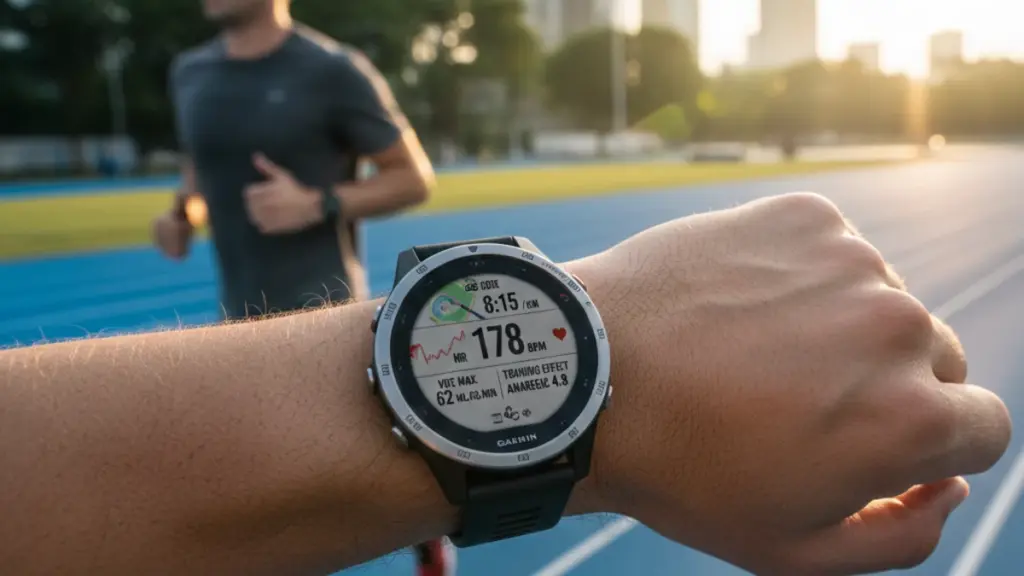
How Advanced Metrics Actually Improve Training: Practical Applications
Owning advanced metrics doesn’t automatically improve performance—understanding how to apply them does. Here’s what I’ve learned about translating tracker data into training decisions.
Training Load: Preventing Overtraining and Optimizing Adaptation
The single most valuable metric I’ve used across all testing has been training load balance—comparing acute load (recent training stress) to chronic load (fitness built over months).
The Practical Application:
I use a simple rule derived from research and personal experience: keep acute:chronic load ratio between 0.8 and 1.3. When my ratio exceeds 1.3 for more than a week, I know I’m overreaching into potential overtraining territory. When it drops below 0.8, I’m undertraining relative to my fitness—maintaining but not improving.
During a 16-week marathon build, I tracked this ratio weekly. In weeks where I pushed ratios above 1.4 (ignoring device warnings), I consistently experienced poor recovery scores and degraded workout quality the following week. When I kept ratios in the optimal range, training felt challenging but sustainable.
VO2 Max Trends: Setting Realistic Performance Expectations
Estimated VO2 max isn’t perfectly accurate, but the trend over time is what matters. I’ve found that 4-6 weeks of consistent training data provides reliable baseline fitness assessment.
How I Use It:
Rather than obsessing over absolute numbers (is my VO2 max 52 or 54?), I focus on directional changes. During productive training blocks, my VO2 max estimate should gradually increase or stay stable. If it starts declining despite consistent training, that’s my signal that I’m not recovering adequately between sessions.
This happened during a high-volume training phase where I was running 60+ miles weekly. My Garmin’s VO2 max estimate dropped from 54 to 51 over three weeks, despite increasing mileage. I took a recovery week, reduced volume by 40%, and within two weeks my estimate rebounded to 53. The race I was training for went significantly better than it would have if I’d ignored this warning.
Heart Rate Variability: The Early Warning System
HRV is tricky because it’s highly individual and affected by numerous factors—stress, alcohol, sleep quality, illness onset, training fatigue. What matters isn’t your absolute HRV (mine averages 65ms; yours might be 120ms), but your personal trends.
The Pattern I Watch:
I track my 7-day average HRV. When it drops more than 15% below my 60-day baseline, I know my body is under stress—even if I can’t identify the specific cause. This has helped me catch overtraining, detect illness before symptoms fully developed, and identify when non-training stressors (work deadlines, travel) were affecting recovery.
The best devices (Garmin, WHOOP, Polar) automatically flag significant HRV deviations. I’ve learned not to make major training decisions based on single-day HRV drops—which can happen randomly—but sustained multi-day decreases always deserve attention.
Running Power: Pacing Consistency Across Varied Terrain
Running power solved a problem I didn’t fully appreciate until I had it: maintaining consistent effort on hills and varied terrain. Heart rate responds too slowly to elevation changes; pace alone doesn’t account for gradient.
The Trail Running Revelation:
During technical trail runs, I used to monitor pace—which led to wildly inconsistent effort. I’d push too hard on climbs (trying to maintain flat-ground pace) and recover too much on descents (running slower than sustainable because I felt tired).
When I switched to power-based pacing, using a target range of 240-260 watts for sustained efforts, my pacing became dramatically more consistent. I maintained even power output up climbs (pace naturally slowing), then recovered that time on descents where I could run faster at the same power output. My post-run fatigue felt more evenly distributed, and my splits became much more predictable.
Setting Up Your Tracker for Maximum Accuracy: The Details That Matter
I’ve learned through extensive testing that configuration decisions significantly impact data reliability. Here are the setup steps that actually matter.
Initial Calibration: Don’t Skip This Process
Every advanced tracker needs 1-2 weeks of varied activity to establish your baseline physiology. During this period:
Do This:
- Perform at least 3-4 outdoor runs/rides with GPS active
- Include one easy effort, one moderate effort, one hard effort
- Pair a chest strap heart rate monitor for maximum accuracy
- Complete at least one max effort (5K race pace for 10-15 minutes)
- Sync sleep data for 7 consecutive nights
Avoid This:
- Making training decisions based on initial metrics
- Comparing your numbers to other athletes
- Getting discouraged by seemingly low VO2 max estimates
My Garmin initially estimated my VO2 max at 47 (I’m a mid-40s runner with 15+ years of consistent training). After two weeks of calibrated data, it adjusted to 54—much closer to my lab-tested value of 55.
Heart Rate Zones: Why Default Settings Fail Most Athletes
Default heart rate zones, usually based on age-predicted maximum heart rate (220 minus age), are wrong for most trained athletes. I’m 44; the formula suggests a max HR of 176. My actual tested max is 189.
The Right Approach:
Conduct a maximum heart rate test (I do this with a 5K time trial, where I sustain maximum effort for 20-25 minutes—max HR occurs in the final minutes). Then set zones based on actual max:
- Zone 1 (Recovery): 50-60% of max HR
- Zone 2 (Endurance): 60-70% of max HR
- Zone 3 (Tempo): 70-80% of max HR
- Zone 4 (Threshold): 80-90% of max HR
- Zone 5 (VO2 Max): 90-100% of max HR
Or, use lactate threshold testing to set zones more precisely. Many devices now include built-in threshold tests (running at maximum sustainable effort for 20-30 minutes).
GPS Settings: Accuracy vs. Battery Life Trade-offs
Every device offers GPS accuracy options: GPS-only, multi-band GPS, and various battery-saving modes. Here’s what I’ve learned about when each setting makes sense:
Use Multi-Band GPS When:
- Running technical trails with tree cover
- Racing in urban environments with tall buildings
- Accuracy is more important than battery life
- Workout duration is under 6 hours
Use Standard GPS When:
- Running open roads or tracks
- Battery life is critical (ultra-distance events)
- Weather conditions are clear (GPS accuracy improves significantly in clear weather)
Avoid “Smart Recording” or “Every Second” Options: Smart recording, which samples GPS position every few seconds rather than continuously, saves battery but reduces accuracy. During testing, I’ve found it can introduce 3-5% distance errors on technical courses.
Common Mistakes Advanced Athletes Make With Fitness Trackers
After testing these devices with dozens of athletes and monitoring my own usage patterns, I’ve identified several recurring mistakes that limit the value of advanced trackers.
Mistake #1: Data Collection Without Data Analysis
I see this constantly: athletes collect mountains of data but never review weekly or monthly trends. Your tracker likely has training load charts, performance trends, and recovery patterns—but these insights only matter if you regularly review them.
What to Do Instead:
Schedule 15 minutes every Sunday to review:
- Weekly training load and acute:chronic ratio
- VO2 max trend over the past month
- Average HRV compared to your baseline
- Sleep quality patterns
- Any performance metrics (race predictors, power curves, threshold estimates)
I keep a simple training log where I note how these metrics correlate with how I actually felt during workouts. Over time, patterns emerge that help me make better training decisions.
Mistake #2: Chasing Metrics Instead of Performance
It’s easy to become obsessed with improving your VO2 max estimate or raising your recovery score, forgetting that these are proxy measures for actual performance. The goal isn’t a higher number on your tracker—it’s running faster, cycling longer, or achieving your competition goals.
What to Do Instead:
Use metrics as guidance tools, not end goals. If your VO2 max is increasing but your race times are stagnating, something is wrong with your training approach (or the metric estimation). Trust actual performance outcomes over estimated metrics.
Mistake #3: Ignoring Recovery Recommendations
This is the mistake I made most frequently during my first year of testing: devices would flag low recovery or excessive training load, and I’d override the warnings because I “felt fine.”
Almost invariably, pushing through low recovery warnings led to poor workout quality, increased injury risk, or extended recovery periods that negated any training benefit.
What to Do Instead:
View recovery warnings as data points worth considering, not absolute prohibitions. If your device flags low recovery but you have a key workout scheduled, you might:
- Reduce workout intensity/duration by 20-30%
- Split the workout into two shorter sessions
- Postpone it 24-48 hours if possible
- Proceed as planned but monitor closely for fatigue signals
Mistake #4: Not Pairing With External Sensors
Wrist-based optical heart rate sensors have improved dramatically, but they still have limitations during high-intensity intervals, cold weather (reduced blood flow to wrists), and certain activities (cycling where wrist position limits sensor contact).
What to Do Instead:
For workouts where heart rate accuracy matters—intervals, threshold tests, racing—pair your tracker with a chest strap monitor. I use a Garmin HRM-Pro ($100), which also provides running dynamics data. The accuracy improvement is substantial and immediately noticeable.
For cycling, consider adding a power meter if you’re serious about training optimization. Even an affordable single-sided crank power meter ($400-600) provides direct measurement that’s far more actionable than heart rate alone.
The Advanced Features That Actually Matter vs. Marketing Gimmicks
Not every feature marketed as “advanced” delivers meaningful training value. Here’s what I’ve learned distinguishing substance from hype.
Features Worth Paying For
Multi-Band GPS: The accuracy improvement in challenging environments (trails, cities) is substantial and measurable. Worth the battery life trade-off for most athletes.
Training Readiness/Recovery Scores: When properly calibrated, these metrics genuinely improve training decisions and reduce overtraining risk.
Running Power or Cycling Power Integration: Direct measurement of work output provides objective pacing guidance that heart rate and perceived exertion can’t match.
Advanced Sleep Tracking: Sleep stage identification and HRV monitoring during sleep provide early warning signals for overtraining and illness.
Structured Workout Programming: The ability to create and follow complex interval workouts directly on the device saves time and improves training consistency.
Features That Sound Good But Rarely Matter
Pulse Oximetry (SpO2): Unless you’re training at altitude or have specific health conditions, continuous blood oxygen monitoring provides minimal training value and drains battery significantly.
Skin Temperature Tracking: Temperature variation can indicate illness onset or hormonal changes, but I’ve found it’s not reliable or actionable enough for regular training decisions.
Stress Monitoring: These algorithms attempt to quantify daily stress based on HRV and heart rate patterns. In my testing, they’re interesting but not accurate enough to base decisions on. HRV trends alone provide better insight.
Music Storage: This is a lifestyle feature, not a training feature. It’s convenient, but doesn’t improve your training data or performance.
Contactless Payments: Again, convenient for lifestyle use, but irrelevant to training quality. Don’t choose a training device based on payment features.
Choosing the Right Device: Match Technology to Training Goals
After all this testing, the most common question I get is: “Which tracker should I buy?” The answer always depends on your specific training focus and priorities.
For Serious Runners (Marathon/Ultra Training)
Top Choice: Garmin Forerunner 965
Why: The combination of accurate GPS, comprehensive training load metrics, race predictions, and running dynamics provides the most complete training picture. Battery life handles marathons comfortably and most 50K races.
Alternative: COROS APEX 2 Pro if battery life is your top priority (100K+ races) and you value simplicity over feature depth.
Budget Option: Garmin Forerunner 265 ($450) provides 90% of the 965’s features at $200 less.
For Cyclists and Triathletes
Top Choice: Polar Vantage V3
Why: Superior heart rate accuracy, excellent power meter integration, and multisport transition features. The Training Load Pro’s separation of cardio and muscle load is particularly valuable for mixed training.
Alternative: Garmin Forerunner 965 if you need better mapping and navigation features for long rides in unfamiliar areas.
For Recovery-Focused Athletes
Top Choice: WHOOP 4.0
Why: If your primary goal is understanding recovery patterns and optimizing training based on readiness, WHOOP’s focused approach provides the clearest insights.
Consideration: Pair it with a sport-specific device (Garmin, COROS, Polar) that provides in-workout metrics WHOOP lacks.
For Ecosystem Integration Priority
Top Choice: Apple Watch Ultra 2
Why: No other device integrates as seamlessly with third-party apps, health platforms, and daily technology use. If you’re heavily invested in Apple’s ecosystem and your training doesn’t exceed marathon distance, it’s genuinely capable.
Limitation: Battery life remains prohibitive for ultra-distance events, and advanced running metrics lag behind dedicated sports watches.
Frequently Asked Questions
How accurate are wrist-based heart rate sensors compared to chest straps?
In my testing, the best wrist-based sensors (Garmin, Polar, Apple) track within 3-5 BPM of chest straps during steady-state efforts. Accuracy degrades during rapid heart rate changes (intervals), cold weather, and certain wrist positions. For casual training, wrist sensors are adequate. For precise threshold testing or interval work, chest straps remain significantly more accurate.
Do I need a chest strap heart rate monitor if my watch has optical HR?
For most training, no. But for intervals, threshold tests, and racing where precise heart rate data affects pacing decisions, a chest strap provides noticeably better accuracy. I use optical HR for easy runs and general training, but pair a chest strap for workouts where heart rate precision matters.
How long does it take for training metrics to become accurate?
Plan on 2-3 weeks of consistent data collection before metrics like VO2 max, training load, and recovery scores accurately reflect your fitness. The devices need this calibration period to establish your baseline physiology. Don’t make training decisions based on day-one metrics.
Can these devices replace a coach?
No, but they provide data that enhances coaching. The best approach I’ve found is using device metrics to inform conversations with a coach, not replace coaching expertise. Devices tell you what’s happening physiologically; coaches help you understand why and what to do about it.
Are training readiness scores actually accurate?
“Accurate” is the wrong framework—they’re useful. In my experience, when my Garmin Training Readiness or WHOOP Recovery score is low (below 50-60%), hard workouts feel significantly harder and recovery takes longer. The scores won’t perfectly predict every workout, but they’ve proven reliable enough to influence my training decisions.
How important is battery life for most athletes?
For runners, 20+ hours of GPS tracking handles almost everything except ultra-distance events. For triathletes, 30+ hours covers most long-course races. Ultra-runners need 50+ hours for multi-day events. My rule: choose a device with 2x the battery life of your longest planned activity, which provides safety margin and accounts for battery degradation over time.
Key Takeaways: What Actually Matters
After thousands of hours testing these devices, here’s what I’ve learned matters most:
Accuracy trumps features. A device that measures heart rate and GPS precisely with five metrics is more valuable than one with 50 metrics measured poorly. Prioritize devices with proven sensor quality and algorithmic processing.
Recovery metrics prevent more problems than performance metrics solve. Training load balance, HRV trends, and readiness scores have saved me from overtraining injuries more times than performance metrics have accelerated my improvement. Learning to respect recovery guidance is the single most valuable lesson from advanced tracker testing.
Consistency matters more than perfection. An affordable device worn consistently provides better insights than an expensive device worn inconsistently. The best tracker is the one you’ll actually wear for every workout and sleep session.
Context matters as much as data. Numbers without interpretation are just numbers. Spend time learning what your personal metrics mean—how your HRV responds to stress, what training load ratios feel sustainable, when your performance degrades despite good numbers.
Don’t chase specs you won’t use. If you’re a road runner who never ventures into wilderness navigation, paying extra for detailed topographic maps is wasted money. Match device capabilities to your actual training environment and goals.
The truth about advanced fitness trackers is simpler than the marketing suggests: they don’t make you faster. They provide information that helps you make better training decisions—but only if you understand what the metrics mean and use them consistently over time.
The device on your wrist is a tool. Your training discipline, recovery habits, and willingness to learn from data—those are what determine whether advanced metrics actually improve your performance.
