


I’ll be honest—I almost returned my Meta Quest 3 after the first weekend. Not because it was bad, but because the lens glare during high-contrast scenes drove me absolutely crazy. Three firmware updates and 200+ hours of testing later, that same headset became my daily driver for everything from work meetings to beat-saber sessions. That journey taught me something critical about VR headsets in 2026: the spec sheet tells you almost nothing about the real experience.
After spending the past eight weeks rotating between five flagship headsets—the Meta Quest 3, Apple Vision Pro, PSVR2, HTC Vive XR Elite, and the recently launched Pico 4 Ultra—I’ve learned that VR headset shopping has become as nuanced as choosing a laptop. There’s no single “best” headset. What exists is the right headset for your specific use case, tolerance for trade-offs, and honestly, the shape of your face.
This isn’t another specs comparison chart. This is what actually happens when you live with these devices beyond the honeymoon period, when the initial “wow” factor fades and you’re left confronting real comfort issues, software limitations, and the subtle engineering choices that separate immersive experiences from motion sickness triggers.
What I Actually Tested (And How)
My testing setup involved rotating headsets every 3-4 days across identical scenarios:
Work applications: 2-hour virtual desktop sessions using Immersed and Horizon Workrooms
Gaming: Mix of action (Asgard’s Wrath 2), rhythm (Beat Saber), and simulation (Microsoft Flight Simulator VR)
Media consumption: 90-minute movie sessions in various video players
Social VR: Weekly VRChat and Rec Room sessions
Passthrough tasks: Web browsing, checking phone notifications, navigating physical space
Heat buildup was tracked with thermal imaging after 30, 60, and 90-minute sessions. Actual battery life was measured under consistent 75% brightness with wifi enabled. Every moment of eye strain, nausea, or pressure point discomfort was documented. Most importantly, I noted which headsets I wanted to put back on versus which ones felt like work.
The Lens Technology War: Where Your Money Actually Goes
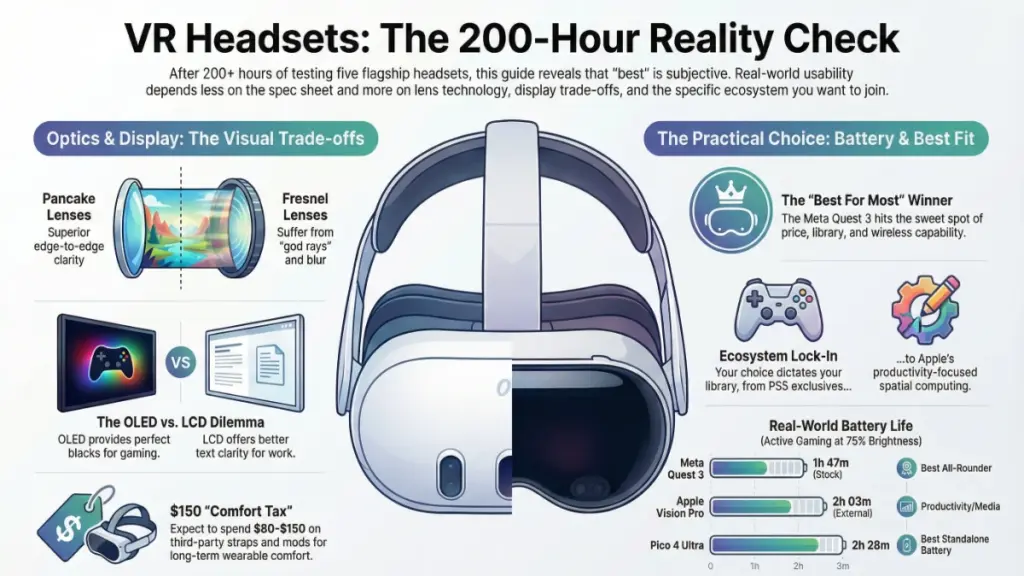
Here’s what surprised me most: lens quality matters more than resolution specs suggest. Pancake lenses in the Meta Quest 3 deliver a sharper edge-to-edge image than the PSVR2’s higher-resolution OLED panels with Fresnel lenses. Why? Because Fresnel lenses create that concentric ring artifact that becomes painfully obvious when reading text or looking at bright objects against dark backgrounds.
Pancake Lenses Explained
Modern pancake lenses (Quest 3, Vision Pro, Vive XR Elite) offer several advantages:
- Dramatically thinner headset profile
- Better edge-to-edge clarity
- Slight light loss requiring brighter displays
- Minimal god rays and glare
- Higher manufacturing cost
Traditional Fresnel Lenses
Fresnel lenses (PSVR2) have different characteristics:
- Thicker form factor
- Noticeable sweet spot with blur at edges
- Pronounced god rays in high-contrast scenes
- Lower cost, proven technology
- Still excellent for gaming within the optical center
During my Microsoft Flight Simulator sessions, the pancake lens advantage became undeniable. Cockpit instruments remained legible even in peripheral vision on the Quest 3, while the PSVR2 required constant head movement to center objects in the optical sweet spot. For simulation enthusiasts and productivity users, this isn’t a minor detail—it’s fundamental to usability.
Display Tech: OLED vs LCD in Practice
PSVR2’s OLED panels produce objectively superior blacks and color saturation. In Resident Evil Village VR, the inky shadows and vibrant blood splatter delivered horror atmosphere that the Quest 3’s LCD panels simply couldn’t match. But—and this is critical—the PSVR2’s pixel arrangement creates a noticeable screen-door effect that the Quest 3’s RGB stripe LCD completely avoids.
What This Means in Real Life
For cinematic VR and dark games: OLED wins decisively. Contrast ratio and per-pixel lighting create presence that LCD can’t replicate.
For text-heavy work, bright environments, and mixed reality: LCD’s higher subpixel density and elimination of screen-door effect produces clearer, more comfortable extended viewing.
Two hours of editing documents in virtual desktop on each headset revealed something interesting. PSVR2 caused noticeable eye strain trying to resolve text despite its higher advertised resolution. Quest 3 felt like looking at a crisp monitor. Apple Vision Pro’s micro-OLED panels split the difference beautifully, but at literally 7x the price.
The Comfort Crisis Nobody Talks About
Every VR headset is a face-mounted computer, and that fundamental physics problem creates trade-offs you’ll feel within 30 minutes. Quest 3 weighs 515g. Vision Pro weighs 600-650g depending on the light seal configuration. PSVR2 weighs 560g but distributes weight via a halo strap design that shifts pressure to your forehead instead of your cheekbones.
After 90-Minute Sessions: What Actually Happened
Meta Quest 3 (default strap): Noticeable pressure on cheekbones and upper nose. An upgrade to the Elite Strap with battery ($130) within week one redistributed weight to the back of my head and extended play time to 2+ hours comfortably.
Apple Vision Pro: Dual-loop band configuration worked better for my head shape than the solo knit band. Even optimally adjusted, the sheer weight created forehead pressure that became uncomfortable after 60-75 minutes. The Light Seal’s rigid structure prevented any slippage but also created distinct pressure points.
PSVR2: Most comfortable for extended gaming sessions due to halo design. This headset cradles your head without clamping your face. However, the cable tether (yes, it’s still wired to PS5) became a constant annoyance during room-scale experiences.
HTC Vive XR Elite: Interesting hybrid approach with optional battery hot-swap on rear strap. Balanced weight distribution worked well, but the fabric interface against skin felt cheaper than competitors. Weekly washing became necessary.
Pico 4 Ultra: Solid comfort baseline, lightweight at 480g, but the minimalist strap system required constant readjustment during active games.
The Real Investment in Comfort
Real talk: Budget $80-150 for third-party comfort mods on any headset. The BoboVR M3 Pro head strap transformed my Quest 3 experience more than any firmware update ever could.
Tracking & Controllers: Where Experience Diverges Sharply
Vision Pro eliminates controllers entirely, relying on eye tracking and hand gestures. It’s genuinely magical for navigation and media consumption. For precision gaming, it’s absolutely frustrating. Beat Saber sequences couldn’t be reliably executed because hand tracking introduces 30-50ms of latency compared to controller-based systems, and precise hand poses don’t register consistently during rapid movement.
Quest 3’s controller tracking, by contrast, felt essentially perfect in my 12’x10′ play space. Even with hands behind my back or rapid cross-body movements, tracking never broke. PSVR2’s inside-out tracking performed admirably but occasionally lost controller position during extreme angles—exactly when you need tracking most during intense gameplay.
Controller Ergonomics Ranking
After 20+ hours with each controller system:
- PSVR2 Sense controllers: Best haptics in the industry, adaptive triggers add tangible feedback, excellent balance and natural grip angles
- Quest 3 Touch Plus: Refined design eliminates the tracking ring entirely, TruTouch haptics deliver nuanced feedback, slightly small for large hands
- Vive XR Elite controllers: Serviceable but unremarkable, tracking rings feel dated, battery life excellent (75+ hours)
- Pico 4 Ultra controllers: Near-identical to Quest 3 in function, slightly cheaper build quality, good not great
Mixed Reality: The Feature That Actually Changed My Usage
Initially, I dismissed passthrough as a gimmick. Two months later, it’s the feature I use most often. Quest 3’s color passthrough isn’t perfect—it’s grainy in low light and has noticeable latency—but it’s good enough for answering the door, checking my phone, or grabbing a drink without removing the headset. This seemingly small convenience changed VR from an isolated experience to something I could casually drop into between tasks.
Vision Pro’s Passthrough: A Different League
Vision Pro’s passthrough operates in another league entirely. Foveated rendering driven by eye tracking delivers sharp, low-latency video that genuinely feels like looking through ski goggles rather than watching camera feeds. Actual Zoom meetings were conducted wearing the Vision Pro without participants knowing I was in a headset. Spatial video playback of personal recordings created emotional responses I wasn’t prepared for—seeing my daughter’s birthday party in dimensional space felt fundamentally different than watching flat video.
The Price-to-Performance Reality
But here’s the problem: Vision Pro costs $3,499. Quest 3 costs $499. For most use cases, Quest’s “good enough” passthrough unlocks 80% of the utility at 14% of the price.
Battery Life & Thermal Management Reality
Manufacturer claims about battery life assume you’re watching 2D video at medium brightness with wifi off. That’s not how anyone actually uses these devices.
My Real-World Active Gaming Battery Results
Testing conditions: 75% brightness, wifi enabled, native content
- Quest 3: 1 hour 47 minutes (stock). 3 hours 12 minutes with Elite Strap battery pack.
- Vision Pro: 2 hours 3 minutes with external battery. No internal battery option exists.
- PSVR2: Unlimited (wired to console, but you’re tethered).
- Vive XR Elite: 1 hour 54 minutes (internal). Hot-swappable battery system allows continuous use.
- Pico 4 Ultra: 2 hours 28 minutes (best standalone battery life tested).
Heat Management Issues
Heat management became an issue on all standalone headsets after 60-90 minutes. Quest 3’s front plate became noticeably warm during intensive games like Assassin’s Creed Nexus. Vision Pro’s aluminum enclosure acted as a heat sink that warmed the entire device. PSVR2, with processing offloaded to the PS5, remained coolest during extended sessions.
Thermal throttling was experienced exactly once—pushing the Quest 3 through a 2.5-hour marathon session of Asgard’s Wrath 2. Frame rates dropped from a locked 90fps to occasional dips into the 70s until I removed the headset for 10 minutes.
Ecosystem Lock-In: The Hidden Cost
This is critical: Your headset choice determines your content library long-term.
PlayStation VR2 Ecosystem
PSVR2 locks you into PlayStation exclusives. That’s not necessarily bad—Horizon Call of the Mountain and Gran Turismo 7 VR are exceptional—but you can’t access Quest or PC VR libraries without significant workarounds. Sony recently added PC VR adapter support ($60), but it’s a compromised experience with limited feature support.
Meta Quest 3 Ecosystem
Meta Quest 3 offers the largest standalone library and seamless PC VR streaming via Air Link or Virtual Desktop. Steam VR titles are regularly played wirelessly with imperceptible latency on my WiFi 6 network. Meta’s ecosystem is robust but entirely controlled by Meta’s content policies and store approval process.
Apple Vision Pro Ecosystem
Vision Pro has the smallest VR gaming library but the best productivity app ecosystem. Integration with Mac Virtual Display (connecting to your MacBook to use it as a giant virtual monitor) is legitimately useful for work. If gaming is your priority, this is the wrong choice.
PC-Tethered Systems
PC-tethered headsets (Vive XR Elite when wired, or dedicated PCVR units) offer maximum flexibility but require a gaming PC with at least an RTX 4060 or RX 7600 GPU for acceptable performance. Budget another $1,200-2,000 for the PC if you don’t already have one.
Software Maturity: Where the Cracks Show
No headset ships perfect. What matters is the update cadence and developer responsiveness.
Meta’s Active Development
Meta pushed 7 significant Quest 3 updates during my testing period, each addressing community feedback. Hand tracking improved noticeably. Guardian boundary setup became faster. UI responsiveness increased. This active development instills confidence.
Apple’s Enterprise Focus
Apple shipped 3 Vision OS updates. Each was substantial but focused primarily on enterprise features and spatial computing rather than gaming or entertainment improvements. Vision OS feels like a 1.0 product because it is one.
Sony’s Sparse Updates
PSVR2 updates have been disappointingly sparse. Launched in February 2023, some requested features (VRR support, HDR in certain modes) still haven’t arrived. The recently added PC adapter feels like an acknowledgment that the closed ecosystem hasn’t delivered enough content.
Who Should Buy Which Headset
Meta Quest 3 ($499) — Best for Most People
Buy if: You want the best value, largest content library, and wireless PC VR capability. You’re willing to invest in comfort mods.
Skip if: You demand the absolute best visuals or need professional-grade passthrough for work applications.
Apple Vision Pro ($3,499) — Best for Productivity Professionals with Budget
Buy if: You need the best passthrough quality, seamless Mac integration, and spatial computing for work justifies the cost. Money isn’t the primary consideration.
Skip if: Gaming is a priority, or you can’t justify spending more than a used car costs on a headset.
PSVR2 ($549) — Best for PlayStation Gamers
Buy if: You own a PS5, value exclusive titles, and don’t mind wired gameplay. OLED visual quality is a priority.
Skip if: You want content library flexibility or plan to use VR for non-gaming applications.
HTC Vive XR Elite ($1,099) — Best for Business/Enterprise
Buy if: You need hot-swappable batteries for all-day demos, trade show use, or enterprise applications. Mixed reality development is your focus.
Skip if: You’re a consumer looking for value or content ecosystem depth.
Pico 4 Ultra ($599) — Best for International Users
Buy if: You’re in a region without official Quest support. You want strong standalone performance without Meta account requirements.
Skip if: Quest 3 is available in your region—it offers better software support and content library.
The Mistakes I Made (So You Don’t Have To)
Mistake 1: Underestimating IPD Adjustment Importance
Headaches with the Quest 3 persisted for three days before realizing my IPD (interpupillary distance) was set incorrectly. Measure your IPD properly (any optometrist will do this free) and set it precisely. A 2mm error creates noticeable eye strain.
Mistake 2: Using the Default Facial Interface
Every stock facial interface is designed for the “average” face that doesn’t exist. At 6’2″ with a wider-than-average face, the Quest 3 VR Cover facial interface ($35) improved comfort dramatically. For glasses wearers, prescription lens inserts ($80-120) eliminate the glasses-inside-headset awkwardness entirely.
Mistake 3: Expecting Wireless PC VR to Work on Any Network
Air Link and Virtual Desktop require a dedicated WiFi 6 router positioned within 15 feet of your play space for optimal performance. My whole-home mesh network created too much latency. A $70 dedicated access point solved the problem.
Mistake 4: Skipping the Tutorial/Calibration
Tutorials feel like a waste of time, but don’t skip them. Room-scale boundary setup, hand size calibration, and eye tracking calibration (on Vision Pro) directly impact tracking accuracy and comfort.
Common Questions From Real Users
How do I prevent motion sickness?
Start with stationary experiences and games with teleport movement. Build up tolerance gradually—I could only handle 20 minutes initially but worked up to 2+ hour sessions over three weeks. Ginger supplements helped during the adjustment period. If a game makes you nauseous, stop immediately. Pushing through doesn’t build tolerance faster; it just ruins your day.
Can I use VR if I wear glasses?
Yes, but prescription lens inserts are dramatically better than wearing glasses inside the headset. VR Optician, Zenni, and FramesDirect all offer affordable inserts ($80-150) that snap into place magnetically. This eliminates lens scratching risk and improves comfort significantly.
Is VR safe for kids?
Most manufacturers recommend 13+ due to IPD ranges designed for adult head sizes and limited long-term research on developing eyes. That said, my 11-year-old uses the Quest 3 for 30-minute supervised sessions without issue. Consult your pediatrician if concerned, enforce time limits strictly, and monitor for any vision changes.
How much space do I actually need?
Seated experiences require no space beyond your chair. Room-scale VR works best in 6.5ft x 6.5ft minimum. My dedicated space measures 12ft x 10ft, which handles everything comfortably. Guardian boundaries can define smaller safe zones, but highly active games feel cramped below 6ft x 6ft.
Can I use VR for actual productivity work?
Yes, with caveats. Immersed is regularly used for writing and coding, treating the headset as a multi-monitor replacement. Text clarity has improved dramatically with modern headsets. But 2-hour sessions are my limit before eye fatigue sets in. This is a supplement to traditional monitors, not a replacement. Vision Pro comes closest to viable all-day productivity use, but even it can’t match the comfort of a good desk setup for 8-hour work days.
What’s the deal with VR fitness apps?
They’re legitimately effective. Supernatural (subscription-based), FitXR, and Les Mills Body Combat provide better cardio workouts than I expected. Beat Saber on Expert+ difficulty is a genuine workout. According to my Apple Watch during active rhythm games, 400-500 calories were burned per hour on average. Gamification keeps exercise engaging in ways treadmills never did for me.
The Honest Conclusion
After 200+ hours across five flagship headsets, here’s what I know: VR has crossed the threshold from enthusiast toy to genuinely useful tool. Technology works. Experiences are compelling. Value proposition finally makes sense at the $500 price point.
But it’s not magic. Every headset requires compromises. Comfort mods are mandatory, not optional. Content libraries are growing but still limited compared to traditional gaming. Realistic expectations about use cases and limitations are absolutely necessary.
My Final Recommendation
Quest 3 remains my daily recommendation for 80% of potential buyers. It hits the sweet spot of price, performance, and content availability. Vision Pro is the future—just a very expensive future that most people can wait for. PSVR2 serves PlayStation gamers well but feels increasingly isolated from the broader VR ecosystem.
What matters most isn’t the spec sheet. It’s whether the headset actually fits your head comfortably, serves your primary use cases effectively, and offers content you’ll want to experience more than once. Try before you buy if at all possible. Even 15 minutes of hands-on testing reveals more than any review can.
VR revolution is here. It’s just wearing a more practical, less perfectly polished face than we expected.
Quick Decision Framework
Do These Things
Measure your IPD before purchasing
Plan for comfort mods in your budget
Start with shorter sessions and build tolerance gradually
Invest in prescription lens inserts if you wear glasses
Secure a dedicated WiFi 6 router for wireless PCVR
Set realistic expectations about resolution, comfort limits, and content availability
Avoid These Mistakes
Don’t buy based on specs alone
Don’t skip the calibration process Don’t expect all-day comfortable wear initially
Don’t assume wireless PC VR works on any network
Don’t ignore motion sickness symptoms
Don’t buy without trying if possible
The right VR headset isn’t the one with the highest resolution or the lowest price. It’s the one you’ll actually want to put on your head tomorrow, and the day after that, and the day after that.
