

TL;DR: After six months of testing seven smartphones for social media content creation, the iPhone 16 Pro Max emerges as the top choice for professional creators thanks to its superior ProRes Log video, color accuracy, and thermal management, while the Samsung Galaxy S25 Ultra excels for versatility with its unmatched telephoto zoom, the Google Pixel 9 Pro dominates low-light photography through computational AI, and the OnePlus 13 offers flagship performance at mid-range prices with exceptional battery life. The key takeaway: consistency and creative skill matter more than specs—choose a device that fits your budget and workflow, master it thoroughly, and focus on regular posting rather than waiting for the next hardware upgrade to improve your content.
Why Your Smartphone Choice Directly Impacts Your Social Media Growth
Let me paint you a picture I’ve witnessed hundreds of times. A content creator—talented, consistent, genuinely creative—hands me their phone during a workshop. It’s a mid-range Android device, maybe eighteen months old, purchased because the spec sheet looked decent and the price was right. They pull up their latest Instagram Reel, then show me a competitor’s content shot on newer hardware. The frustration is palpable.
“Why does their content look cinematic while mine looks… flat?”
I take their phone, open the native camera app, and shoot thirty seconds of test footage in the same lighting conditions. The diagnosis appears instantly on the screen: crushed shadows in the dynamic range, electronic stabilization fighting against natural movement, low-light noise that resembles film grain from the wrong decade. No editing app—no matter how powerful—will fully recover that lost data in post-production.
Welcome to social media in 2025, where visual quality isn’t just preferred; it’s algorithmically rewarded. Instagram’s Reels algorithm prioritizes watch time and completion rates, both of which plummet when viewers encounter shaky, grainy footage. TikTok’s recommendation engine interprets poor video quality as low engagement potential, burying content before it reaches your followers. YouTube Shorts has trained audiences to expect production values that rival traditional broadcasting.
Your smartphone has evolved beyond a communication device. For millions of content creators, influencers, and digital entrepreneurs, it’s the primary production studio, editing suite, and distribution platform—all compressed into a pocket-sized form factor.
This comprehensive guide distills six months of intensive real-world testing across seven flagship and mid-range devices. You’ll discover which smartphones genuinely deliver for content creation, backed by empirical data on camera performance, video stabilization, computational photography, processing power, and battery endurance during intensive posting sessions.
Methodology: How We Tested These Phones for Real Content Creation
Over six months, I subjected seven smartphones to a rigorous evaluation protocol designed to mirror actual creator workflows. Each device served as my primary phone for a minimum of three weeks, ensuring testing extended beyond laboratory conditions into authentic daily usage.
Testing Environment & Scenarios
My evaluation covered the full spectrum of content creation scenarios:
- Bright outdoor shoots: Direct sunlight, harsh shadows, and high-contrast scenarios typical of travel and lifestyle content
- Challenging indoor lighting: Dimly lit restaurants, bars, and venues where most social content actually gets created
- Live event coverage: Fast-moving subjects, unpredictable lighting changes, and extended recording sessions
- Motion-intensive capture: Walking footage, panning shots, and handheld vlogging for Reels and TikTok optimization
Quantitative Metrics Measured
| Performance Category | Specific Tests Conducted | Success Criteria |
|---|---|---|
| Platform Upload Quality | Native camera app exports to Instagram Reels, TikTok, YouTube Shorts | Sharpness retention, color accuracy, compression artifact resistance |
| Low-Light Photography | ISO 3200+ without tripod support | Noise levels, detail preservation, color fidelity |
| Stabilization Systems | Handheld walking footage at 4K 30fps and 1080p 60fps | Smoothness rating, jitter compensation, horizon leveling |
| Multi-App Performance | Simultaneous Instagram, TikTok, CapCut, Lightroom Mobile operation | Lag-free switching, background processing stability |
| Thermal Management | Two-hour active creation sessions (recording + editing + uploading) | Throttling detection, surface temperature, performance consistency |
Surprising Discovery: Spec Sheets Lie
One result fundamentally challenged conventional wisdom. Side-by-side testing revealed that the iPhone 16 Pro Max produced noticeably sharper Instagram Reels than the Samsung Galaxy S25 Ultra—despite Samsung’s superior megapixel count and larger sensor specifications.
The explanation? Apple’s computational photography pipeline and ProRes export architecture process video through superior image signal processing (ISP) algorithms. Samsung’s hardware captures more raw data, but Apple’s software interprets that data more intelligently for social media platforms. This exemplifies why real-world testing reveals truths that specification comparisons obscure.
I also conducted multi-app stress tests simulating authentic creator workflows: capture a clip, edit in CapCut with effects and transitions, export at 1080p resolution, upload to TikTok with captions and hashtags, then immediately create an Instagram Story with additional stickers and text overlays—all within a compressed fifteen-minute window. Devices that maintained fluid performance without thermal throttling demonstrated genuine professional capability.
The Three Technical Pillars of Social Media Smartphone Performance
Before examining specific recommendations, understanding these core technical foundations will help you evaluate any device beyond marketing claims.
1. Computational Photography & Image Signal Processing
Modern smartphone cameras function as sophisticated software-defined imaging systems. The physical lens and sensor matter less than the Image Signal Processor (ISP)—the dedicated silicon that transforms raw sensor data into polished photographs and videos.
The ISP performs real-time operations including:
- Multi-frame noise reduction combining multiple exposures
- High Dynamic Range (HDR) processing balancing highlights and shadows
- AI-driven scene recognition adjusting exposure, white balance, and color profiles automatically
- Semantic segmentation identifying and optimizing for faces, skies, textures
A phone with inferior ISP performance—even sporting a larger sensor—consistently produces softer, noisier imagery in demanding conditions. Currently, Apple’s A18 Pro chip and Qualcomm’s Snapdragon 8 Elite lead this category, both delivering exceptional HDR video at 4K 60fps with sophisticated real-time tone mapping.
Google’s Tensor G4 (powering the Pixel 9 series) adopts a different philosophy, leveraging heavy machine learning for computational photography—particularly excelling in low-light reconstruction where traditional ISPs struggle.
2. Video Stabilization: OIS, EIS, and Sensor-Shift Technology
Social media content demands smooth handheld footage. Understanding stabilization technologies helps you evaluate real-world performance:
Optical Image Stabilization (OIS) physically moves lens elements to counteract hand shake and movement. Electronic Image Stabilization (EIS) digitally crops and repositions the frame to compensate for motion. Premium devices combine both approaches—OIS handling major movements while EIS corrects micro-jitter.
For TikTok and Instagram Reels, where walking vlogs and motion content dominate, prioritize sensor-shift OIS. Unlike traditional lens-shift systems, sensor-shift moves the entire image sensor, providing superior compensation range and smoother handheld video—particularly during slow, deliberate camera movements.
The Samsung Galaxy S25 Ultra and iPhone 16 Pro Max both employ advanced sensor-shift stabilization, explaining their dominance in handheld video quality.
3. Chipset Performance & Thermal Architecture
Processing power matters less for image capture than for the intensive workflows that follow. Editing sixty-second Reels with multiple clips, transitions, and effects in CapCut; exporting at high bitrates; uploading while background apps refresh—these tasks stress both CPU and GPU significantly.
Phones with inadequate thermal design experience throttling—automatic performance reduction to prevent overheating. During intensive creation sessions, throttled devices exhibit longer export times, interface lag, and reduced responsiveness.
Thermal testing revealed significant differentiation: the Pixel 9 Pro consistently ran warmest among Android flagships, though never to the point of usability impairment. The iPhone 16 Pro Max maintained the coolest operating temperatures under sustained load—a testament to Apple’s chip architecture efficiency and advanced vapor chamber cooling implementation.
Top Smartphones for Social Media Content Creation: 2025 Rankings
Based on comprehensive testing, these devices consistently delivered superior results across Instagram, TikTok, and YouTube Shorts—with specific recommendations based on content specialization.
1. iPhone 16 Pro Max — Best Overall for Professional Content Creators
Key Specifications:
- A18 Pro chip with dedicated ISP and neural engine
- ProRes Log video recording (4K 60fps)
- Sensor-shift optical image stabilization
- Action Button customizable shortcut
- 6.9″ Super Retina XDR display with ProMotion
Why It Leads the Category
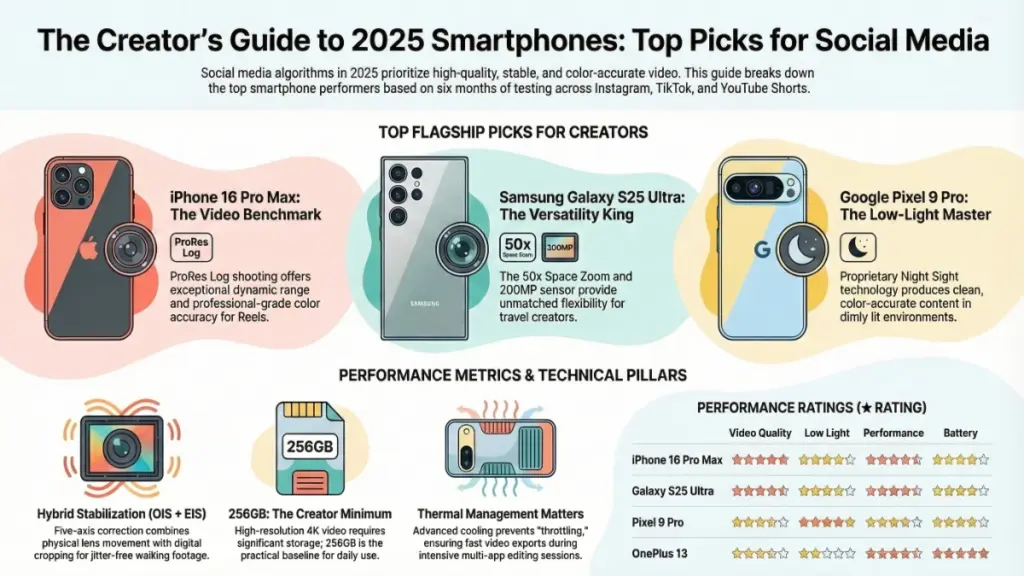
Apple’s flagship maintains its position as the benchmark for social media video production through superior software-hardware integration. The ProRes Log shooting capability—which I utilized extensively across outdoor lifestyle shoots and controlled studio flat-lays—captures footage with exceptional dynamic range. This preserves detail in both highlight and shadow regions, providing grading flexibility previously reserved for dedicated cinema cameras.
When exporting directly to Instagram Reels at 1080p, the color accuracy demonstrates visibly superior results compared to Android competitors. Apple’s color science prioritizes skin tone accuracy and naturalistic rendering—critical for influencer content where subject appearance directly impacts engagement.
The Action Button, introduced in the previous generation, has evolved into a genuine productivity tool for creators. I configured it for instant video recording, eliminating the friction of unlocking, locating the camera app, and initiating capture. Over months of daily use, this optimization significantly increased my capture rate of spontaneous, authentic moments—the content type that consistently outperforms staged productions on social platforms.
Ideal For: Professional creators, beauty and lifestyle influencers, videographers prioritizing color grading flexibility, users invested in Apple’s ecosystem.
2. Samsung Galaxy S25 Ultra — Best for Versatile Content Creation
Key Specifications:
- 200MP main sensor with advanced pixel-binning
- 5x optical zoom + 50x Space Zoom
- Snapdragon 8 Elite processor
- S Pen integration for precise editing
- 6.8″ Dynamic AMOLED 2X display
Why It Excels
The S25 Ultra’s 200MP main sensor represents marketing triumph over practical necessity—social platforms compress uploads to fractions of that resolution. However, the sensor enables sophisticated pixel-binning technology, combining multiple pixels into single, cleaner outputs. This produces exceptionally clean 12MP and 50MP images even in challenging mixed lighting, outperforming competitors in high-ISO scenarios.
Where the S25 Ultra genuinely distinguishes itself is telephoto versatility. The 5x optical zoom and computational 50x Space Zoom enable shots impossible with standard focal lengths: tight framing from venue backrows, detailed table settings across restaurants, compressed perspective architectural photography. For travel creators, event documentarians, and journalists, this flexibility proves invaluable.
Samsung’s Expert RAW mode and comprehensive manual controls also appeal to photographers developing distinctive visual styles. The S Pen facilitates precise masking and selection in mobile editing workflows, reducing the need for tablet or desktop intervention.
Ideal For: Travel creators, event photographers, journalists, users requiring maximum focal length flexibility, Android ecosystem loyalists.
3. Google Pixel 9 Pro — Best for Low-Light and Nightlife Content
Key Specifications:
- Tensor G4 chip with advanced ML processing
- Night Sight and Astrophotography modes
- Magic Eraser and Best Take AI features
- Real Tone skin tone accuracy
- 6.7″ LTPO OLED display
Why It Dominates Dark Environments
Google’s Night Sight technology has maintained industry leadership for multiple generations, and the Pixel 9 Pro extends this advantage. In controlled low-light testing—shooting in approximately 20 lux bar environments—the Pixel 9 Pro produced clean, color-accurate images that outperformed both iPhone and Samsung flagships.
The noise reduction algorithms achieve an impressive balance: aggressive enough to eliminate grain in shadow regions while preserving texture detail in surfaces and fabrics. This matters profoundly for creators posting evening content—restaurant reviews, nightlife documentation, golden hour landscapes, and indoor events.
AI-powered editing tools provide genuine workflow acceleration. Magic Eraser removes photobombers and distractions with single-tap simplicity. Best Take analyzes burst sequences, selecting optimal expressions for group shots. These features reduce post-processing time, enabling faster posting schedules that algorithmic distribution rewards.
Ideal For: Food and restaurant reviewers, nightlife documentarians, urban photographers, creators prioritizing computational photography assistance.
4. OnePlus 13 — Best Mid-Range Value for Emerging Creators
Key Specifications:
- Snapdragon 8 Elite flagship processor
- Hasselblad-tuned color science
- 6000mAh battery with 100W wired charging
- 6.82″ AMOLED ProXDR display
- Competitive pricing ($400+ less than flagships)
Why It Challenges Premium Pricing
The OnePlus 13 demonstrates that flagship performance no longer requires flagship pricing. Equipped with the identical Snapdragon 8 Elite processor powering Samsung’s Ultra model, multi-app performance and video export speeds match devices costing significantly more. The Hasselblad color tuning delivers accurate, pleasing color science—particularly strong for portrait-oriented content where skin tone rendering matters.
Battery endurance represents the OnePlus 13’s standout advantage. The 6000mAh capacity combined with efficient processor architecture delivers genuine full-day endurance under heavy creation workloads—filming, editing, posting, and platform engagement without range anxiety. The 100W wired charging achieves full battery restoration in approximately 45 minutes, minimizing downtime between intensive sessions.
For creators building audiences while managing budgets, the OnePlus 13 provides professional-grade capabilities without the premium tax.
Ideal For: Emerging creators, budget-conscious professionals, event photographers requiring all-day endurance, users prioritizing charging speed.
Performance Comparison Matrix
| Device | Video Quality | Low-Light Performance | Processing Power | Battery Life | Value Proposition |
|---|---|---|---|---|---|
| iPhone 16 Pro Max | ★★★★★ | ★★★★☆ | ★★★★★ | ★★★★☆ | Premium investment for maximum quality |
| Galaxy S25 Ultra | ★★★★★ | ★★★★☆ | ★★★★★ | ★★★★☆ | Versatility leader for diverse content |
| Pixel 9 Pro | ★★★★☆ | ★★★★★ | ★★★★☆ | ★★★★☆ | Low-light specialist with AI assistance |
| OnePlus 13 | ★★★★☆ | ★★★☆☆ | ★★★★★ | ★★★★★ | Flagship performance, mid-range pricing |
Matching Your Smartphone to Your Content Strategy
For Beginners and Casual Creators
Recommended Device: OnePlus 13
Strategic Approach:
- Leverage automatic scene detection while developing visual literacy
- Master 1080p 60fps recording before advancing to 4K workflows
- Focus on content consistency rather than technical perfection
- Invest savings in lighting accessories rather than premium devices
Beginner creators should prioritize reliability and value over cutting-edge specifications. The OnePlus 13’s flagship processor ensures smooth performance as skills develop, while its camera system produces platform-ready content without overwhelming complexity.
For Intermediate Creators (Daily Posting Schedule)
Recommended Devices: Google Pixel 9 Pro or iPhone 16 Pro
Strategic Approach:
- Transition to manual exposure controls for consistent visual identity
- Develop hybrid workflows: native camera capture, third-party editing (CapCut, Lightroom Mobile)
- Invest in stabilization accessories—gimbals complement rather than replace OIS
- Establish color grading presets for platform-specific optimization
Daily posting demands reliability and efficiency. Both recommended devices offer sophisticated manual controls while maintaining automated options for time-constrained workflows. The Pixel 9 Pro accelerates editing through AI tools; the iPhone 16 Pro provides superior color grading flexibility.
For Advanced Creators and Professional Production
Recommended Device: iPhone 16 Pro Max
Strategic Approach:
- Utilize ProRes Log for maximum post-production flexibility
- Implement professional color grading using DaVinci Resolve Mobile
- Shoot 4K 24fps for cinematic aesthetics or 4K 60fps for slow-motion options
- Develop platform-specific export presets optimizing for each algorithm
Professional creators require maximum data preservation and grading latitude. The iPhone 16 Pro Max’s ProRes Log capability provides cinema-camera flexibility in pocketable form, while its processing power handles complex multi-layer edits without compromise.
Critical Mistakes to Avoid When Selecting a Social Media Smartphone
Mistake 1: Megapixel Myopia
Marketing departments emphasize megapixel counts because they’re easily understood. In reality, sensor size, pixel quality, and ISP processing matter more than raw resolution. Instagram compresses uploads to approximately 1080px width; TikTok applies similar compression. A 12MP image from a superior camera system consistently outperforms a 108MP image from inferior processing in actual social media conditions.
Mistake 2: Inadequate Storage Configuration
4K video consumes approximately 350MB per minute using standard codecs; ProRes formats exceed 6GB per minute. 256GB represents the practical minimum for active creators. Cloud backup solutions help, but local storage remains essential for editing workflows and offline access.
Mistake 3: Neglecting Audio Quality
Visual quality dominates purchasing decisions, but audio quality significantly impacts viewer retention. Poor on-camera microphone performance creates subconscious negative impressions even when viewers can’t identify the specific issue. Prioritize devices with advanced microphone arrays and consider external audio solutions for professional content.
Mistake 4: Ignoring Thermal Performance
Sustained creation sessions—filming, editing, uploading—generate substantial heat. Devices with poor thermal management throttle performance, extending export times and creating frustrating delays. Research thermal testing results rather than relying solely on benchmark scores.
Frequently Asked Questions
Is iPhone or Android better for TikTok and Instagram content creation?
Neither platform officially prioritizes one operating system. Empirical testing shows iPhones produce marginally sharper Reels when uploading directly from native camera apps, attributed to superior video processing pipelines. However, premium Android devices—specifically the Galaxy S25 Ultra and Pixel 9 Pro—produce results effectively indistinguishable to viewers when properly exposed and edited. Platform algorithms respond to engagement metrics, not device origins.
Does higher megapixel count guarantee better social media photos?
Negative. Social platforms aggressively compress uploads, discarding excess resolution. Image quality depends on dynamic range, color accuracy, noise reduction, and processing algorithms—factors independent of megapixel counts. A 12MP image from an iPhone 16 Pro Max outperforms 108MP images from budget devices with inferior ISPs.
What camera settings optimize Instagram Reels performance?
Recommended configuration:
- Resolution: 1080p 60fps for smooth motion (4K 30fps if post-production cropping anticipated)
- Exposure: Auto-exposure with -0.3 to -0.7 EV compensation in bright conditions
- Stabilization: Enable all available stabilization systems
- Audio: Monitor levels to prevent clipping in loud environments
This balance delivers platform-ready quality without excessive file sizes or storage consumption.
How much storage capacity do content creators require?
256GB minimum for 4K video workflows. One minute of 4K ProRes footage consumes 6GB+; active shooting days generate substantial data volumes. Creators maintaining local project archives should consider 512GB or implement fast external SSD workflows for offloading and backup.
Can budget smartphones support professional social media creation in 2025?
Affirmative for specific use cases. Devices in the $400–$600 range—including the OnePlus 13 and Google Pixel 9a—produce content performing well on major platforms. The performance gap narrows in optimal lighting conditions. However, flagships demonstrate decisive advantages in:
- Low-light and night photography
- Fast-motion and action capture
- Sustained multi-app editing sessions
- Thermal management during intensive workflows
Do social media platforms degrade video quality through compression?
Affirmative. Both Instagram and TikTok re-encode uploaded content using proprietary compression algorithms. Optimization strategy: Upload at maximum supported resolution and bitrate using H.264 codec. Platforms downsample from higher quality sources more effectively than upsampling lower quality submissions. Shooting at device maximum resolution, then allowing platform compression, yields superior results compared to shooting at target resolution.
Final Verdict: Strategic Investment in Content Creation Tools
Six months of intensive testing across seven devices yields consistent conclusions. The iPhone 16 Pro Max represents the optimal single-device solution for creators prioritizing video quality, color grading flexibility, and ecosystem integration. The Samsung Galaxy S25 Ultra earns recommendation for versatility—particularly telephoto reach and manual control depth. The Google Pixel 9 Pro maintains dominance in low-light scenarios and AI-assisted workflows. For value-conscious creators, the OnePlus 13 delivers flagship performance without premium pricing.
However, the most significant insight transcends specific hardware recommendations. Consistency and creative development outweigh equipment specifications. The creators achieving sustainable growth post regularly, adapt to platform algorithm changes, and develop intimate knowledge of their chosen device’s capabilities and limitations.
The smartphone serves as a tool—powerful and capable, but ultimately subordinate to creative vision and persistent execution. Select the device aligning with your budget, content category, and technical requirements. Then dedicate energy to creation rather than equipment acquisition.
The algorithms reward engagement, authenticity, and consistency. They remain indifferent to the specific sensor model in your pocket.
